
1. Introduction
The Bitmini NerdMiner V2 NM-2.8 is a compact, standalone device designed for Bitcoin lottery mining. It integrates an ESP32-WROOM-32 module with a 2.8-inch smart display, allowing for independent operation via Wi-Fi. This device is suitable for both solo and pool mining, offering a hashrate of 960KH/s. This manual provides essential information for its proper setup, operation, and maintenance.
2. Product Overview
The NerdMiner V2 NM-2.8 features a clear display for real-time mining statistics and a robust ESP32 microcontroller for efficient operation. Its design prioritizes low power consumption and ease of use.
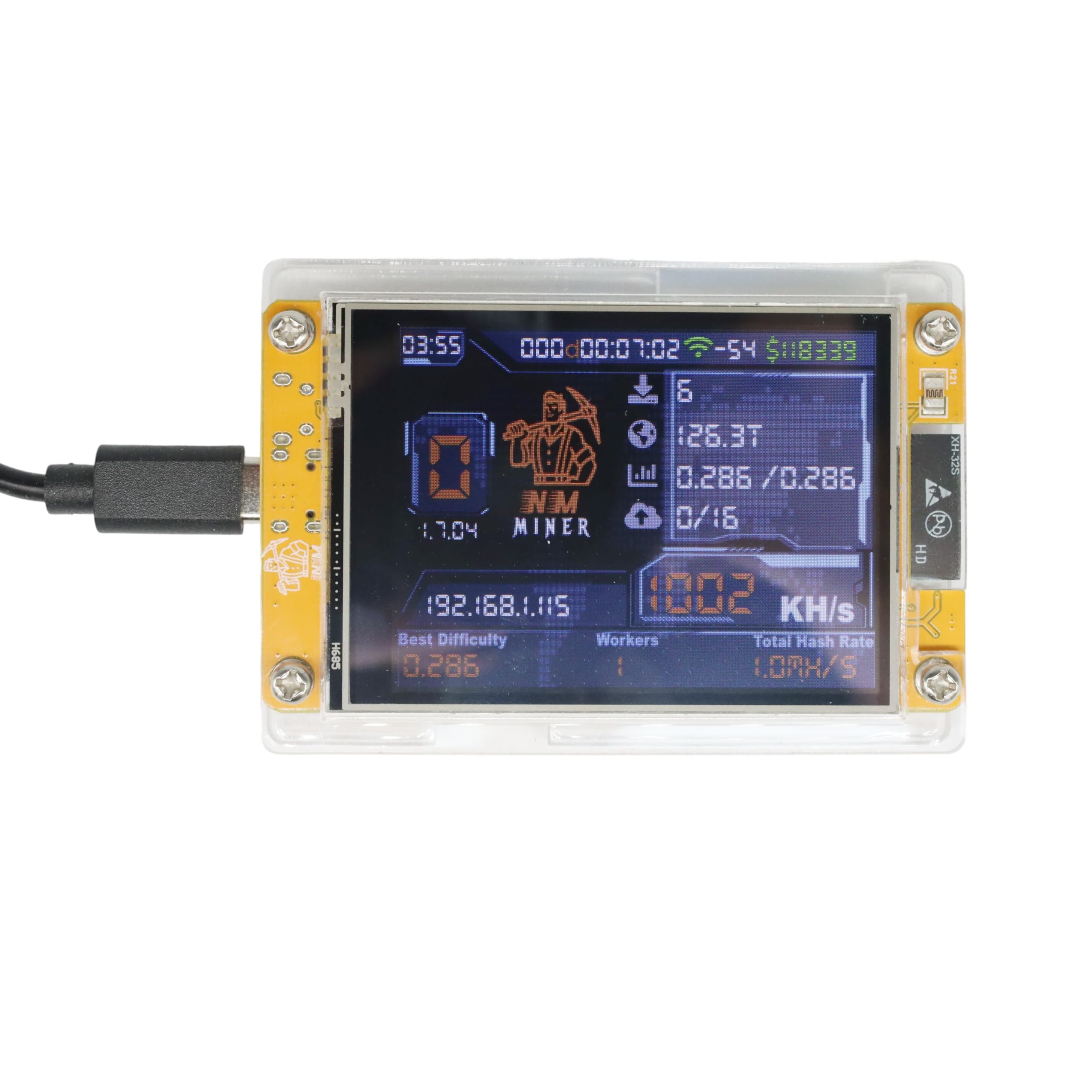
Figure 1: Bitmini NerdMiner V2 NM-2.8 in operation, displaying current mining statistics.

Figure 2: Top view of the NerdMiner V2 NM-2.8, showing the 2.8-inch display and USB-C port.
3. Setup Instructions
Follow these steps to set up your Bitmini NerdMiner V2 NM-2.8:
- Assembly: If the device is not pre-assembled, carefully attach the protective plastic case using the provided screws. Ensure all components are securely fitted.
- Power Connection: Connect the device to a power source using a standard USB-C cable (not included). The device requires a 5V power supply.
- Initial Boot: Upon powering on, the device will boot up. The 2.8-inch display will show initial setup prompts or attempt to connect to a Wi-Fi network.
- Wi-Fi Configuration:
- The device will typically create a Wi-Fi access point (AP) or display instructions to connect to its configuration interface via a web browser on a smartphone or computer.
- Connect your smartphone or computer to the device's Wi-Fi AP.
- Open a web browser and navigate to the IP address displayed on the miner's screen (e.g.,
192.168.4.1) or the specified configuration URL. - Enter your home Wi-Fi network credentials (SSID and password) to connect the miner to your network.
- Wallet Address Configuration:
- It is critical to configure your own Bitcoin wallet address. If not configured, the device may mine for the manufacturer or a default address.
- Within the web configuration interface, locate the field for the Bitcoin wallet address.
- Enter your personal Bitcoin wallet address. Ensure accuracy to avoid loss of potential rewards.
- Mining Pool Configuration (Optional for Solo Mining):
- For solo mining, the device attempts to find blocks independently. For pool mining, you need to specify a mining pool.
- In the configuration interface, enter the URL and port for your chosen mining pool. Note: Some pre-set or outdated pool URLs may not function correctly. It is recommended to use a current and reliable mining pool.
- Save all configurations and restart the device if prompted.

Figure 3: Internal view of the NerdMiner V2 NM-2.8 circuit board, highlighting the ESP32 module and other components.
4. Operating Instructions
Once configured, the NerdMiner V2 NM-2.8 operates autonomously. The 2.8-inch display provides real-time feedback on its status:
- Hashrate (KH/s): Indicates the current processing power of the miner. The device is designed to achieve approximately 960KH/s.
- Workers: Shows the number of active mining processes.
- IP Address: Displays the device's current IP address on your network.
- Connection Status: Icons or text may indicate Wi-Fi connectivity and connection to the mining pool.
- Time/Date: Current time and date information.
The device is designed for continuous operation. Ensure it is placed in a well-ventilated area to maintain optimal performance.
5. Maintenance
To ensure the longevity and optimal performance of your NerdMiner V2 NM-2.8, consider the following maintenance tips:
- Cleaning: Periodically clean the device and its display with a soft, dry cloth to remove dust. Avoid using liquid cleaners directly on the device.
- Ventilation: Ensure the device is not obstructed and has adequate airflow to prevent overheating, especially during continuous operation.
- Firmware Updates: Check the manufacturer's official channels for any available firmware updates. Updating firmware can improve performance, add features, or address bugs. Follow the provided instructions carefully during any update process.
- Power Supply: Use a stable 5V USB-C power supply. Fluctuations in power can affect device stability.
6. Troubleshooting
If you encounter issues with your NerdMiner V2 NM-2.8, refer to the following common problems and solutions:
- Device Not Powering On:
- Ensure the USB-C cable is securely connected to both the device and a working power source.
- Try a different USB-C cable and power adapter.
- Wi-Fi Connection Issues:
- Verify that your Wi-Fi credentials (SSID and password) were entered correctly during setup.
- Ensure the device is within range of your Wi-Fi router.
- Restart your Wi-Fi router and the miner.
- If the device is stuck in AP mode, try re-entering your Wi-Fi details.
- No Mining Activity / Shares Rejected:
- Wallet Address: Double-check that your Bitcoin wallet address is correctly configured. An incorrect address will result in mining for a different entity or no rewards.
- Mining Pool: Verify the mining pool URL and port. Some pre-configured or outdated pools may not be operational. Research and use a reliable, current mining pool.
- Internet Connection: Confirm that your internet connection is stable.
- Display Not Working or Showing Errors:
- Restart the device.
- Ensure the display ribbon cable (if accessible) is properly seated.
- Difficulty with Initial Setup:
- The setup process requires careful attention to Wi-Fi and wallet configurations. Review Section 3 thoroughly.
- If you are a beginner, consider searching for community guides or videos specific to NerdMiner ESP32 devices for visual assistance.
7. Specifications
| Model Name | NM-2.8 |
| Brand | Bitmini |
| Processor | ESP32-WROOM-32 Module, ESP32-S3R8 MCU |
| Display | 2.8 inch Smart Display |
| Connectivity | Wi-Fi, BLE |
| Hashrate | Up to 960 KH/s |
| Power Input | USB-C (5V) |
| Output Wattage | 1 Watt |
| Cooling Method | Air |
| Product Dimensions (L x W x H) | 3.15 x 2.36 x 0.39 inches |
| Compatible Devices | Laptop, Cellphone (for configuration) |
8. Warranty and Support
For warranty information and technical support regarding your Bitmini NerdMiner V2 NM-2.8, please refer to the following:
- Warranty: Specific warranty terms and duration are typically provided by the seller or manufacturer at the time of purchase. Please retain your proof of purchase for warranty claims.
- Technical Support: For assistance with setup, troubleshooting, or other technical inquiries, please contact the seller directly through the platform where the product was purchased. You may also check the manufacturer's official website for additional resources or community forums.