
1. Introduction
This manual provides essential information for the safe and effective use of your VERPAL Lightweight Electric Wheelchair, Model K04-12Ah. This foldable electric wheelchair is designed to enhance mobility and independence for adults and seniors. It features a 360W dual motor, a 12Ah battery, and a lightweight aluminum frame. Please read this manual thoroughly before operating the wheelchair to ensure proper function and safety.
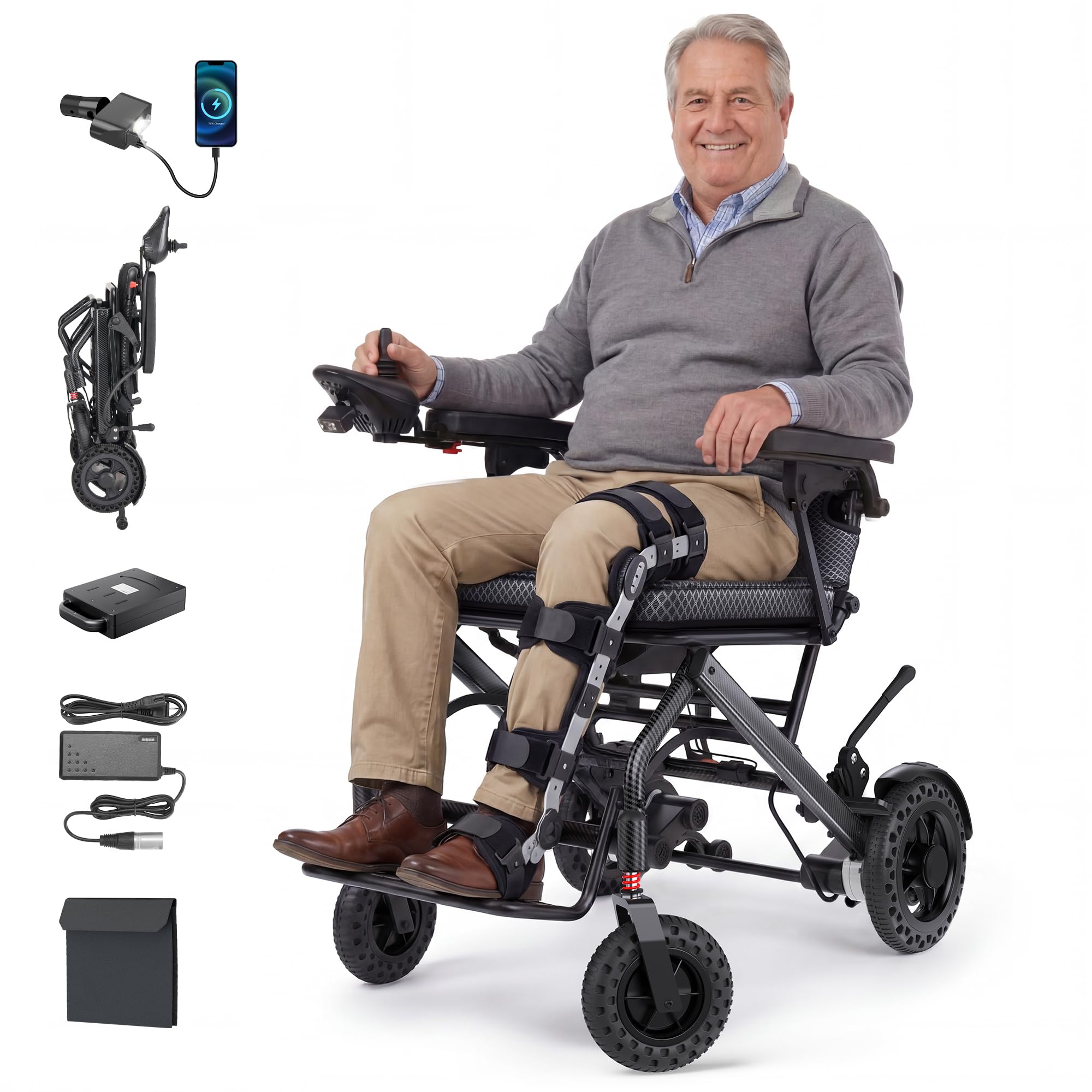
Figure 1.1: VERPAL Lightweight Electric Wheelchair K04-12Ah. This image shows the overall design of the electric wheelchair, highlighting its compact and modern appearance.
2. Safety Information
Always prioritize safety when operating the electric wheelchair. Failure to follow safety guidelines can result in injury or damage to the device.
- Read the Manual: Fully understand all instructions before first use.
- Weight Capacity: Do not exceed the maximum weight capacity of 220 lbs.
- Environmental Conditions: Avoid operating in extreme weather conditions (heavy rain, snow, ice) or on excessively steep slopes (maximum recommended incline is 12°).
- Braking: Familiarize yourself with both the electromagnetic and manual braking systems.
- Obstacles: Exercise caution when navigating over obstacles, curbs, or uneven terrain.
- Battery Safety: Use only the provided charger and battery. Do not attempt to modify the battery or charger.
- Children and Pets: Keep children and pets away from the wheelchair during operation and charging.
3. Components Overview
The VERPAL K04-12Ah electric wheelchair consists of several key components:
- Frame: Lightweight aluminum alloy construction.
- Joystick Controller: 360° rotating joystick with a 6-button keypad for power, speed adjustment, horn, mute, and SOS functions. Includes a built-in LED light and USB port.
- Motors: Dual 360W motors for reliable propulsion.
- Battery: Removable 12Ah (292Wh) lithium-ion battery, FAA compliant for air travel.
- Wheels: 9-inch anti-slip rear tires and solid PU foam honeycomb front tires.
- Brakes: Electromagnetic braking system and manual brakes.
- Seat and Backrest: Breathable 2-inch thick seat cushion and reclining backrest (10°).
- Armrests: Dual adjustable armrests for easy access.
- Footrest: Extendable footrest for leg support.
4. Setup
4.1 Unpacking and Initial Inspection
- Carefully remove the wheelchair from its packaging.
- Inspect all components for any signs of damage during transit. Contact customer support immediately if any damage is found.
- Ensure all listed components are present.
4.2 Unfolding the Wheelchair
- Place the folded wheelchair on a flat, stable surface.
- Gently pull the backrest upwards until the frame locks into place.
- Ensure all locking mechanisms are securely engaged before use.
4.3 Battery Installation and Initial Charging
The wheelchair's battery may not be fully charged upon arrival. It is recommended to fully charge the battery before first use.
- Locate the battery compartment, typically under the seat.
- Insert the 12Ah battery into its compartment, ensuring it clicks securely into place.
- Connect the charger to the charging port on the joystick controller or directly to the battery if removed.
- Plug the charger into a standard electrical outlet. The charging indicator light will show the charging status.
- Allow 6-7 hours for a full charge. Disconnect the charger once charging is complete.

Figure 4.1: Battery Charging Methods. This image illustrates three ways to charge the battery: removing the battery to charge, charging via the controller, and direct charging to the wheelchair.
5. Operating Instructions
5.1 Powering On/Off
Press the power button on the joystick controller to turn the wheelchair on or off. The battery level display will illuminate when powered on.
5.2 Joystick Control
The 360° rotating joystick allows for precise control of movement. Push the joystick forward to move forward, pull back to move backward, and push left or right to turn. Releasing the joystick will engage the electromagnetic brakes.

Figure 5.1: Joystick Controller. This image highlights the 360° control joystick, showing buttons for battery level, power, horn, speed adjustment, mute, SOS, and speed indicator.
5.3 Speed Adjustment
Use the speed adjustment buttons (+/-) on the joystick controller to select one of the 5 available speeds, up to a maximum of 3.75 MPH.
5.4 Braking System
The wheelchair is equipped with an intelligent electromagnetic braking system that automatically engages when the joystick is released. For additional security, manual brakes are located on the rear wheels.

Figure 5.2: Double Safety Braking System. This image illustrates both the manual brake lever and the electronic braking function of the joystick controller.

Figure 5.3: Electromagnetic Brake. This image shows the automatic braking upon release of the controller and the wheelchair parking function after braking.
5.5 Folding and Unfolding
The wheelchair is designed for quick and easy folding in approximately 3 seconds, making it convenient for transport and storage.
- Ensure the wheelchair is powered off and the brakes are engaged.
- Follow the specific folding mechanism instructions provided in the quick start guide (not detailed here).
- Once folded, the wheelchair can be easily lifted and stored.

Figure 5.4: Foldable Design. This image demonstrates the compact folded state of the electric wheelchair and its minimal storage footprint.
5.6 Adjustments
- Armrests: The armrests can be adjusted for easier access and transfer.
- Footrest: The footrest is extendable to accommodate different user leg lengths and reduce pressure.
- Joystick Position: The joystick controller can be swapped from right to left for user preference or specific needs.

Figure 5.5: Comfort and Adjustability. This image details the adjustable armrests, 10° reclining backrest, 2-inch breathable seat cushion, and extendable footrest.

Figure 5.6: Flexible Controller. This image demonstrates the ability to easily swap the joystick from the right to the left side of the wheelchair.
5.7 Operational Videos
Video 5.1: How to use Verpal new upgraded compact electric wheelchair? This video provides a visual guide on the basic operation and features of the VERPAL electric wheelchair.
Video 5.2: Verpal New Upgraded Compact Electric Wheelchair - Outdoor Use. This video demonstrates the wheelchair's performance and features in an outdoor setting.
Video 5.3: 35lbs Lightweight Electric Wheelchair. A brief overview video showcasing the lightweight and portable aspects of the electric wheelchair.
6. Battery Information
The VERPAL K04-12Ah is equipped with a 12Ah (292Wh) lithium-ion battery, providing a range of up to 20 miles on a single charge. The battery is designed to be FAA compliant for air travel, with each battery unit being less than 300Wh.

Figure 6.1: Airline-Approved Battery. This image shows the 12Ah battery pack, highlighting its FAA compliance for safe air travel and ease of removal for charging.
7. Maintenance
7.1 Cleaning
Regularly clean the wheelchair with a damp cloth. Avoid using abrasive cleaners or excessive water, especially near electrical components. Ensure the wheelchair is dry before storing or operating.
7.2 Battery Care
- Charge the battery fully after each use.
- If storing the wheelchair for an extended period, charge the battery at least once a month to maintain its health.
- Store the battery in a cool, dry place.
7.3 Tire Maintenance
The wheelchair features solid PU foam honeycomb tires, which are designed to be puncture-proof and require minimal maintenance. Regularly check tires for wear and tear.

Figure 7.1: Tire Design. This image shows the PU Foam Honeycomb Tire and anti-slip rear wheel, indicating durability and low maintenance.
8. Troubleshooting
If you encounter issues with your VERPAL electric wheelchair, refer to the following common troubleshooting steps:
| Problem | Possible Cause | Solution |
|---|---|---|
| Wheelchair does not power on | Battery not installed correctly, battery discharged, power cable loose. | Ensure battery is fully inserted. Charge the battery. Check all cable connections. |
| Wheelchair moves slowly or inconsistently | Low battery, speed setting too low, motor obstruction. | Charge the battery. Increase speed setting on joystick. Check for obstructions around motors/wheels. |
| Joystick not responding | Joystick cable loose, controller malfunction. | Check joystick cable connection. Power off and restart the wheelchair. If issue persists, contact support. |
| Brakes not engaging/disengaging properly | Manual brakes engaged, electromagnetic brake issue. | Ensure manual brakes are disengaged. If electromagnetic brakes fail, contact support immediately. |
For issues not listed above or if troubleshooting steps do not resolve the problem, please contact VERPAL customer support.
9. Specifications
| Feature | Detail |
|---|---|
| Model Number | K04-12Ah |
| Product Dimensions (L x W x H) | 35" x 23.4" x 37" |
| Net Weight (without battery) | 35.7 lbs |
| Maximum Weight Recommendation | 220 lbs |
| Motor Power | Dual 360W |
| Battery Capacity | 12Ah (292Wh) |
| Maximum Speed | 3.75 MPH |
| Range per Charge | Up to 20 miles |
| Maximum Incline | 12° |
| Brake Style | Electromagnetic |
| Seat Width | 18.5 Inches |
| Seat Height | 18.5 Inches |
| Seat Depth | 5 Inches |
| Wheel Size | 10 Inches |
| Turn Radius | 24 Inches |
| Material Type | Aluminum |
10. Warranty Information
VERPAL products are covered by a manufacturer's warranty. For specific details regarding your product's warranty period and terms, please refer to the warranty card included with your purchase or contact VERPAL customer support. Keep your proof of purchase for warranty claims.
11. Customer Support
For any questions, technical assistance, or support inquiries regarding your VERPAL Lightweight Electric Wheelchair, please contact VERPAL customer service. When contacting support, please have your model number (K04-12Ah) and purchase information ready.
Important Notice: VERPAL processes order support and refunds exclusively through the messaging system of the platform where the purchase was made (e.g., Amazon). VERPAL will never ask for bank details, credit card numbers, personal information, or request payment via wire transfer, QR code, gift card, or third-party payment methods directly. If anyone claiming to represent VERPAL contacts you and asks for such information, do not respond.

Figure 11.1: VERPAL Customer Notice. This image outlines VERPAL's commitment to safe shopping and clarifies official support channels and payment policies.