
1. Introduction
The JIGUUN 1500W Pure Sine Wave Power Inverter converts 12V DC battery power to 110-120V AC household power. This device is designed to provide clean, stable power for various applications, including home use, RVs, camping, cars, and trucks. It features multiple AC outlets, a USB charging port, and an LCD display for monitoring system status.
2. Safety Information
WARNING: Failure to follow these safety instructions may result in serious injury or property damage.
- Read the entire manual before operating the inverter.
- Ensure proper ventilation around the inverter. Do not block cooling vents.
- Do not expose the inverter to water, rain, or excessive moisture.
- Do not operate the inverter near flammable materials or in environments with explosive gases.
- Connect the inverter only to a 12V DC power source. Connecting to other voltages may damage the unit.
- Ensure all connections are tight and secure to prevent overheating and arcing.
- Do not open the inverter casing. There are no user-serviceable parts inside.
- Keep children away from the inverter during operation.
- Always disconnect the inverter from the battery before performing any maintenance or cleaning.
- The inverter generates heat; avoid touching the casing during prolonged operation.
3. Package Contents
Verify that all items are present in your package:
- 1x JIGUUN 1500W Pure Sine Wave Inverter
- 1x User Manual
- 2 Sets of Battery Cables (2x Red, 2x Black)
- 1x Remote Control
- 10x 30A Spare Fuses (Note: Fuses are pre-installed; these are spares)
- 1x Alligator Clip Safety Ground
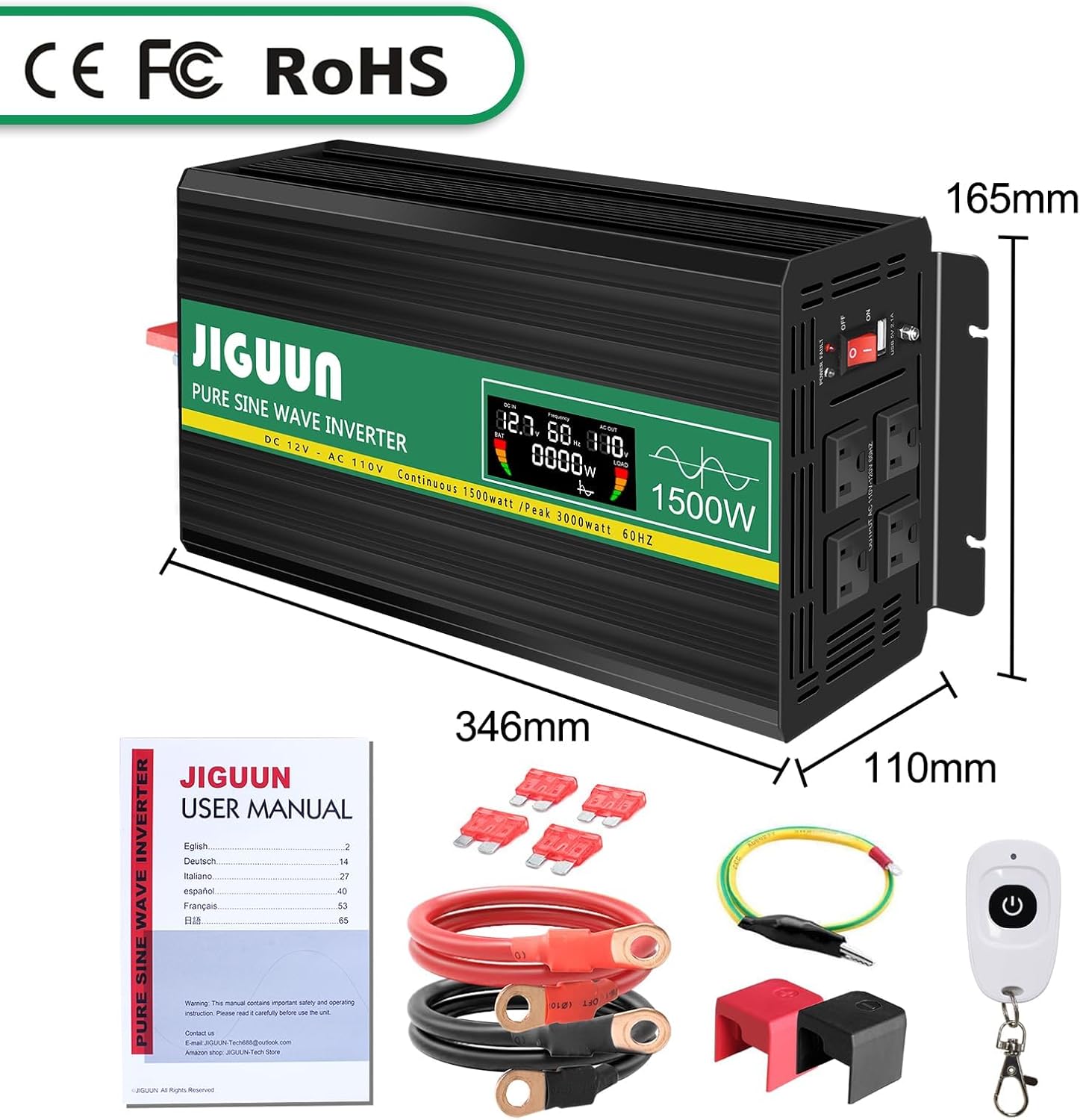
Image: Contents of the JIGUUN 1500W Pure Sine Wave Inverter package.
4. Product Features
- Pure Sine Wave Output: Provides clean, stable power suitable for sensitive electronics.
- High Power Output: Continuous 1500W, Peak 3000W.
- Input/Output: 12V DC input to 110-120V AC output.
- Multiple Outlets: 3 AC outlets and 1x 2.1A USB charging port.
- LCD Display: Shows input/output voltage, output frequency, and load power for real-time monitoring.
- Comprehensive Protection: Includes under-voltage, over-voltage, overload, over-temperature, short circuit, AC ground terminal, and reverse connection protection.
- Efficient Cooling: Equipped with 2 high-speed heat dissipation silent fans that activate when temperature exceeds 45°C.
- Durable Design: Aluminum alloy shell for lasting protection.
- Remote Control: For convenient operation.
5. Component Identification

Image: Front and Rear Panel Components.
Front Panel:
- AC Receptacles (x3): For connecting AC-powered devices.
- USB Ports (2.1A): For charging USB-powered devices.
- ON/OFF Switch: To power the inverter on or off.
- Power Indicator: LED light indicating operational status.
- LCD Display: Shows real-time operational data.
Rear Panel:
- DC Input Terminals: Red for positive (+), Black for negative (-). Connect battery cables here.
- Cooling Fans: Two high-speed fans for heat dissipation.
- Ground Terminal: For safety grounding.
6. Setup and Installation
- Prepare the Battery: Ensure your 12V DC battery has sufficient capacity for the appliances you intend to power. Insufficient battery capacity may prevent high-power appliances from running.
- Ensure Voltage Matching: Confirm that the inverter's input voltage (12V DC) matches your battery's voltage.
- Connect Battery Cables:
- Connect the red battery cable to the positive (+) terminal of the inverter and the positive (+) terminal of your 12V battery.
- Connect the black battery cable to the negative (-) terminal of the inverter and the negative (-) terminal of your 12V battery.
- Ensure connections are tight and secure. Use the provided wrench for the inverter terminals.
- Grounding: Connect the alligator clip safety ground to the inverter's ground terminal and to a suitable ground point (e.g., vehicle chassis).
- Initial Power On: Before connecting any appliances, turn the inverter's ON/OFF switch to the "ON" position. The LCD display should illuminate, showing input voltage and other parameters.
- Connect Appliances: Once the inverter is powered on and stable, connect your AC-powered devices to the AC outlets and USB devices to the USB port. Ensure the total wattage of connected equipment does not exceed the inverter's continuous power rating (1500W).
IMPORTANT: Do not connect the inverter directly to an AC circuit breaker panel or any other AC power source. This inverter is for DC to AC conversion only.
7. Operating Instructions
Powering On/Off:
- To turn on the inverter, press the ON/OFF switch to the "ON" position.
- To turn off the inverter, press the ON/OFF switch to the "OFF" position.
Using the LCD Display:
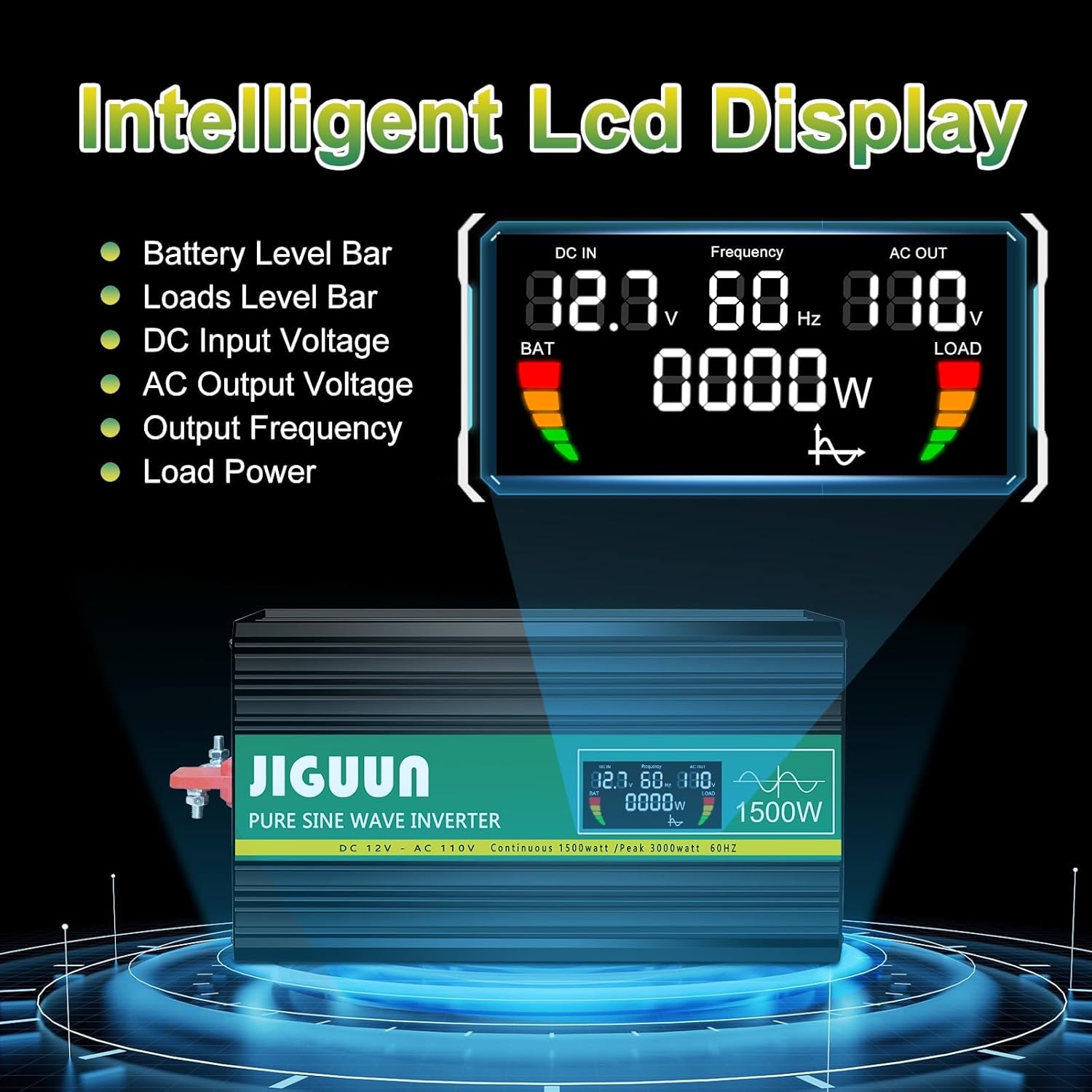
Image: Intelligent LCD Display.
The intelligent LCD display provides real-time information:
- Battery Level Bar: Indicates the remaining battery charge.
- Load Level Bar: Shows the current power draw from connected devices.
- DC Input Voltage: Displays the voltage from your 12V battery.
- AC Output Voltage: Shows the output voltage (110-120V AC).
- Output Frequency: Displays the output frequency (60Hz).
- Load Power: Indicates the current wattage being used by connected appliances.
Using the Remote Control:

Image: Remote Control for convenient operation.
The included remote control allows you to power the inverter on and off from a distance, providing convenience in various setups.
Connecting Devices:
- Plug AC appliances into the 3-prong AC outlets.
- Plug USB devices into the 2.1A USB charging port.
- Always ensure the total power consumption of all connected devices does not exceed the inverter's continuous power rating (1500W). Overloading the inverter will trigger protection mechanisms.
8. Protection System

Image: Upgraded BMS System Protection Features.
The JIGUUN inverter incorporates an advanced protection system to ensure safe and reliable operation:
- Under Voltage Protection: Shuts down the inverter if the input DC voltage drops too low (10.0±0.5V DC) to protect the battery from over-discharge.
- Over Voltage Protection: Shuts down the inverter if the input DC voltage exceeds a safe level (15.0±0.5V DC).
- Overload Protection: Automatically shuts down if the connected load exceeds the inverter's capacity.
- Over Temperature Protection: Activates cooling fans when the internal temperature exceeds 45°C and shuts down if it becomes too high.
- Short Circuit Protection: Protects against short circuits in the output.
- AC Ground Terminal: Provides a safety ground connection.
- Reverse Connection Protection: Protects the inverter and battery from damage due to incorrect polarity connection.
If any protection is triggered, the inverter will typically shut down. Disconnect the load, resolve the issue, and then restart the inverter.
9. Maintenance
- Cleaning: Periodically clean the exterior of the inverter with a dry, soft cloth. Ensure cooling vents are free from dust and debris. Do not use liquid cleaners.
- Connections: Regularly check all DC input connections to ensure they are tight and free from corrosion. Loose connections can cause overheating.
- Storage: When not in use for extended periods, store the inverter in a cool, dry place away from direct sunlight and moisture. Disconnect it from the battery.
- Battery Maintenance: Ensure your 12V battery is properly maintained and charged according to its manufacturer's instructions. A healthy battery is crucial for optimal inverter performance.
10. Troubleshooting
| Problem | Possible Cause | Solution |
|---|---|---|
| Inverter does not turn on. | No power from battery; loose connections; low battery voltage. | Check battery connections and voltage. Ensure battery is charged. |
| No AC output. | Overload; short circuit; over-temperature; low/high input voltage. | Reduce load. Check for short circuits. Allow inverter to cool. Check battery voltage. |
| Fans are constantly running or very loud. | High internal temperature due to heavy load or poor ventilation. | Ensure adequate ventilation. Reduce load. Clean vents if blocked. |
| Connected appliance not working correctly. | Appliance power requirement exceeds inverter capacity; appliance not compatible with pure sine wave. | Check appliance wattage. Ensure appliance is suitable for pure sine wave power. |
If troubleshooting steps do not resolve the issue, please contact JIGUUN customer support.
11. Specifications
| Parameter | Value |
|---|---|
| Output Wave | Pure Sine Wave |
| Continuous Output Power | 1500W |
| Surge Output Power | 3000W |
| Nominal Input Voltage | 12-13.2V DC |
| Nominal Output Voltage | 110-120V AC |
| Output Frequency | 60Hz |
| Input Over-Voltage Shutdown | 15.0±0.5V DC |
| Input Under-Voltage Alarm | 10.5±0.5V DC |
| Input Low Voltage Shutdown | 10.0±0.5V DC |
| Cooling Fan Activation | 45°C |
| Conversion Efficiency | >90% |
| Item Weight | 8 pounds |
| Package Dimensions | 13 x 11 x 6 inches |
12. Warranty and Support
The JIGUUN 1500W Pure Sine Wave Power Inverter comes with a 1-year warranty, including free replacement for manufacturing defects.
For any questions, issues, or support needs during use, please feel free to contact the JIGUUN team. We are committed to assisting you.
Contact information can typically be found on the product packaging or through the retailer's support channels.
