
1. Important Safety Instructions
Please read all instructions carefully before assembly and use. Keep this manual for future reference.
- Ensure all parts are present and undamaged before assembly. Do not use if any parts are missing or broken.
- Assemble the chair on a soft, clean surface to prevent scratches.
- Do not overtighten screws during assembly.
- Keep children and pets away during assembly.
- Maximum weight capacity: 120 kg (265 lbs). Do not exceed this limit.
- Regularly check all bolts and screws for tightness. Retighten as necessary.
- Use the chair only for its intended purpose as an office or desk chair.
2. Package Contents
Verify that all components listed below are included in your package:
- Seat Cushion
- Backrest
- Armrests (2)
- Gas Lift Cylinder
- Base (Cross Legs)
- Mounting Hardware (screws, washers, Allen key)

Image: The product is delivered in one package, containing all necessary components for assembly.
3. Assembly Instructions
Follow these steps for quick and hassle-free assembly:
- Attach Armrests to Seat: Secure the armrests to the underside of the seat cushion using the provided screws. Ensure they are firmly attached.
- Attach Backrest to Seat: Connect the backrest to the seat cushion, aligning the mounting holes and securing with screws.
- Insert Gas Lift into Base: Place the gas lift cylinder into the center hole of the cross-leg base.
- Attach Assembled Seat to Gas Lift: Carefully place the assembled seat and backrest unit onto the gas lift cylinder. Apply gentle downward pressure to secure it.
The chair comes disassembled with all tools and instructions for quick and hassle-free assembly.
4. Operating Instructions
Your HOMCOM office chair is designed with several adjustable features for personalized comfort.
4.1. Height Adjustment
To adjust the seat height:
- To raise the seat: Lift the lever located under the seat while taking your weight off the chair. The seat will rise automatically.
- To lower the seat: Lift the lever while remaining seated on the chair. The seat will lower.
4.2. Reclining Function
The chair features a gentle reclining function for relaxation:
- To activate recline: Pull the lever outwards.
- To lock upright position: Push the lever inwards.
- Tension adjustment: Rotate the knob under the seat to adjust the recline tension, making it easier or harder to recline.

Image: The chair's tilting mechanism allows for gentle recline. Pull the lever to unlock/lock and adjust tension with the knob.
4.3. 360° Swivel
The chair is designed to swivel 360 degrees, providing flexibility and ease of movement within your workspace.

Image: The chair offers a full 360-degree swivel for dynamic movement, supported by a stable cross base.
4.4. Foldable Armrests
The armrests can be folded up to allow for greater freedom of movement or to easily store the chair under a desk, saving space.
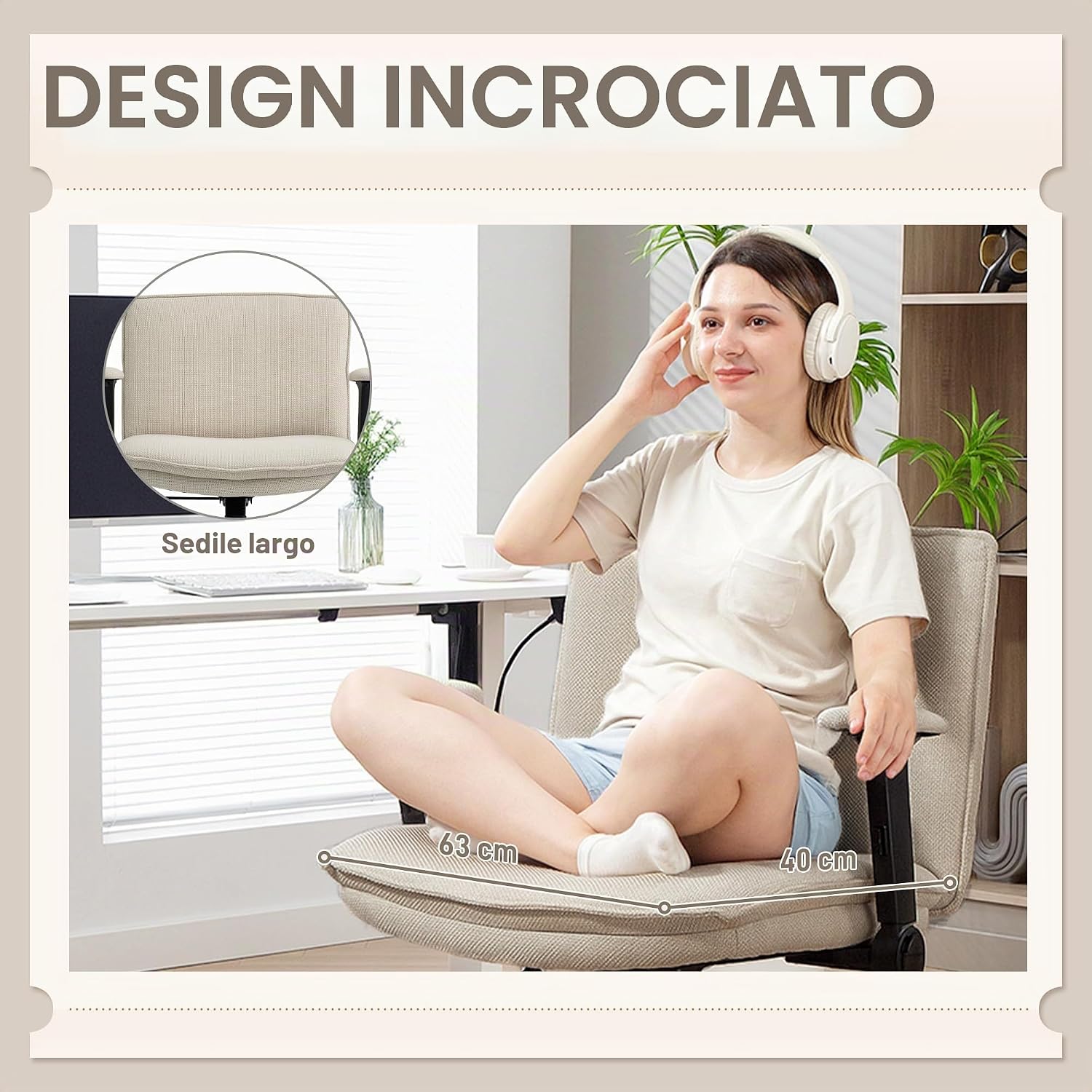
Image: The armrests can be raised for increased mobility or to tuck the chair neatly under a desk when not in use.
4.5. Wide Seat Design
The extra-wide 63 cm seat with a double-layer cushion and breathable linen-effect fabric provides ample space and comfort, even allowing for sitting with crossed legs.

Image: The wide seat (63 cm) offers enhanced comfort and flexibility, allowing users to sit in various positions, including with crossed legs.
5. Maintenance
Proper care will extend the life and appearance of your chair.
- Cleaning: Wipe the chair with a damp cloth. For tougher stains on the linen-effect fabric, use a mild fabric cleaner and follow the product instructions. Do not use abrasive cleaners.
- Inspection: Periodically check all screws and bolts to ensure they are tight. Retighten if necessary to maintain stability and safety.
- Avoid Direct Sunlight: Prolonged exposure to direct sunlight can cause fabric fading.
- Weight Limit: Do not exceed the maximum weight capacity of 120 kg.
6. Troubleshooting
If you encounter any issues with your chair, refer to the following common problems and solutions:
| Problem | Possible Cause | Solution |
|---|---|---|
| Chair does not adjust height | Gas lift cylinder malfunction or lever not engaged. | Ensure the height adjustment lever is fully engaged. If the problem persists, the gas lift may need replacement. |
| Chair feels unstable or wobbly | Loose screws or uneven assembly. | Check and tighten all assembly screws. Ensure the chair is on a flat, even surface. |
| Reclining function is too stiff or too loose | Tension knob adjustment. | Adjust the tension knob located under the seat to your preferred resistance. |
| Armrests do not fold smoothly | Mechanism obstruction or loose pivot points. | Check for any obstructions. Ensure the armrest pivot screws are adequately tightened but not overtightened. |
7. Specifications
Key technical details for your HOMCOM office chair:
| Feature | Detail |
|---|---|
| Model Number | 921-893V00CW |
| Color | Crema (Cream) |
| Overall Dimensions (LxWxH) | 76 x 70 x 85-97 cm |
| Seat Dimensions (LxD) | 63 x 40 cm |
| Seat Height (Adjustable) | 46-57 cm |
| Backrest Height | 40 cm |
| Armrest Height | 28 cm |
| Material | Linen-effect fabric (100% Polyester), Foam padding, Steel alloy frame |
| Weight Capacity | 120 kg (265 lbs) |
| Net Weight | 13.5 kg |
| Special Features | Adjustable Height, Foldable Armrests, 360° Swivel, Reclining Function, Cross Leg Base (no wheels) |

Image: Detailed dimensions of the chair, including overall height (85-97 cm), seat height (46-57 cm), seat width (63 cm), and depth (40 cm).
8. Warranty and Support
For warranty information or technical support, please refer to the purchase documentation or contact HOMCOM customer service through their official website or the retailer where the product was purchased.
Keep your purchase receipt as proof of purchase for any warranty claims.


