
1. Introduction
Thank you for choosing the Eureka N6 Plus Robot Vacuum Cleaner. This manual provides essential information for the safe operation, maintenance, and troubleshooting of your device. Please read it thoroughly before use and keep it for future reference. The Eureka N6 Plus combines powerful suction, intelligent navigation, and convenient app control to deliver an efficient and effortless cleaning experience for modern homes.
2. Safety Instructions
To reduce the risk of injury or damage, read and follow all safety precautions.
- This appliance can be used by children aged 8 years and above and persons with reduced physical, sensory or mental capabilities or lack of experience and knowledge if they have been given supervision or instruction concerning use of the appliance in a safe way and understand the hazards involved.
- Do not allow children to play with the appliance. Cleaning and user maintenance shall not be made by children without supervision.
- Use only the original power adapter and charging base provided by the manufacturer.
- Do not use the robot to pick up large objects, sharp debris, liquids, or burning/smoking materials.
- Ensure the robot operates on stable, level surfaces. Avoid operating near stairs or elevated areas without proper barriers.
- Keep hair, loose clothing, fingers, and all parts of the body away from openings and moving parts.
- Do not immerse the robot or its charging base in water or other liquids.
- Before cleaning or performing maintenance, ensure the robot is turned off and disconnected from the power supply.
- Store the robot in a dry, cool place when not in use.
3. Package Contents
Verify that all components are present and in good condition upon unpacking.
- Eureka N6 Plus Robot Vacuum Cleaner
- Self-emptying Charging Base
- Power Adapter
- Instruction Manual
4. Product Overview
Familiarize yourself with the main components of your Eureka N6 Plus robot vacuum cleaner and its self-emptying base.
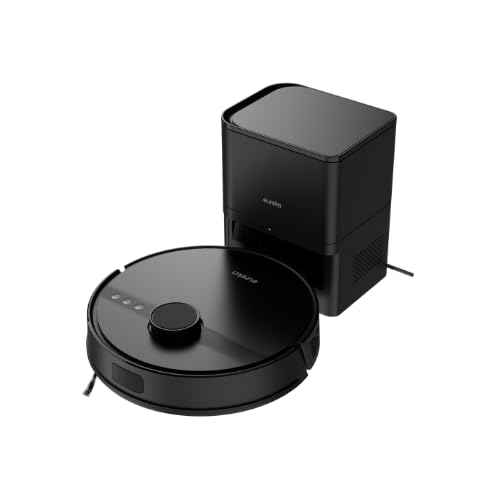
Image 4.1: Eureka N6 Plus Robot Vacuum Cleaner with its self-emptying base and a smartphone displaying the control app interface. The robot is dark grey with a central button, and the base is a matching dark grey tower.

Image 4.2: Top-down view of the Eureka N6 Plus Robot Vacuum Cleaner, highlighting the integrated water tank for mopping functionality. The robot is black with a central LiDAR sensor and control buttons.
Robot Components:
- LiDAR Sensor: For precise navigation and mapping.
- Control Buttons: Power/Start, Home/Recharge.
- Dustbin/Water Tank: Integrated for vacuuming and mopping.
- Side Brushes: To sweep debris from edges and corners.
- Main Brush: Anti-tangle design for effective cleaning.
- Cliff Sensors: To prevent falls from stairs.
- Charging Contacts: For connection to the charging base.
Self-Emptying Charging Base:
- Dust Bag Compartment: Houses the 2.5-liter disposable dust bag.
- Charging Dock: Where the robot returns to charge and empty its dustbin.
- Power Indicator: Shows charging status.
5. Setup
5.1 Charging Base Placement
- Place the self-emptying charging base against a wall in an open area.
- Ensure there is at least 0.5 meters (1.6 feet) of clear space on both sides and 1.5 meters (4.9 feet) in front of the base.
- Connect the power adapter to the charging base and plug it into a wall outlet.
- Ensure the power cable is neatly arranged to prevent the robot from tangling.
5.2 Initial Charging
- Place the robot onto the charging base. Ensure the charging contacts on the robot align with those on the base.
- The robot will automatically begin charging. Allow it to fully charge before its first use (approximately 4-6 hours). The indicator light on the robot will change to indicate a full charge.
5.3 App Connection
- Download the "Eureka Robot" app from your smartphone's app store (available for iOS and Android).
- Open the app and create an account.
- Follow the in-app instructions to add your Eureka N6 Plus robot. This typically involves connecting to the robot's Wi-Fi hotspot temporarily and then connecting it to your home Wi-Fi network.
- Once connected, you can control the robot, schedule cleanings, adjust settings, and view cleaning maps from your smartphone.
6. Operating Instructions
6.1 Starting a Cleaning Cycle
- Manual Start: Press the Power/Start button on the robot once. The robot will begin cleaning in Auto mode.
- App Start: Open the "Eureka Robot" app, select your device, and tap the 'Start' or 'Clean' button. You can also select specific cleaning modes or areas.
6.2 Stopping/Pausing a Cleaning Cycle
- Press the Power/Start button on the robot once to pause. Press again to resume.
- Use the 'Pause' or 'Stop' button in the app.
6.3 Returning to Charging Base
- Press the Home/Recharge button on the robot.
- Use the 'Recharge' or 'Dock' button in the app. The robot will automatically return to its charging base.
6.4 Mopping Function
The Eureka N6 Plus features a simultaneous vacuuming and mopping function.
- Fill the integrated water tank with clean water. Do not use detergents or cleaning solutions not approved for robot vacuums.
- Attach the mopping pad securely.
- In the app, you can select the desired water flow level (three adjustable levels) suitable for different hard floor types.
- The robot will vacuum and mop simultaneously.
6.5 Voice Assistant Control
The Eureka N6 Plus supports voice control via Alexa and Google Assistant.
- Enable the "Eureka Robot" skill/action in your Alexa or Google Home app.
- Link your Eureka Robot account.
- Use commands such as "Alexa, tell Eureka Robot to start cleaning" or "Hey Google, ask Eureka Robot to go home."
7. Maintenance
Regular maintenance ensures optimal performance and extends the lifespan of your robot vacuum.
7.1 Self-Emptying Dust Bag (Base)
- The 2.5-liter dust bag in the self-emptying base should be replaced when full. The app will notify you.
- Open the top cover of the charging base, remove the full bag, and insert a new one.
7.2 Robot Dustbin and Filter
- Even with the self-emptying feature, it is recommended to periodically check and manually empty the robot's internal dustbin.
- Clean the HEPA filter regularly by tapping it to remove dust. Replace the filter every 3-6 months, depending on usage. Do not wash the HEPA filter with water.
7.3 Main Brush and Side Brushes
- Main Brush: Remove the main brush cover and lift out the brush. Use the cleaning tool to remove hair and debris tangled around the brush.
- Side Brushes: Check side brushes for wear or damage. Remove any tangled hair. Replace if bristles are bent or missing.
7.4 Sensors and Charging Contacts
- Wipe all sensors (cliff sensors, wall sensors, LiDAR sensor window) and charging contacts on both the robot and the base with a clean, dry cloth.
7.5 Water Tank and Mopping Pad
- After each mopping session, empty any remaining water from the tank.
- Clean the mopping pad thoroughly and allow it to air dry before storing.
8. Troubleshooting
If you encounter issues with your Eureka N6 Plus, refer to the following common problems and solutions.
| Problem | Possible Cause | Solution |
|---|---|---|
| Robot does not turn on | Low battery; Power button not pressed; Robot stuck. | Charge the robot; Press and hold the power button; Clear any obstructions. |
| Robot cannot find charging base | Base obstructed; Base not powered; Robot too far. | Ensure clear space around base; Check power connection; Manually place robot near base. |
| Poor cleaning performance | Full dustbin/dust bag; Clogged filter; Tangled brushes. | Empty dustbin/replace dust bag; Clean/replace filter; Clean main and side brushes. |
| App connection issues | Incorrect Wi-Fi password; Router too far; Robot offline. | Verify Wi-Fi credentials; Move robot closer to router; Restart robot and router. |
| Robot gets stuck frequently | Obstacles on floor; Dark surfaces triggering cliff sensors. | Clear cables, toys, and small objects; Use no-go zones in app for problematic areas. |
9. Specifications
Detailed technical specifications for the Eureka N6 Plus Robot Vacuum Cleaner.
| Feature | Specification |
|---|---|
| Brand | EUREKA |
| Model Name | N6 Plus Black |
| Dimensions (L x W x H) | 35L x 35W x 41.1H cm |
| Item Weight | 5.5 Kilograms |
| Battery Type | Lithium-ion |
| Voltage | 14.4 Volts |
| Battery Life | Up to 120 minutes (continuous cleaning) |
| Suction Power | Approximately 5000 Pa |
| Dust Bag Capacity (Base) | 2.5 Liters |
| Filter Type | HEPA |
| Navigation Type | LiDAR Sensor |
| Control Method | App Control, Voice Control (Alexa, Google Assistant) |
| Special Features | Self-emptying base, Simultaneous vacuuming and mopping, Anti-tangle brush, Three adjustable water levels |
| Recommended Surfaces | All floor types |
10. Warranty and Support
10.1 Warranty Information
The Eureka N6 Plus Robot Vacuum Cleaner comes with a manufacturer's warranty. Please refer to the warranty card included in your package for specific terms and conditions. Spare parts availability in the EU is guaranteed for 3 years.
10.2 Customer Support
For technical assistance, warranty claims, or general inquiries, please contact Eureka customer support through the following channels:
- Website: Visit the official Eureka website for FAQs and support resources.
- Email: Refer to your warranty card or the Eureka website for the appropriate support email address.
- Phone: Contact numbers for your region can be found on the Eureka website.
Please have your model number (N6 Plus Black) and purchase information ready when contacting support.


