1. Introduction
This manual provides essential information for the safe and efficient operation of your DSV A3 Plus XP600 DTF Printer S13. This advanced DTF printer is designed for high-quality textile printing, featuring an XP600 printhead for increased speed, a 4.5-inch LED foldable touch screen for intuitive control, and integrated white ink circulation and auto-cleaning functions. It also includes a dual alarm system for ink levels and waste ink overflow, ensuring reliable performance.
2. What's in the Box
Verify that all components are present upon unpacking:
- S13 Printer
- Powder Shaker
- Laptop (pre-installed with necessary software)
Additional items may include ink bottles, DTF powder, PET film, USB cable, power cable, lint-free cloths, and syringes for maintenance.
3. Product Specifications
| Feature | Specification |
|---|---|
| Product Dimensions | 30.7"D x 13.4"W x 13.4"H |
| Item Weight | 160 pounds |
| Maximum Media Size | A3 |
| Sheet Size | 13 Inches |
| Print Head | XP600 |
| Printing Accuracy | 2880x1440dpi |
| Printing Speed | A3 in 5 minutes (up to 10 high-quality prints/hour) |
| Ink Color | CMYK+WW |
| Connectivity Technology | USB |
| Special Features | XP600 Printhead, Upgraded Mainboard, Smart Timed Printhead Cleaning, Foldable Touch Panel, 13-inch Large Printing Area, High Resolution, Ink Low-Level Alarm, Waste Ink Overflow Alarm |
For detailed printer parameters, refer to the image below:

Image: Printer Parameters including Model, Print Head, Printing Size, Software, Ink Color, Printing Accuracy, Printing Speed, Package Size, Interface type, Package Weight.
4. Setup
4.1 Unpacking and Placement
Carefully remove all components from the packaging. Place the printer on a stable, level surface with adequate space for operation and maintenance. Ensure proper ventilation.
4.2 Ink Installation and System Activation
Fill the ink reservoirs with the provided DTF inks (CMYK and White). The printer features a white ink stirring and circulation system to prevent settling. Activate this system as per the on-screen instructions on the 4.5-inch LED foldable touch screen. The dual alarm system will alert you to low ink levels or waste ink overflow.
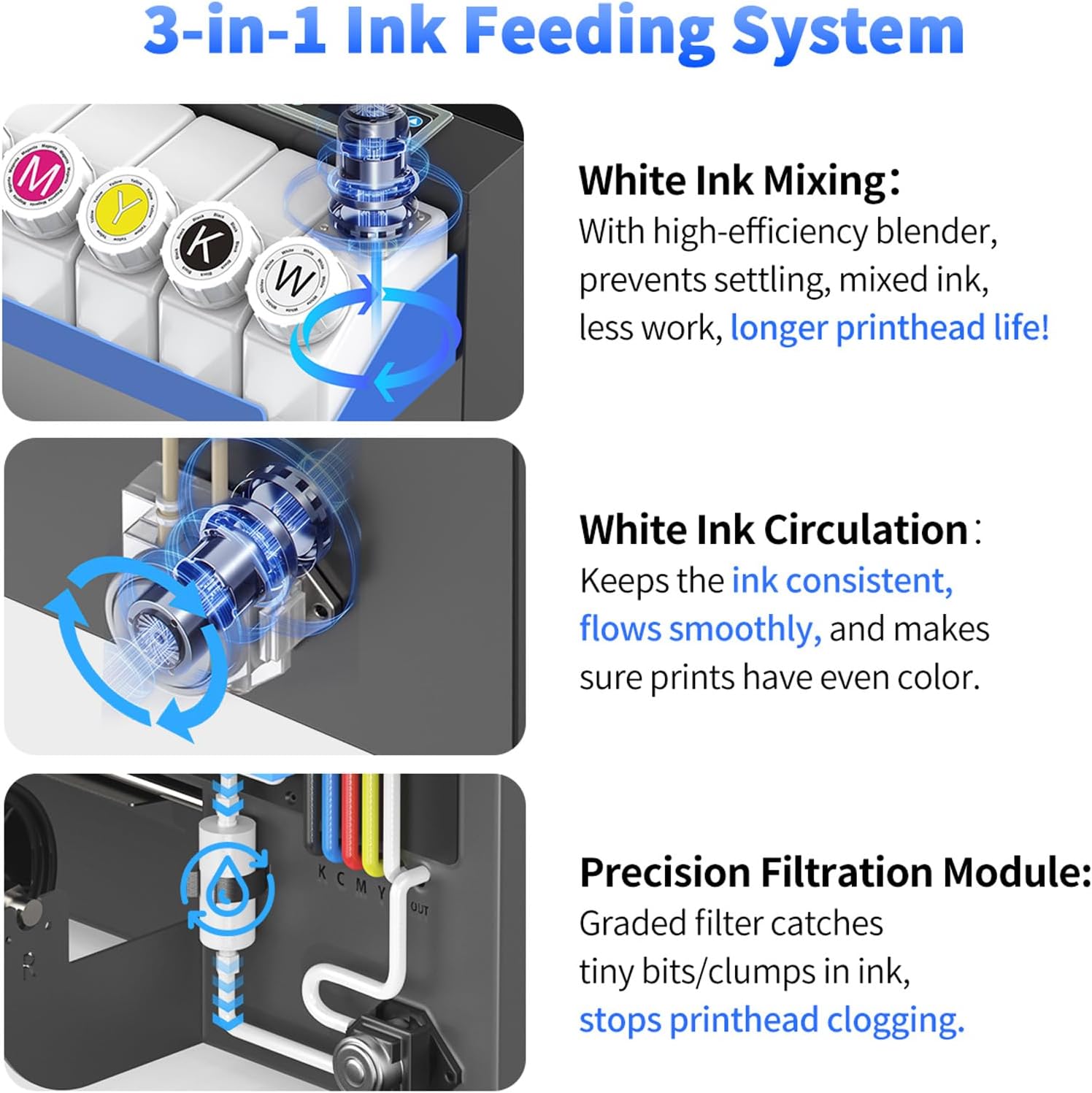
Image: Illustration of the 3-in-1 Ink Feeding System, showing White Ink Mixing, White Ink Circulation, and Precision Filtration Module.

Image: Diagram of the Advanced Dual Alarm System, highlighting the Ink Low-Level Alarm and Waste Ink Overflow Alarm.
4.3 Software Installation
The included laptop comes with the necessary RIP software pre-installed. Connect the printer to the laptop via the provided USB cable. Follow any on-screen prompts for initial software configuration.
4.4 Film Loading
Load the DTF film into the printer. The S13 printer supports a 13-inch wide film, accommodating both sheet and roll film printing. Ensure the film is loaded correctly to prevent jams and ensure optimal print quality.
4.5 Power On and Initial Checks
Connect the power cable and turn on the printer. The printer will perform an initial self-check. The smart timed printhead cleaning function can be programmed via the foldable touch panel to prevent printhead blockages and maintain stable printing performance.

Image: A DSV DTF printer in operation, showing the printhead moving across the film.
5. Operating Instructions
5.1 Preparing Your Design
Use the pre-installed RIP software on the laptop to prepare your design. Ensure the design is correctly sized for the 13-inch film and set to the desired 2880x1440dpi resolution for optimal print quality.
5.2 Printing Process
Send the prepared design from the laptop to the printer. Monitor the printing progress on the 4.5-inch LED foldable touch screen. The XP600 printhead allows for fast printing, completing an A3 print in approximately 5 minutes.

Image: Visual comparison illustrating the 200% speed advantage of the DSV XP600 printhead over other models, showing A3 prints in 5 minutes versus 12 minutes.
5.3 Film Cutting
After printing, the integrated automatic film cutter will precisely cut the printed film. This feature streamlines the workflow and ensures clean edges for your transfers.

Image: A DSV A3 DTF printer demonstrating the film cutting process.
5.4 Applying DTF Powder and Curing
Apply the DTF powder evenly to the wet ink on the printed film using the included powder shaker. Cure the film using a heat press or curing oven according to the powder manufacturer's instructions. This step is crucial for the transfer's durability.
5.5 Heat Press Application
Once the film is cured, place it onto the desired garment or substrate. Use a heat press to transfer the design. Follow the heat press manufacturer's guidelines for temperature, pressure, and time for optimal adhesion and vibrant results.
Video: An overview of the DSV XP600 DTF Printer, demonstrating its features and printing capabilities.
6. Maintenance
6.1 Printhead Cleaning
The printer is equipped with a smart timed printhead self-cleaning function. This can be scheduled via the foldable operation screen to prevent printhead clogs and extend printhead lifespan. Regular cleaning is essential for consistent print quality.

Image: A user interacting with the foldable touch panel to set up smart timed printhead cleaning, showing the timer and cleaning options.
6.2 Ink System Management
Regularly check ink levels and ensure the white ink circulation system is active. The Ink Low-Level Alarm and Waste Ink Overflow Alarm provide timely warnings to prevent interruptions and potential damage. Empty the waste ink bottle when prompted by the alarm.
6.3 General Cleaning
Keep the printer's exterior and interior clean using lint-free cloths. The oversized inspection door allows for easy access to internal components for in-situ checks and cleaning without complete disassembly.

Image: The oversized inspection door of the DTF printer opened, showing internal components for maintenance access.
7. Troubleshooting
This section addresses common issues you might encounter:
- Poor Print Quality: Check printhead for clogs, ensure ink levels are sufficient, and verify film loading. Perform a printhead cleaning cycle.
- Printer Not Responding: Ensure all cables are securely connected (power, USB). Restart the printer and laptop.
- Ink Alarms: Address low ink levels by refilling or empty the waste ink bottle as indicated by the dual alarm system.
- Film Jams: Carefully remove any jammed film. Ensure film is loaded correctly and not wrinkled.
For persistent issues, refer to the detailed troubleshooting guide in the full user manual or contact DSV customer support.
Video: A promotional video for the DSV S13 DTF Printer, showcasing its features and ease of use in a business setting.
8. Warranty and Support
DSV provides a 6-month printhead warranty and a 1-year warranty for non-consumable accessories. Our professional after-sales team offers one-on-one assistance for printer setup and responds to inquiries within 24 hours. Lifetime technical support is available through various channels including email, live chat, call, WhatsApp Group, and remote services.
For support, please visit the DSV website or contact our customer service team directly.


