1. Introduction
Thank you for choosing the HOOBRO Floating Wall Shelves with LED Lights. This manual provides essential information for the safe and correct assembly, operation, and maintenance of your new product. Please read these instructions carefully before installation and retain them for future reference.
2. Safety Information
- Weight Capacity: Each tier of the shelf supports up to 11 lb (5 kg). Do not exceed this weight limit to prevent damage or injury.
- Wall Mounting: Ensure the shelves are securely mounted to a sturdy wall using appropriate hardware for your wall type (e.g., drywall anchors, concrete anchors, wood studs). Consult a professional if unsure.
- Electrical Safety: The LED lights require a power source. Ensure all electrical connections are secure and follow local electrical codes. Do not expose LED strips or power cables to water or excessive moisture.
- Children and Pets: Keep small parts and packaging materials away from children and pets to avoid choking hazards.
- Assembly: Assemble the product on a soft, clean surface to prevent scratches. Ensure all screws and fasteners are tightened before use.
3. Package Contents
Please verify that all components listed below are present before beginning assembly. If any parts are missing or damaged, contact customer support.
- 4-Tier Floating Shelf components (MDF panels, metal frames if applicable)
- RGB LED Light Strips
- Smart Remote Controller for LED Lights
- Power Adapter for LED Lights
- Mounting Hardware (screws, wall anchors)
- Instruction Manual
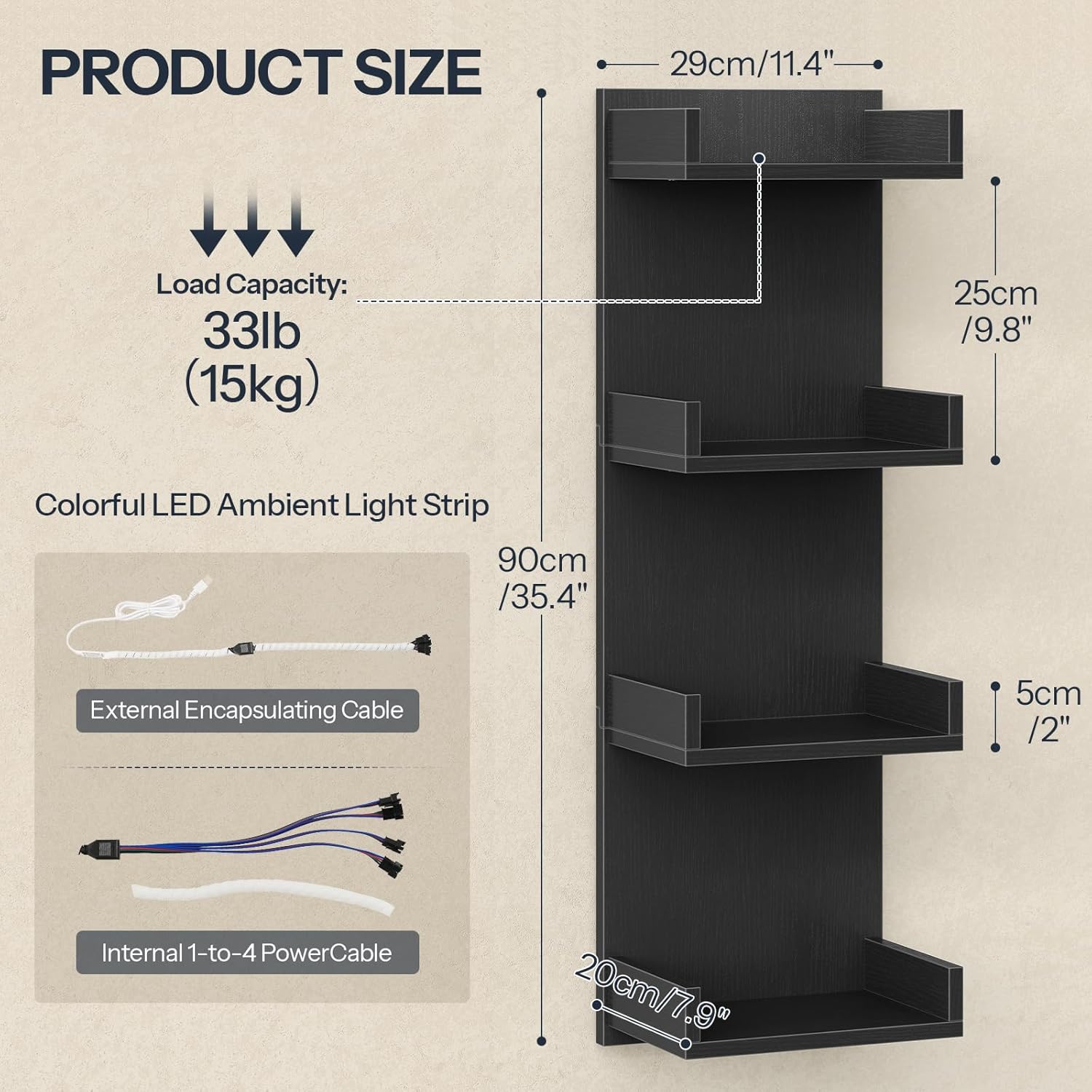
Image 3.1: Product dimensions, load capacity, and LED light strip components including external encapsulating cable and internal 1-to-4 power cable.
4. Setup and Installation
Follow these steps carefully to assemble and mount your HOOBRO Floating Wall Shelves.
- Prepare the Area: Choose a suitable wall location. Ensure there are no hidden electrical wires or pipes. Use a stud finder if mounting to wood studs.
- Assemble Shelf Structure: Follow the detailed assembly instructions provided in the separate assembly guide (if included) or diagrams. Secure all MDF panels and any metal frames using the provided screws.
- Mark Mounting Points: Hold the assembled shelf against the wall at the desired height. Use a level to ensure it is straight. Mark the drilling points for the mounting hardware.
- Drill Holes: Drill pilot holes at the marked points. Use the appropriate drill bit size for your wall anchors. Insert wall anchors if necessary.
- Mount the Shelf: Align the shelf with the drilled holes and secure it to the wall using the provided screws. Tighten all screws firmly but do not overtighten.
- Install LED Lights: Attach the LED light strips to the designated areas on the underside of each shelf tier. Connect the LED strips to the internal 1-to-4 power cable, then connect to the external encapsulating cable and power adapter.
- Connect Power: Plug the power adapter into a standard electrical outlet.

Image 4.1: Example of HOOBRO Floating Wall Shelves with LED Lights installed.
5. Operating the LED Lights
The integrated RGB LED lights offer various customization options via the included smart remote controller.
- Power On/Off: Press the power button on the remote to turn the LED lights on or off.
- Color Selection: Use the color buttons on the remote to select from multiple static colors (e.g., red, green, blue, white, etc.).
- Mode Selection: Cycle through various dynamic lighting modes (e.g., flash, strobe, fade, smooth) using the 'MODE' button.
- Brightness Adjustment: Use the 'BRIGHT' buttons (up/down arrows) to increase or decrease the brightness level of the lights. There are 5 brightness levels available.
- Speed Adjustment: For dynamic modes, use the 'SPEED' buttons to adjust the transition speed.
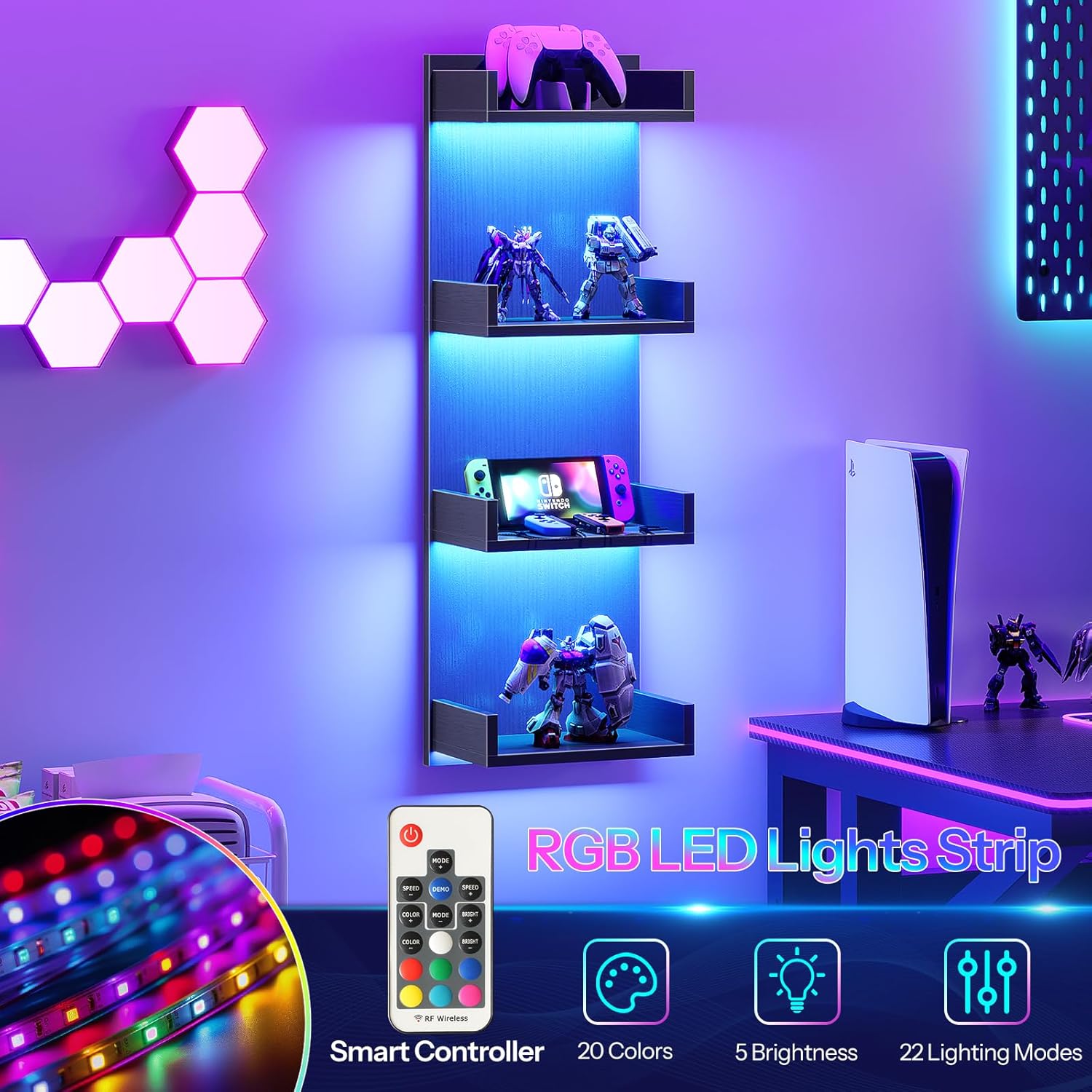
Image 5.1: The smart remote controller for RGB LED lights, offering 20 colors, 5 brightness levels, and 22 lighting modes.

Image 5.2: Detail of the LED lighting effect on the shelves.
6. Maintenance
Proper care will ensure the longevity and appearance of your floating shelves.
- Cleaning: Wipe the shelves with a soft, damp cloth. Avoid abrasive cleaners or harsh chemicals that may damage the finish or LED strips.
- Dusting: Regularly dust the shelves and LED strips to maintain optimal light output and appearance.
- Check Connections: Periodically check all mounting screws and electrical connections to ensure they remain secure.
- LED Care: Do not attempt to modify or repair the LED strips or power adapter. If issues arise, refer to the troubleshooting section or contact customer support.
7. Troubleshooting
If you encounter any issues with your HOOBRO Floating Wall Shelves, refer to the following common problems and solutions:
| Problem | Possible Cause | Solution |
|---|---|---|
| LED lights do not turn on. | Power adapter unplugged, loose connection, remote battery dead. | Ensure power adapter is securely plugged into outlet and LED strip. Check all cable connections. Replace remote battery. |
| Remote control not working. | Remote battery dead, remote out of range, obstruction. | Replace remote battery. Ensure remote is pointed at the LED receiver and within range. Remove any obstructions. |
| Shelves feel unstable or wobbly. | Mounting screws loose, improper wall anchors, overloaded. | Tighten all mounting screws. Ensure appropriate wall anchors were used for your wall type. Reduce weight on shelves, ensuring it does not exceed 11 lb per tier. |
| LED lights flicker or change color unexpectedly. | Loose electrical connection, interference. | Check all LED cable connections. Try unplugging and replugging the power adapter. Ensure no other electronic devices are causing interference. |
If the problem persists after attempting these solutions, please contact HOOBRO customer support.
8. Specifications
- Model: BK41DBJ01-BF73DBJ01
- Dimensions: 11.4"L x 7.9"W x 35.4"H (29cm L x 20cm W x 90cm H)
- Material: High-quality MDF
- Load Capacity: Up to 11 lb (5 kg) per tier
- LED Type: RGB LED Light Strips
- LED Features: Multiple colors, modes, 5 brightness levels, remote control operation
- Number of Tiers: 4
9. Warranty and Support
HOOBRO products are designed for quality and durability. For warranty information, product support, or to report missing/damaged parts, please contact HOOBRO customer service directly through their official website or the retailer where the product was purchased. Please have your model number (BK41DBJ01-BF73DBJ01) and purchase details ready when contacting support.