
1. Introduction
Thank you for choosing the TTARTISAN Tilt-Shift 17mm f/4 lens. This manual provides essential information for the proper setup, operation, and maintenance of your lens. This ultra-wide manual focus prime lens is designed for full-frame cameras with an E-Mount, offering unique tilt and shift functionalities for creative photography.
The lens features a wide 17mm focal length, a maximum aperture of f/4, and a robust construction. Its specialized design allows for perspective control and selective focus effects, making it suitable for architectural, landscape, and creative photography.
2. Setup
2.1 Unpacking the Lens
Carefully remove the lens from its packaging. Ensure all components are present: the TTARTISAN Tilt-Shift 17mm f/4 lens and the dedicated lens hood.
2.2 Attaching the Lens to Your Camera
- Ensure your camera is powered off.
- Align the red dot on the lens barrel with the corresponding red dot on your camera's E-Mount.
- Gently insert the lens into the camera mount and rotate it clockwise until it clicks into place. Do not force the lens.
- To remove the lens, press the lens release button on your camera and rotate the lens counter-clockwise.

Image: The TTARTISAN Tilt-Shift 17mm f/4 lens, ready for mounting on an E-Mount camera.
3. Operating the Lens
3.1 Tilt Function for Miniature World Effect
The tilt function allows you to change the plane of focus, creating a selective focus effect often referred to as the "miniature world" effect. By tilting the lens, you can make a specific area appear sharp while blurring the foreground and background, simulating a shallow depth of field typically seen in macro photography of small objects.

Image: An aerial view of a city highway interchange, demonstrating the miniature world effect achieved with the tilt function. The central area of the image is in focus, while the surrounding areas are blurred, making the scene appear like a small model.
3.2 Shift Function for Perspective Correction
The shift function enables you to move the lens parallel to the sensor plane. This is particularly useful in architectural photography to correct converging vertical lines that occur when photographing tall buildings from a low angle. By shifting the lens upwards, you can keep the building's lines straight and parallel, maintaining a natural perspective.

Image: A comparison showing the effect of the shift function. On the left, buildings appear straight and vertical with the shift function applied. On the right, the same buildings without shift appear to tilt and distort due to perspective.
3.3 360° Rotation Mechanism
The lens features a 360° rotation mechanism, allowing you to adjust the tilt and shift axes independently. This provides flexibility in controlling the plane of focus and perspective correction in various orientations. Note that for GFX-mount versions, the 360° rotation is not available; it only allows tilting left/right and panning up/down. The rotation and shift functions cannot be used simultaneously.

Image: A diagram illustrating the rotation capabilities. Lenses for E, Z, RF, and L-mounts are 360° rotatable, allowing tilt and pan at any angle. GFX-mount lenses do not have 360° rotation and only tilt left/right and pan up/down.
3.4 Manual Focus
This is a manual focus lens. Use your camera's focus peaking or magnification features to achieve precise focus. The lens has a minimum focus distance of 0.3 meters, allowing for close-up shots and creative perspectives.
3.5 Aperture Control
The lens is equipped with 10 aperture blades, which contribute to smooth bokeh (background blur) and a distinctive 10-point starburst effect when shooting bright light sources at narrower apertures.

Image: A night landscape photo featuring a person standing on rocky terrain with a bright light source creating a prominent 10-point starburst effect, demonstrating the lens's aperture blade characteristics.
3.6 Lens Hood Usage
The dedicated lens hood helps to reduce flare and provides additional protection for the front element. Attach the hood by aligning it with the front of the lens and twisting until it locks into place. Ensure it is securely attached before use.

Image: A person holding a camera with the TTARTISAN Tilt-Shift 17mm f/4 lens, demonstrating the attachment of the dedicated lens hood. The hood is being twisted onto the front of the lens.
3.7 Understanding the Ultra-Large Image Circle
The TTARTISAN Tilt-Shift 17mm f/4 lens features an image circle of approximately 64mm. This is significantly larger than typical full-frame and even some medium-format lens image circles. A larger image circle provides more room for tilt and shift movements without vignetting, especially when using the lens's full capabilities.
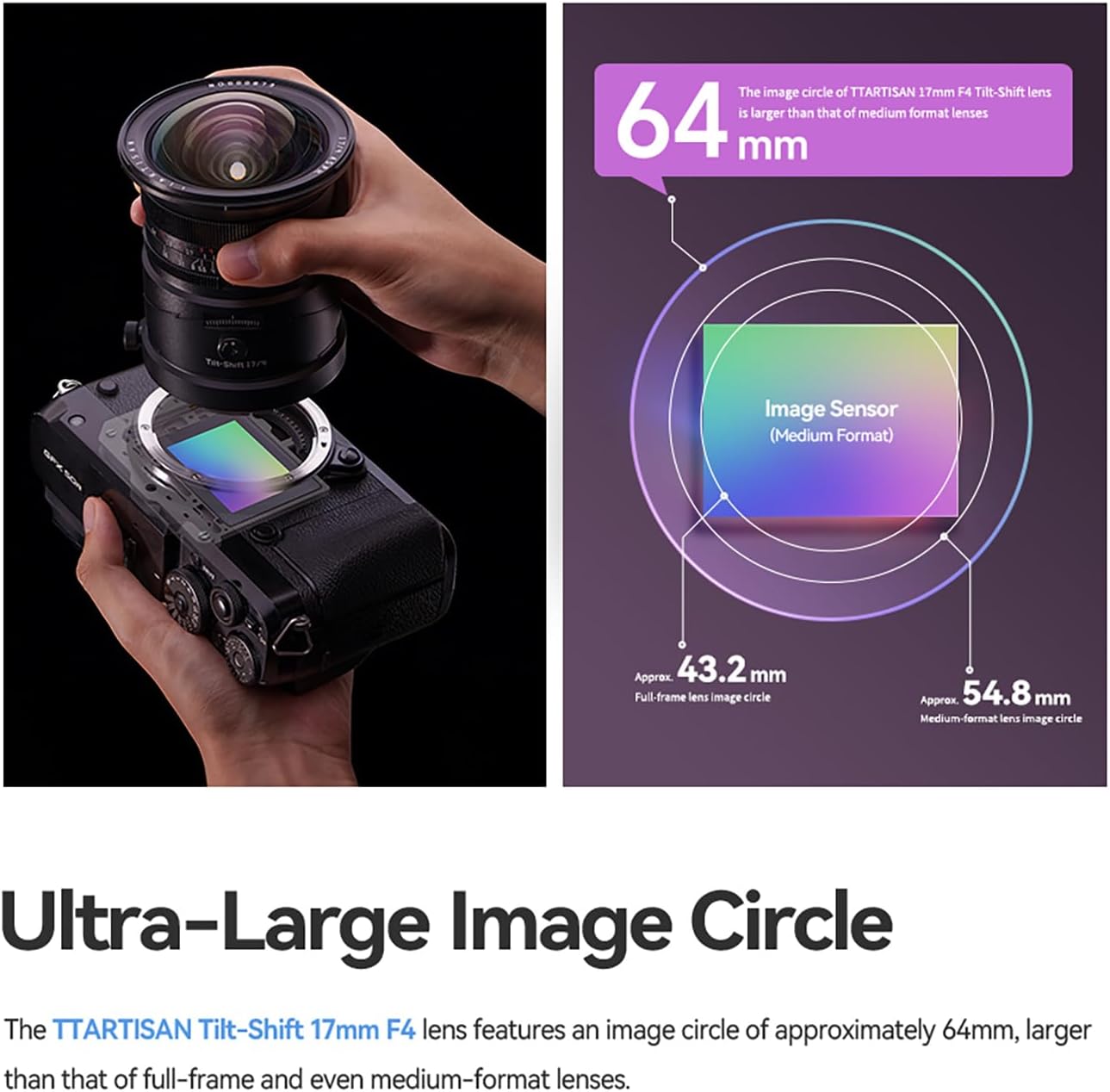
Image: A diagram illustrating the image circle of the TTARTISAN 17mm f/4 lens (approx. 64mm) in comparison to full-frame (approx. 43.2mm) and medium-format (approx. 54.8mm) image circles. The lens's larger image circle provides greater flexibility for tilt and shift movements.
3.8 Product Video Overview
Video: An introductory video showcasing the TTARTISAN Tilt-Shift 17mm f/4 lens, demonstrating its tilt and shift functionalities, 360° rotation, and the benefits of its large image circle for architectural and creative photography.
4. Maintenance
4.1 Cleaning the Lens
- Use a soft, lint-free cloth or a lens brush to remove dust from the lens surfaces.
- For smudges or fingerprints, use a specialized lens cleaning solution applied to a microfiber cloth. Never apply cleaning solution directly to the lens surface.
- Avoid touching the glass elements with your fingers.
4.2 Storage
- Store the lens in a cool, dry place away from direct sunlight and extreme temperatures.
- Use front and rear lens caps to protect the glass elements when not in use.
- If storing for extended periods, consider using a dehumidifying agent to prevent mold growth.
5. Troubleshooting
5.1 Vignetting Issues
While the lens has a large image circle, extreme tilt or shift movements, especially when combined with certain camera formats or lens hoods, can sometimes lead to slight vignetting. If you experience vignetting:
- Reduce the amount of tilt or shift applied.
- Ensure the lens hood is correctly attached and not obstructing the view.
- For GFX-mount users, note that using the lens hood with shift function may result in slight vignetting.
5.2 Difficulty Focusing
As a manual focus lens, precise focusing requires practice. If you are having difficulty:
- Utilize your camera's focus peaking feature, which highlights in-focus areas.
- Use the camera's magnification assist to zoom into the image and fine-tune focus.
- Ensure the aperture ring is set to an appropriate value for your desired depth of field.
6. Specifications
| Feature | Specification |
|---|---|
| Focal Length | 17mm |
| Maximum Aperture | f/4 |
| Minimum Aperture | f/16 |
| Lens Type | Tilt-Shift Prime Lens |
| Compatible Mountings | Sony FE (E-Mount) |
| Tilt Range | ±8mm |
| Shift Range | ±8mm |
| Image Circle | Approx. 64mm |
| Aperture Blades | 10 |
| Minimum Focus Distance | 0.3m |
| Optical Design | Includes 2 aspherical elements and 6 high-index elements |
| Product Dimensions | 3 x 2.5 x 2.5 inches |
| Item Weight | 1.5 pounds |

Image: A diagram illustrating the optical design of the TTARTISAN Tilt-Shift 17mm f/4 lens, highlighting the placement of high-index and aspherical lens elements for optimal performance.
7. Warranty
This TTARTISAN lens comes with an official 12-month warranty, assuring quality and providing support for manufacturing defects. Please retain your proof of purchase for warranty claims.
8. Support
For further assistance, product inquiries, or technical support, please visit the official TTARTISAN store or contact their customer service. You can find more information and contact details on the TTARTISAN Official Store.
