
1. Introduction
The Lockzo SP300 Smart Lock is an advanced keyless entry system designed for enhanced home security and convenience. It integrates multiple unlocking methods, including palm vein recognition, PIN code, app control, voice commands, and traditional mechanical keys. This manual provides detailed instructions for installation, operation, maintenance, and troubleshooting to ensure optimal performance and user experience.
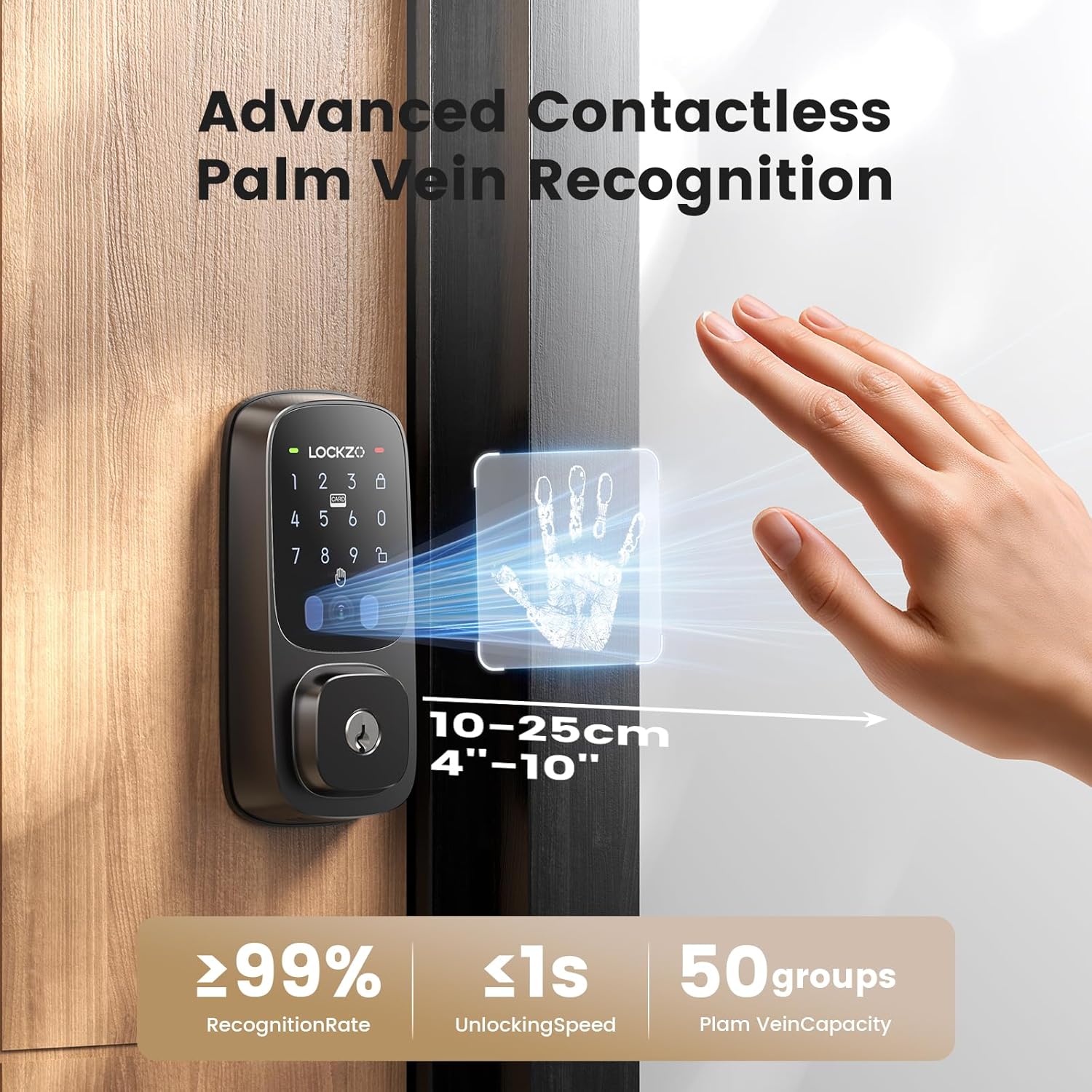
Image: The Lockzo SP300 Smart Lock, showcasing its sleek design and keypad on a wooden door.
2. Product Features
- Palm Vein Biometrics: Advanced contactless palm vein recognition for secure and rapid unlocking in 0.5 seconds, suitable for all ages and hand conditions.
- Multiple Unlocking Methods: Offers 5 AI-enabled methods including palm vein, PIN code, app control, voice command (Alexa & Google Assistant compatible), and traditional key.
- Integrated WiFi 6: Built-in WiFi 6 module for direct connection to your home network, enabling secure remote control and monitoring via the app.
- Long-Lasting Battery: Equipped with a 10,000mAh battery featuring AI-powered power consumption for extended standby time and dynamic power allocation. Supports emergency charging via power bank.
- Auto-Lock Function: Configurable automatic locking from 1 to 60 minutes for added security and peace of mind.
- Anti-Peeping Password: Allows adding random numbers before and after your actual PIN to prevent unauthorized viewing.
- Durable and Weather-Resistant: IP54 waterproof and dustproof rating, operating effectively in temperatures from -4°F to 140°F (-20°C to 60°C).
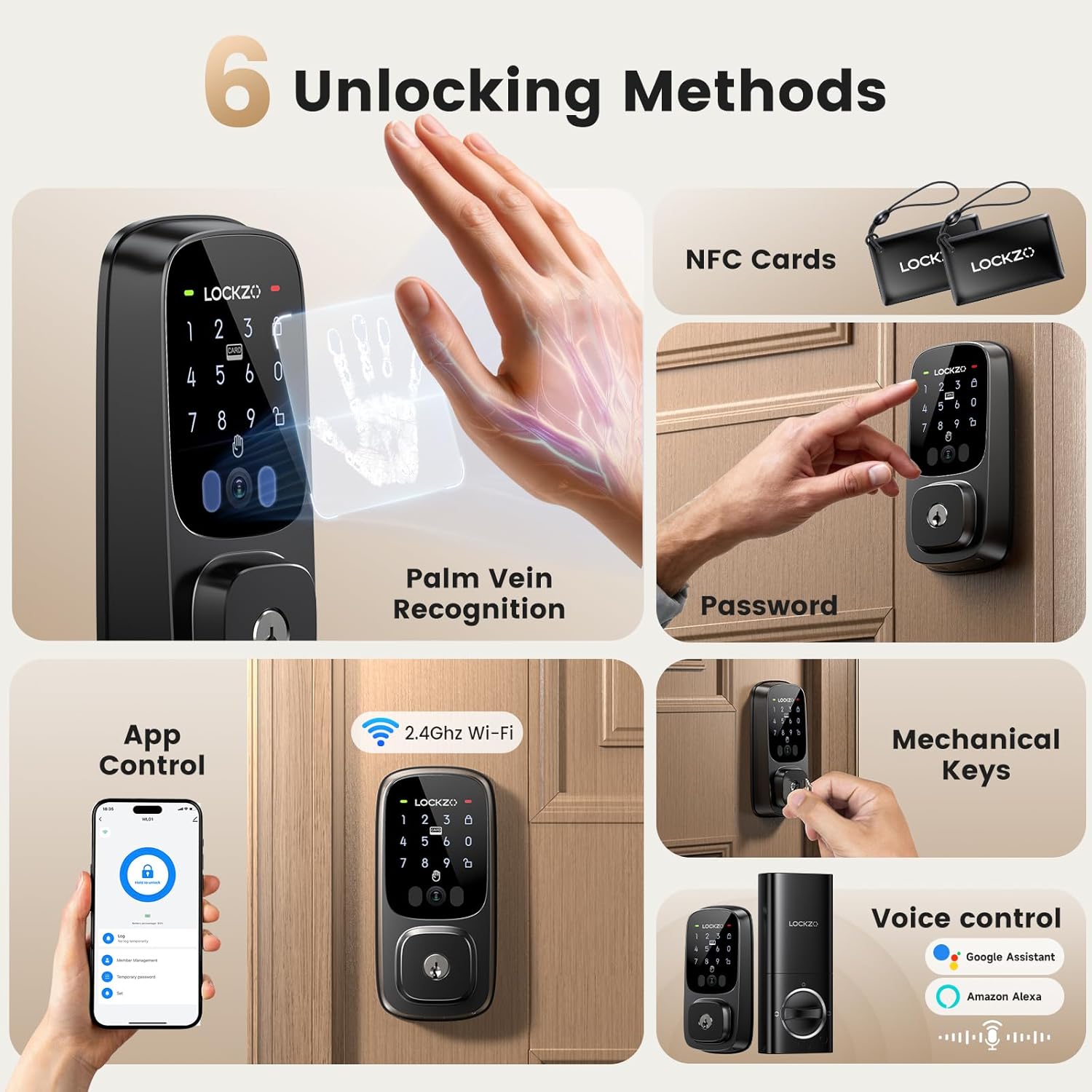
Image: Visual representation of the six unlocking methods: Palm Vein Recognition, Password, App Control, Mechanical Keys, NFC Cards, and Voice Control.

Image: The palm vein recognition system is effective across various hand conditions, including wet, dirty, dry, and blurred fingerprints.
3. Installation Guide
Before installation, ensure your door meets the following specifications:
- Cross Bore Diameter: 1-1/2" (38mm) to 2-1/8" (54mm)
- Door Thickness: 1-3/8" to 2-1/8" (35mm to 55mm)
- Backset: 2-3/8" (60mm) or 2-3/4" (70mm)

Image: Door measurement guide for cross bore diameter, door thickness, and backset, indicating compatibility for both left and right-handed doors.
3.1. Installation Video
Video: This video provides a step-by-step guide for installing the Lockzo SP300 Smart Lock, covering latch adjustment, component placement, wiring, and securing the lock to the door.
4. Operating Instructions
4.1. App Function Guide
Video: This video demonstrates how to use the Lockzo SP300 Smart Lock's mobile application, including unlocking/locking, adding palm vein data, setting up passwords, and managing NFC cards.
4.2. Network Configuration
Video: This video guides you through the process of configuring the Lockzo SP300 Smart Lock to your home WiFi network using the mobile application.
4.3. Unlocking Methods
- Palm Vein Recognition: Place your palm over the sensor for instant unlocking. The system recognizes palm vein patterns for high security.
- PIN Code: Enter your 6-8 digit PIN on the keypad. Utilize the anti-peeping feature by adding random digits before or after your actual code.
- App Control: Use the Lockzo app on your smartphone to remotely unlock or lock the door. Manage access permissions and view entry logs.
- NFC Cards: Tap a registered NFC card on the lock's sensor to unlock.
- Voice Control: Integrate with Alexa or Google Assistant for voice-activated unlocking.
- Mechanical Key: In case of power failure or emergency, use the provided mechanical key for manual unlocking.

Image: A user demonstrating contactless palm vein recognition on the Lockzo SP300 Smart Lock.

Image: The anti-peeping password feature in use, showing how random numbers can be added around the correct PIN for security.
5. Maintenance
5.1. Battery Management
The Lockzo SP300 Smart Lock is powered by a 10,000mAh rechargeable battery. The app will provide low-power alerts when the battery needs charging. For emergency situations, the lock supports charging via a power bank using its USB port.

Image: The 10,000mAh long-lasting rechargeable battery pack for the Lockzo SP300 Smart Lock, highlighting its eco-friendly and low-power alert features.
5.2. Cleaning and Care
To maintain the performance and appearance of your smart lock, wipe the exterior surfaces with a soft, damp cloth. Avoid using abrasive cleaners or solvents that could damage the finish or electronic components. Ensure the palm vein sensor and keypad are kept clean for optimal recognition.
6. Troubleshooting
If you encounter issues with your Lockzo SP300 Smart Lock, please refer to the following common troubleshooting steps:
- Lock not responding: Check the battery level in the app or attempt emergency charging with a power bank. Ensure the lock is properly installed and all connections are secure.
- Palm vein recognition failure: Ensure your palm is clean and dry. Position your palm correctly over the sensor within the recommended distance (4-10 inches). Re-register your palm vein if issues persist.
- PIN code not working: Verify the correct PIN is being entered. Ensure the lock is not in a temporary lockout mode due to multiple incorrect attempts.
- App connectivity issues: Confirm your home WiFi network (2.4 GHz) is active and the lock is within range. Restart your router and the smart lock. Re-pair the device with the app if necessary.
- Auto-lock not engaging: Check the auto-lock settings in the app to ensure it is enabled and the delay time is configured as desired.
For further assistance, please contact Lockzo customer support.
7. Specifications
| Feature | Detail |
|---|---|
| Brand | Lockzo |
| Model Name | SP300 |
| Lock Type | Deadbolt |
| Special Feature | Auto-Lock, Palm Vein Recognition |
| Control Method | App, Gesture (Palm Vein), Push Button (Keypad), Voice |
| Connectivity Protocol | Wi-Fi (2.4 GHz) |
| Item Weight | 2 Pounds |
| Product Dimensions | 1 x 1 x 1 inches (approximate) |
| Color | Black |
| Power Source | 10,000mAh Rechargeable Battery |
| Weather Resistance | IP54 Waterproof and Dustproof |
| Operating Temperature | -4°F to 140°F (-20°C to 60°C) |
| Smart Home Compatibility | Alexa, Google Assistant |
8. Warranty and Support
Lockzo products are designed for reliability and performance. For warranty information, product registration, or technical support, please visit the official Lockzo website or contact our customer service team. Keep your purchase receipt for warranty claims.
Customer Support: Refer to your product packaging or the Lockzo website for the most current contact information.
Online Resources: Additional FAQs, video tutorials, and software updates may be available on the Lockzo support page.


