
Important Safety Instructions
Please read and save these instructions before operating your humidifier. Failure to follow these instructions may result in electric shock, fire, or serious injury.
- Always place the humidifier on a firm, flat, water-resistant surface at least 12 inches (30 cm) away from walls and appliances.
- Do not place the humidifier on carpet, near heat sources, or in direct sunlight.
- Use only clean, cool tap water. Distilled or demineralized water is recommended to prevent white dust.
- Do not add essential oils directly into the water tank. Use a dedicated aroma tray if available.
- Unplug the humidifier before filling, cleaning, or moving it.
- Keep out of reach of children and pets.
- Do not block air vents.
- Do not immerse the base unit in water or other liquids.
- If the power cord is damaged, it must be replaced by the manufacturer or a qualified service agent.
Product Overview
Familiarize yourself with the components of your KZF Large Humidifier.
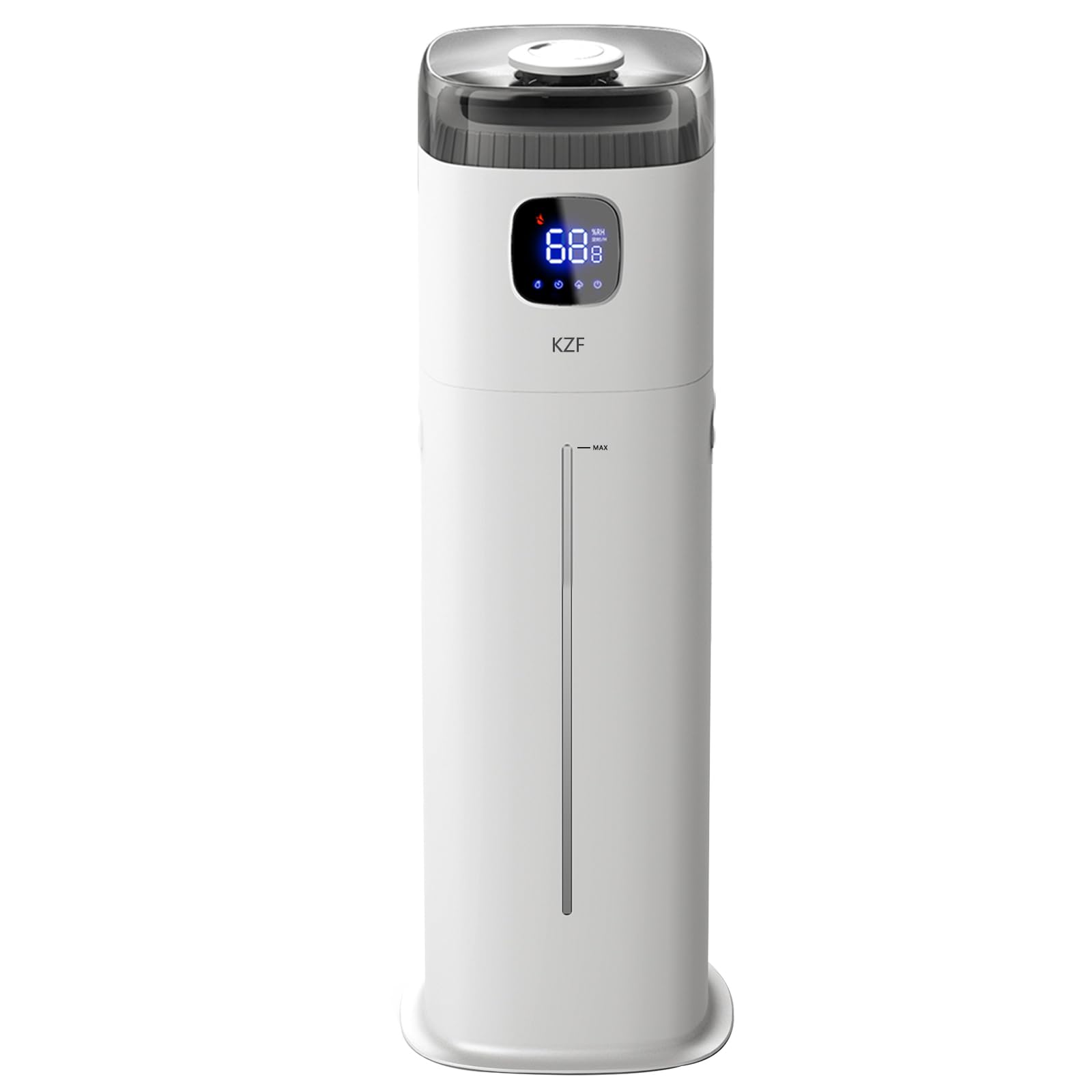
Image 1: KZF Large Humidifier ZG-561. This image shows the complete humidifier unit, highlighting its sleek design and large water tank capacity.
Package Contents:
- Humidifier Base Unit
- Water Tank (9 Liters / 2.5 Gallons)
- Top Cover with 360° Rotating Nozzle
- Remote Control
- User Manual (this document)
Setup
- Unpack: Carefully remove all components from the packaging. Retain packaging for future storage or transport.
- Placement: Place the humidifier base unit on a flat, stable, and water-resistant surface. Ensure it is at least 12 inches (30 cm) from walls and furniture.
- Fill Water Tank:
- Remove the top cover.
- Fill the water tank with clean, cool tap water. Do not exceed the MAX fill line. Distilled or demineralized water is recommended.
- Replace the top cover securely.

Image 2: Water tank filling. This image illustrates the process of removing the top cover and filling the water tank with water.
- Connect Power: Plug the power cord into a standard electrical outlet. The unit will beep once, and the display will illuminate briefly.
Operating Instructions
Your KZF Humidifier can be operated via the touch control panel or the included remote control.
Control Panel Overview:

Image 3: Control Panel. This image displays the touch-sensitive control panel with various function icons and the LED display.
- Power Button: Turns the unit On/Off.
- Mist Level Button: Cycles through Low, Medium, High mist output.
- Humidity Setting Button: Adjusts desired humidity from 45% to 90% in 5% increments.
- Timer Button: Sets operating time from 1 to 12 hours.
- Sleep Mode Button: Activates/deactivates sleep mode (LED display turns off).
Basic Operation:
- Power On: Press the Power button (●) on the control panel or remote. The unit will start humidifying at the default mist level.
- Adjust Mist Level: Press the Mist Level button (≡) repeatedly to cycle through Low, Medium, and High mist output settings.
- Set Desired Humidity (Humidistat): Press the Humidity Setting button (%) to set your desired humidity level. The unit will automatically maintain this level, turning off when reached and restarting when humidity drops.
- Timer Function: Press the Timer button (⏱) to set the humidifier to operate for a specific duration (1-12 hours). The unit will automatically shut off after the set time.
- Sleep Mode: Press the Sleep Mode button (☽) to turn off the LED display for undisturbed sleep. The humidifier will continue to operate according to its settings.
- 360° Nozzle Adjustment: Manually rotate the mist nozzle on the top cover to direct the mist flow in any desired direction.
- Power Off: Press the Power button (●) again to turn off the humidifier.
Maintenance
Regular cleaning is essential for optimal performance and hygiene of your humidifier.
Daily Maintenance:
- Empty and rinse the water tank and base reservoir daily.
- Wipe any remaining water with a clean, dry cloth.
- Refill with fresh, cool water.
Weekly Cleaning:
- Unplug: Always unplug the humidifier before cleaning.
- Clean Water Tank:
- Remove the water tank and empty any remaining water.
- Pour 2 cups of undiluted white vinegar into the tank. Swish to coat all interior surfaces.
- Let it stand for 20 minutes.
- Brush the interior with a soft brush to remove mineral buildup.
- Rinse thoroughly with clean water until the vinegar smell is gone.
- Clean Base Reservoir:
- Pour 1 cup of undiluted white vinegar into the base reservoir.
- Let it stand for 20 minutes.
- Gently clean the ultrasonic transducer (the small disc) with a soft brush or cotton swab. Do not scrape.
- Rinse the reservoir thoroughly with clean water.
- Dry: Wipe all parts dry with a clean cloth before reassembling.
Storage:
When storing the humidifier for an extended period, ensure all parts are clean and completely dry. Store in a cool, dry place, preferably in its original packaging.
Troubleshooting
Refer to this section for common issues and their solutions.
| Problem | Possible Cause | Solution |
|---|---|---|
| No mist or very little mist. |
|
|
| White dust around the humidifier. | Hard water used. | Use distilled or demineralized water. Clean the unit regularly. |
| Unusual noise. |
|
|
| Water leakage. |
|
|
Specifications
| Model Name: | ZG-561 |
| Brand: | KZF |
| Capacity: | 9 Liters (2.5 Gallons) |
| Operation Mode: | Ultrasonic Cool Mist |
| Max Mist Output: | 350 ML/H |
| Runtime: | Up to 72 hours (on low mist setting) |
| Product Dimensions: | 7.5"D x 7.5"W x 23"H |
| Item Weight: | 2.59 pounds |
| Special Features: | Humidistat, 360° Nozzle, Timer, Sleep Mode, Auto Shut-off |
Warranty and Support
Product Warranty:
KZF offers a 360-day free product replacement warranty from the date of purchase. This warranty covers defects in materials and workmanship under normal use. It does not cover damage caused by misuse, accident, unauthorized modifications, or failure to follow the instructions in this manual.
Please retain your proof of purchase for warranty claims.
Customer Support:
If you encounter any issues or have questions regarding your KZF Humidifier, please contact our professional customer service team. We are available 24 hours a day to assist you.
Contact Information:
- Email: support@kzfhome.com (Example email, replace if actual contact is known)
- Website: www.kzfhome.com (Example website, replace if actual contact is known)
When contacting support, please have your model number (ZG-561) and purchase date ready.