
1. Introduction
The PILSAMAS Wireless Bed Exit Alarm System is designed to assist caregivers in monitoring elderly individuals or patients with dementia. This system provides timely alerts for bed exits or movement within a monitored area, enhancing safety and peace of mind. It utilizes infrared motion detection and a portable caregiver pager for real-time notifications.
2. Safety Information
- Read all instructions thoroughly before operating the device.
- Keep all components away from water and moisture.
- Use only the specified battery types (3 AAA for motion sensor, built-in rechargeable for pager).
- Ensure proper placement of the motion sensor to prevent false alarms and ensure accurate detection.
- This device is an assistive tool and does not replace direct supervision or professional medical care.
- Do not attempt to open or repair the devices yourself. Contact customer support for assistance.
3. Package Contents
Verify that all items are present in your package:
- 1 x Motion Detector (Sensor)
- 1 x Caregiver Pager (Receiver)
- 1 x USB-C Charging Cable
- Instruction Manual
4. Setup
4.1 Powering the Devices
- Motion Sensor: Insert 3 AAA batteries (not included) into the battery compartment, or connect it via a USB-C cable to a power source.
- Caregiver Pager: The pager has a built-in rechargeable lithium-polymer battery. Charge it using the provided USB-C cable. A full charge typically lasts 1 to 3 months depending on usage.
4.2 Mounting the Motion Sensor
The motion sensor offers 360-degree tool-free mounting options for walls, floors, or tables.
- For bed exit detection, place the sensor near the bed, ensuring it detects feet touching the floor rather than bed movement.
- For room exit detection, mount the sensor above the doorway or in a strategic location within the room.
- Optimal installation height is between 38.1 cm and 50.8 cm (15 to 20 inches) from the floor to minimize false triggers from pets.


4.3 Pairing Additional Sensors (If Applicable)
The system supports up to 20 sensors. If you have additional sensors, refer to the specific pairing instructions included with those units. The caregiver pager will display a unique ID for each paired sensor when triggered.

5. Operating Instructions
5.1 Caregiver Pager Functions
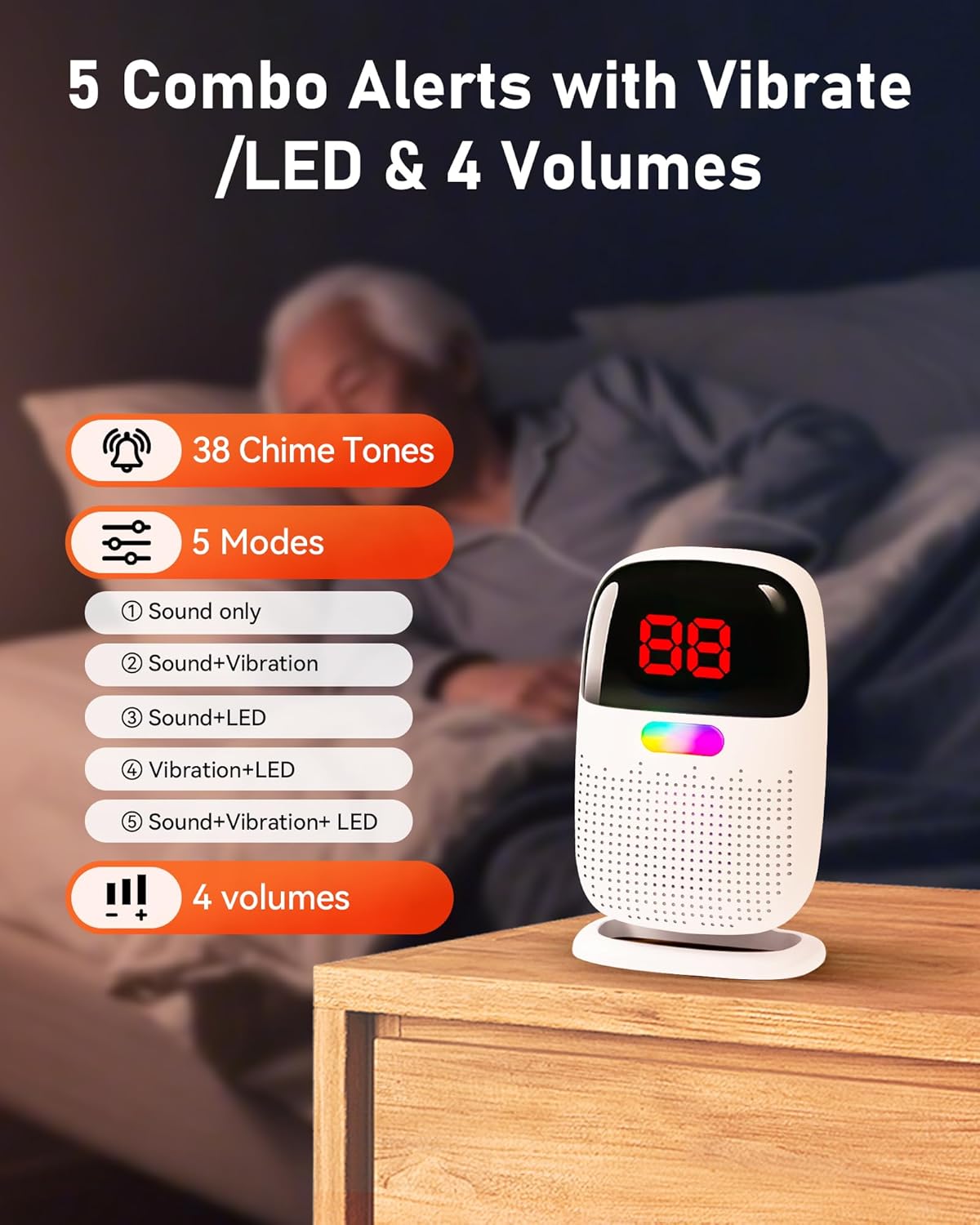
The pager provides various alert modes and volume levels to suit your needs:
- Alert Modes: Choose from 5 combination alert modes: Sound only, Sound + Vibration, Sound + LED, Vibration + LED, or Sound + Vibration + LED.
- Chime Tones: Select from 38 distinct chime tones.
- Volume Levels: Adjust the alert volume with 4 available levels.
5.2 Alert Identification
When a motion sensor is triggered, the pager's screen will display the exact sensor ID (e.g., '01', '02'), allowing you to quickly identify the location requiring attention. The system has a wireless range of up to 304.8 meters (1000 feet), enabling freedom of movement throughout your home and yard.

6. Maintenance
6.1 Battery Management
- Motion Sensor: Replace AAA batteries when the low battery indicator appears, or connect to USB-C power for continuous operation.
- Caregiver Pager: Recharge the pager when the low battery alert is indicated. Avoid fully depleting the battery to prolong its lifespan.
6.2 Cleaning
Wipe the devices with a soft, dry cloth. Do not use abrasive cleaners or immerse in water.
7. Troubleshooting
- False Alarms: Ensure the motion sensor is installed at the recommended height (38.1-50.8 cm / 15-20 inches) to avoid detecting pets or other unintended movements. The infrared sensors are designed to detect feet on the floor, not bed movement, which helps eliminate false alarms common with traditional sensor pads.
- No Alert from Sensor:
- Check if the motion sensor has power (batteries or USB-C).
- Ensure the pager is powered on and within range (up to 304.8 meters / 1000 feet).
- Verify that the sensor's detection area is clear and unobstructed.
- Pager Not Displaying Sensor ID:
- Confirm the sensor is properly paired with the pager.
- Check the sensor's battery level.
- Short Pager Battery Life: Ensure the pager is fully charged. Battery life can vary based on alert frequency and mode settings.

8. Specifications
| Feature | Specification |
|---|---|
| Model Number | PG03M |
| Brand | PILSAMAS |
| Motion Sensor Power Source | 3 x AAA batteries or USB-C |
| Pager Power Source | Rechargeable Lithium-polymer battery |
| Connectivity Technology | Wireless |
| Sensor Technology | Motion Sensor (Infrared) |
| Alert Type | Motion only |
| Maximum Range | 304.8 meters (1000 feet) |
| Dimensions (L x W x H) | 6.6 x 3 x 9.9 cm |
| Control Method | Touch |
| Installation Type | Self-adhesive / Tool-free mounting |
| Max Sensors per System | 20 |
9. Warranty and Support
For warranty information, technical support, or any inquiries regarding your PILSAMAS Wireless Bed Exit Alarm System, please refer to the manufacturer's official website or contact their customer service department directly. Contact details are typically provided on the product packaging or a separate warranty card.