
Introduction
The Jorest Wireless Induction Speaker with Phone Stand is a versatile device combining a portable speaker with a phone holder. It offers both wireless induction and Bluetooth connectivity for audio playback, along with an adjustable stand and ambient lighting. This manual provides detailed instructions for its proper use and care.

Figure 1: Jorest Wireless Induction Speaker with Phone Stand in use, demonstrating its dual functionality as a speaker and phone stand.
Setup
1. Powering On/Off
- To power on the device, press and hold the power button located on the base until the indicator lights illuminate.
- To power off, press and hold the power button again until the indicator lights turn off.
2. Induction Mode Operation
For induction mode, simply place your smartphone onto the phone stand. The speaker will automatically amplify the sound from your phone's internal speaker. The volume will adjust automatically to approximately 30-40% or higher for optimal amplification. This mode is particularly convenient as it requires no pairing.

Figure 2: Illustration of a smartphone placed on the speaker stand, activating induction mode for automatic sound amplification.
3. Bluetooth Mode Pairing
- Ensure the speaker is powered on.
- Activate Bluetooth on your smartphone or tablet.
- Search for available Bluetooth devices and select "Jorest Speaker" (or similar name) from the list.
- Once paired, the speaker will confirm the connection. Bluetooth mode offers superior audio quality compared to induction mode.
Note: Phone calls are not supported in Bluetooth mode. For calls, use induction mode.
Operating Instructions
1. Adjusting the Phone Stand
The phone stand features a 270-degree rotation for horizontal adjustment and a 180-degree vertical pivot. Adjust the stand to your preferred viewing angle. The stand includes independent clips and silicone anti-slip strips to secure your device.
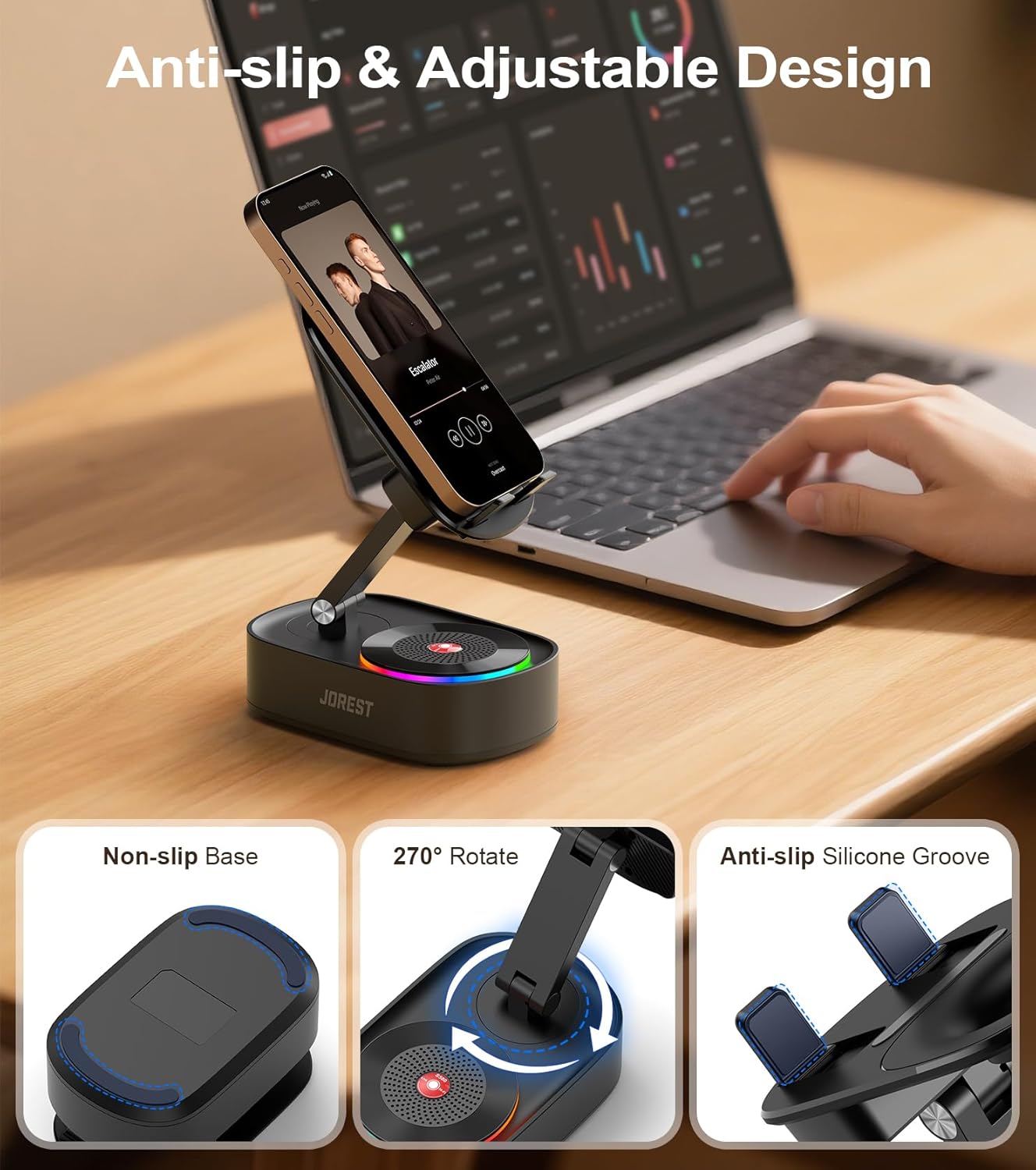
Figure 3: Detailed view of the adjustable phone stand, highlighting its rotation capabilities and anti-slip components.
2. Ambient Lighting Modes
The speaker base is equipped with three lighting modes: Rainbow, Blue, and White. Press the light button (refer to product diagram for location) to cycle through these modes and select your desired ambiance.

Figure 4: The speaker displaying its RGB ambient lighting feature, enhancing the user experience.
3. Emergency Charging Function
The device includes a reverse charging function for emergency power needs. Connect your phone to the speaker's USB port (if available) to utilize this feature. This is intended for temporary charging only.
Maintenance
1. Cleaning
To clean the speaker and stand, use a soft, dry cloth. Avoid using abrasive cleaners, solvents, or excessive moisture, as these can damage the device. Ensure the device is powered off before cleaning.
2. Battery Care
The speaker is equipped with a 2000 mAh lithium battery, providing approximately 5 to 8 hours of operation at maximum volume. For optimal battery life, avoid fully discharging the battery frequently and store the device in a cool, dry place when not in use for extended periods.
Troubleshooting
- No Sound in Induction Mode: Ensure your phone's speaker is aligned with the induction area on the stand. Check your phone's volume settings.
- Bluetooth Not Connecting: Make sure Bluetooth is enabled on your device and the speaker is in pairing mode. Try forgetting the device on your phone and re-pairing. Ensure the speaker is within the 10-meter Bluetooth range.
- Low Volume: Adjust the volume on both your connected device and the speaker. In induction mode, ensure your phone's volume is sufficiently high.
- Lights Not Working: Check if the device is powered on and press the light button to cycle through modes.
- Device Not Charging (Emergency Function): Ensure the cable is properly connected and the speaker has sufficient battery charge. This function is for emergency use only and may not provide fast charging.
Specifications
| Feature | Specification |
|---|---|
| Model Number | AJJOBS0101ORDDER1 |
| Dimensions (L x W x H) | 12.5 x 8.3 x 20.2 cm |
| Weight | 360 grams |
| Connectivity Technology | Bluetooth, Wireless Induction |
| Bluetooth Range | Up to 10 meters |
| Speaker Output Power | 5 Watts |
| Speaker Size | 5.2 Centimeters |
| Frequency Response | 20 Hz (lower bound, typical for speakers) |
| Signal-to-Noise Ratio | 80 dB |
| Battery Type | Lithium (1 included) |
| Battery Capacity | 2000 mAh |
| Average Battery Life | 6.5 hours (up to 8 hours at lower volumes) |
| Compatible Devices | Smartphones, Tablets (3" to 33 cm, non-foldable) |

Figure 5: The speaker stand demonstrating its compatibility with a wide range of smartphones and tablets.
Warranty and Support
For warranty information or technical support, please refer to the product packaging or contact Jorest customer service through the retailer where the product was purchased. Keep your proof of purchase for warranty claims.