
BARBERBOSS QR-6020
BarberBoss 5-in-1 Grooming Kit QR-6020 User Manual
Model: QR-6020
1. Introduction
Thank you for choosing the BarberBoss 5-in-1 Grooming Kit QR-6020. This versatile grooming tool is designed to provide a comprehensive solution for your personal grooming needs. Please read this manual carefully before first use to ensure safe and optimal performance. Keep this manual for future reference.
2. Safety Instructions
To reduce the risk of electric shock, injury, or fire, always follow these basic safety precautions:
- This appliance is not intended for use by persons (including children) with reduced physical, sensory or mental capabilities, or lack of experience and knowledge, unless they have been given supervision or instruction concerning use of the appliance by a person responsible for their safety.
- Children should be supervised to ensure that they do not play with the appliance.
- Do not use this appliance near bathtubs, showers, basins or other vessels containing water.
- Do not immerse the appliance in water. The main body is waterproof for rinsing, but should not be submerged.
- Always check the appliance, attachments, and power cord for damage before use. Do not use if damaged.
- Only use the charging cable provided with the device.
- Keep the appliance away from hot surfaces.
- Do not use the appliance for any purpose other than its intended use.
- Ensure the appliance is switched off before cleaning or changing attachments.
3. Product Overview
The BarberBoss 5-in-1 Grooming Kit QR-6020 includes a main trimmer unit and five interchangeable magnetic heads, along with various accessories for comprehensive grooming.
3.1 Components and Attachments
- Main Trimmer Unit: Features an LED display for battery level, speed mode, and charging reminders. Equipped with a power button and speed adjustment buttons (+/-).
- Hair & Beard Trimmer Head: Standard trimmer for general hair and beard styling.
- Precision Trimmer Head: For detailed styling, sharp lines, and intricate designs.
- Body Trimmer Head: Designed for grooming body hair on the chest, arms, and legs.
- Nose & Ear Trimmer Head: Safely removes unwanted hair from the nose and ears.
- Detail Foil Shaver Head: Provides a smooth, close shave for finishing touches.
3.2 Included Accessories
- 4 Guide Combs: (3mm, 6mm, 9mm, 12mm) for precise hair length control.
- Styling Comb: For pre-trimming and general hair grooming.
- Cleaning Brush: For removing hair debris from blades and attachments.
- USB Charging Cable: Universal 5V USB cable for convenient charging.
- Storage Tray: Keeps all components organized and accessible.
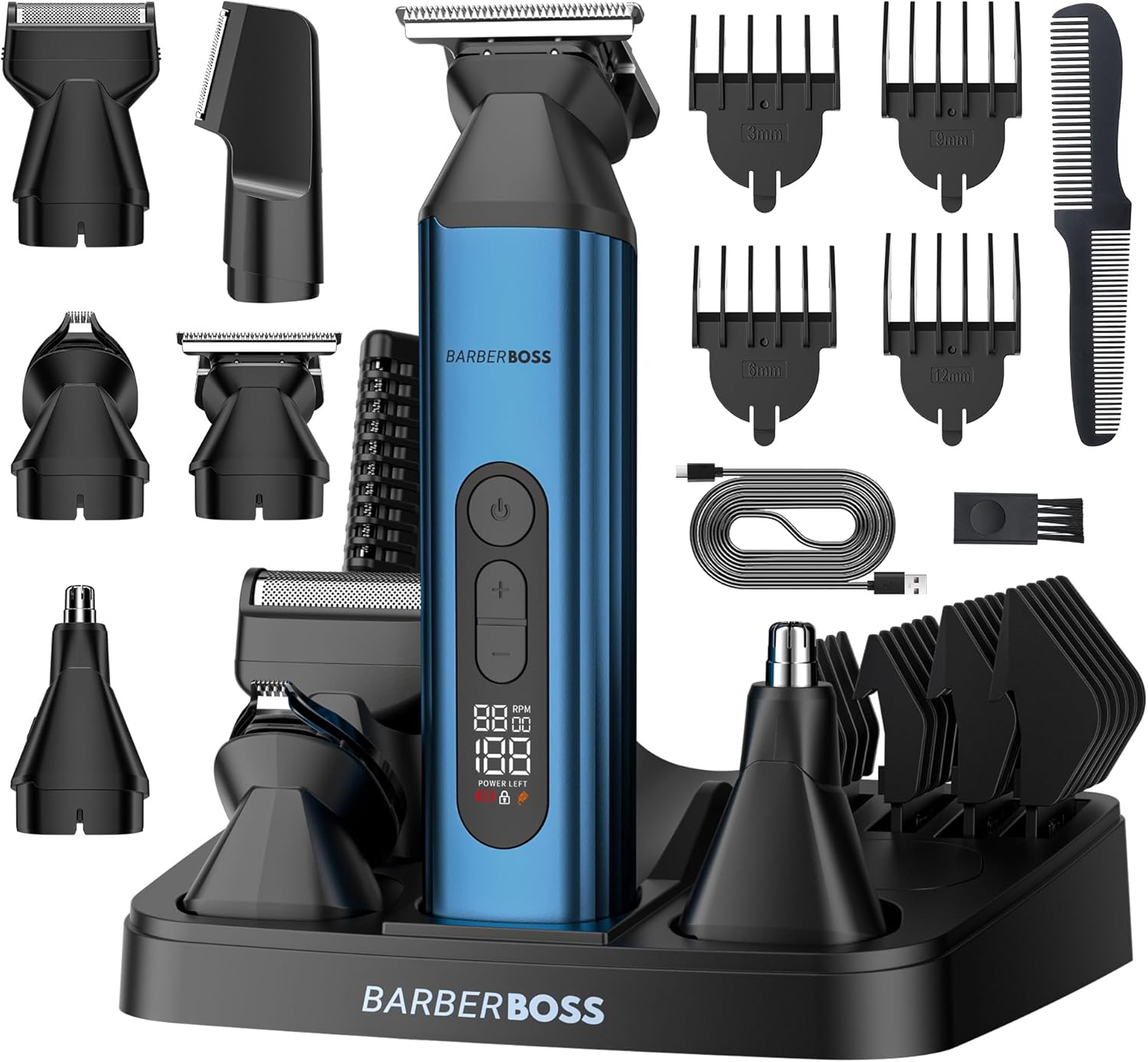
Image: The complete BarberBoss 5-in-1 Grooming Kit, showcasing the main unit, five interchangeable heads, four guide combs, USB charging cable, cleaning brush, styling comb, and the storage tray.

Image: A close-up view of the BarberBoss trimmer, emphasizing the magnetic interchangeable heads and the durable stainless steel blades.
4. Setup
4.1 Charging the Device
- Ensure the trimmer is switched off before charging.
- Connect the USB charging cable to the charging port at the bottom of the trimmer unit.
- Plug the other end of the USB cable into a 5V USB power adapter (not included) or a computer USB port.
- The LED display will show a charging indicator and the battery level will increase.
- A full charge takes approximately 1 hour and provides up to 60 minutes of cordless operation.

Image: The BarberBoss trimmer unit being charged via its USB cable, illustrating the charging process.
4.2 Attaching and Removing Trimmer Heads
The BarberBoss grooming kit features a Quick Swap magnetic design for easy attachment changes.
- To attach a head: Align the desired trimmer head with the top of the main unit. The magnetic connection will securely snap it into place.
- To remove a head: Gently pull the trimmer head away from the main unit.

Image: The BarberBoss trimmer demonstrating the magnetic attachment mechanism for its five interchangeable heads.
5. Operating Instructions
5.1 Basic Operation
- Press the power button to turn the trimmer on. The LED display will illuminate.
- Use the '+' and '-' buttons to select one of the three available speed settings (Speed 1, Speed 2, Speed 3). Choose a speed appropriate for your hair type and desired result.
- After use, press the power button again to turn the trimmer off.
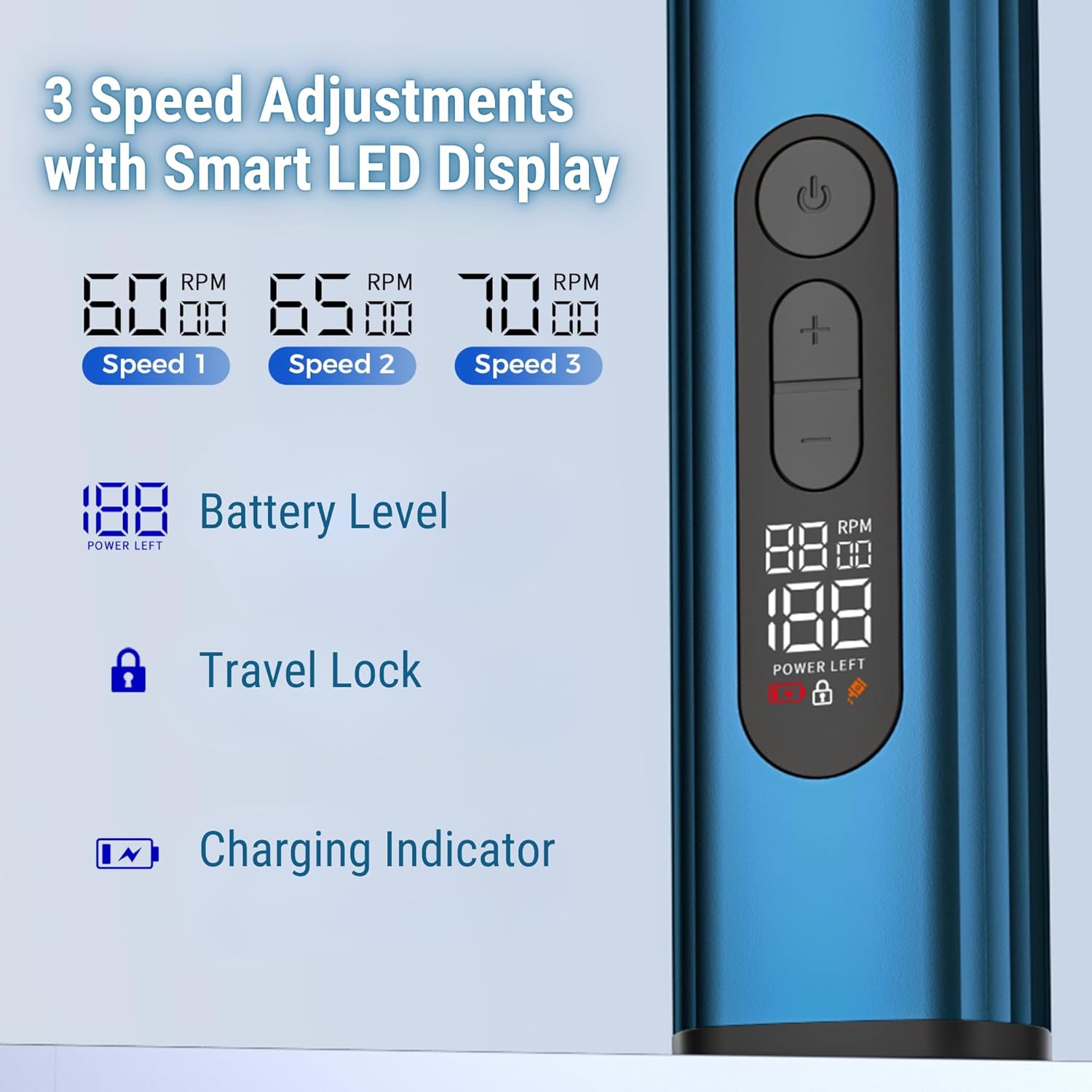
Image: A close-up of the BarberBoss trimmer's LED display, illustrating the battery level, speed settings (80, 65, 70 RPM), and the travel lock indicator.
5.2 Using Different Trimmer Heads
- Hair & Beard Trimmer: Attach the hair and beard trimmer head. For desired length, attach one of the 4 guide combs (3mm, 6mm, 9mm, 12mm). Move the trimmer against the direction of hair growth.
- Precision Trimmer: Use this head without a comb for precise lines, edging, and detailing around the beard, mustache, or hairline.
- Body Trimmer: Attach the body trimmer head. Use with or without a comb depending on desired length. Move gently over the skin.
- Nose & Ear Trimmer: Insert the nose and ear trimmer head gently into the nostril or ear canal. Move in a circular motion to trim unwanted hair. Do not insert too deeply.
- Detail Foil Shaver: Use this head for a smooth finish on small areas, such as cheeks or necklines, after trimming. Hold flat against the skin and move in short, gentle strokes.

Image: A collage demonstrating the versatile applications of the BarberBoss grooming kit, including beard trimming, precision shaving, nose and ear hair removal, body grooming, and haircutting.
5.3 Travel Lock Function
To prevent accidental activation during travel:
- To activate: With the trimmer off, press and hold the power button for 3 seconds. A lock icon will appear on the LED display.
- To deactivate: Press and hold the power button for 3 seconds again. The lock icon will disappear.

Image: The BarberBoss trimmer placed in a suitcase, illustrating the travel lock feature to prevent accidental power-on during transport.
6. Maintenance and Cleaning
Regular cleaning and maintenance will ensure the longevity and optimal performance of your grooming kit.
6.1 Cleaning the Trimmer Heads and Unit
- Ensure the trimmer is switched off and disconnected from the charging cable before cleaning.
- Remove the trimmer head from the main unit.
- Use the provided cleaning brush to remove any loose hair from the blades and inside the trimmer head.
- The trimmer heads and the main unit are waterproof. They can be rinsed directly under running water. Ensure water does not enter the charging port when rinsing the main unit.
- Allow all parts to air dry completely before reattaching or storing.

Image: The BarberBoss trimmer with water splashing around it, indicating its waterproof capability for wet use and easy rinsing.

Image: The BarberBoss trimmer being rinsed under running water, highlighting its waterproof feature for easy cleaning.
6.2 Blade Care
The trimmer features self-sharpening stainless steel blades. For optimal performance, occasionally apply a small drop of lubricating oil (not included) to the blades after cleaning and drying.

Image: A detailed view of the BarberBoss trimmer's self-sharpening stainless steel blade, designed for precise and consistent cutting.
6.3 Storage
Store the grooming kit and all its accessories in the provided storage tray in a cool, dry place, away from direct sunlight and moisture.

Image: The BarberBoss grooming kit neatly arranged in its complementary storage tray, demonstrating an organized way to keep all tools.
7. Troubleshooting
| Problem | Possible Cause | Solution |
|---|---|---|
| Trimmer does not turn on. | Battery is depleted. Travel lock is activated. | Charge the trimmer. Deactivate travel lock by holding the power button for 3 seconds. |
| Trimmer pulls hair or cuts unevenly. | Blades are dull or clogged. Incorrect speed setting. | Clean the blades thoroughly. Apply lubricating oil. Select a higher speed setting. |
| Short operating time after charging. | Battery not fully charged. Battery degradation over time. | Ensure a full 1-hour charge. If the issue persists, contact customer support. |
| Trimmer head does not attach securely. | Debris on magnetic connection. Head is damaged. | Clean the magnetic connection points on both the head and the main unit. If damaged, replace the head. |
8. Specifications
| Feature | Specification |
|---|---|
| Model Number | QR-6020 |
| Brand | BARBERBOSS |
| Power Source | Rechargeable Battery (Internal) |
| Charging Time | Approx. 1 hour |
| Operating Time | Up to 60 minutes (cordless) |
| Blade Material | Stainless Steel |
| Waterproof Rating | Rinsable (main unit and heads) |
| Special Features | USB Charging, Multigroomer, Detachable Magnetic Heads, LED Display, Travel Lock |
| Recommended Uses | Beard, Body, Moustache, Nose, Ear, Chest, Face |
| Dimensions (Package) | 22.1 x 17.2 x 7.1 cm |
| Weight (Package) | 610 grams |
| Country of Origin | China |
9. Warranty and Support
BARBERBOSS products are designed for quality and durability. For warranty information or technical support, please refer to the warranty card included in your product packaging or visit the official BARBERBOSS website.
If you encounter any issues not covered in the troubleshooting section, please contact BARBERBOSS customer service for assistance.

Image: An illustration representing BarberBoss customer support, featuring a headset icon and chat bubbles.
Ask a question about this manual
Ask about setup, troubleshooting, compatibility, parts, safety, or missing instructions. Manuals+ will review the question and use this page’s manual context to help answer it.