1. Introduction
This manual provides detailed instructions for the operation and maintenance of your Maycall MC-720 Global Walkie Talkie. Please read this manual thoroughly before using the device to ensure safe and optimal performance. The MC-720 is a Push-to-Talk Over Cellular (PoC) radio designed for long-range communication using 2G/3G/4G LTE networks.
2. Key Features
- Lifetime Service with No Hidden Fees: Utilizes major U.S. carriers (Verizon, AT&T, T-Mobile) with automatic switching based on signal strength, offering lifetime use without subscription fees.
- Unlimited Range Communication: Achieves communication range exceeding 3,000 miles via advanced 2G/3G/4G LTE technology, supporting individual and group calls.
- Versatile Calling Modes & High-Fidelity Audio: Supports one-on-one calls and group chats with advanced noise-canceling technology for clear conversations. Features a responsive Push-to-Talk (PTT) button.
- 3000mAh Long-Lasting Battery Performance: Provides up to 3 days of continuous use or 7 days on standby, with smart power-saving mode and USB-C charging compatibility.
- Built-in High-Brightness Flashlight: Includes a 300-lumen LED flashlight for emergency use, with a smooth, ergonomic casing for easy grip.
- Integrated Antenna: The antenna is integrated and inseparable, designed to enhance signal reception and acceptance distance.
- Dual SIM Support: Features smart dual SIM card slots for enhanced network flexibility.
- SOS Function: Equipped with an SOS one-click alarm for emergencies.
- Waterproof Design: Designed with a waterproof rating for durability in various environments.
3. Package Contents
Please check the package contents upon unboxing. If any items are missing or damaged, contact Maycall customer support.

Image: The packing list for the Maycall MC-720 walkie talkie, showing the radio unit, two batteries, two back clips, an instruction manual, two Type-C lines, two charging heads, and two SIM cards.
- Maycall MC-720 Walkie Talkie Unit
- Battery (x2)
- Back Clip (x2)
- Instruction Manual
- Type-C Charging Cable (x2)
- Charging Head (x2)
- SIM Card (x2)
4. Product Overview
Familiarize yourself with the main components of your Maycall MC-720 walkie talkie.

Image: Front view of the Maycall MC-720 walkie talkie, highlighting its dimensions (141.5mm height, 58mm width, 31mm thickness) and key features such as 5000km global distance, 3000mAh battery, single/group call, smart dual SIM cards, high-brightness flashlight, USB charging, 2G/3G/4G network support, and SOS one-click alarm.
- Antenna: Integrated for signal reception.
- Power/Volume Knob: Rotate to turn on/off and adjust volume.
- PTT Button: Push-to-Talk button for communication.
- Flashlight Button: Activates the built-in LED flashlight.
- Display Screen: Shows status, menu, and call information.
- Navigation Buttons: For menu navigation and selection.
- Microphone: For voice input.
- Speaker: For audio output.
- Charging Port (USB-C): Located at the bottom for charging.
- Earphone Jack: Located on the side, covered by a protective flap.
- SIM Card Slots: Located under the battery cover for dual SIM cards.
5. Setup Guide
5.1. Installing the SIM Card and Battery
- Remove the battery cover on the back of the walkie talkie.
- Insert the provided SIM cards into the designated slots. Ensure correct orientation.
- Insert the main 3000mAh battery into the compartment, ensuring it is securely seated.
- Replace the battery cover.
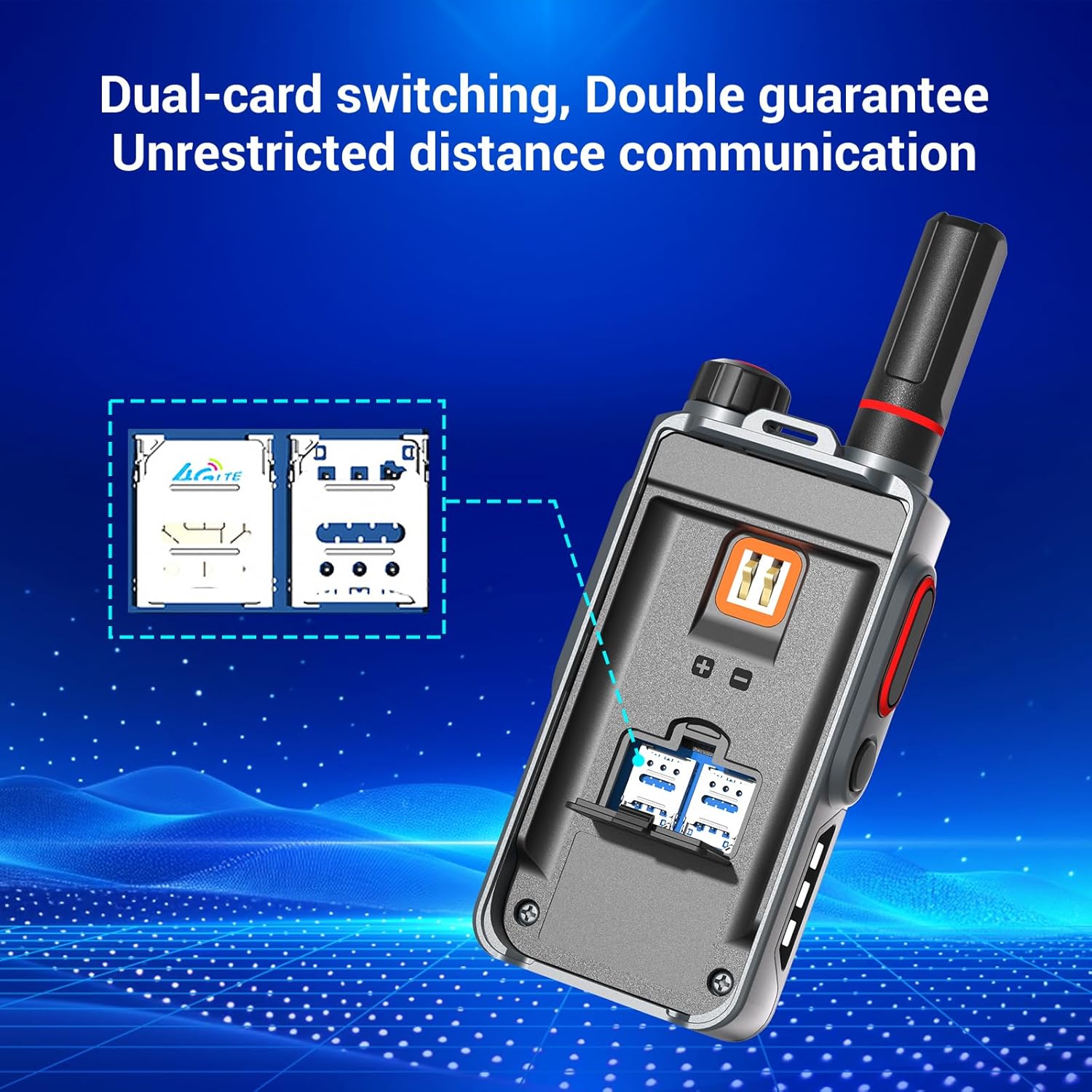
Image: Rear view of the Maycall MC-720 walkie talkie with the battery cover removed, illustrating the dual SIM card slots for network connectivity.
5.2. Initial Charging
Before first use, fully charge the walkie talkie. Connect the USB-C charging cable to the port at the bottom of the device and plug the charging head into a power outlet. The charging indicator will show the charging status.

Image: An internal view of the Maycall MC-720 walkie talkie, showcasing its 3000mAh battery and indicating 24 hours of working time and 8 days of standby time.
5.3. Device Activation and Registration
To activate your walkie talkie and register for lifetime service, scan the QR code provided on the product packaging using your mobile phone's browser. Follow the on-screen instructions to enter your recipient's phone number and desired username. This process links your device to the Maycall network for unlimited range communication.

Image: A Maycall walkie talkie with text emphasizing "No Renewal SIM Cards" and "Lifetime Free Unlimited Data" using high-speed IoT SIM cards from AT&T and T-Mobile.
6. Operating Instructions
6.1. Power On/Off and Volume Adjustment
- To power on the device, rotate the Power/Volume knob clockwise until the screen illuminates.
- To power off, rotate the knob counter-clockwise until the device shuts down.
- Adjust the volume by rotating the same knob clockwise (increase) or counter-clockwise (decrease) when the device is on.
6.2. Making a Call (Push-to-Talk)
- Ensure the device is powered on and connected to the network (4G indicator visible).
- Select the desired contact or group from the menu using the navigation buttons.
- Press and hold the large PTT (Push-to-Talk) button on the side of the walkie talkie to transmit your voice.
- Speak clearly into the microphone.
- Release the PTT button to listen for a response.
6.3. Using the Flashlight
- Press the dedicated Flashlight button to activate the high-brightness LED flashlight.
- Press it again to cycle through different lighting modes (e.g., steady on, flashing red/blue, SOS).
- Press a third time to turn off the flashlight.

Image: The Maycall MC-720 walkie talkie with its built-in flashlight illuminated, showing a bright white light.
Image: Two Maycall MC-720 walkie talkies demonstrating the flashlight feature. One shows a steady white light, and the other shows a red and blue rapid-flashing light, indicating emergency or signaling modes.
6.4. SOS Function
In an emergency, press the dedicated SOS button (if available and configured) to send an alert to pre-programmed contacts or groups. Refer to the device's menu for SOS configuration options.
6.5. Menu Navigation
Use the navigation buttons below the screen to access and navigate through the device's menu. Options typically include Group Select, Member Select, Friend Select, Location Info, and Settings. Press the 'Enter' button to select an option and 'Back' to return to the previous screen.
7. Maintenance
- Cleaning: Wipe the device with a soft, damp cloth. Do not use harsh chemicals or abrasive cleaners.
- Battery Care: Avoid fully discharging the battery frequently. Charge regularly to maintain battery health.
- Storage: Store the walkie talkie in a cool, dry place away from direct sunlight and extreme temperatures.
- Water Resistance: While waterproof, avoid prolonged submersion or exposure to high-pressure water jets. Ensure all port covers are securely closed.
8. Troubleshooting
| Problem | Possible Cause | Solution |
|---|---|---|
| Device does not power on. | Low battery; incorrect battery installation. | Charge the battery; ensure battery is correctly installed. |
| Cannot make or receive calls. | No network signal; SIM card not properly installed or activated; incorrect group/contact selected. | Check network signal strength; re-install SIM card; verify activation; select correct contact/group. |
| Poor audio quality. | Weak signal; microphone/speaker obstructed; volume too low. | Move to an area with better signal; clear obstructions; adjust volume. |
| Flashlight not working. | Low battery; button malfunction. | Charge the battery; contact support if issue persists. |
9. Specifications
| Feature | Detail |
|---|---|
| Brand | Maycall |
| Model | MC-720 |
| Color | MC-720 (Grey/Black) |
| Number of Channels | 10000 |
| Special Feature | Long Range |
| Talking Range Maximum | 3000 Miles |
| Water Resistance Level | Waterproof |
| Product Dimensions | 4.45"D x 1.4"W x 2.36"H |
| Main Battery | 3000mAh (rechargeable) |
| Additional Batteries | 2 LR44 batteries (included, likely for minor internal functions) |
| Included Components | Walkie Talkie Unit, Main Battery, LR44 Batteries, Back Clip, Instruction Manual, Type-C Charging Cable, Charging Head, SIM Card |
| Compatible Devices | Maycall two-way radios, standard two-way radio accessories |
10. Safety Information
- Do not operate the device in explosive atmospheres (e.g., near flammable gases, dust, or powders).
- Do not disassemble or modify the device. This can void the warranty and cause damage.
- Keep the device away from extreme temperatures, direct sunlight, and moisture.
- Use only Maycall-approved accessories and charging equipment.
- Dispose of batteries and the device according to local regulations.
11. Warranty and Support
Your Maycall MC-720 Global Walkie Talkie comes with a standard manufacturer's warranty. For specific warranty terms and conditions, please refer to the warranty card included in your package or visit the official Maycall website.
For technical support, troubleshooting assistance, or service inquiries, please contact Maycall customer service through the contact information provided on the product packaging or official website.


