
1. Introduction
The ZOYI R02 is a versatile 2-in-1 device combining a high-resolution infrared thermal imaging camera with a 25,000-count True RMS digital multimeter. This compact tool is designed for professionals and hobbyists requiring precise measurements and thermal analysis in various applications, including electrical diagnostics, automotive inspections, HVAC, and home maintenance. It features a 2.4-inch color TFT display, adjustable thermal imaging settings, and comprehensive multimeter functions.
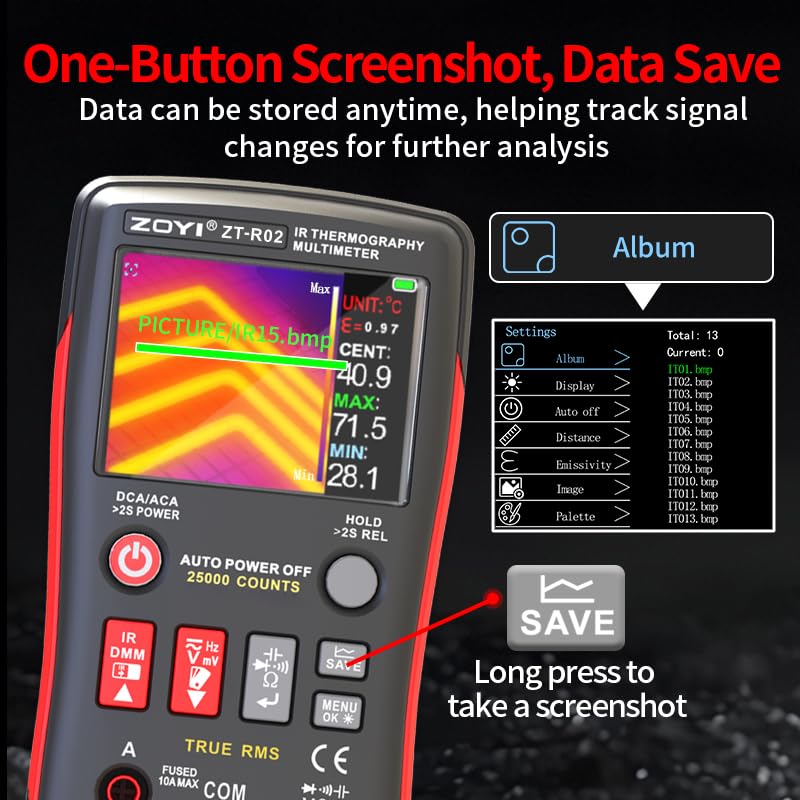
Figure 1.1: The ZOYI R02 device, showcasing its dual thermal imaging and multimeter capabilities.
2. Safety Information
Always adhere to the following safety precautions to prevent personal injury or damage to the device:
- Read this manual thoroughly before operation.
- Do not use the device if it appears damaged or operates abnormally.
- Ensure proper input connections for multimeter measurements to avoid electrical shock or damage.
- Do not exceed the maximum input ratings for any function.
- Exercise caution when working with live circuits.
- Keep the device away from water and extreme temperatures.
- Only use specified replacement parts and accessories.
- Do not attempt to modify or repair the device yourself. Refer to qualified service personnel.
3. Product Overview
Familiarize yourself with the components and controls of your ZOYI R02 device.
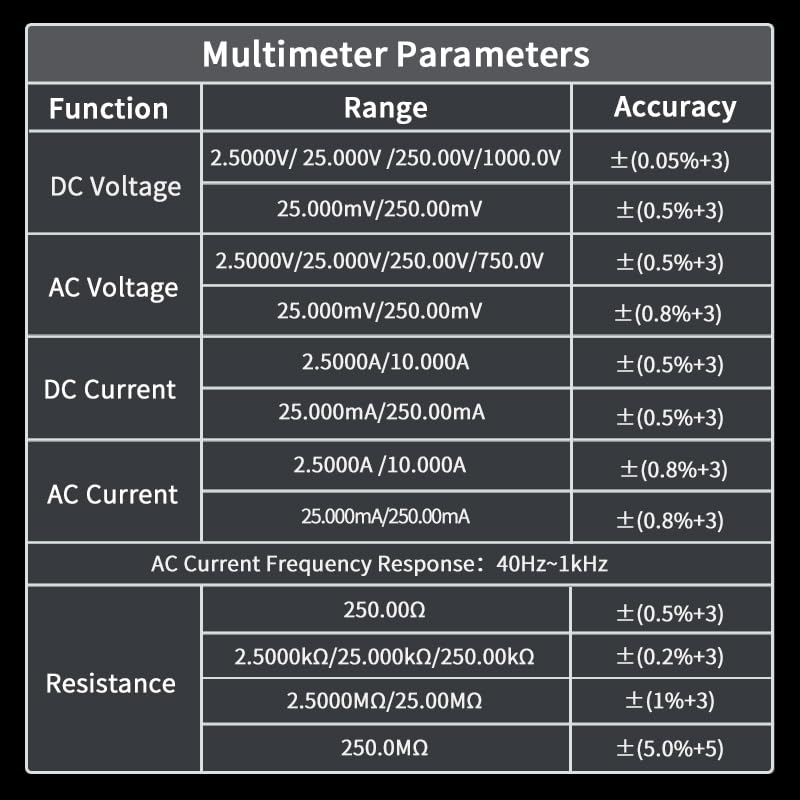
Figure 3.1: Front panel and button descriptions of the ZOYI R02.
Key Components:
- Infrared Lens: Captures thermal images.
- Flashlight: Provides illumination in dark environments.
- Display Screen: 2.4-inch TFT touch LCD for viewing thermal images, multimeter readings, and menu options.
- Power Button: Long press to power on/off. Short press in multimeter mode to switch current measurement range.
- IR DMM Button: Long press to switch between Multimeter and Thermal Imaging modes. Short press to adjust thermal imaging brightness or select options in settings.
- Hz/mV Button: For frequency and millivolt measurements.
- Ω/Capacitance Button: For resistance and capacitance measurements.
- SAVE Button: Long press to save measurement data screenshot. Short press to turn waveform display on or off.
- MENU/OK Button: Short press to enter settings menu. Long press to turn flashlight on/off.
- HOLD/>2S REL Button: Short press to save data hold. Long press to enter or exit relative measurement mode.
- Input Ports (A, mA, COM, VΩHz): For connecting test leads for various electrical measurements.
4. Setup
4.1 Charging the Device
The ZOYI R02 is equipped with a built-in 2000mAh lithium battery. To charge the device, connect it to a standard USB power source using the provided Type-C cable. The charging port is located on the side of the device, accessible by opening the protective cover.
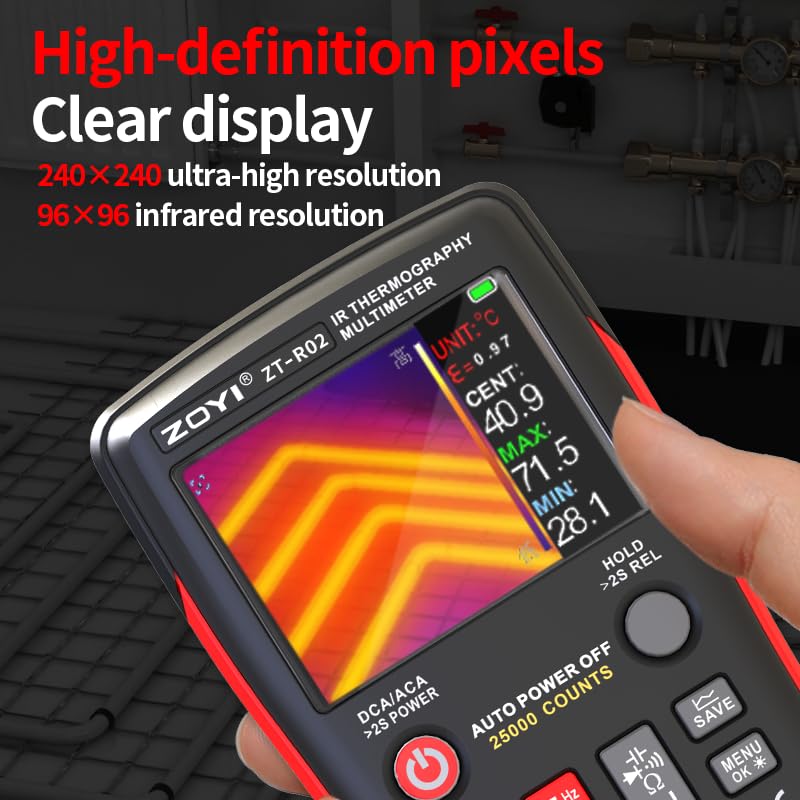
Figure 4.1: The Type-C charging port and adjustable auto power-off duration feature.
4.2 Powering On/Off
To power on the device, long press the Power Button. To power off, long press the Power Button again.
4.3 Language Settings
The device supports multiple languages. To change the language, navigate to the settings menu using the MENU/OK Button and select the desired language option (e.g., English or Chinese).
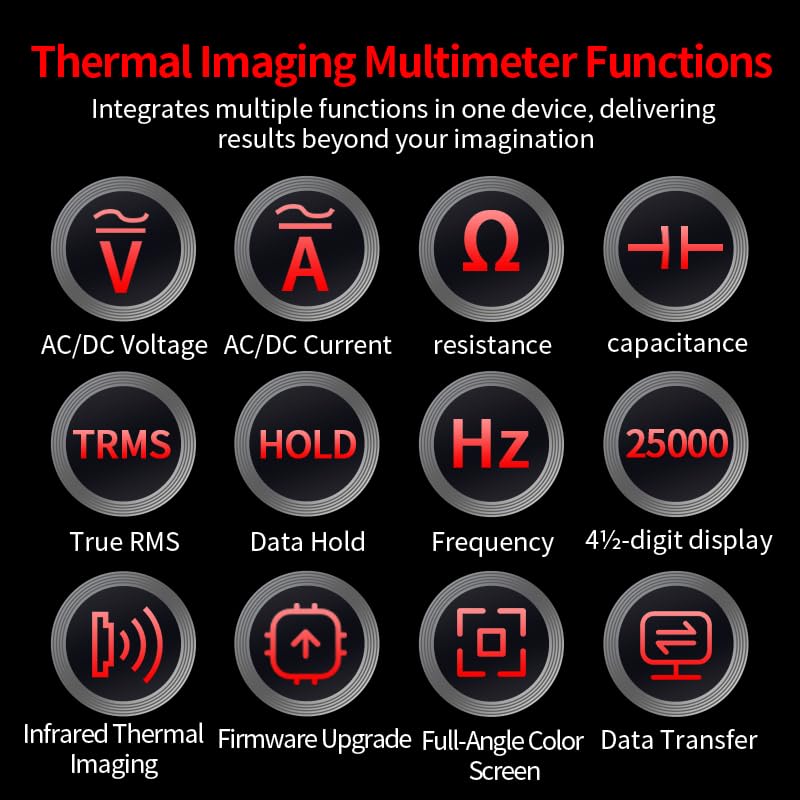
Figure 4.2: Switching between Chinese and English language settings on the ZOYI R02.
5. Operating Instructions
5.1 Switching Between Modes
Long press the IR DMM Button to toggle between Thermal Imaging mode and Multimeter mode.
5.2 Thermal Imaging Mode
In Thermal Imaging mode, the device displays a thermal image with temperature readings. The 240x240 imaging resolution provides clear visualization of temperature variations.
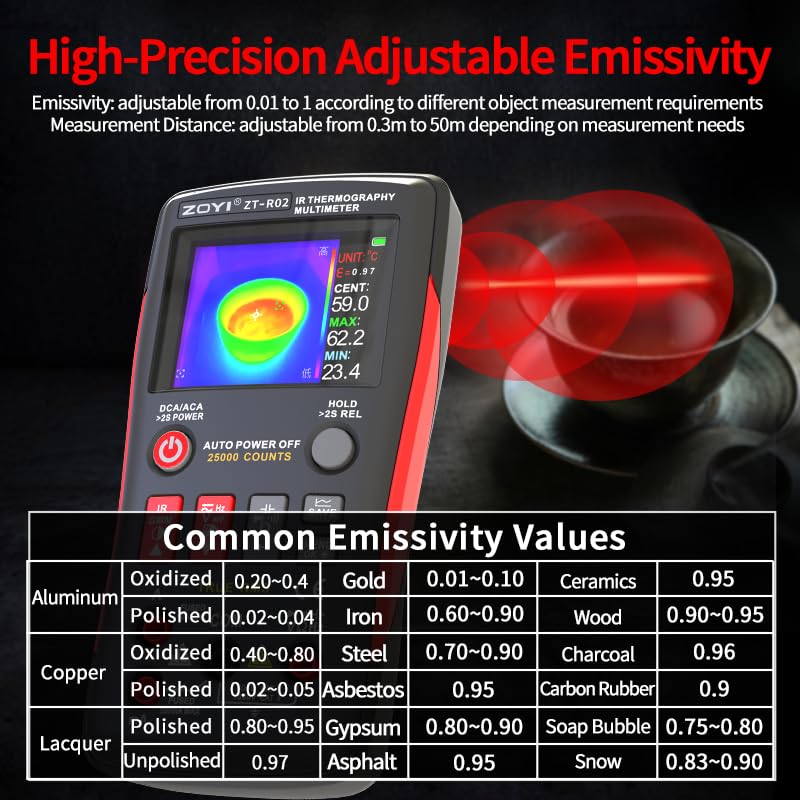
Figure 5.1: High-definition thermal display showing temperature distribution.
5.2.1 Thermal Palettes
The ZOYI R02 offers 8 pseudo-color modes (thermal palettes) to visualize temperature differences. These palettes help in identifying hot spots and cold spots more effectively. You can select different palettes from the settings menu.
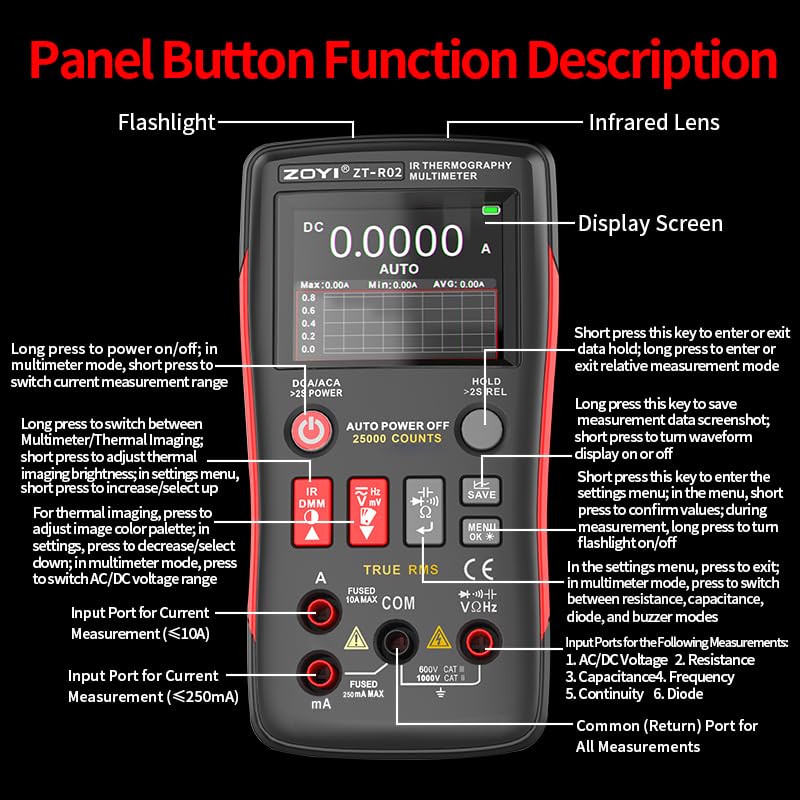
Figure 5.2: Examples of the 8 pseudo-color thermal palettes available on the ZOYI R02.
5.2.2 Hot and Cold Tracking
The device features 3-point temperature measurement, automatically tracking the maximum, minimum, and center temperature points on the screen. This helps in quickly identifying critical temperature areas.
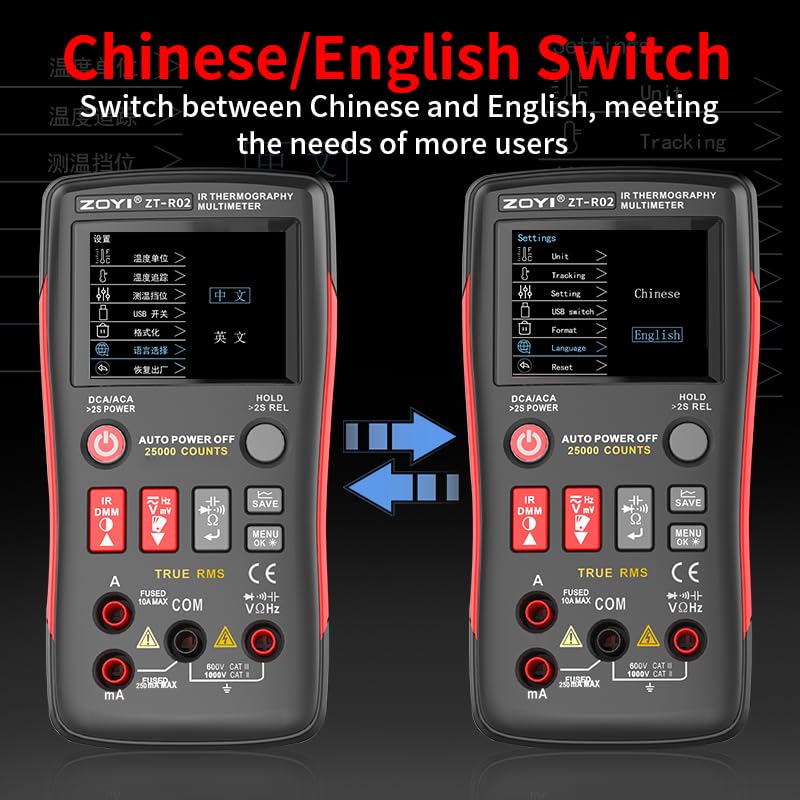
Figure 5.3: Display showing automatic tracking of maximum, minimum, and center temperature points.
5.2.3 Adjustable Emissivity
Emissivity is a crucial parameter for accurate temperature measurement. The ZOYI R02 allows for high-precision adjustable emissivity from 0.01 to 1.00, depending on the object being measured. Adjust this setting in the menu for optimal accuracy.
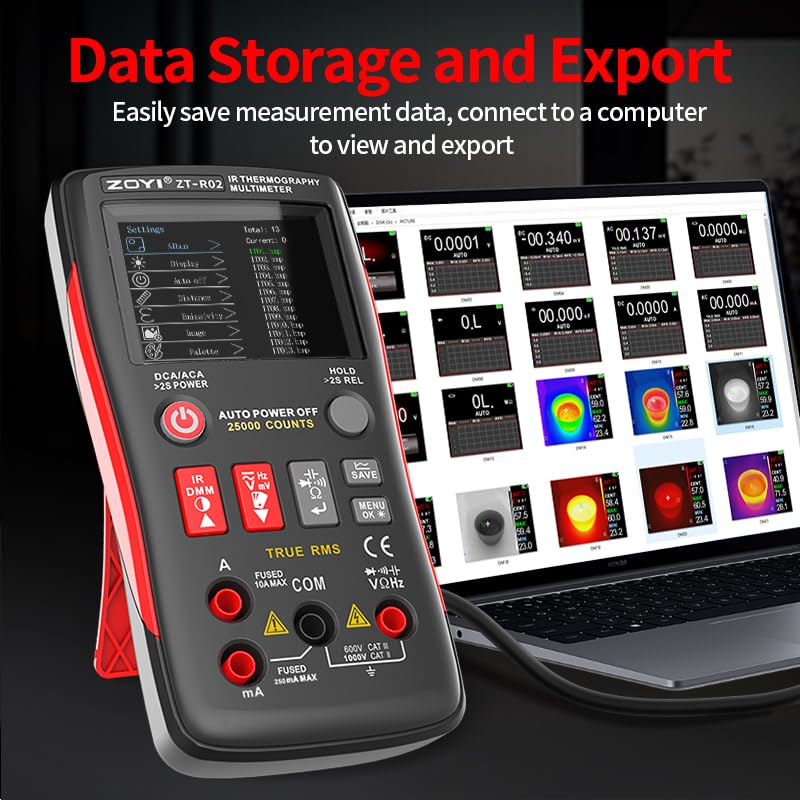
Figure 5.4: Emissivity adjustment interface and a table of common emissivity values for various materials.
5.2.4 Screenshot and Data Saving
To capture a screenshot of the thermal image, long press the SAVE Button. The device stores these images internally, allowing you to track signal changes and analyze data later. Saved images can be viewed in the Album section of the menu.
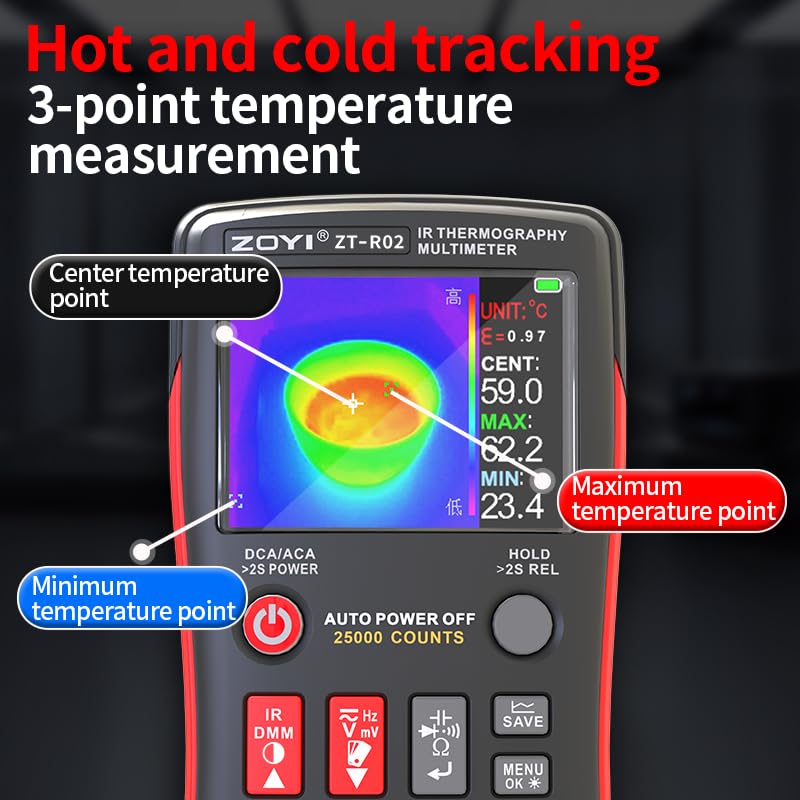
Figure 5.5: Instructions for taking a screenshot and accessing the image album.
5.2.5 Application Example: Underfloor Heating Pipe Leak Detection
The thermal imaging capability is highly effective for detecting hidden issues suchs as leaks in underfloor heating pipes. Follow these steps for detection:
- Pressurize each circuit of the underfloor heating system.
- Use thermal imaging to locate the leaking circuit or inject hot water.
- Check the underfloor heating condition after fifteen minutes.
- Use thermal imaging along the circuit to find abnormal points or leak points.
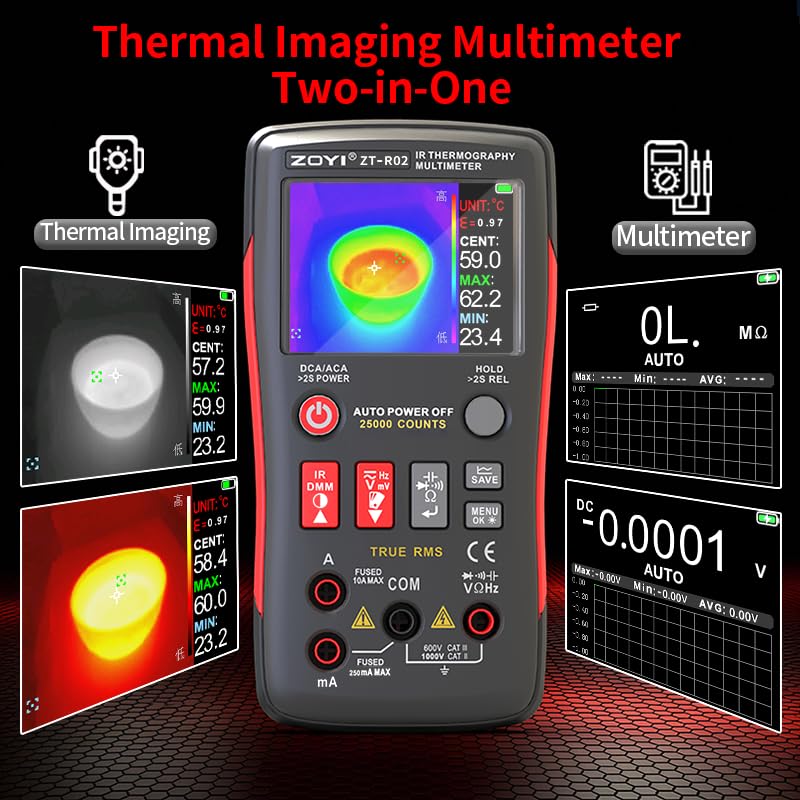
Figure 5.6: Visual guide for detecting underfloor heating pipe leaks using the ZOYI R02.
5.3 Multimeter Mode
In Multimeter mode, the ZOYI R02 functions as a 25,000-count True RMS digital multimeter, capable of measuring various electrical parameters.
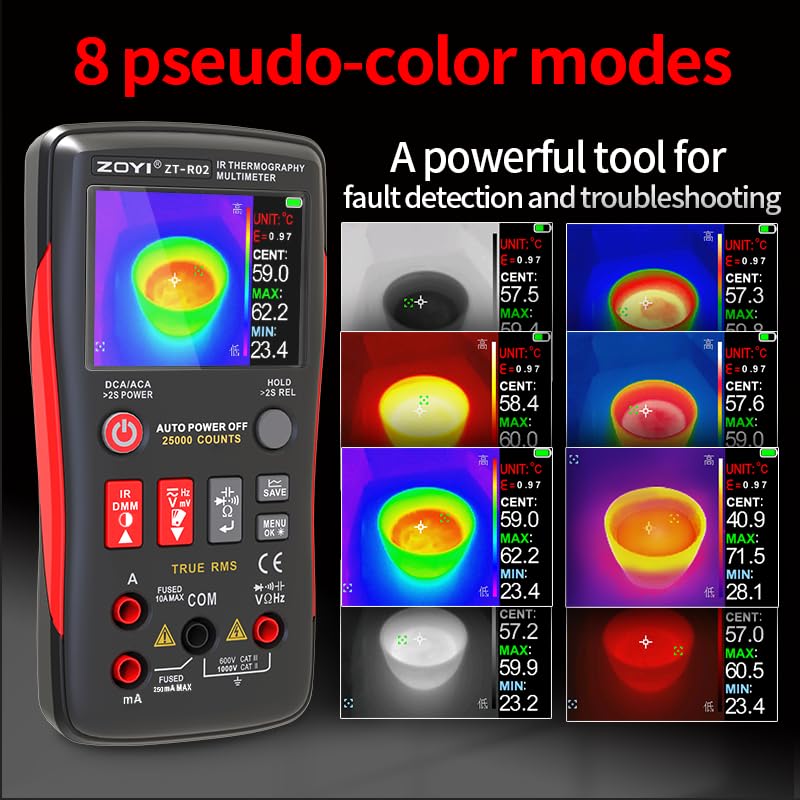
Figure 5.7: The ZOYI R02 displaying both thermal imaging and multimeter functions.
5.3.1 Multimeter Functions
The device supports the following measurements:
- AC/DC Voltage (V)
- AC/DC Current (A)
- Resistance (Ω)
- Capacitance (F)
- Frequency (Hz)
- Continuity
- Diode Test
- True RMS (TRMS) for accurate non-sinusoidal waveform measurements.
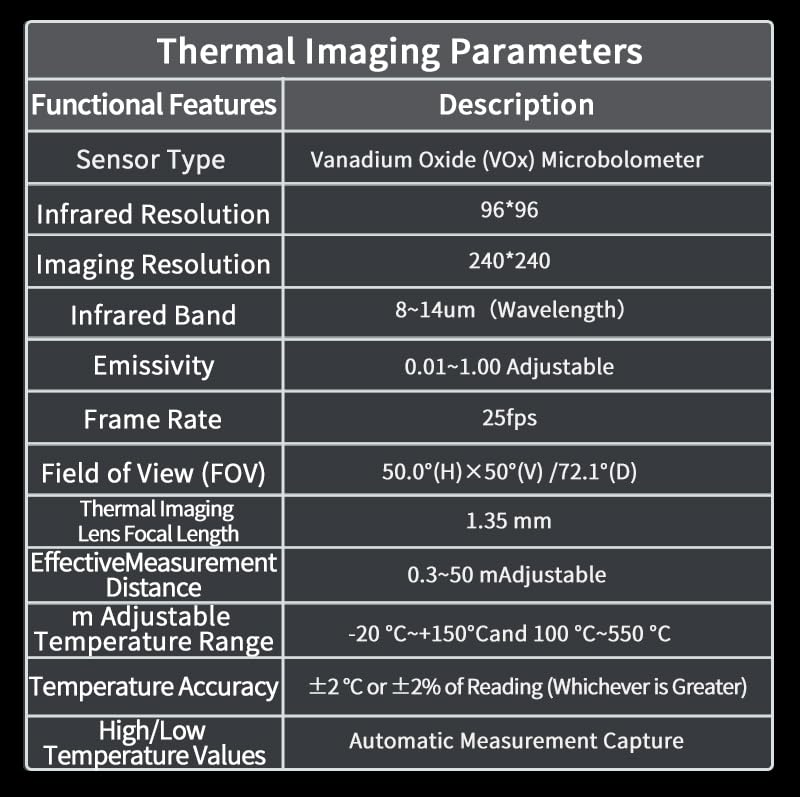
Figure 5.8: Icons representing the various functions of the ZOYI R02 multimeter.
Connect the test leads to the appropriate input ports (A, mA, COM, VΩHz) based on the desired measurement. Refer to the "Panel Button Function Description" (Figure 3.1) for port details.
6. Maintenance
6.1 Cleaning
To clean the device, use a soft, damp cloth. Do not use abrasive cleaners or solvents. Ensure the device is powered off and disconnected from any power source before cleaning.
6.2 Battery Care
To prolong battery life, avoid fully discharging the battery frequently. Charge the device regularly, especially if it will be stored for an extended period. Store the device in a cool, dry place.
6.3 Data Storage and Export
The ZOYI R02 allows for easy saving of measurement data. To export data, connect the device to a computer using the Type-C USB cable. The device will appear as a removable storage device, allowing you to access and transfer saved images and data files.
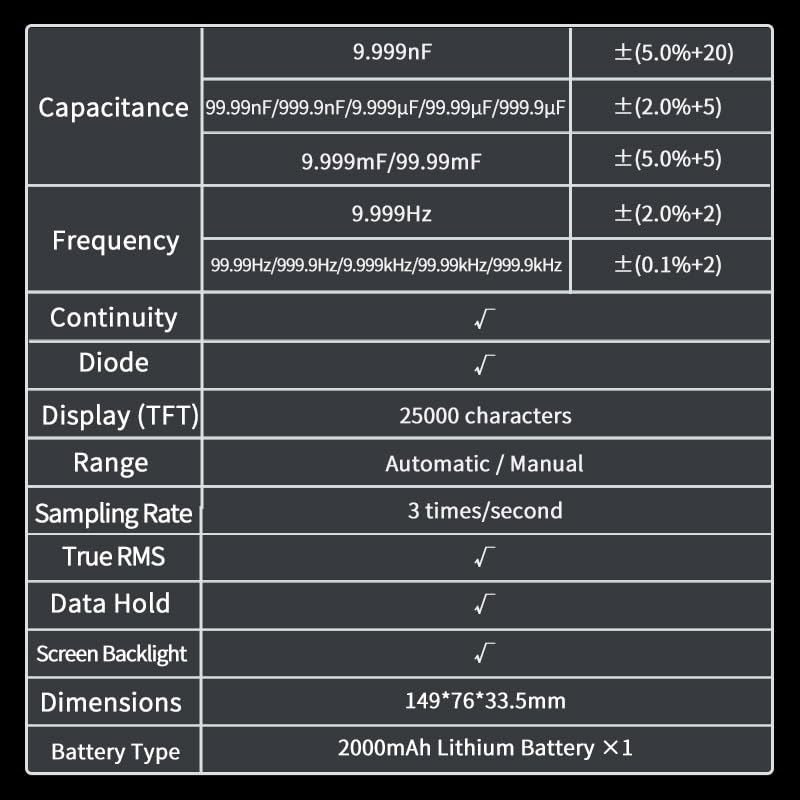
Figure 6.1: Connecting the ZOYI R02 to a computer for data storage and export.
7. Troubleshooting
If you encounter issues with your ZOYI R02, refer to the following common problems and solutions:
- Device does not power on: Ensure the battery is charged. Connect to a Type-C charger and try again.
- Inaccurate temperature readings: Check and adjust the emissivity setting for the material being measured (refer to Figure 5.4). Ensure the lens is clean.
- Multimeter readings are incorrect: Verify that the test leads are correctly connected to the appropriate input ports for the desired measurement. Check the battery level.
- Screen is unresponsive: Try restarting the device by long-pressing the power button. If the issue persists, contact customer support.
- Cannot transfer data to computer: Ensure the Type-C cable is securely connected to both the device and the computer. Check if the device is recognized as a storage device.
8. Specifications
8.1 Multimeter Parameters

Figure 8.1: Multimeter parameters including DC/AC Voltage, DC/AC Current, and Resistance ranges with accuracy.
Additional multimeter specifications are detailed below:
| Function | Range | Accuracy |
|---|---|---|
| Capacitance | 9.999nF | ±(5.0%+20) |
| 99.99nF / 999.9nF / 9.999µF / 99.99µF / 999.9µF | ±(5.0%+5) | |
| 9.999mF / 99.99mF | ±(5.0%+5) | |
| Frequency | 9.999Hz | ±(2.0%+2) |
| 99.99Hz / 999.9Hz / 9.999kHz / 99.99kHz / 999.9kHz | ±(0.1%+2) | |
| Continuity | √ | |
| Diode | √ | |
| Display (TFT) | 25000 characters | |
| Range | Automatic / Manual | |
| Sampling Rate | 3 times/second | |
| True RMS | √ | |
| Data Hold | √ | |
| Screen Backlight | √ | |
| Dimensions | 149*76*33.5mm | |
| Battery Type | 2000mAh Lithium Battery ×1 |
Figure 8.2: Additional multimeter parameters and general device specifications.
8.2 Thermal Imaging Parameters
| Functional Features | Description |
|---|---|
| Sensor Type | Vanadium Oxide (VOx) Microbolometer |
| Infrared Resolution | 96*96 |
| Imaging Resolution | 240*240 |
| Infrared Band | 8~14um (Wavelength) |
| Emissivity | 0.01~1.00 Adjustable |
| Frame Rate | 25fps |
| Field of View (FOV) | 50.0°(H)×50°(V) / 72.1°(D) |
| Thermal Imaging Lens Focal Length | 1.35 mm |
| Effective Measurement Distance | 0.3~50 m Adjustable |
| Adjustable Temperature Range | -20 °C~+150 °C and 100 °C~550 °C |
| Temperature Accuracy | ±2 °C or ±2% of Reading (Whichever is Greater) |
| High/Low Temperature Values | Automatic Measurement Capture |
| Temperature Measurement Point | Center Point |
| Temperature Measurement Area | 3 Points (Max, Real-time, Min Temperature) |
| Display | 2.4-inch TFT |
| Display Resolution | 320*240 |
| Imaging Mode | Infrared |
| Color Palette | White Hot, Black Hot, Blue, Iron Red, Color, Red Hot, Fusion, Rainbow |
| Contrast & Brightness | Adjustable |
| Image Format | bmp |
| Screenshot Viewing | Supported |
| USB Interface | Type-C |
| Firmware Upgrade | Supported |
| Power Supply | 3.6V-4.2V Lithium Battery |
| Charging | USB Interface 5V |
Figure 8.3: Detailed thermal imaging parameters and specifications.
9. Warranty and Support
For warranty information and technical support, please refer to the documentation included with your purchase or visit the official ZOYI website. Keep your purchase receipt as proof of purchase for warranty claims.
Manufacturer: ZOYI
Model Number: R02


