
1. Introduction
The EVERCROSS BOT U8 is an advanced cordless robotic pool cleaner designed to efficiently clean the bottom, walls, and waterline of your swimming pool. Featuring intelligent navigation and app control, it provides a comprehensive cleaning solution for pools up to 200 m².
Product Compatibility
This robot is suitable for all pool linings, including vinyl, fiberglass, ceramic tiles, and concrete. Important: It is not recommended for circular or oval-shaped pools.

Image: The EVERCROSS BOT U8 is compatible with various pool linings such as vinyl, fiberglass, ceramic tiles, and concrete. It is not suitable for circular or oval pools.
2. Safety Instructions
- Read all instructions carefully before operating the robot.
- Ensure the robot is fully charged before each use.
- Do not operate the robot if the water temperature is outside the recommended range (typically 10°C to 35°C).
- Keep children and pets away from the pool area while the robot is operating.
- Always remove the robot from the pool before swimming or performing maintenance.
- Use only the original charger provided with the device.
- Do not attempt to disassemble or repair the robot yourself. Contact customer support for assistance.
- Store the robot in a cool, dry place when not in use.
3. Product Overview
The EVERCROSS BOT U8 is designed for ease of use and efficient cleaning. Familiarize yourself with its main components.
Components Included
- EVERCROSS BOT U8 Pool Robot Cleaner
- Charging Adapter
- User Manual
- Quick Start Guide
- Retrieval Hook (for use with a standard pool pole)

Image: The EVERCROSS BOT U8 cordless pool robot cleaner, featuring a black body with blue accents and track wheels.

Image: Contents of the EVERCROSS BOT U8 package, including the robot, charging adapter, and documentation.
4. Setup
4.1 Charging the Robot
Before first use, fully charge the robot. Connect the charging adapter to the robot's charging port and plug it into a power outlet. The charging indicator will show the charging status. A full charge takes approximately 4-5 hours.

Image: The robot connected to its charger, illustrating the fast charging capability and 110W power.
4.2 Initial Placement in the Pool
Once charged, gently place the robot into the pool. Ensure it sinks to the bottom completely before starting operation.
4.3 App Connection (Optional)
For advanced control and monitoring, download the dedicated app (e.g., SmartLife app mentioned in reviews). Ensure your phone's Bluetooth is enabled and follow the in-app instructions to pair with the robot. You may need to register an account.
5. Operating Instructions
5.1 Basic Operation Steps
- Step 1: Press the power on/off button on the robot.
- Step 2: Select one of the four cleaning modes (see section 5.2).
- Step 3: Place the robot in the pool.
- Step 4: When cleaning is complete, turn off the power button and allow it to dry.

Image: A user demonstrating the simple 4-step process to operate the pool robot: power on, select mode, place in pool, and power off after use.
5.2 Cleaning Modes
The U8 offers four distinct cleaning modes to suit your pool's needs:
- Floor Mode: Cleans only the bottom surface of the pool.
- Wall Mode: Focuses on cleaning the vertical walls of the pool.
- Waterline Mode: Specifically cleans the area around the pool's waterline.
- Automatic Mode: Provides a comprehensive clean of the floor, walls, and waterline in a single cycle.
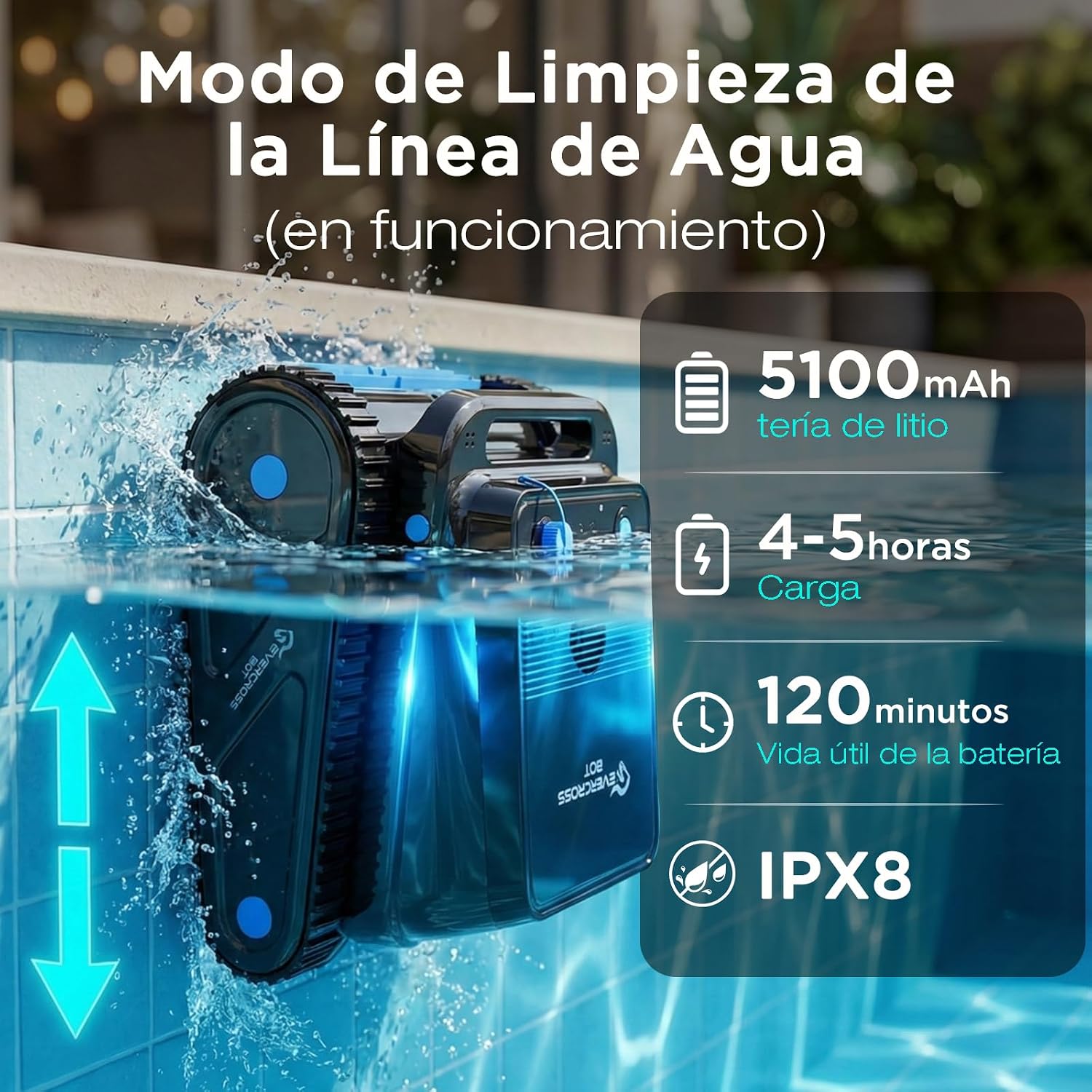
Image: Diagram illustrating the four cleaning modes: Floor, Wall, Waterline, and Automatic.

Image: The robot actively cleaning the pool floor, demonstrating its underwater operation.

Image: A visual representation of the robot's intelligent navigation pattern for thorough pool coverage.
5.3 App Control Features
The mobile app allows you to:
- Select cleaning modes.
- Check battery status.
- Monitor real-time cleaning status.
- Configure cleaning duration.

Image: A smartphone displaying the app interface for controlling the EVERCROSS BOT U8, showing options for mode selection, battery status, and cleaning duration.
5.4 Automatic Return and Retrieval
When the battery is low or a cleaning cycle is complete, the robot will automatically return to the edge of the pool for easy retrieval. Use the provided retrieval hook attached to a standard pool pole to lift the robot out of the water.

Image: The robot demonstrating its automatic return to the pool edge, indicated by a 'P' for parking.

Image: A person using a retrieval hook to safely lift the EVERCROSS BOT U8 from the pool.
6. Maintenance
6.1 Cleaning the Filter
Regularly clean the superfine filter to ensure optimal cleaning performance. The filter captures particles such as leaves, hair, sand, and dust. The robot features a 6L dustbin capacity.

Image: An exploded view of the robot's filter basket and 180µm superfine filter, showing how it captures debris like leaves, hair, sand, and dust.

Image: Close-up of the 180µm superfine filter and 6L dustbin, highlighting its ability to capture various types of debris.
6.2 General Care
- After each use, rinse the robot with fresh water to remove any chlorine or chemical residue.
- Ensure the robot is completely dry before storing.
- Inspect the brushes and tracks for wear or damage periodically.
- Store the robot in a shaded area, away from direct sunlight and extreme temperatures.
7. Troubleshooting
| Problem | Possible Cause | Solution |
|---|---|---|
| Robot does not turn on | Low battery; Power button not pressed correctly | Charge the robot fully; Ensure the power button is pressed firmly. |
| Poor cleaning performance | Clogged filter; Worn brushes/tracks; Incorrect cleaning mode selected | Clean the filter basket; Inspect and replace brushes/tracks if necessary; Select the appropriate cleaning mode. |
| Robot gets stuck or moves erratically | Obstruction in pool; Pool shape not compatible; Low battery | Remove any large debris; Ensure pool is not circular/oval; Charge the robot. |
| App not connecting | Bluetooth off; Robot not powered on; App not updated | Enable Bluetooth on your device; Turn on the robot; Update the app to the latest version. |
| Robot does not climb walls | Low battery; Excessive algae on walls; Water chemistry imbalance | Charge the robot; Brush pool walls manually; Check and adjust pool water chemistry. |
8. Specifications
- Model Number: U8
- Brand: EVERCROSS BOT
- Product Dimensions: 43 x 40 x 21.5 cm (L x W x H)
- Product Weight: 13.05 kg
- Material: Plastic
- Color: Black
- Power Source: Battery
- Battery Type: 1 Lithium Ion (included)
- Battery Capacity: 5100 mAh
- Charging Time: 4-5 hours
- Operating Time: Up to 120 minutes
- Maximum Cleaning Area: Up to 200 m²
- Special Features: App Control, Waterline Cleaning, Smart Navigation, Automatic Return, 4-Motor System
- Control Method: Application / On-device button
- Waterproof Rating: IPX8
- Filter Fineness: 180µm
- Dustbin Capacity: 6L

Image: Key specifications including 5100mAh lithium battery, 4-5 hours charging time, 120 minutes battery life, and IPX8 waterproof rating.

Image: Details on the robot's extreme performance, powerful 4X motors, 5100 mAh battery, and maximum working depth of 5 meters.
9. Warranty and Support
For warranty information, technical support, or service inquiries, please refer to the contact details provided with your purchase documentation or visit the official EVERCROSS BOT website. Keep your proof of purchase for warranty claims.


