
1. Introduction and Safety Information
Thank you for choosing the Enventor 850W Reciprocating Saw, Model DF7002. This manual provides essential information for the safe and efficient operation, maintenance, and troubleshooting of your tool. Please read this manual thoroughly before first use and keep it for future reference.
General Safety Warnings
- Read all safety warnings and instructions. Failure to follow the warnings and instructions may result in electric shock, fire, and/or serious injury.
- Wear appropriate personal protective equipment (PPE). Always wear safety glasses, hearing protection, and gloves when operating the saw.
- Keep work area clean and well-lit. Cluttered or dark areas invite accidents.
- Do not operate power tools in explosive atmospheres. Do not use near flammable liquids, gases, or dust.
- Secure the workpiece. Use clamps or other practical ways to secure and support the workpiece to a stable platform.
- Avoid accidental starting. Ensure the switch is in the off-position before connecting to power, picking up, or carrying the tool.
- Maintain proper footing and balance. This enables better control of the power tool in unexpected situations.
2. Product Overview and Components
Familiarize yourself with the parts of your Enventor Reciprocating Saw before operation.

Figure 2.1: Labeled diagram of the Enventor 850W Reciprocating Saw, showing key components such as the saw blade, quick-change chuck, variable speed switch, handle rotation button, and speed adjustment wheel.
Key Components:
- Saw Blade: The cutting accessory.
- Saw Frame: Supports the blade and guides the cut.
- Quick-Change Chuck: Allows for tool-free blade changes.
- Variable Speed Switch: Controls the operating speed of the blade.
- Switch Self-locking Button: Locks the switch for continuous operation.
- Rubber Non-slip Handle: Provides a secure and comfortable grip.
- Handle Rotation Button: Enables 180° rotation of the handle for various working angles.
- Speed Adjustment Wheel: Fine-tunes the maximum speed setting.
- Left/Right Carbon Brush Cover Plate: Access points for carbon brush maintenance.
- Saw Frame Adjustment Wrench: Used for adjusting the saw frame.
- Heat Dissipation Holes: Vents for motor cooling.
- LED Light: Illuminates the cutting area.
3. Setup
3.1 Blade Installation and Removal
The Enventor Reciprocating Saw features a tool-free blade change system for quick and easy blade replacement.

Figure 3.1: The quick-change chuck allows for easy blade insertion and removal without additional tools. Recommended blade thickness is between 0.9mm and 1.7mm.
- To Install a Blade: Ensure the saw is unplugged. Twist the quick-change chuck collar counter-clockwise and hold it. Insert the blade fully into the chuck opening until it clicks into place. Release the collar. Gently pull on the blade to ensure it is securely locked.
- To Remove a Blade: Ensure the saw is unplugged. Twist the quick-change chuck collar counter-clockwise and hold it. The blade will release. Remove the blade and release the collar.
Note: Always use sharp, undamaged blades appropriate for the material being cut. The saw comes with various blades, including 18 TPI for metal, and 6 TPI and 5 TPI for wood.

Figure 3.2: Included blades: 18 TPI Metal Blade, 6 TPI Wood Blade, and 5 TPI Wood Blade (longer). These blades are 5.91 inches (150mm) and 9.45 inches (240mm) in length.
3.2 Power Connection
Connect the saw's power cord to a suitable power outlet. Ensure the voltage matches the tool's requirements (refer to specifications). Always ensure the variable speed switch is in the 'OFF' position before plugging in the tool.
4. Operating Instructions
4.1 Variable Speed Control
The saw features a variable speed trigger and a 6-level speed adjustment wheel (0-2800 SPM) to match the cutting speed to the material and application.

Figure 4.1: The 6-level speed adjustment wheel and variable speed trigger allow precise control over the blade's strokes per minute (SPM).
- Variable Speed Trigger: Pressing the trigger initiates operation. The further the trigger is pressed, the faster the blade moves.
- Speed Adjustment Wheel: Use this wheel to set the maximum speed limit. A lower setting is suitable for cutting metal or delicate materials, while a higher setting is ideal for wood.
- Self-locking Button: For continuous operation, press the variable speed switch and then engage the self-locking button. To disengage, press the variable speed switch again.
4.2 Handle Rotation
The saw's handle can rotate 180° to provide optimal ergonomics and access in various cutting situations.
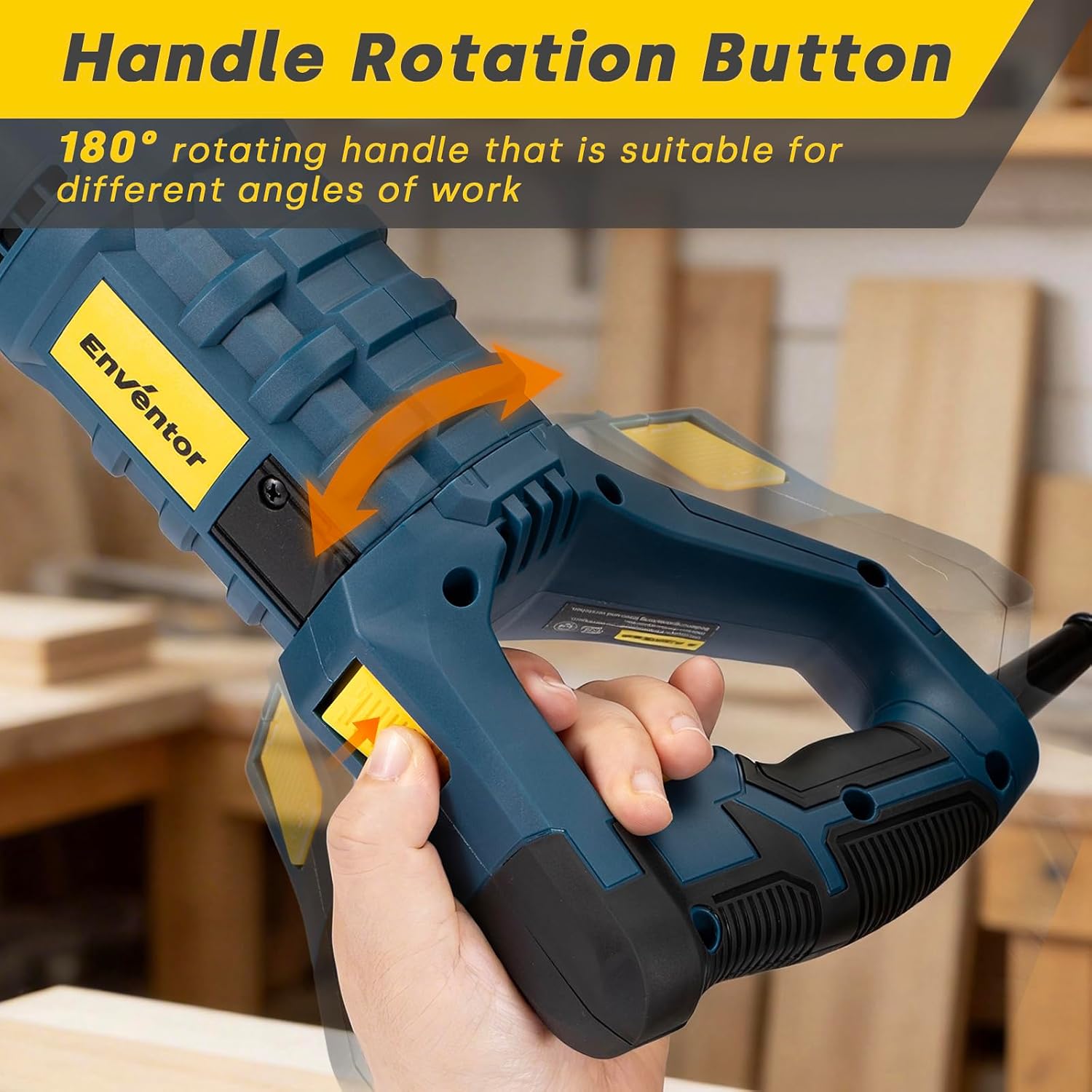
Figure 4.2: The handle rotation button enables the handle to pivot 180 degrees, adapting to different working angles and improving user comfort.
- To Rotate the Handle: Press and hold the handle rotation button. Rotate the handle to the desired position (0°, 90° left, or 90° right). Release the button to lock the handle in place.
4.3 Cutting Techniques
The Enventor Reciprocating Saw is suitable for cutting various materials, including wood, metal, and PVC.

Figure 4.3: The saw is versatile for tasks such as branch pruning, wood cutting, PVC pipe cutting, and soft metal cutting.
- General Cutting: Always ensure the workpiece is securely clamped. Place the shoe of the saw firmly against the workpiece before starting the cut.
- Wood Cutting: Use a wood-specific blade (e.g., 6 TPI or 5 TPI). Apply moderate pressure and allow the saw to do the work. Higher speeds are generally effective.
- Metal Cutting: Use a metal-specific blade (e.g., 18 TPI). Use a slower speed setting and apply cutting oil or lubricant to prolong blade life and improve cutting efficiency. Avoid excessive pressure.
- PVC/Plastic Cutting: Use a fine-toothed blade and a moderate speed to prevent melting the material.
- Plunge Cutting: For plunge cuts into wood, ensure the blade is sharp. Tilt the saw forward so the shoe rests on the workpiece, with the blade tip clear. Start the saw and slowly pivot it down until the blade cuts through the material.
5. Maintenance
Regular maintenance ensures the longevity and safe operation of your reciprocating saw.
- Cleaning: After each use, unplug the saw and clean the tool with a soft cloth. Remove any sawdust, metal shavings, or debris from the ventilation openings and the blade clamp area. Do not use harsh chemicals or abrasive cleaners.
- Blade Care: Inspect blades before each use for sharpness and damage. Replace dull or bent blades immediately. Store blades in a protective case.
- Carbon Brush Replacement: The motor uses carbon brushes which wear down over time. If the saw experiences reduced power or intermittent operation, the carbon brushes may need replacement. Access the carbon brushes by unscrewing the left and right carbon brush cover plates. Replace both brushes simultaneously with genuine Enventor replacement parts.
- Cord Inspection: Regularly inspect the power cord for cuts, fraying, or damage. If damaged, have it repaired by a qualified technician.
6. Troubleshooting
This section addresses common issues you might encounter with your reciprocating saw.
| Problem | Possible Cause | Solution |
|---|---|---|
| Saw does not start | No power supply; Damaged power cord; Faulty switch; Worn carbon brushes. | Check power outlet and connections; Inspect power cord; Contact service center; Replace carbon brushes. |
| Reduced cutting performance | Dull or incorrect blade; Insufficient power; Overheating. | Replace blade or use appropriate blade for material; Check power supply; Allow tool to cool down. |
| Excessive vibration or noise | Loose blade; Damaged blade; Internal component issue. | Ensure blade is securely installed; Replace damaged blade; Contact service center. |
| Saw stops during operation | Overload; Worn carbon brushes; Power interruption. | Reduce cutting pressure; Replace carbon brushes; Check power supply. |
7. Specifications
Technical data for the Enventor 850W Reciprocating Saw, Model DF7002.

Figure 7.1: Key specifications include an 850W powerful motor, no-load speed of 0-2800 SPM, and a maximum cutting depth of 5.91 inches (150mm).
| Feature | Specification |
|---|---|
| Model Number | DF7002 |
| Brand | Enventor |
| Wattage | 850 Watts |
| No-Load Speed | 0-2800 SPM (Strokes Per Minute) |
| Stroke Length | 28 mm (1-1/10 inches) |
| Max Cutting Depth (Wood) | 150 mm (5.91 inches) |
| Power Source | Corded Electric |
| Blade Material | High-speed steel |
| Handle Material | Metal with Rubber Grip |
| Item Weight | 2.5 Kilograms (5.51 lbs) |
| Product Dimensions (L x W x H) | 48 x 11.2 x 24 cm (18.9 x 4.4 x 9.4 inches) |
| Special Features | Versatile material cutting, Variable speed, Dust extraction (implied by design) |
8. Warranty and Support
Enventor products are manufactured to high-quality standards. For warranty information, technical support, or service inquiries, please refer to the warranty card included with your product or contact Enventor customer service through their official website or the retailer where the product was purchased.