Introduction
The MiLESEEY XTAPE1 is an advanced measuring tool combining a digital tape measure with a laser distance meter. This manual provides essential information for the safe and effective operation, maintenance, and troubleshooting of your device.

Image: The MiLESEEY XTAPE1 device, showcasing its digital display, laser emitters, and tape measure blade.
Key Features:
- Dual Measurement Modes: Combines a 12ft digital tape measure and a 330ft laser distance meter.
- Modular Design: Allows for quick replacement of the tape measure module.
- High Accuracy: Achieves up to ±1/32" accuracy with Super OptiTracking technology.
- Green Aligning Laser: Provides exceptional brightness and extended range for precise alignment.
- Advanced Functions: Includes calculations for distance, area, volume, P2P measurements, incremental measurements, and 1/N line split.
- App Synchronization: Connects to a dedicated app for data transmission and annotation.
- Durable Construction: IP54 rated for dust and splash resistance, with a 1,500mAh rechargeable lithium battery.
- Live Angle Display: Measures included angles using the green aligning laser.
Package Contents
Verify that all items are present in the package:
- 1 x XTAPE1 Digital Tape Measure
- 1 x User Manual
- 1 x Lanyard Strap
- 1 x Storage Bag
- 1 x USB C Cable
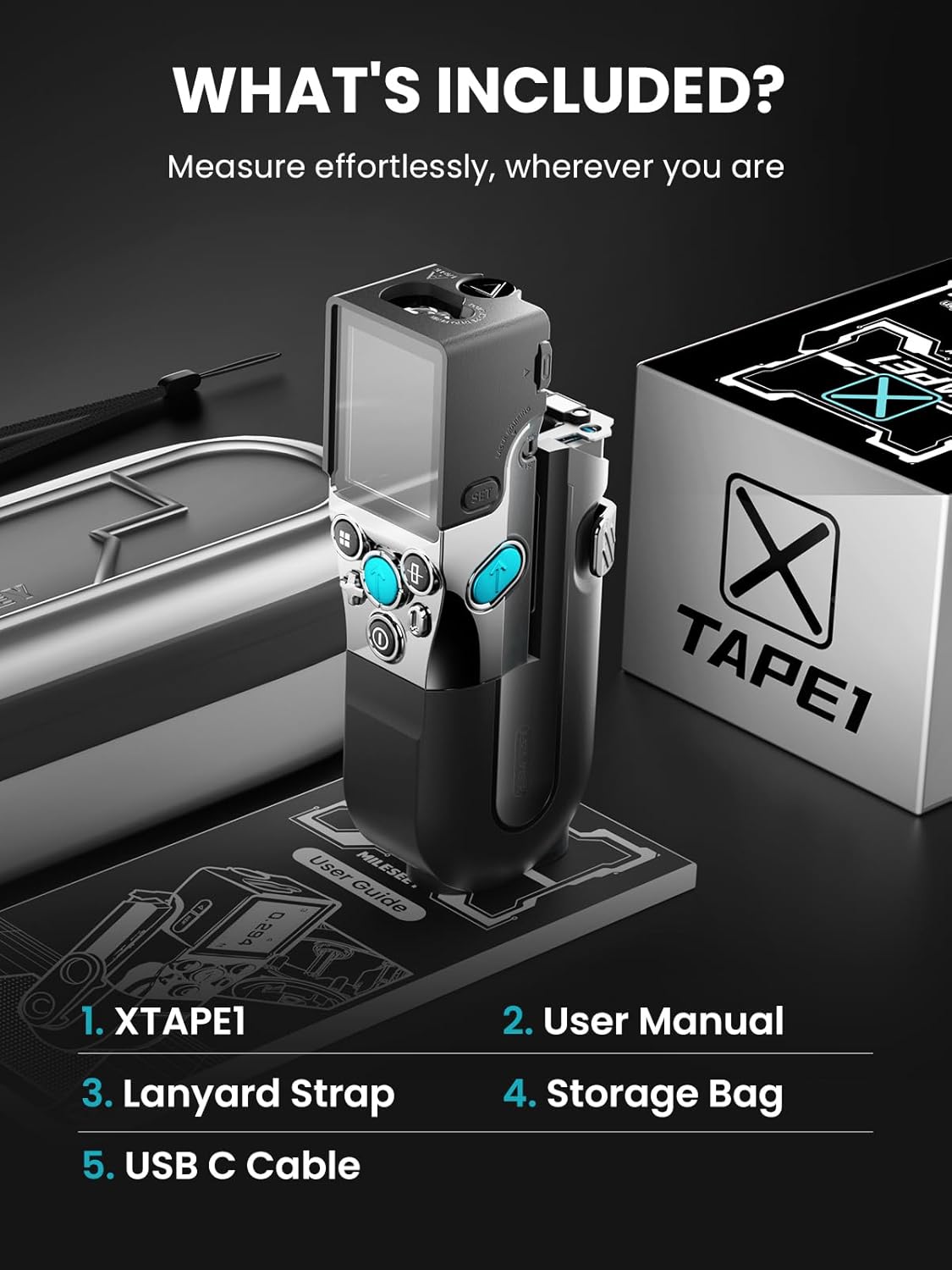
Image: Illustration of the XTAPE1 device, user manual, lanyard strap, storage bag, and USB-C cable included in the product package.
Setup
1. Charging the Device
The XTAPE1 is equipped with a 1,500mAh rechargeable lithium battery. Before first use, fully charge the device using the provided USB-C cable and a compatible power adapter (not included).
- Connect the USB-C cable to the charging port on the device.
- Connect the other end of the cable to a USB power source.
- The battery indicator on the display will show charging status.
2. Power On/Off
- To power on, press and hold the power button until the display illuminates.
- To power off, press and hold the power button until the display turns off.
3. Unit Selection
The device supports various measurement units (Imperial, Metric). Refer to the on-screen menu to select your preferred unit (feet, inches, meters, millimeters, centimeters).

Image: The XTAPE1 display showing various distance unit options for selection, including feet, meters, and inches.
4. App Synchronization
The XTAPE1 can connect to a dedicated mobile application for enhanced functionality, including data transmission and annotation.
- Download the MiLESEEY app from your device's app store.
- Enable Bluetooth on your smartphone or tablet.
- Follow the in-app instructions to pair your XTAPE1 device.
Operating Instructions
1. Digital Tape Measure Function
Extend the tape measure blade to take measurements. The digital display will show the measurement in real-time. The tape features a strong magnetic, four-side movable hook and double-sided markings for versatility.
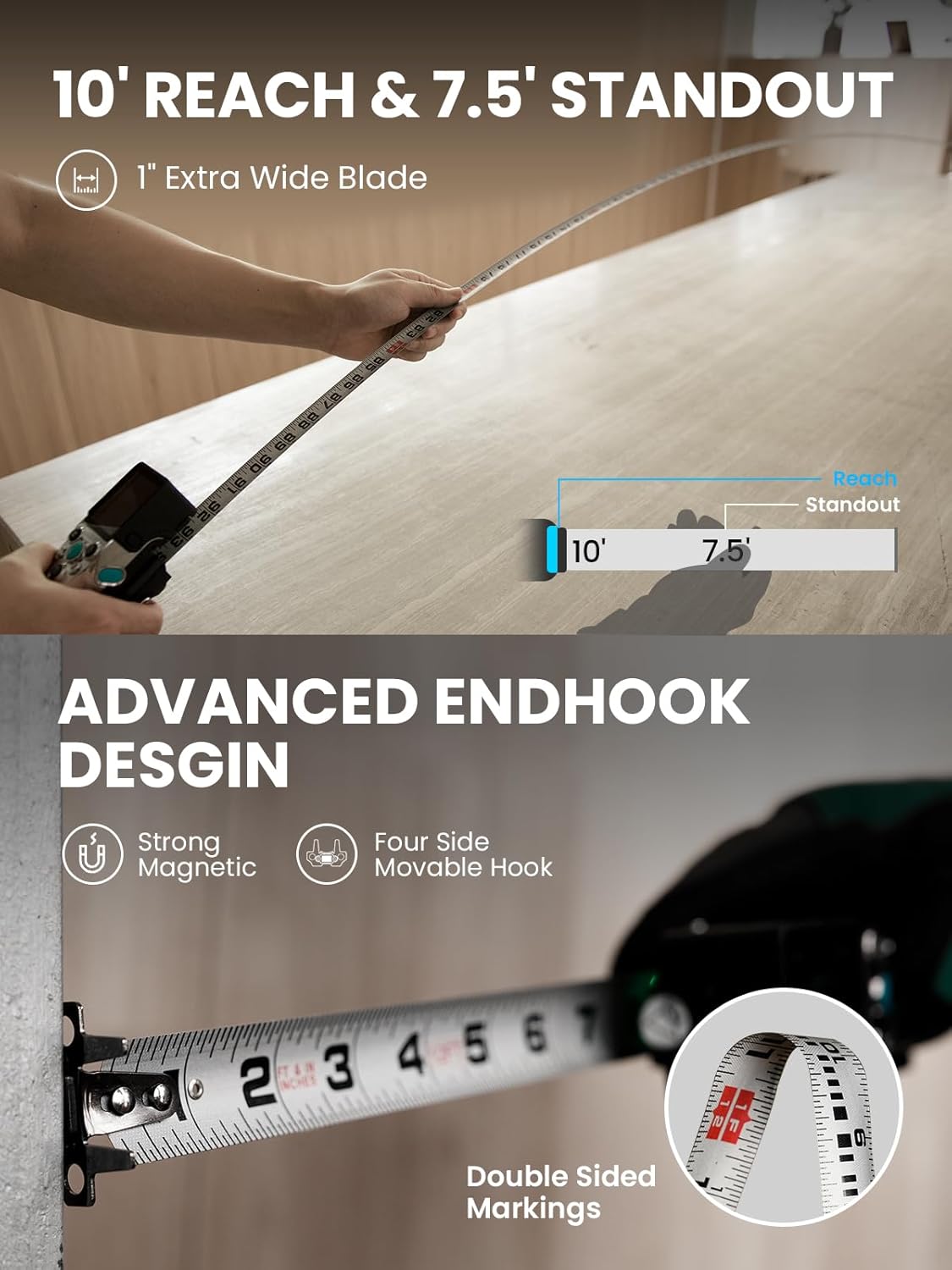
Image: A user extending the 12ft tape measure blade of the XTAPE1, with the digital display showing the measurement. The image also highlights the 10-foot reach and 7.5-foot standout of the tape, along with its advanced endhook design featuring strong magnets and a four-side movable hook.
2. Laser Distance Meter Function
For longer distances, use the integrated laser distance meter. The laser can measure up to 330ft with an accuracy of ±1/16".
- Point the laser emitter towards the target surface.
- Press the measurement button to activate the laser and obtain a reading.
- The device allows selection of reference points (front, back, or from the tape line) for laser measurements.

Image: Two examples of the XTAPE1 in use. The top shows the digital tape measure providing a reading with ±1/32" accuracy. The bottom shows the laser measure function projecting a red laser line onto a wall, displaying a measurement with ±1/16" accuracy.
3. Green Aligning Laser
The XTAPE1 features a bright green laser for alignment tasks, ideal for cross-surface alignment and precise marking.
- Activate the green laser through the device's menu.
- Use the laser line as a visual guide for leveling or aligning objects.
- The green laser also enables the Live Angle Display feature for measuring angles.

Image: The XTAPE1 mounted on a tripod, projecting a bright green laser line for alignment. The image highlights the laser's 1/16 inch accuracy at 16 feet and its 270-degree extended range.
4. Advanced Measuring Functions
- Incremental Measuring: Start measurements from "0" at any position on the tape. This allows for easy calculation-free measurements of successive segments.
- 1/N Line Split: Automatically divides a line into N equal segments, useful for evenly spacing objects or finding the center of a line.
- Quick Distance Estimation (P2P): Measure distances between any two points from a single location using P2P technology.
- Internal Measurements: Acquire inside lengths with rear reference, offering fast and accurate internal measurements.

Image: A demonstration of the XTAPE1's incremental measuring feature, showing how the device can be reset to "0" at any point along the tape to measure subsequent segments without manual calculation.

Image: The XTAPE1 demonstrating the 1/N line split function, showing how it can divide a measured length into equal segments, useful for precise layout tasks.

Image: A user operating the XTAPE1 to perform a P2P (Point-to-Point) measurement, estimating the distance between two points on a ceiling from a single standing position.

Image: The XTAPE1 being used to take an internal measurement, with the device's rear serving as the reference point for accurate readings within a confined space.
5. Display Settings
The XTAPE1 offers various display options for improved readability and user preference.
- Ambidextrous Reading / Screen Rotation: The display can rotate automatically or manually to accommodate left-handed or right-handed use.
- Large Font Mode: Activate large font mode for easier viewing of measurements.
- Multi-Color Tape Display: Customize the visual representation of the tape on the digital screen.

Image: The XTAPE1 display demonstrating its screen rotation feature, allowing for ambidextrous reading by adjusting the orientation of the measurement readout.

Image: A close-up of the XTAPE1 display showing the large font mode, which enhances readability of measurement values.

Image: The XTAPE1 display showing various options for customizing the visual appearance of the digital tape, including different color schemes and text styles.
Maintenance
Proper maintenance ensures the longevity and accuracy of your MiLESEEY XTAPE1.
- Cleaning: Wipe the device with a soft, dry cloth. Do not use abrasive cleaners or solvents. Ensure the laser apertures and display remain clean for optimal performance.
- Battery Care: Recharge the lithium battery regularly, even if the device is not in frequent use, to maintain battery health. Avoid fully discharging the battery for extended periods.
- Storage: Store the device in the provided storage bag in a cool, dry place, away from direct sunlight and extreme temperatures.
- Tape Blade Replacement: The modular design allows for replacement of the tape blade if it becomes damaged or worn. Refer to the specific instructions provided with replacement blades for proper installation.
- Environmental Protection: The XTAPE1 has an IP54 rating, providing protection against dust ingress and splashing water. While durable, avoid submerging the device in water or exposing it to heavy rain.

Image: A close-up of the XTAPE1's tape blade and housing, emphasizing its durable construction with AISI 1060 Carbon Steel Blade, Magnesium-Aluminum Frame, and DuraShield Hardshell, designed to withstand harsh conditions.
Troubleshooting
If you encounter issues with your XTAPE1, refer to the following common problems and solutions:
| Problem | Possible Cause | Solution |
|---|---|---|
| Device does not power on. | Low battery or discharged battery. | Charge the device fully using the USB-C cable. |
| Inconsistent or inaccurate measurements. |
|
|
| Laser alignment appears weak or imprecise. | Environmental conditions (bright light) or dirty laser emitter. | Use in appropriate lighting conditions. Clean the laser emitter. Ensure the device is on a stable surface. |
| Tape blade does not extend or retract smoothly. | Debris in the tape mechanism or damaged blade. | Gently clean the tape slot. If the blade is damaged, consider replacing the modular tape unit. |
| App synchronization issues. | Bluetooth not enabled or app not updated. | Ensure Bluetooth is active on both devices. Update the MiLESEEY app to the latest version. Restart both devices. |
Specifications
| Feature | Detail |
|---|---|
| Model Number | XTAPE1-CA |
| Brand | MiLESEEY |
| Product Dimensions | 9.84 x 3.94 x 0.04 inches |
| Item Weight | 2.14 Pounds |
| Measurement Accuracy | ±1/32" |
| Battery Type | 1 Lithium Ion battery (included) |
| Battery Capacity | 1,500mAh |
| Case Material | Acrylonitrile Butadiene Styrene |
| Lock Type | Push-Button |
| IP Rating | IP54 (Dust and Splash Resistant) |
Warranty and Support
Warranty Information
MiLESEEY provides a 180-day no-hassle replacement policy for any quality problems. This ensures that your device is free from defects in materials and workmanship under normal use.
Customer Support
For technical assistance, troubleshooting, or warranty claims, please contact MiLESEEY customer support. They offer professional technical support and solutions with a 7*24H online rapid response.
- Online Support: Refer to the official MiLESEEY website for support resources and contact information.
- Email Support: Contact support via email for detailed inquiries.
- Phone Support: Available during business hours for immediate assistance.
Please have your model number (XTAPE1) and purchase information ready when contacting support.


