
1. Introduction
Thank you for choosing the zhizhi Smart Watch S53. This manual provides essential information for setting up, operating, and maintaining your device. Please read it carefully to ensure proper use and to maximize the features of your smartwatch.
2. Package Contents
- zhizhi Smart Watch S53
- Charging Cable
- User Manual
3. Device Overview
Familiarize yourself with the main components of your zhizhi Smart Watch S53.
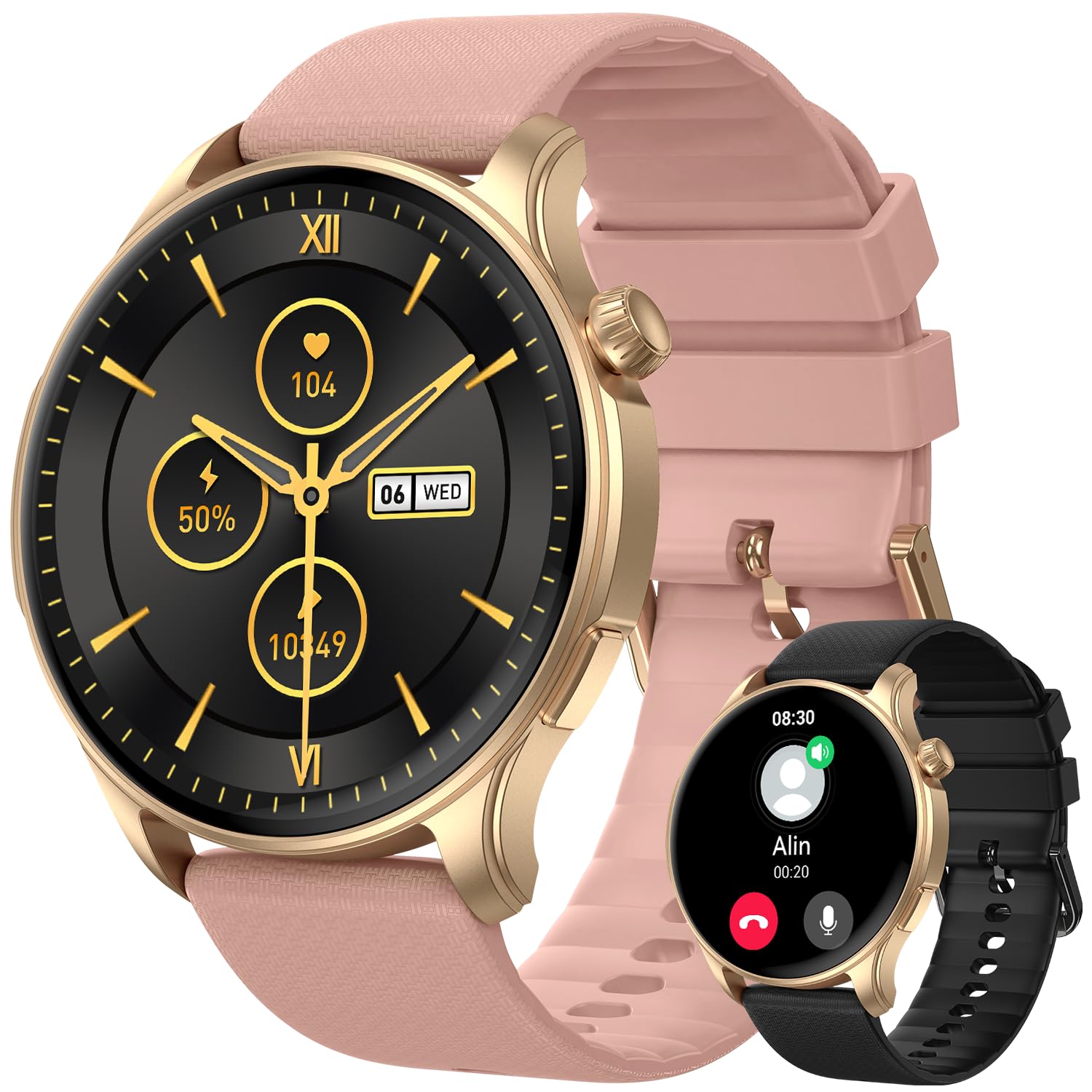
Image 1: Front view of the zhizhi Smart Watch S53, showing the 1.43-inch AMOLED display and watch strap.
- 1.43-inch AMOLED HD Touchscreen: Main display for interaction and information.
- Side Button(s): For power on/off, screen wake, and menu navigation (specific functions may vary).
- Sensors (underside): Heart rate, SpO2, and other health monitoring sensors.
- Charging Contacts (underside): For connecting the magnetic charging cable.
4. Setup
4.1 Initial Charging
Before first use, fully charge your smartwatch. Connect the magnetic charging cable to the charging contacts on the back of the watch and plug the USB end into a standard USB power adapter (not included). The watch will display a charging indicator. A full charge typically takes approximately 2 hours.
4.2 App Installation
To unlock the full functionality of your zhizhi Smart Watch S53, download and install the companion application on your smartphone. Search for the official 'zhizhi Smart' app (or similar, refer to packaging for exact name) in the Apple App Store (for iOS devices) or Google Play Store (for Android devices).
4.3 Pairing with Smartphone
- Ensure your smartphone's Bluetooth is enabled.
- Open the installed companion app on your smartphone.
- Follow the in-app instructions to add a new device. The app will search for available smartwatches.
- Select 'zhizhi S53' from the list of found devices.
- Confirm the pairing request on both your smartphone and the smartwatch, if prompted.
- Once paired, the watch will synchronize time, date, and other settings with your phone.
4.4 Initial Settings
After pairing, complete your personal profile within the app (e.g., age, height, weight) to ensure accurate health and fitness tracking data.
5. Operating Instructions
5.1 Basic Navigation
- Swipe Up/Down: Scroll through menus or notifications.
- Swipe Left/Right: Access quick widgets or different watch faces.
- Tap: Select an item or confirm an action.
- Side Button: Press to return to the home screen, or long-press for power options.
5.2 Sports Modes
The S53 supports over 110 sports modes and features built-in GPS for accurate outdoor activity tracking. To start a workout:
- Navigate to the 'Workout' or 'Sports' menu on your watch.
- Select your desired activity (e.g., Running, Cycling, Walking).
- For outdoor activities, wait for the GPS signal to lock (indicated by an icon).
- Tap 'Start' to begin tracking.
- During the activity, you can view real-time data such as duration, distance, heart rate, and calories burned.
- To pause or end the workout, swipe right or press the side button, then select the appropriate option.
5.3 Health Monitoring
The watch continuously monitors various health metrics:
- Heart Rate: Access the Heart Rate app on the watch to view your current heart rate and historical data.
- Blood Oxygen (SpO2): Use the SpO2 app to take on-demand measurements. Ensure the watch is snug on your wrist.
- Sleep Tracking: Wear the watch to bed for automatic sleep stage analysis (deep sleep, light sleep, wake periods). View detailed reports in the companion app.
- Step Tracker: Your daily steps, distance, and calories burned are automatically recorded.
5.4 Bluetooth Calls & Smart Notifications
With Bluetooth 5.3, the S53 allows you to manage calls and notifications directly from your wrist.
- Making/Answering Calls: Once paired, you can answer incoming calls or dial numbers from the watch's call interface.
- Notifications: Receive real-time alerts for messages, emails, and social media apps (e.g., Facebook, WhatsApp, Instagram). Configure which app notifications appear on your watch via the companion app settings.
5.5 Other Features
The zhizhi S53 includes additional utilities:
- Weather Forecast: View current weather conditions and forecasts.
- Music Control: Control music playback on your smartphone (play, pause, skip tracks).
- Camera Control: Use your watch as a remote shutter for your phone's camera.
- Alarm Clock: Set alarms directly on the watch or through the app.
- Stopwatch & Timer: Basic timing functions.
- Sedentary Reminder: Get alerts to move if you've been inactive for too long.
6. Maintenance
6.1 Cleaning
Regularly clean your watch and strap to prevent skin irritation and maintain device performance.
- Wipe the screen and body with a soft, lint-free cloth. If necessary, slightly dampen the cloth with water.
- For the strap, use mild soap and water, then rinse thoroughly and dry completely before wearing.
- Avoid using harsh chemicals, abrasive cleaners, or solvents.
6.2 Water Resistance (IP68)
The zhizhi S53 has an IP68 water resistance rating, meaning it is resistant to dust and can withstand immersion in water up to 1.5 meters for 30 minutes. It supports various swimming styles.
Important Note: IP68 rating does not make the watch suitable for diving, sauna, hot showers, or exposure to high-velocity water. Avoid contact with hot water, steam, and corrosive liquids. Water resistance is not a permanent condition and may decrease over time.
6.3 Battery Care
- Use only the provided charging cable.
- Avoid extreme temperatures during charging and storage.
- For optimal battery longevity, avoid fully discharging the battery frequently.
6.4 Software Updates
Periodically check for firmware updates through the companion app. Updates can provide new features, performance improvements, and bug fixes. Follow the in-app instructions for updating your watch.
7. Troubleshooting
If you encounter issues with your zhizhi Smart Watch S53, refer to the following common solutions:
- Watch not turning on: Ensure the watch is fully charged. Connect it to the charger for at least 10 minutes.
- Cannot pair with phone: Make sure Bluetooth is enabled on your phone, the watch is charged, and the companion app is open. Try restarting both the watch and your phone.
- Inaccurate health data: Ensure the watch is worn snugly on your wrist, not too tight or too loose. Clean the sensor area.
- Notifications not appearing: Check app notification settings on your phone and within the companion app. Ensure the watch is connected via Bluetooth.
- Short battery life: Reduce screen brightness, disable unnecessary features, and ensure no apps are running excessively in the background.
7.1 Factory Reset
If problems persist, a factory reset may resolve the issue. This will erase all data on the watch and restore it to its original settings. Navigate to 'Settings' on your watch, then look for 'System' or 'Reset' options. Confirm the reset when prompted.
8. Specifications
| Model Number | S53 |
| Display Type | 1.43-inch AMOLED HD Touchscreen |
| Battery Capacity | 400mAh Lithium Ion |
| Charging Time | Approx. 2 hours |
| Typical Usage Time | 5-7 days |
| Standby Time | Up to 50 days |
| Connectivity | Bluetooth 5.3, Built-in GPS (GPS, Beidou, Galileo, GLONASS, NAVIC, QZSS) |
| Operating System Compatibility | Android 5.0 and above, iOS 9.0 and above |
| Water Resistance | IP68 |
| Material | Zinc alloy with vacuum-plated finish |
| Item Weight | 3.53 ounces (approx. 100g) |
| Package Dimensions | 11.38 x 3.5 x 0.59 inches |
9. Warranty and Support
9.1 Warranty Information
Your zhizhi Smart Watch S53 is covered by a manufacturer's warranty against defects in materials and workmanship. The specific terms and duration of the warranty may vary by region. Please refer to the warranty card included in your package or contact customer support for detailed information.
9.2 Customer Support
For technical assistance, warranty claims, or any questions regarding your zhizhi Smart Watch S53, please contact our customer support team. Contact details can typically be found on our official website or on the product packaging.
