
1. Introduction and Overview
The OSCAL PowerMax 6000 is a high-capacity portable power station designed to provide reliable power for various applications, from home emergency backup to outdoor adventures and professional work. Featuring a 3600Wh LiFePO4 battery and a 6000W (9000W peak) output, it offers versatile power solutions with 14 output ports and a rapid 5ms Uninterruptible Power Supply (UPS) function.

The OSCAL PowerMax 6000 provides persistent power, always on standby.
2. Safety Information
Please read all safety warnings and instructions before using this product to prevent injury or damage. Keep this manual for future reference.
- Do not expose to extreme temperatures: Avoid operating or storing the unit in temperatures outside the recommended range (-20°C to 55°C, optimal -10°C to 45°C).
- Keep away from water: Do not immerse the unit in water or expose it to heavy rain. Ensure the unit is dry before use.
- Ensure proper ventilation: Do not block ventilation openings. Adequate airflow is essential to prevent overheating.
- Avoid dropping: While designed to withstand drops up to 0.8 meters, excessive impact can cause damage.
- Fire safety: The unit features a UL94V-0 flame-retardant casing to reduce fire risk. However, do not expose it to open flames or extreme heat sources.
- Children and pets: Keep the device out of reach of children and pets.
- Disassembly: Do not attempt to disassemble, repair, or modify the unit. Contact customer support for assistance.

The PowerMax 6000 features an Anti-UV and UL94V-0 Rated Fire-Retardant Case for enhanced safety and durability.
3. Package Contents
Verify that all items are included in your package:
- PowerMax 6000 Portable Power Station
- AC Charging Cable
- Car Charging Cable
- Solar Charging Cable
- User Manual

Included accessories with the PowerMax 6000, demonstrating its portability with smooth wheels and telescopic handles.
4. Product Features and Components
The PowerMax 6000 is engineered with advanced features for optimal performance and reliability.
4.1. Output Ports
The unit is equipped with 14 versatile output ports to power a wide range of devices:
- 4 AC Outlets (6000W total, 9000W peak)
- 2 100W USB-C Ports
- 3 18W USB-A Ports
- 1 12W USB-A Port
- 1 12V Car Outlet
- 1 Anderson Port
- 2 36W DC5521 Ports

Overview of the 14 versatile outlets on the PowerMax 6000, capable of powering 99% of essential devices.
4.2. LiFePO4 Battery and BMS
Utilizing a durable and stable Lithium Iron Phosphate (LiFePO4) battery, the PowerMax 6000 offers a lifespan of up to 3500 cycles, equivalent to approximately 25 years of practical use. An advanced 8-level Battery Management System (BMS) provides protection against overcharge, over-discharge, over-voltage, over-current, short circuits, and abnormal temperatures, ensuring safety and longevity.

The PowerMax 6000 features a long-lasting LiFePO4 battery with a 25-year lifespan.

Intelligent BMS provides eightfold safety protection, promptly fixing overheating, overload, or over-voltage issues.
4.3. Uninterruptible Power Supply (UPS)
Equipped with a UPS function, the PowerMax 6000 automatically switches to built-in battery power within 5-8 milliseconds during a power outage. This ensures an uninterrupted power supply for critical devices.

The PowerMax 6000 features a 0.005-0.008s fast switch for 24/7 uninterrupted power.
4.4. Durability and Environmental Resistance
The PowerMax 6000 features a rugged ABS+PC structure, allowing it to withstand drops from up to 0.8 meters. It is designed for diverse environments, effectively resisting solid particle ingress and water splashes. It operates stably in temperatures from -20°C to 55°C (optimal range: -10°C to 45°C).

The PowerMax 6000 offers four powerful defenses, fearless of challenges, including drop-proof design.

The PowerMax 6000 supports discharge temperatures from -20°C to 55°C.
4.5. Expandability
The PowerMax 6000 is expandable up to 57.6 kWh by connecting additional battery packs, meeting demands for extended power supply.

The PowerMax 6000 is expandable up to 57600Wh with additional battery packs.
4.6. Portability
Designed with smooth wheels and telescopic handles, the PowerMax 6000 can be easily transported like a trolley case, making it convenient for various scenarios.
5. Setup
Before first use, ensure the PowerMax 6000 is fully charged. Unpack all components and place the power station on a stable, flat surface with adequate ventilation.
- Initial Charge: Connect the AC charging cable to the power station and a wall outlet. Allow the unit to charge completely. The digital display will indicate charging status.
- Familiarize with Ports: Review the port layout (Section 4.1) to understand the location and type of each output.
- App Installation (Optional): Download the OSCAL mobile app from your device's app store for remote control and monitoring.
6. Operating Instructions
6.1. Powering Devices
To power a device, simply plug it into the appropriate output port on the PowerMax 6000. Ensure the power station is turned on and the specific output group (AC, DC, USB) is activated via its respective switch.
- AC Outlets: Press the AC power button to activate. Use for appliances requiring standard wall power.
- USB Ports: Press the USB power button to activate. Use for charging phones, tablets, and other USB-powered devices.
- DC Ports (12V Car Outlet, DC5521, Anderson): Press the DC power button to activate. Use for 12V devices, car accessories, or specific DC-powered equipment.

The PowerMax 6000 can power essential home appliances for extended durations.

The PowerMax 6000 supports outdoor enjoyment by powering mobile phones, camping lights, and coffee machines.

The PowerMax 6000 can power heavy-duty tools like weeders, chainsaws, and corded mowers.
6.2. Charging the Power Station
The PowerMax 6000 supports multiple charging methods:
- AC Charging: Connect the AC charging cable to a wall outlet. Full recharge in approximately 1.96 hours.
- Solar Charging: Connect compatible solar panels (e.g., optional PM100/PM200 solar panels) to the solar input port. Max 2400W solar input.
- Car Charging: Use the car charging cable to charge from your vehicle's 12V outlet.
- Other Methods: Supports charging via diesel generators, wind power, hydropower, and EV charging stations.

Fast recharging options for the PowerMax 6000, including AC and solar.

The PowerMax 6000 offers 7 charging methods for efficient energy replenishment.
6.3. Smart App Control
The dedicated mobile app allows for remote management and real-time monitoring of your PowerMax 6000. You can control output ports, monitor battery level, and view input/output power from your smartphone.
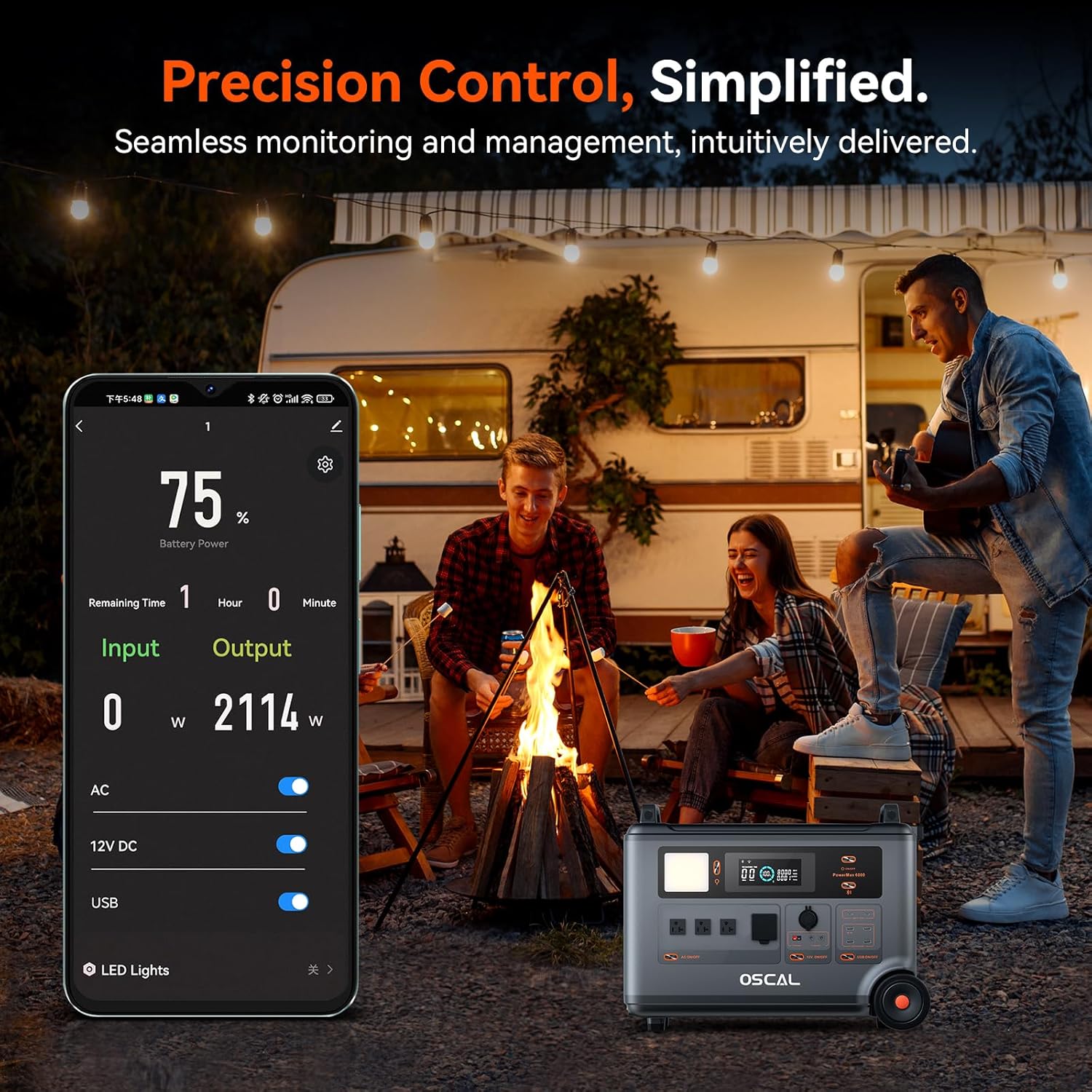
Precision control simplified: seamless monitoring and management via the intuitive app.

Remote monitoring and control with the Smart App, simple and easy to use.
6.4. Lighthouse-like Signal Light
The PowerMax 6000 features five LED lighting modes, including a signal light that can blink in Morse code for numbers from 0 to 9 and alphabets from A to Z, generated from content inputted via the Smart APP. This can be useful for communication in emergency situations.
Official product video demonstrating the features and capabilities of the OSCAL PowerMax 6000, including its UPS function, power tool compatibility, environmental resistance, various charging methods, app control, and portability.
7. Maintenance
- Cleaning: Use a dry, soft cloth to clean the exterior of the unit. Do not use abrasive cleaners or solvents.
- Storage: Store the PowerMax 6000 in a cool, dry place, away from direct sunlight and extreme temperatures. For long-term storage, charge the unit to 50-80% every 3-6 months to maintain battery health.
- Battery Care: Avoid fully discharging the battery frequently. Regular partial discharges and recharges are beneficial for LiFePO4 battery longevity.
8. Troubleshooting
If you encounter issues with your PowerMax 6000, refer to the following common problems and solutions:
| Problem | Possible Cause | Solution |
|---|---|---|
| Unit not turning on | Low battery; Power button not pressed correctly | Charge the unit; Press and hold the power button for 3 seconds |
| No output from AC ports | AC output not activated; Overload; Device incompatible | Press AC power button; Reduce load; Check device wattage |
| Slow charging | Charging source insufficient; Cable issue; High ambient temperature | Use higher wattage charger/solar panel; Check cable connections; Move to cooler environment |
| Unit beeping (low battery alarm) | Battery level is critically low | Recharge the power station immediately. |
If the problem persists, please contact OSCAL customer support.
9. Specifications
| Feature | Detail |
|---|---|
| Model Name | OSCAL PowerMax 6000 |
| Battery Type | LiFePO4 |
| Capacity | 3600Wh (Expandable to 57.6 kWh) |
| Rated Power | 6000W |
| Peak Power | 9000W |
| AC Outlets | 4 |
| Total Output Ports | 14 |
| UPS Switching Time | 5-8ms |
| Operating Temperature | -20°C to 55°C (Optimal: -10°C to 45°C) |
| Dimensions | 15"L x 9"W x 10"H |
| Item Weight | 33 pounds (15 Kilograms) |
| Color | Black |
| UPC | 810192209965 |
10. Warranty and Support
The OSCAL PowerMax 6000 comes with a 7-year manufacturer's warranty, ensuring long-term reliability and peace of mind. OSCAL also provides lifetime technical support to assist you with any questions or issues you may encounter.

OSCAL Official Store offers exclusive 7 years quality support.
For technical assistance, warranty claims, or any product-related inquiries, please contact OSCAL customer service. You can typically find contact information in the included product card or on the official OSCAL website.


