
1. Introduction
This manual provides detailed instructions for the assembly, operation, and maintenance of your Nordivale 70-inch Fireplace TV Stand. Please read all instructions carefully before beginning assembly or use to ensure safe and proper functionality of the product.
The Nordivale 70-inch Fireplace TV Stand is designed to accommodate TVs up to 80 inches, offering both media storage and an integrated electric fireplace. Key features include a realistic electric fireplace with adjustable flame settings, ample storage space, and a modern design.
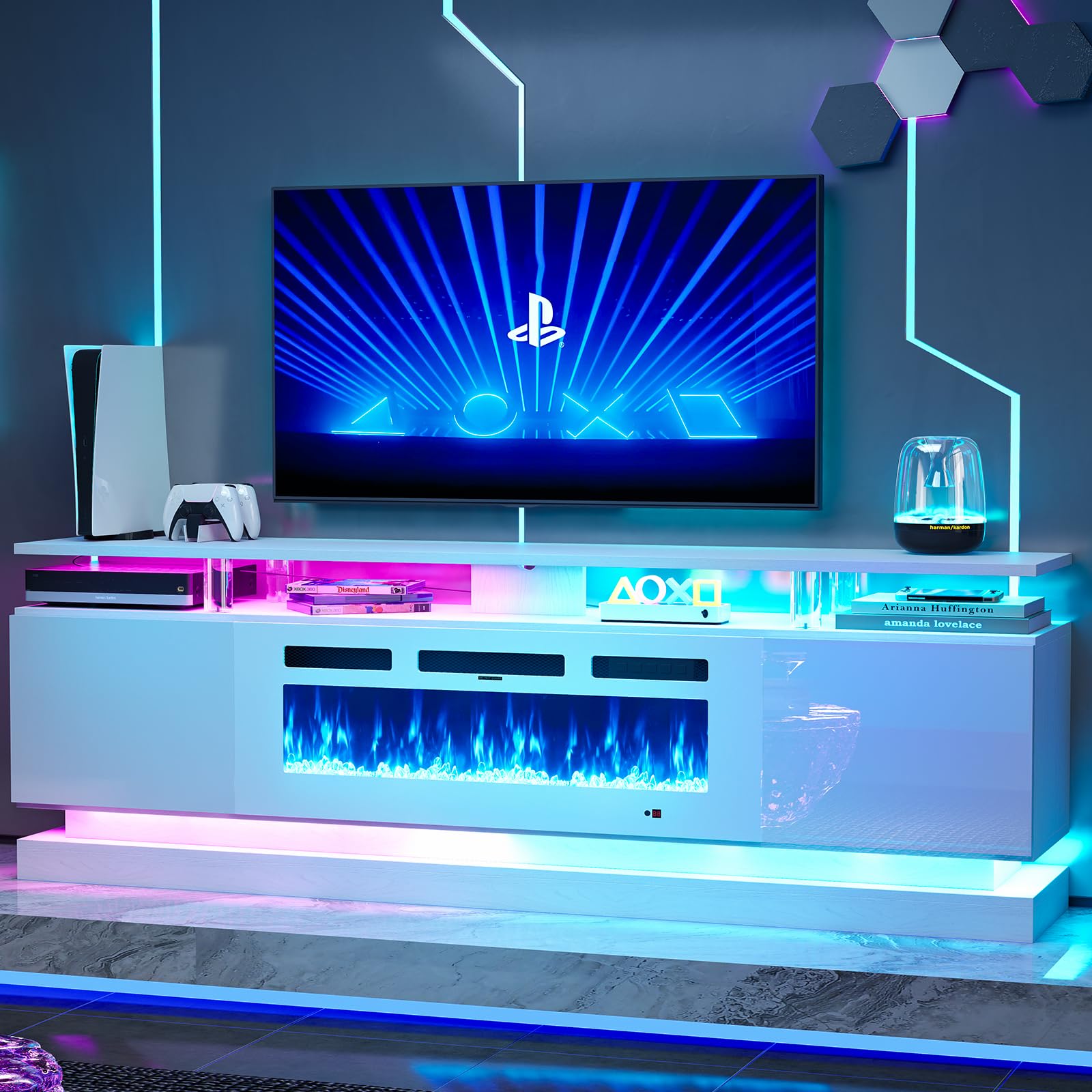
Figure 1: Nordivale 70-inch Fireplace TV Stand (White & White)
2. Safety Information
Please adhere to the following safety guidelines to prevent injury or damage to the product:
- Always secure the TV to the stand using appropriate mounting hardware.
- Do not place objects exceeding the specified weight capacity on the top shelf or any other part of the stand.
- Keep children and pets away from the unit, especially sharp edges and the fireplace heating element.
- Ensure proper ventilation for the electric fireplace. Do not block any vents.
- Do not operate the fireplace if the ambient temperature exceeds 100°F (38°C).
- The electric fireplace is CSA & ETL certified and includes overheat protection and an auto shut-off timer for safety.
3. Product Features
3.1. Realistic Electric Fireplace
The integrated 36-inch electric fireplace features realistic crystal stones and offers 5 levels of flame brightness. It includes multiple lighting modes and 12 colors for the backlight. The fireplace provides a temperature control function, allowing adjustment from 62°F to 82°F, with overheat protection and an auto shut-off timer.

Figure 2: Electric Fireplace Features

Figure 3: Flame and LED Color Options
3.2. Structural Design
The TV stand incorporates four cylindrical acrylic columns for enhanced stability and a modern aesthetic. The transparent acrylic texture contributes to the product's contemporary design.
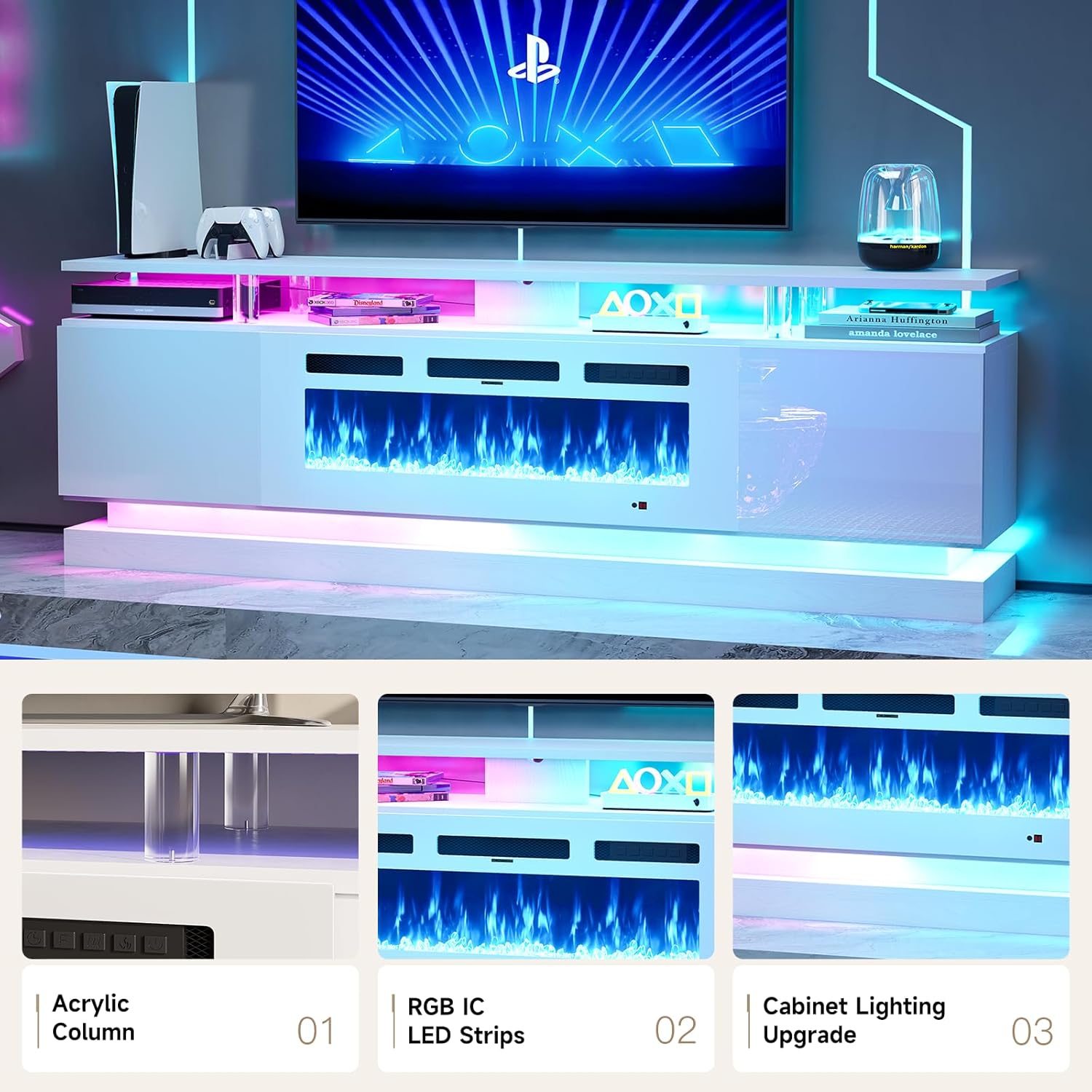
Figure 4: Acrylic Columns and LED Lighting
3.3. Storage Capacity
Equipped with a wide tabletop and two side cabinets, this TV stand provides ample storage for media devices, books, and other items, helping to maintain an organized living space.

Figure 5: Large Storage Space
3.4. Cable Management and Stability
The TV stand features a sturdy and stable base. Integrated cable holes assist in organizing wires, reducing clutter and improving the overall aesthetic.

Figure 6: Mirror Craft Door and Cable Access
4. Assembly Instructions
The Nordivale 70-inch Fireplace TV Stand is shipped in two separate packages, which may arrive on different days. Please ensure you have received both packages before beginning assembly.

Figure 7: Product Dimensions and Packaging Information
- Unpack Components: Carefully unpack all parts and hardware. Verify that all components listed in the included parts list are present and undamaged.
- Identify Hardware: Separate and identify all screws, dowels, and other hardware using the provided diagrams.
- Assemble Frame: Follow the step-by-step diagrams in the separate assembly manual to construct the main frame of the TV stand.
- Install Shelves and Doors: Attach interior shelves and cabinet doors as instructed.
- Insert Fireplace: Carefully place the electric fireplace insert into the designated opening. Connect the power cord.
- Attach LED Strips: Apply the RGB IC LED strips according to the instructions for cabinet and base lighting.
- Final Placement: Position the assembled TV stand in its desired location. Ensure it is level and stable.
For detailed, step-by-step assembly instructions, please refer to the separate assembly manual included in your packaging. It is recommended to have two people for assembly.
5. Operating Instructions
5.1. Electric Fireplace Operation
The electric fireplace can be controlled via the control panel on the unit or the included remote control.

Figure 8: Fireplace Control Panel Functions
- Power On/Off: Press the power button to turn the fireplace on or off.
- Flame Brightness: Use the flame button to cycle through 5 levels of flame brightness (L1-L5).
- Flame Color: Adjust the flame color using the dedicated button on the remote or control panel to select from 12 available colors.
- Heat Settings: Select between 750W or 1500W heat modes. The temperature can be adjusted from 62°F to 82°F.
- Timer Function: Set the auto shut-off timer from 0 to 8 hours.
5.2. LED Lighting Operation
The integrated LED light strips offer multiple lighting modes and 12 colors. These can be controlled via the remote control provided with the unit.
- Color Selection: Use the color buttons on the remote to choose from 12 distinct LED colors.
- Mode Selection: Cycle through various lighting modes (e.g., static, fade, flash) using the mode button.
- Brightness Adjustment: Adjust the brightness of the LED lights to your preference.
6. Maintenance
Regular maintenance will help prolong the life and appearance of your TV stand.
- Cleaning: Wipe surfaces with a soft, damp cloth. Avoid abrasive cleaners or harsh chemicals that may damage the finish.
- Dusting: Regularly dust all surfaces to prevent buildup.
- Fireplace Care: Ensure the fireplace vents are clear of obstructions. Periodically check the power cord for any damage.
- Hardware Check: Periodically check and tighten all assembly hardware to ensure stability.
7. Troubleshooting
If you encounter issues with your Nordivale Fireplace TV Stand, refer to the following common solutions:
| Problem | Possible Cause | Solution |
|---|---|---|
| Fireplace not turning on | Power cord unplugged; circuit breaker tripped; unit overheated. | Check power connection; reset circuit breaker; allow unit to cool down. |
| No heat output | Heat function not activated; temperature setting too low. | Ensure heat function is on; increase temperature setting. |
| LED lights not working | LED strip not connected; remote control battery low. | Check LED strip connections; replace remote control batteries. |
| Stand is wobbly | Loose hardware; uneven floor. | Tighten all screws; adjust floor levelers if available, or place shims. |
If problems persist, please contact Nordivale customer support.
8. Specifications
| Attribute | Detail |
|---|---|
| Brand | Nordivale |
| Model Number | H21426-70WH+H20100-36SWHSNL |
| Color | White & White |
| Size | 70 inches (79.92"W x 13.78"D x 24.21"H) |
| Material Type | Engineered Wood, Wood |
| Item Weight | 143 pounds |
| Tabletop Weight Capacity | 132 lbs |
| Shelves Weight Capacity | 33 lbs |
| Fireplace Size | 36 inches |
| Fireplace Heat Output | 750W/1500W (5000 BTU, auxiliary heating for 400 sq ft) |
| Temperature Range | 62°F-82°F |
| Flame Brightness Levels | 5 |
| LED Colors | 12 |
| Timer Function | 0-8 hours |
| Certifications | CSA & ETL certified |
| Additional Features | Adjustable Flame, Multicolor Flame, Overheat Protection, Water Resistant |
9. Warranty & Support
For information regarding product warranty, returns, or technical support, please refer to the documentation included with your purchase or visit the official Nordivale website. Nordivale-service offers a 30-day easy return policy and customer support.