
1. Introduction
Thank you for choosing the MERACH MR-T25 Treadmill. This manual provides essential information for the safe and effective operation, maintenance, and troubleshooting of your new fitness equipment. Please read this manual thoroughly before initial use and retain it for future reference.
2. Safety Information
Before using the MERACH MR-T25 Treadmill, please observe the following safety precautions:
- Consult a physician before starting any new exercise program.
- Ensure the treadmill is placed on a flat, stable surface with adequate clearance around it (at least 0.6 meters on all sides, and 2 meters at the rear).
- Keep children and pets away from the treadmill during operation.
- Do not exceed the maximum user weight capacity of 180 kg.
- Wear appropriate athletic footwear and clothing.
- Unplug the treadmill from the power outlet when not in use, before cleaning, or before performing any maintenance.
- Do not operate the treadmill if it has a damaged cord or plug, or if it is not working properly.
- This treadmill is designed for walking and light jogging. Do not use it for intense running if the maximum speed is 6 km/h.
Important: The MERACH MR-T25 is a walking pad designed for home and office use. It does not feature traditional handrails or a safety key. Exercise caution during use.
3. Package Contents
Carefully unpack the box and ensure all items are present:
- MERACH MR-T25 Treadmill Unit
- Power Cord
- Remote Control
- Tool Kit (for minor adjustments/maintenance)
- User Manual (this document)
4. Setup
The MERACH MR-T25 Treadmill is designed for minimal setup. It arrives largely pre-assembled.
- Placement: Choose a flat, stable surface for the treadmill. Ensure there is sufficient space around the unit for safe operation and movement. The compact design (127.5 x 56.5 x 15.5 cm) allows it to fit in smaller spaces.
- Unfolding: This model is a flat walking pad and does not require unfolding in the traditional sense. Simply place it in your desired location.
- Power Connection: Connect the power cord to the treadmill's power input and then plug it into a grounded electrical outlet.
- Initial Inspection: Before first use, inspect the running belt for any signs of damage or misalignment. Ensure all components are securely in place.

Image: The MERACH MR-T25 Treadmill demonstrating its compact footprint and quiet operation in a home setting. The image highlights its small covered surface area of 0.27 m² and ultra-silent operation below 25 dB.
5. Operating Instructions
The MERACH MR-T25 Treadmill is operated primarily via the included remote control.
5.1 Powering On/Off
- To Power On: Plug the treadmill into a power outlet. Locate the main power switch (usually at the front or rear of the unit) and turn it to the 'ON' position. The display will illuminate.
- To Power Off: Press the 'STOP' button on the remote control. Once the belt has come to a complete stop, turn off the main power switch and unplug the unit from the wall.
5.2 Using the Remote Control
The remote control allows you to start, stop, adjust speed, and control the incline.
- START/STOP: Press to begin or end your workout.
- Speed Adjustment: Use the '+' and '-' buttons to increase or decrease the walking speed. The speed range is 1-6 km/h.
- Incline Adjustment: Use the incline control buttons (often represented by up/down arrows or specific incline levels) to adjust the automatic incline from 0% to 12%.
5.3 Automatic Incline Feature
The MERACH MR-T25 features an automatic incline system, allowing you to vary your workout intensity.
- The incline can be adjusted from 0% (flat) up to 12%.
- Increasing the incline can help burn more calories and engage different muscle groups, similar to walking uphill.
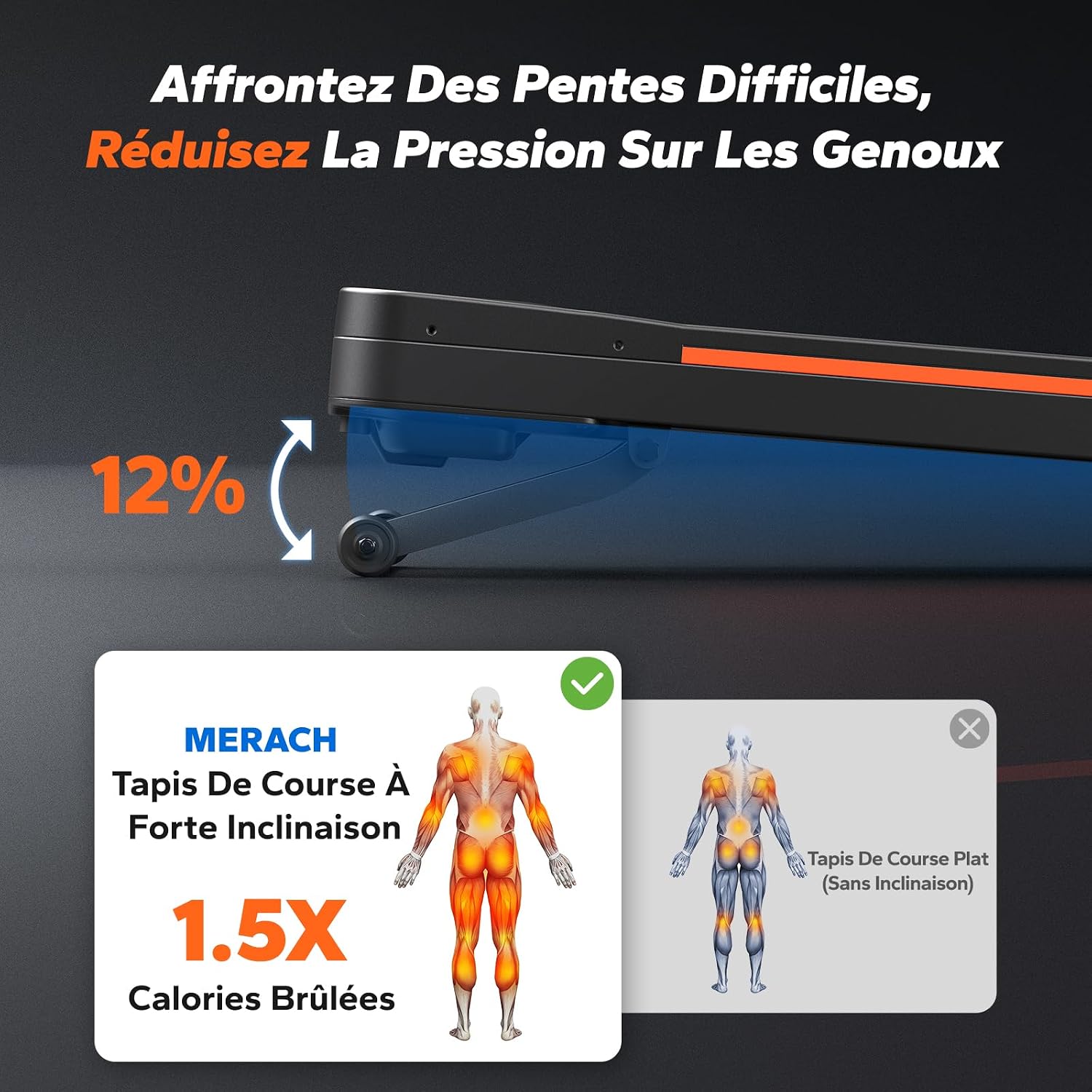
Image: A visual representation of the MERACH MR-T25 Treadmill's 12% automatic incline capability, showing how the front of the walking pad elevates. An accompanying diagram indicates that a treadmill with strong incline burns 1.5 times more calories compared to a flat treadmill.
5.4 MERACH App Integration
Enhance your workout experience by connecting your treadmill to the MERACH application.
- Download the MERACH app from your device's app store (Apple Health and Google Fit compatible).
- Follow the in-app instructions to pair your treadmill.
- The app may offer personalized workout plans, track your progress, and provide additional features.

Image: The MERACH MR-T25 Treadmill shown with a tablet displaying the MERACH app interface, which offers personalized fat-burning plans and connectivity with Apple Health and Google Fit. The image also mentions a limited-time offer for a 6-month subscription.
6. Key Features
- Robust Construction: Equipped with an industrial-grade steel frame, supporting a maximum user weight of 180 kg. The reinforced base prevents wobbling, ensuring stability during use.

Image: A user walking on the MERACH MR-T25 Treadmill, illustrating its stability and industrial carbon steel frame, capable of supporting up to 180 kg. The image also shows the 1-6 km/h speed range and 10 hours of continuous operation.
- Silent Brushless Motor: Features a 3.5 HP professional brushless motor, operating at an ultra-quiet 25 dB. This motor allows for up to 10 hours of continuous operation without overheating.

Image: An internal view of the MERACH MR-T25 Treadmill, highlighting its 3.5 HP brushless motor. The diagram compares its 90% operating efficiency, 10 hours continuous autonomy, and ultra-silent <25 dB noise level against traditional brush motors.
- Professional Running Belt: The 42 cm wide running belt provides ample space for comfortable walking and light jogging. Its diamond-textured anti-slip surface ensures maximum grip.

Image: A close-up view of the MERACH MR-T25 Treadmill's 42 cm wide running belt, emphasizing its professional format. The image indicates it is 22.3% wider than classic devices and offers 30% improved comfort, with dimensions of 42 cm x 105 cm.
- Joint-Friendly Cushioning: Features a 6-layer shock absorption system and a 6-layer anti-slip belt, designed to reduce knee impact by up to 30%.

Image: A cutaway diagram of the MERACH MR-T25 Treadmill's running belt, showing the multi-layer shock absorption structure. It contrasts the cushioning system with a non-cushioned structure, highlighting the "soft cushioning for joints" feature.
- Portability: Equipped with robust transport wheels for easy movement and storage. Its compact frame (127.5 x 56.5 x 15.5 cm) makes it suitable for small living spaces.
7. Maintenance
Regular maintenance ensures the longevity and optimal performance of your MERACH MR-T25 Treadmill.
- Cleaning: Wipe down the treadmill with a damp cloth after each use to remove sweat and dust. Do not use abrasive cleaners or solvents.
- Belt Lubrication: The running belt may require lubrication periodically. Refer to the specific instructions in your quick start guide or contact customer support for guidance on the correct lubricant and application frequency.
- Belt Tension and Alignment: Over time, the running belt may become loose or misaligned. Use the provided tool kit to adjust the belt tension and alignment as needed. Ensure the belt is centered and has proper tension (not too tight or too loose).
- Storage: When not in use, store the treadmill in a dry, clean area. Its compact design allows for easy storage under furniture or against a wall.
8. Troubleshooting
If you encounter issues with your MERACH MR-T25 Treadmill, refer to the following common troubleshooting steps:
| Problem | Possible Cause | Solution |
|---|---|---|
| Treadmill does not power on. | Power cord not plugged in; main power switch off; circuit breaker tripped. | Ensure power cord is securely plugged into a grounded outlet. Turn main power switch to 'ON'. Check household circuit breaker. |
| Running belt stops or slips. | Belt too loose; belt needs lubrication; motor overload. | Adjust belt tension. Lubricate the belt as per maintenance instructions. Reduce user weight or speed. |
| Unusual noise during operation. | Loose components; belt rubbing; motor issue. | Check for and tighten any loose screws. Ensure belt is centered and not rubbing against the frame. If noise persists, contact customer support. |
| Incline not adjusting. | Incline motor issue; remote control battery low. | Check remote control battery. Ensure no obstructions are preventing incline movement. If issue persists, contact customer support. |
| Remote control not responding. | Battery low or dead; remote out of range; interference. | Replace remote control battery. Ensure you are within effective range. Remove any potential sources of interference. |
For issues not covered here, please contact MERACH customer support.
9. Specifications
| Feature | Detail |
|---|---|
| Model Number | MR-T25 |
| Dimensions (L x W x H) | 127.5 x 56.5 x 15.5 cm |
| Folded Size (L x W x H) | 1275 x 565 x 155 mm |
| Item Weight | 30.5 Kilograms |
| Maximum Recommended Load | 180 Kilograms |
| Material | Aluminium (Frame Material: Alloy Steel) |
| Maximum Speed | 6 Kilometers per hour |
| Maximum Incline Percentage | 12% (Automatic Incline) |
| Maximum Power | 3.5 Horsepower |
| Power Source | Electric Cord |
| Included Components | Power Cord, User Manual, Tool Kit, Remote Control |
| Target Audience | Adult |
10. Warranty and Support
MERACH products are designed for quality and durability. For specific warranty details, please refer to the warranty card included with your product or visit the official MERACH website.
If you require technical assistance, have questions about your product, or need to claim warranty service, please contact MERACH customer support through their official channels. Keep your purchase receipt and model number (MR-T25) handy when contacting support.

Image: MERACH company details, indicating service in over 50 countries, more than 140 exclusive products, and 24/7 expert support. It also displays various safety certifications like CE, UL, and ASTM.


