
Fafeicy ZN-MT32
Fafeicy Indoor Quality Monitor ZN-MT32 User Manual
Model: ZN-MT32 | Brand: Fafeicy
1. Introduction
The Fafeicy ZN-MT32 Indoor Quality Monitor is a versatile device designed to assess various environmental parameters within your indoor spaces. Utilizing advanced semiconductor gas sensors and laser scattering technology, it provides real-time data for a comprehensive understanding of air quality.
This manual provides detailed instructions for the setup, operation, and maintenance of your Fafeicy ZN-MT32 monitor to ensure accurate and reliable performance.
2. Product Features
- Multi-Parameter Analysis: Tracks 18 essential parameters including AQI, carbon dioxide (CO2), formaldehyde (HCHO), TVOC, and particulate matter (PM0.3 to PM10).
- Convenient Portable Design: Integrated 2000mAh battery provides up to 7 hours of continuous operation, with USB Type-C recharging.
- Intuitive Color Display: A 2.8-inch high-resolution screen presents 13 simultaneous readings with a color-based quality indicator system.
- Calibrated Measurement Accuracy: Sophisticated sensors provide detailed readings with high precision for various pollutants.
- Comprehensive Data Tracking: Allows review of particulate distribution changes, historical data trends, and computer connectivity for detailed record extraction.
3. Package Contents
Please verify that all items are present in the package:
- 1 x Fafeicy Indoor Quality Monitor (ZN-MT32)
- 1 x USB Type-C Cable
- 1 x User Manual
4. Device Overview
Familiarize yourself with the physical components and display of your monitor.

Figure 1: Front and back view of the Fafeicy Indoor Quality Monitor ZN-MT32, showing the display and rear ventilation/mounting points.

Figure 2: Close-up of the monitor's 2.8-inch color display, showing various air quality parameters.

Figure 3: Dimensions of the Fafeicy ZN-MT32 monitor (90mm x 70mm x 35mm).
5. Setup
5.1 Charging the Device
Before first use, fully charge the device. Connect the provided USB Type-C cable to the monitor's charging port and plug the other end into a compatible USB power adapter (DC5V 1A). The battery indicator on the display will show charging status.
5.2 Powering On/Off
Press and hold the power button (usually located on the side) for a few seconds to turn the device on or off.
5.3 Initial Placement
Place the monitor in the area where you wish to measure air quality. Ensure it is on a stable surface and not obstructed, allowing for proper airflow to the sensors.
6. Operating Instructions
The device is operated primarily through a single button, with different click patterns triggering various functions.
6.1 Basic Navigation
- Single Click (Main Interface): Switches between Celsius (℃) and Fahrenheit (℉) temperature display.
- Double Click: Toggles the sound (beeps/alerts) on or off.
- Triple Click: Enters the calibration interface. Follow on-screen instructions for calibration.
- Quadruple Click: Enters screen-off mode. A single click will turn the screen back on.
- Quintuple Click: Enters the curve interface to view historical data graphs. Single click within this interface to switch between different curves. Quintuple click again to return to the main interface.
- Sextuple Click: Enters the PM2.5 comparison interface. Double click to record the first group of 30-second evaluation data. Double click again to record the average data of 2 groups of 30 seconds. Quintuple click to return to the main interface.
- Septuple Click: Enters the temperature adjustment interface. Single click to increase temperature by 1 degree Celsius. Double click to decrease temperature by 1 degree Celsius. Quintuple click to exit, or the interface will exit automatically after five seconds of inactivity.
7. Display Interface and Data Interpretation
The 2.8-inch LCD screen provides a clear overview of current air quality. Readings are often color-coded to indicate different quality levels (e.g., green for good, yellow for moderate, red for poor).
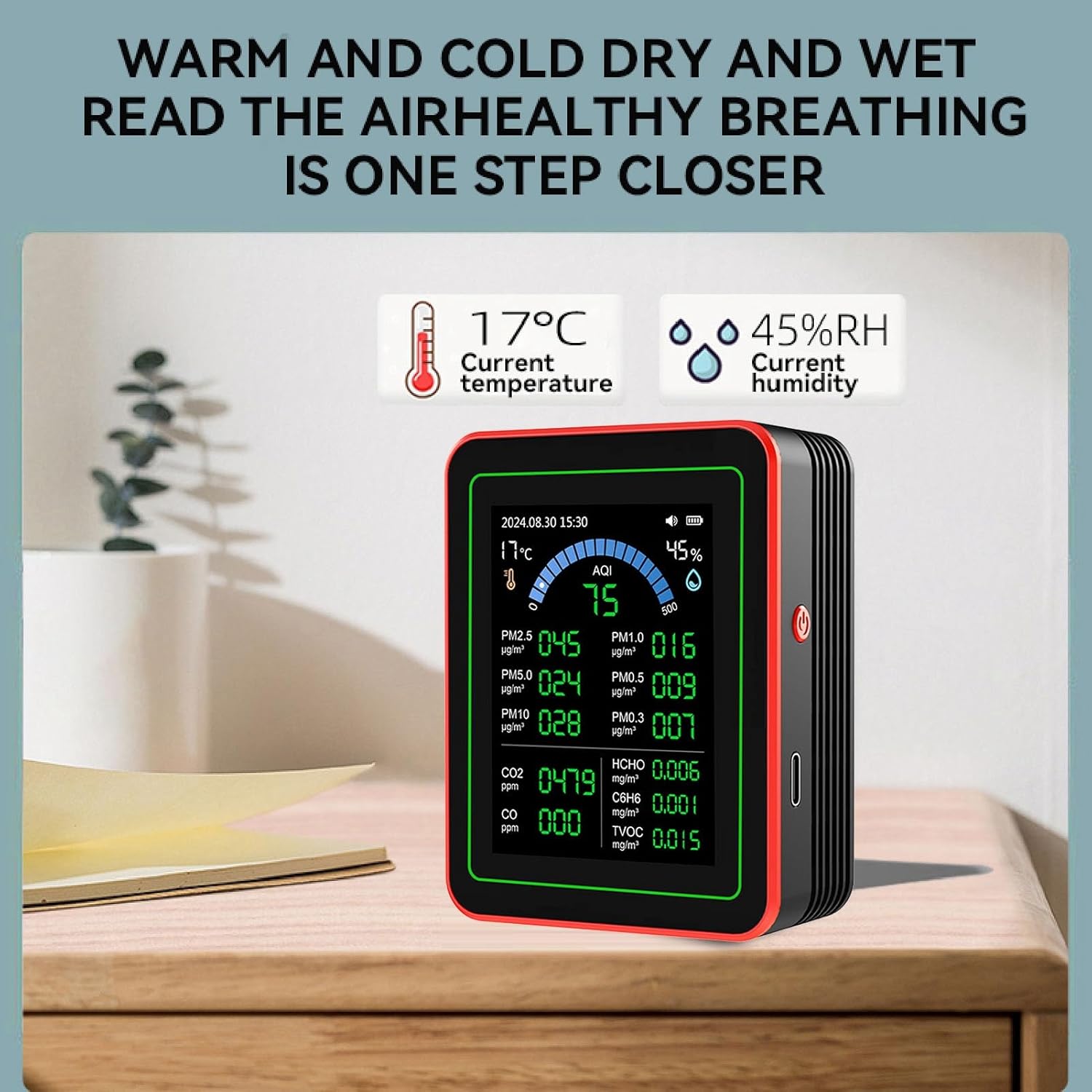
Figure 4: Monitor displaying current temperature and humidity, alongside other air quality metrics.

Figure 5: Overview of the 18 real-time values displayed, including PM levels, CO2, HCHO, TVOC, temperature, and humidity.

Figure 6: The AQL (Air Quality Level) composite index provides an overall assessment of air quality.

Figure 7: Color grading display visually indicates the severity of different air quality parameters.
8. Data Tracking and Analysis
The monitor supports long-term data preservation and analysis.
8.1 Historical Data Trends
Access the curve interface (Quintuple Click) to view historical data trends for key pollutants like PM2.5, HCHO, TVOC, and CO2 over a 24-hour period.

Figure 8: Data evaluation screen, showing particle detection comparison over time.
8.2 PC Connectivity and Data Export
The device can connect to a computer for detailed record extraction and traceability. This allows for long-term monitoring and scientific analysis of environmental data.

Figure 9: Monitor in PC mode, connected to a computer for data management.
9. Maintenance
9.1 Cleaning
Wipe the device with a soft, dry cloth. Do not use abrasive cleaners or solvents. Ensure no liquid enters the sensor openings.
9.2 Storage
Store the monitor in a cool, dry place away from direct sunlight and extreme temperatures when not in use for extended periods.
9.3 Sensor Care
Avoid exposing the sensors to high concentrations of pollutants or strong chemical fumes, as this may affect their accuracy and lifespan.
10. Troubleshooting
- Device does not power on: Ensure the device is fully charged. Connect it to a power source using the USB Type-C cable and try again.
- Inaccurate readings: Ensure the device is placed in an area with good airflow and away from direct sources of heat, cold, or strong air currents. Allow the device to stabilize for a few minutes after powering on. Consider performing a calibration if available (Triple Click).
- Screen is off: If the screen is off, it might be in screen-off mode. Single click the button to reactivate the display.
- No sound: Double click the button to toggle the sound on or off.
11. Specifications
| Parameter | Value |
|---|---|
| Model | ZN-MT32 |
| Temperature Range | 0-70℃ |
| Display | LCD screen with backlight |
| Operating Voltage | DC5V 1A TYPE C USB |
| Operating Current | 180mA |
| Sensors | PM2.5 infrared sensor, semiconductor sensor |
| Battery | 1 x 3.7V rechargeable Li-ion battery 2000mAh |
| Size | Approx. 90 x 70 x 35mm / 3.54 x 2.76 x 1.38in |
| Material | ABS |
| Color | Black |
12. Warranty and Support
For warranty information and technical support, please refer to the documentation provided with your purchase or contact Fafeicy customer service. Keep your purchase receipt for warranty claims.
Ask a question about this manual
Ask about setup, troubleshooting, compatibility, parts, safety, or missing instructions. Manuals+ will review the question and use this page’s manual context to help answer it.