
Introduction
This manual provides essential instructions for setting up, operating, and maintaining your Lonvgrt GPS Sport Smartwatch. Please read this manual thoroughly before use to ensure proper functionality and to maximize your device's performance.

Image: The Lonvgrt GPS Sport Smartwatch main display, showing current time, date, activity metrics, and weather information.
The Lonvgrt GPS Sport Smartwatch is designed for active individuals, featuring military-grade durability, comprehensive health monitoring, and advanced GPS capabilities. It includes a 1.43-inch AMOLED display, Bluetooth calling, and over 170 sport modes.
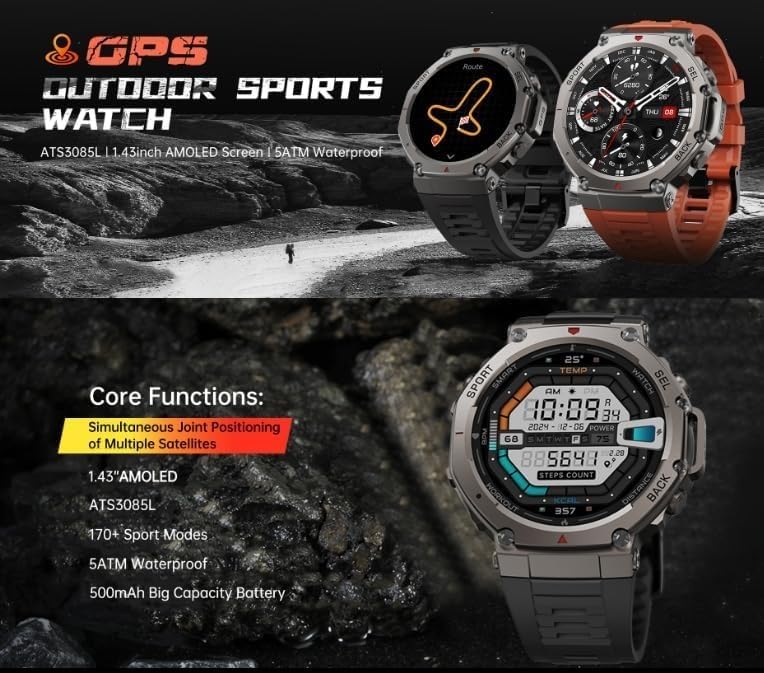
Image: An overview showcasing the core functions of the Lonvgrt GPS Sport Smartwatch, including its AMOLED screen, ATS3085L chip, 170+ sport modes, 5ATM waterproofing, and 500mAh battery.
Setup
1. Unboxing and Initial Charge
Carefully remove the smartwatch and all accessories from the packaging. Before first use, fully charge the device using the provided charging cable. Connect the magnetic charging pins to the back of the watch and plug the USB end into a compatible power adapter (not included).

Image: The smartwatch connected to its charging cable, illustrating the charging process and battery life indicators, including continuous GPS usage, always-on screen, normal use, and standby times.
2. App Installation and Pairing
Download the official companion application from your smartphone's app store (compatible with iOS and Android devices). Open the app and follow the on-screen instructions to create an account and pair your smartwatch via Bluetooth. Ensure Bluetooth is enabled on your smartphone.
The watch supports Bluetooth connectivity for seamless integration with your smartphone, tablet, or laptop.
3. Basic Settings
Once paired, configure essential settings such as time format, unit preferences (metric/imperial), and personal profile information within the app.
Operating Instructions
1. Navigation
The smartwatch features a 1.43-inch AMOLED display with touch functionality. Swipe left, right, up, or down to navigate through menus and features. Use the physical buttons on the side for quick access to specific functions (e.g., "SPORT" for sport modes, "SEL" for selection, "BACK" to return).

Image: Close-up of the smartwatch display highlighting its AMOLED screen quality, high resolution, wide viewing angle, and icons related to GPS satellite connectivity.
2. Bluetooth Calling
After successful Bluetooth pairing, you can make and receive calls directly from your smartwatch. The device is equipped with high-fidelity waterproof speakers for clear communication. To answer a call, tap the green phone icon on the watch screen. To make a call, access the dialer or contacts through the watch interface.

Image: A user demonstrating the Bluetooth call feature on the smartwatch, showing an incoming call notification on the display.
3. Activity Tracking and Sport Modes
The smartwatch automatically tracks daily activities such as steps, distance, and calories burned. Access over 170 sport modes by pressing the "SPORT" button or navigating through the menu. Select your desired activity to begin tracking. The integrated GPS provides high-precision positioning, supporting multiple satellite systems including GPS, GLONASS, BDS, Galileo, NAVIC, and QZSS.

Image: The smartwatch screen showing a tracked GPS route on a map, alongside readings for compass direction, altitude, and atmospheric pressure, useful for outdoor sports.
4. Health Monitoring
The device features 24-hour continuous heart rate monitoring using a professional VC30F-S sensor. View your current and historical heart rate data in the companion app. Sleep tracking functionality monitors your sleep stages (deep, light, REM) and provides insights into your sleep quality. Access sleep data through the app.

Image: The smartwatch display showing detailed sleep stage analysis, including duration of deep, light, and REM sleep, along with a goal and next reminder.
5. Other Features
The smartwatch includes additional features such as a compass, altimeter, and barometer for outdoor activities.
Maintenance
1. Cleaning
Regularly clean your smartwatch with a soft, dry cloth. For stubborn dirt, slightly dampen the cloth with water. Avoid using harsh chemicals or abrasive materials, as these can damage the display and casing.
2. Water Resistance
The smartwatch is 5ATM waterproof, suitable for swimming and showering. However, it is not recommended for diving or high-pressure water activities. Avoid exposing the watch to hot water or steam.
3. Battery Care
To prolong battery life, avoid fully discharging the battery frequently. Charge the device when the battery level is low. Store the watch in a cool, dry place when not in use for extended periods.
Troubleshooting
- Watch not turning on: Ensure the watch is fully charged. Connect it to the charger for at least 30 minutes.
- Unable to pair with smartphone:
- Ensure Bluetooth is enabled on your phone and the watch.
- Make sure the watch is within range of your phone.
- Restart both the watch and your smartphone.
- Try unpairing and re-pairing through the app.
- Inaccurate heart rate or activity data: Ensure the watch is worn snugly on your wrist, about one finger's width above the wrist bone. Clean the sensor on the back of the watch.
- GPS signal issues: Ensure you are in an open outdoor area with a clear view of the sky. Allow a few minutes for the watch to acquire a GPS signal.
Specifications
| Feature | Detail |
|---|---|
| Model | Lonvgrt |
| Display | 1.43-inch AMOLED, 466x466 resolution, 326 ppi |
| Connectivity | Bluetooth |
| Compatible Devices | iOS and Android Smartphones, Tablets, Laptops |
| Battery Capacity | 500 mAh |
| Battery Life (Typical Use) | 5-10 days |
| Battery Life (Continuous GPS) | 22 hours |
| Water Resistance | 5ATM |
| GPS | Integrated, supports GPS, GLONASS, BDS, Galileo, NAVIC, QZSS |
| Sensors | Heart Rate (VC30F-S), Compass, Altimeter, Barometer |
| Durability | Military-grade, Panda glass (8H hardness) |
| Chipset | ATS3085L |
| Dimensions (Watch Face) | 52.2mm |
| Thickness | 13.5mm |
| Total Length (with strap) | 260mm |

Image: Technical diagram illustrating the physical dimensions of the smartwatch and details about its ATS3085L processing chip, highlighting its power efficiency and performance.
Warranty and Support
For warranty information and customer support, please refer to the official Lonvgrt website or contact your retailer. Keep your purchase receipt as proof of purchase.
Availability of spare parts: Information unavailable.
Software updates guaranteed until: Information unavailable.