
Introduction
Thank you for choosing the MOMAX Magnetic Wireless Power Bank 10000mAh. This ultra-slim and lightweight portable charger is designed to provide convenient power for your compatible devices, including iPhone 12-17 series, Samsung Galaxy, and Google Pixel phones. This manual provides essential information for safe and efficient use of your power bank.
Important Safety Information
- Do not expose the power bank to extreme temperatures (above 45°C or below 0°C), direct sunlight, or high humidity.
- Avoid dropping, disassembling, or attempting to repair the device yourself. This may cause damage and void the warranty.
- Keep the power bank away from water and other liquids.
- Use only certified charging cables and adapters.
- Do not place metal objects between the power bank and your device during wireless charging.
- A slight increase in temperature during charging is normal. If the device becomes excessively hot, discontinue use and contact support.
- Dispose of the power bank responsibly according to local regulations.
Package Contents
Please check the package for the following items:
- MOMAX Magnetic Wireless Power Bank 10000mAh
- USB-C to USB-C Charging Cable
- User Manual (this document)
Product Overview
The MOMAX Magnetic Wireless Power Bank features a sleek design with essential components for efficient charging.

Image: The MOMAX Magnetic Wireless Power Bank demonstrating its ultra-slim 0.5-inch (13mm) profile, designed for comfortable handling with a smartphone.
- Ultra-Slim Design: Measures approximately 0.5 inches (13mm) thin and weighs 190g for portability.
- 10000mAh Capacity: Provides supplemental power for daily use.
- Magnetic Attachment: Features 18 N52 magnets for a strong 11N holding force, ensuring secure alignment for wireless charging.
- USB-C Port: Supports Power Delivery (PD) 20W wired fast charging.
- Wireless Charging Pad: Delivers up to 15W wireless charging (7.5W for iPhone).
- LED Indicators: Display the remaining battery level.
- Premium Materials: Constructed with an aluminum alloy and glass panel for durability and efficient heat dissipation.
- Advanced Safety Features: Includes graphene heat dissipation, NTC temperature monitoring, and protection against over-charging, over-current, overheating, and short circuits.
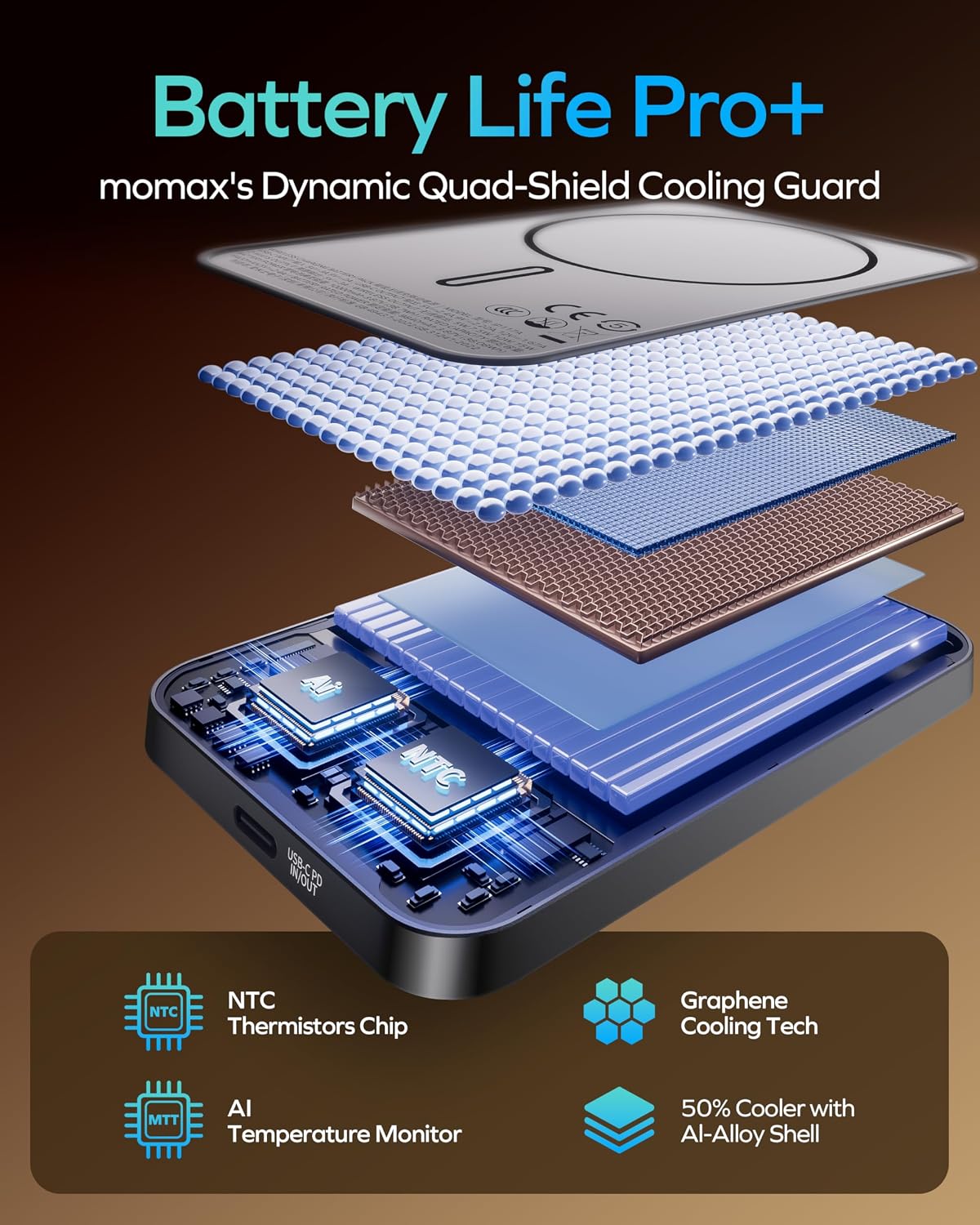
Image: An exploded view diagram illustrating the internal components and safety features, including NTC thermistors, AI temperature monitor, graphene cooling technology, and an aluminum alloy shell for efficient heat management.
Specifications
| Feature | Detail |
|---|---|
| Model Number | IP117A |
| Brand | MOMAX |
| Battery Capacity | 10000 Milliamp Hours (mAh) |
| Connector Type | USB Type C |
| Wired Output | 20W Power Delivery (PD) |
| Wireless Output | Up to 15W (7.5W for iPhone) |
| Dimensions (Thickness) | 0.5 inches (13mm) |
| Weight | 190g (0.42lb) |
| Battery Cell Type | Lithium Ion |
| Special Features | Lightweight, Slim, Wireless Charging, Magnetic Attachment |
| Compatible Devices | iPhone 12-17 Series, Samsung Galaxy, Google Pixel, iPad Pro, iPad Air, Apple Watch Series, AirPods |
Note: Specifications are subject to change without prior notice.
Setup and Initial Use
1. Charging the Power Bank
Before first use, fully charge your MOMAX Magnetic Wireless Power Bank.
- Connect the provided USB-C to USB-C cable to the power bank's USB-C port.
- Connect the other end of the cable to a compatible USB-C wall adapter (not included).
- The LED indicators on the power bank will illuminate to show the charging status. All LEDs will be solid when fully charged.
2. Checking Battery Level
Press the power button once to view the current battery level indicated by the LEDs.
Operating Instructions
Wireless Charging (Magnetic)
The power bank supports magnetic wireless charging for compatible devices.
- Ensure your device is compatible with MagSafe or has a magnetic case (less than 3mm thick).
- Align the power bank with the back of your compatible device. The magnets will automatically snap it into place.
- Wireless charging will begin automatically. The power bank provides up to 15W wireless charging, with iPhones receiving up to 7.5W.
- To stop charging, simply detach the power bank from your device.

Image: A user demonstrating the magnetic attachment of the MOMAX power bank to an iPhone, highlighting the "Power in a Snap" feature for wireless charging.

Image: An illustration detailing the 11N strong magnetic force and the arrangement of 18 N52 magnets within the power bank, ensuring automatic alignment and seamless charging.
Wired Charging (USB-C)
Use the USB-C port for fast wired charging of your devices.
- Connect one end of a USB-C to USB-C cable (or a compatible cable for your device) to the power bank's USB-C port.
- Connect the other end of the cable to your device's charging port.
- The power bank will automatically begin charging your device at up to 20W Power Delivery (PD).

Image: A user charging an iPhone via the USB-C port of the MOMAX power bank, demonstrating the PD 20W wired fast charging capability.
Device Compatibility
The MOMAX Magnetic Wireless Power Bank is compatible with a wide range of devices:
- iPhones: iPhone 12, 13, 14, 15, 16, 17 series (and their Pro, Pro Max, Mini, Plus, Air variants) with MagSafe.
- Android Phones: Samsung Galaxy, Google Pixel, and other Android phones when used with a magnetic case (less than 3mm thick) or universal MagSafe rings.
- Other Devices: iPads, Apple Watches, AirPods, and other USB-C powered devices.

Image: A visual guide illustrating the wide wireless compatibility, including iPhones with MagSafe (12-17 series or later), phones with magnetic cases (or cases less than 3mm thick), and universal MagSafe rings. It also shows examples of non-magnetic cases that are not compatible.
Maintenance
- Cleaning: Use a soft, dry cloth to clean the surface of the power bank. Do not use harsh chemicals or abrasive materials.
- Storage: Store the power bank in a cool, dry place away from direct sunlight and extreme temperatures. For long-term storage, charge the power bank to about 50-75% capacity every three months to maintain battery health.
- Avoid Physical Damage: Protect the power bank from drops, impacts, and excessive pressure, especially due to its glass panel construction.
Troubleshooting
- Power bank is not charging / Device is not charging.
- Ensure all cables are securely connected.
- Verify that the wall adapter is functioning correctly and provides sufficient power.
- Check if the power bank itself has sufficient charge.
- For wireless charging, ensure proper alignment between the power bank and your device.
- Remove any thick or non-magnetic cases that may interfere with wireless charging.
- Device is charging slowly.
- For optimal wired charging speed, ensure your device supports PD 20W and you are using a compatible USB-C cable.
- Wireless charging is generally slower than wired charging. iPhones receive up to 7.5W wirelessly.
- Ensure there are no foreign objects between the power bank and your device during wireless charging.
- Power bank or device gets warm during charging.
- A slight increase in temperature during charging is normal due to energy conversion.
- The power bank is designed with advanced thermal management (graphene heat dissipation, NTC temperature monitoring) to control heat.
- If the device becomes excessively hot or you notice any unusual odors, discontinue use immediately and contact customer support.
- Magnetic attachment is weak.
- Ensure your phone has MagSafe capability or is using a compatible magnetic case.
- Non-magnetic cases or cases thicker than 3mm may reduce magnetic strength.
- Ensure there are no obstructions between the power bank and your device.
Warranty and Support
Warranty Information
MOMAX products are manufactured with high-quality standards. For specific warranty terms and conditions, please refer to the warranty card included with your product or visit the official MOMAX website. Some customer reviews indicate a 24-month warranty period.
Customer Support
If you encounter any issues or have questions regarding your MOMAX Magnetic Wireless Power Bank, please contact MOMAX customer support. You can find contact information and frequently asked questions on the official MOMAX website or through the MOMAX Store on Amazon.


