
1. Introduction
Thank you for choosing the TIQLAB L-Shaped Electric Standing Desk. This manual provides essential information for the safe assembly, operation, and maintenance of your new desk. Please read these instructions carefully before use and retain them for future reference.
This electric standing desk is designed to offer a versatile workspace, allowing you to switch between sitting and standing positions to promote a healthier work environment. It features a spacious L-shaped desktop, integrated storage drawers, and an upper shelf for enhanced organization.
2. Safety Information
Important Safety Precautions:
- Always ensure the desk is properly anchored to the floor to prevent tipping, especially when adjusting the height or when the desk is at its maximum weight capacity.
- Keep children and pets away from the desk during operation.
- Ensure no obstacles are in the path of the desk's movement during height adjustments.
- Do not overload the desk. Refer to the 'Specifications' section for maximum weight capacity.
- Disconnect power before cleaning or performing any maintenance.
3. Setup and Assembly
Assembly of your TIQLAB L-Shaped Electric Standing Desk requires careful attention to detail. Please follow the included assembly guide for step-by-step instructions. Ensure all components are present before beginning.

Figure 3.1: Desk Dimensions and Load Capacity. The desk measures 75x65 inches and has a height adjustment range of 28.3 to 45.6 inches. It supports a maximum static load of 250 lbs.
3.1 Component Identification
Before assembly, identify all parts using the provided parts list in your separate assembly manual. Key components include:
- L-shaped desktop sections (FSC-Certified wood)
- Electric lift columns and feet
- Control panel
- Six soft fabric drawers
- Upper shelf components
- Hardware kit (screws, bolts, tools)
3.2 Assembly Steps Overview
- Attach the electric lift columns to the desktop sections.
- Connect the desktop sections to form the L-shape.
- Install the control panel in the designated location.
- Assemble and insert the six fabric drawers into their compartments.
- Mount the upper shelf onto the desktop.
- Connect all necessary power cables and ensure they are securely routed.

Figure 3.2: Desk with Drawers and Upper Shelf. This image illustrates the integrated storage solutions, including six fabric drawers and an elevated shelf, designed for organization.
4. Operating Instructions
Your TIQLAB Electric Standing Desk features an intuitive control panel for height adjustment and memory presets.
4.1 Height Adjustment
The desk can be adjusted between a minimum height of 28.3 inches and a maximum height of 45.6 inches.
- To Raise: Press and hold the Up Arrow button on the control panel.
- To Lower: Press and hold the Down Arrow button on the control panel.

Figure 4.1: Height Adjustment Range. The desk offers a flexible height range from 28.3 inches (sitting) to 45.6 inches (standing).
4.2 Memory Presets
The control panel allows you to save preferred sitting and standing heights for quick adjustments.
- Adjust the desk to your desired height using the Up/Down arrows.
- Press the M button, then press one of the numbered preset buttons (e.g., 1 or 2) to save the current height.
- To recall a saved height, simply press the corresponding numbered preset button.
4.3 Smooth and Quiet Operation
The desk's powerful lift system operates smoothly and quietly, with noise levels typically below 50dB, ensuring minimal disruption to your work environment.
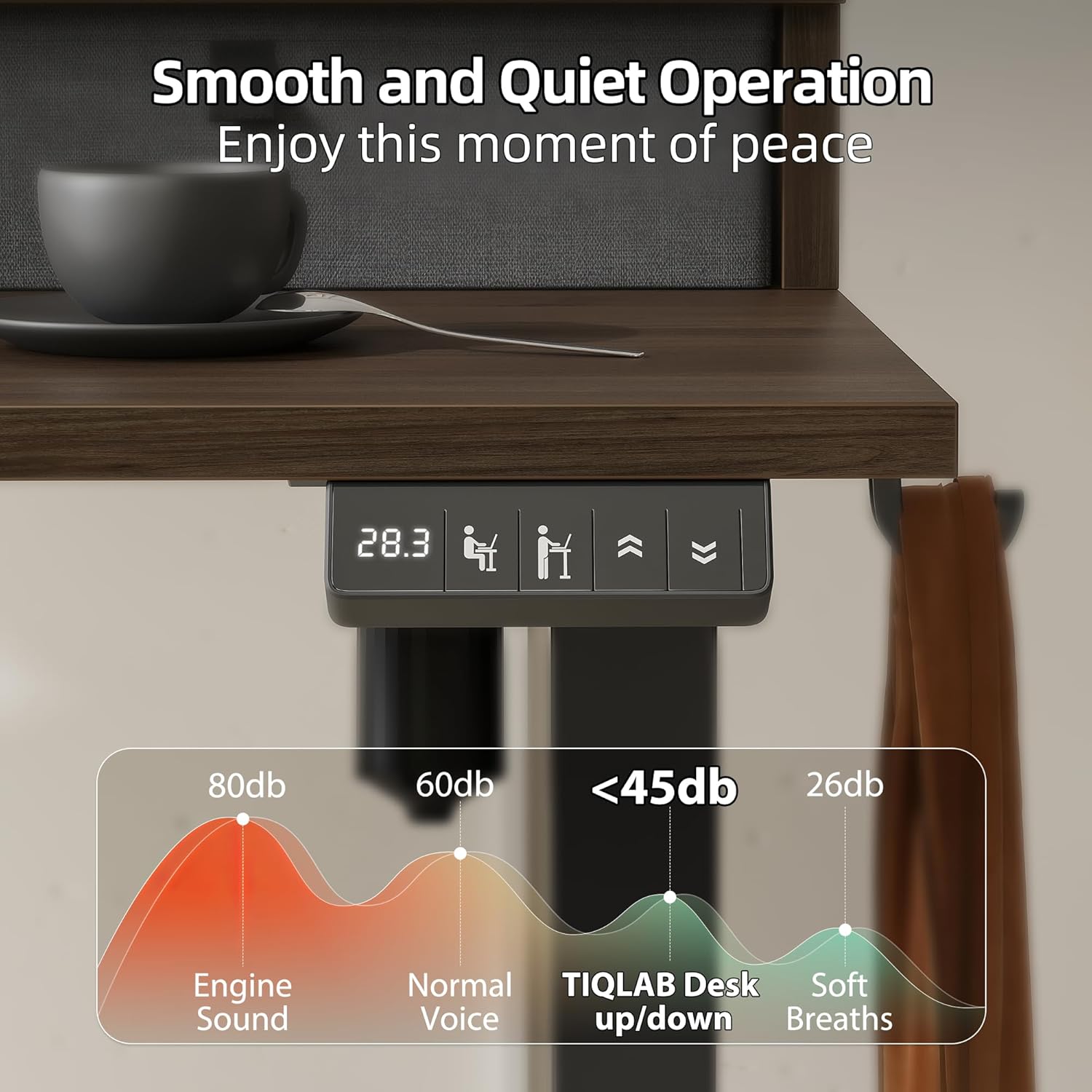
Figure 4.2: Noise Level Comparison. The desk operates at less than 45dB, comparable to soft breaths, ensuring a quiet workspace.
4.4 Anti-Collision Technology
The desk is equipped with an auto-sensing anti-collision system. If the desk encounters an obstruction during height adjustment, it will automatically stop and reverse slightly to prevent damage.

Figure 4.3: Anti-Collision Feature. The desk's anti-collision system detects obstructions and stops movement to prevent damage.
5. Maintenance
Regular maintenance ensures the longevity and optimal performance of your desk.
- Cleaning: Wipe the desktop and frame with a soft, damp cloth. Avoid harsh chemicals or abrasive cleaners.
- Cable Management: Periodically check and organize cables to prevent tangles and damage.
- Fasteners: Ensure all screws and bolts remain tight. Retighten if necessary.
- Weight Distribution: Distribute weight evenly across the desktop to prevent strain on the lift system.
6. Troubleshooting
If you encounter issues with your desk, refer to the following common troubleshooting steps:
| Problem | Possible Cause | Solution |
|---|---|---|
| Desk does not move | Power cable disconnected; Overload; Motor error | Check power connection; Reduce weight on desk; Unplug and replug power after 30 seconds. |
| Uneven height adjustment | Uneven weight distribution; Sensor issue | Redistribute weight; Perform a reset (refer to specific control panel instructions in assembly manual). |
| Noise during operation | Loose fasteners; Obstruction | Check and tighten all fasteners; Ensure no objects are interfering with the lift columns. |
| Anti-collision activates frequently | Sensitive setting; Obstruction | Ensure clear path for desk movement; Refer to assembly manual for sensitivity adjustment if available. |
If the problem persists after attempting these solutions, please contact TIQLAB customer support.
7. Specifications
| Feature | Detail |
|---|---|
| Model | B0FRSG31W1 |
| Brand | TIQLAB |
| Desk Design | L-Shaped Standing Desk |
| Dimensions (L x W) | 75 x 65 inches |
| Height Adjustment Range | 28.3 inches to 45.6 inches |
| Maximum Static Load Capacity | 250 lbs (114 kg) |
| Noise Level | <50dB |
| Desktop Material | FSC-Certified Engineered Wood |
| Frame Material | Metal |
| Number of Drawers | 6 (soft fabric) |
| Number of Shelves | 1 (upper shelf) |
| Special Features | Electric height adjustment, Memory presets, Anti-collision technology |
8. Warranty
This TIQLAB L-Shaped Electric Standing Desk comes with a limited warranty. Please refer to the warranty card included with your product packaging for specific terms, conditions, and duration of coverage. The warranty typically covers manufacturing defects and malfunctions under normal use.
9. Customer Support
For any questions, assistance with assembly, troubleshooting, or warranty claims, please contact TIQLAB customer support. You can reach us through the Amazon platform where you purchased the product. Our dedicated support team is committed to ensuring your satisfaction.
Contact Method: Via Amazon's messaging system.