
1. Introduction
This manual provides essential information for the safe and efficient operation of your DOOGEE S200 Ultra 5G Rugged Phone. Please read this manual thoroughly before using the device to ensure proper functionality and to understand its features.

Figure 1: DOOGEE S200 Ultra 5G Rugged Phone Overview
Video 1: Official product video demonstrating the key features and rugged design of the DOOGEE S200 Ultra 5G Rugged Phone, including its dual screen, camera capabilities, battery life, and durability.
2. What's in the Box
The standard package for your DOOGEE S200 Ultra includes the following items:
- DOOGEE S200 Ultra 5G Rugged Phone
- USB Cable
- Power Adapter (66W)
- SIM Ejector Tool
- Screen Protector (pre-applied)
- User Manual (this document)
3. Device Overview
3.1. Dual Screen Functionality
The DOOGEE S200 Ultra features a dual-screen design for enhanced usability:
- Main Display: A 6.72-inch FHD+ IPS display with a 2400x1080 resolution and a 120Hz refresh rate. It is protected by Corning Gorilla Glass.
- Rear Display: A 1.32-inch AMOLED display with a 60Hz refresh rate. This secondary screen provides dynamic watch faces, notifications, music controls, and call information without activating the main screen.

Figure 2: Main Display Specifications

Figure 3: Rear Display Features
3.2. Dynamic Breathing Light
The device incorporates a dynamic breathing light on the rear panel, which provides visual alerts for various functions such as incoming calls, messages, music playback, low battery status, charging, and game mode activation.

Figure 4: Dynamic Breathing Light in action
4. Setup
4.1. SIM Card and Storage Installation
- Locate the SIM card tray on the side of the device.
- Insert the SIM ejector tool into the small hole next to the tray and press firmly until the tray pops out.
- Place your Nano-SIM cards (up to two) and/or a microSD card (for expandable storage up to 2TB) into the designated slots on the tray. Ensure the metal contacts face downwards.
- Carefully reinsert the tray into the device until it clicks into place.
4.2. Initial Power On and Charging
- Press and hold the Power button (located on the side) until the DOOGEE logo appears on the screen.
- Follow the on-screen instructions to complete the initial setup, including language selection, Wi-Fi connection, and Google account setup.
- For optimal battery performance, fully charge the device before first use. Connect the USB cable to the phone's charging port and the power adapter to a wall outlet. The device supports 66W fast charging.
5. Operating the Device
5.1. Android 15 Operating System
The DOOGEE S200 Ultra operates on Android 15, offering enhanced security, customization options, and optimized performance. It integrates AI features, including Gemini AI, for various tasks such as image analysis, content creation, and smart assistance.

Figure 5: Android 15 with Gemini AI Features
5.2. Performance and Storage
Equipped with the MediaTek Dimensity 7400 5G chipset (4nm octa-core, 2.6GHz) and an advanced cooling system, the device ensures smooth, lag-free performance. It features 12GB physical RAM + 36GB virtual RAM (total 48GB) and 1TB of internal memory, expandable up to 2TB with a microSD card.

Figure 6: Processor and Memory Configuration
5.3. Connectivity
The DOOGEE S200 Ultra supports comprehensive connectivity options:
- Dual 5G SIM: Compatible with various carriers (T-Mobile, Speedtalk, Mint Mobile, etc.). Note: Not compatible with CDMA carriers such as AT&T, Cricket Wireless, Verizon, Straight Talk, or U.S. Cellular.
- NFC: For contactless payments (Google Pay) and quick pairing.
- Wi-Fi 6E: For high-speed wireless internet access.
- Bluetooth 5.4: For connecting wireless accessories.
- Navigation: Hyper-precise navigation via GPS, Beidou, GLONASS, and Galileo satellite systems.
6. Camera Features
The device is equipped with an advanced multi-camera system:
- 100MP AI Main Camera: Features Electronic Image Stabilization (EIS) and Optical Image Stabilization (OIS) for clear photos and videos.
- 20MP Night Vision Camera: Utilizes Morpho technology to capture details in low-light or dark environments.
- 2MP Macro Camera: For detailed close-up photography.
- 32MP Front Camera: Automatically optimizes selfies for improved quality.

Figure 7: Multi-Camera System
7. Durability and Protection
The DOOGEE S200 Ultra is designed for rugged environments, certified with industry-leading protection standards:
- IP68: Dust and water resistant (submersible up to 1.5 meters for 30 minutes).
- IP69K: Resistant to high-pressure, high-temperature water jets.
- MIL-STD-810H: Military-grade standard for protection against drops, shocks, vibrations, and extreme temperatures.
The precision-engineered body combines a streamlined profile with reinforced panels, offering protection against shock, compression, and vibration.

Figure 8: Ruggedness Certifications
8. Battery Management
The device is powered by an 11000mAh Silicon-Carbon battery, providing extended usage times:
- Up to 650 hours of standby time.
- Up to 50 hours of talk time.
- Up to 20 hours of video playback.
It supports 66W super-fast charging, reaching 24% in approximately 10 minutes and 100% in about 1 hour and 15 minutes. The 10W OTG (On-The-Go) function allows the phone to charge other accessories.
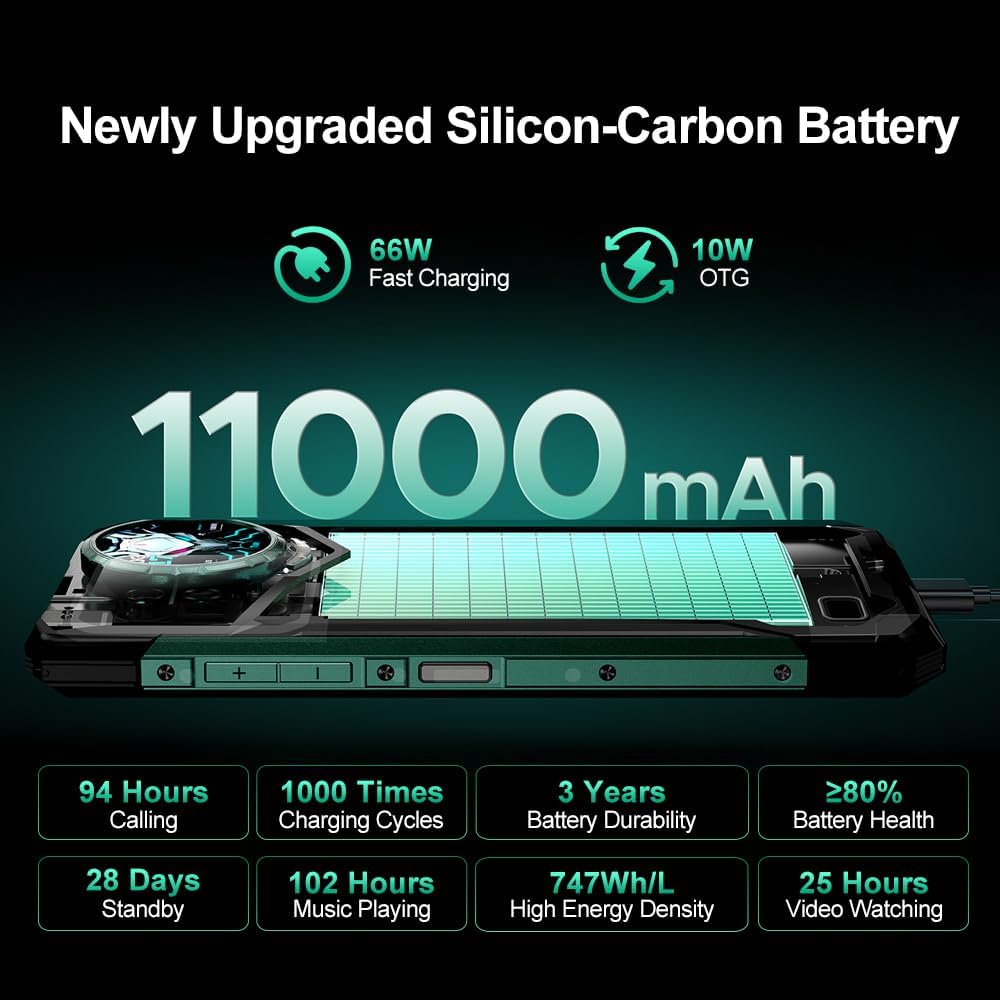
Figure 9: Battery Performance and Charging
9. Specifications
| Feature | Detail |
|---|---|
| Model Name | S200 Ultra |
| Operating System | Android 15 |
| Processor | MediaTek Dimensity 7400 5G (4nm Octa-core, 2.6GHz) |
| RAM | 48GB (12GB Physical + 36GB Virtual) |
| Internal Storage | 1TB (Expandable up to 2TB via microSD) |
| Main Display | 6.72 Inches FHD+ IPS (2400x1080), 120Hz |
| Rear Display | 1.32 Inches AMOLED, 60Hz |
| Main Camera | 100MP AI (EIS+OIS) |
| Night Vision Camera | 20MP |
| Macro Camera | 2MP |
| Front Camera | 32MP |
| Battery Capacity | 11000mAh |
| Charging | 66W Fast Charging, 10W OTG |
| Durability | IP68, IP69K, MIL-STD-810H |
| Connectivity | 5G, NFC, Wi-Fi 6E, Bluetooth 5.4, GPS/Beidou/GLONASS/Galileo |
| Dimensions | 7.07 x 3.25 x 0.75 inches |
| Item Weight | 13.5 ounces (383 Grams) |
| Color | Black |
10. Maintenance
To ensure the longevity and optimal performance of your DOOGEE S200 Ultra, follow these maintenance guidelines:
- Cleaning: Use a soft, damp cloth to clean the device. Avoid harsh chemicals or abrasive materials.
- Screen Care: While the main display is protected by Corning Gorilla Glass, avoid placing sharp objects directly on the screen.
- Port Protection: Ensure all port covers (USB, SIM tray) are securely closed to maintain water and dust resistance.
- Software Updates: Regularly check for and install software updates to benefit from the latest features, security patches, and performance improvements.
- Battery Care: Avoid exposing the device to extreme temperatures. While the battery is designed for durability, prolonged exposure to heat or cold can affect its lifespan.
11. Troubleshooting
If you encounter issues with your DOOGEE S200 Ultra, consider the following common troubleshooting steps:
- Device Not Turning On: Ensure the battery is charged. Connect the device to the charger for at least 15 minutes before attempting to power it on again.
- Screen Unresponsive: Try restarting the device by holding down the Power button for approximately 10-15 seconds.
- Network Issues: Check if your SIM card is properly inserted. Verify that mobile data or Wi-Fi is enabled. If issues persist, contact your network provider.
- App Malfunctions: Clear the cache and data of the problematic app via Settings > Apps. If the issue continues, uninstall and reinstall the app.
- Slow Performance: Close unnecessary background applications. Clear cached data regularly. Consider performing a factory reset as a last resort (back up your data first).
12. Warranty and Support
The DOOGEE S200 Ultra 5G Rugged Phone comes with a 2-year warranty. This warranty covers manufacturing defects and ensures your device functions as intended under normal use.
For technical support, warranty claims, or any other inquiries, please contact the seller or DOOGEE customer service. Refer to the contact information provided with your purchase documentation or visit the official DOOGEE website for support resources.
If you have any problem with the mobile phone, please feel free to contact us.


