
1. Product Overview
The PROSTER Pinless Moisture Meter PST272 is a non-destructive device designed for accurately measuring moisture content in various materials without causing damage. It utilizes advanced high-frequency electromagnetic wave technology to scan up to 20mm deep, providing an average reading across a 40x40mm area. This meter is ideal for inspecting finished drywall, hardwood floors, and other delicate surfaces.

Image 1: PROSTER Pinless Moisture Meter PST272, showing the device, carrying case, and AAA batteries.
Key Features:
- Non-Destructive Deep Sensing: Scans up to 20mm deep across a 40x40mm area using high-frequency electromagnetic waves, ensuring no damage to surfaces.
- 4-Material Smart Mode: Provides precise measurements for Drywall, Mortar, Hardwood, and Softwood.
- Dual Alarms: Features a customizable audio alarm that activates when moisture levels exceed a set threshold, complemented by a 3-color bar graph (Green: Dry, Yellow: Risk, Red: Wet) on the display.
- Data Management: Includes HOLD function to lock readings and MAX/MIN record to track extreme moisture levels.
- Environmental Tracking: Measures ambient temperature and humidity for a comprehensive diagnostic picture.
- User-Friendly Design: Ergonomic grip with soft rubber for secure handling, auto-calibration in 3 seconds, and auto-off after 10 minutes of inactivity.
2. Package Contents
The following items are included with your PROSTER Pinless Moisture Meter PST272:
- 1x PROSTER Pinless Moisture Meter PST272
- 1x Storage Bag
- 3x AAA Batteries
- 1x User Manual

Image 2: All items included in the PROSTER Pinless Moisture Meter PST272 package.
3. Setup
3.1. Battery Installation
- Locate the battery compartment on the back of the device.
- Open the battery cover.
- Insert 3 AAA batteries, ensuring correct polarity (+/-).
- Close the battery cover securely.
3.2. Initial Power On & Calibration
After installing the batteries, press the power button (U) to turn on the device. The meter will automatically calibrate within 3 seconds. Ensure the sensor area is not in contact with any material during calibration for accurate results.
Video 1: Demonstration of the LASELION MS04 Pinless Moisture Meter, showing unboxing, power-on, calibration, and measurement on various surfaces like wash basins, wall corners, and wooden flooring. It also highlights the temperature display and alarm value setting.
4. Operating Instructions
4.1. Power On/Off
- Press the power button (U) briefly to turn the meter on.
- Press and hold the power button (U) for approximately 2 seconds to turn the meter off.
- The meter features an auto-off function after 10 minutes of inactivity to conserve battery life.
4.2. Mode Selection
The PST272 offers four dedicated measurement modes for different materials. Press the 'SEL' button to cycle through the modes:
- Drywall Mode: For measuring moisture in drywall.
- Mortar Mode: For measuring moisture in mortar and masonry.
- Hardwood Mode: For measuring moisture in hardwood materials.
- Softwood Mode: For measuring moisture in softwood materials.
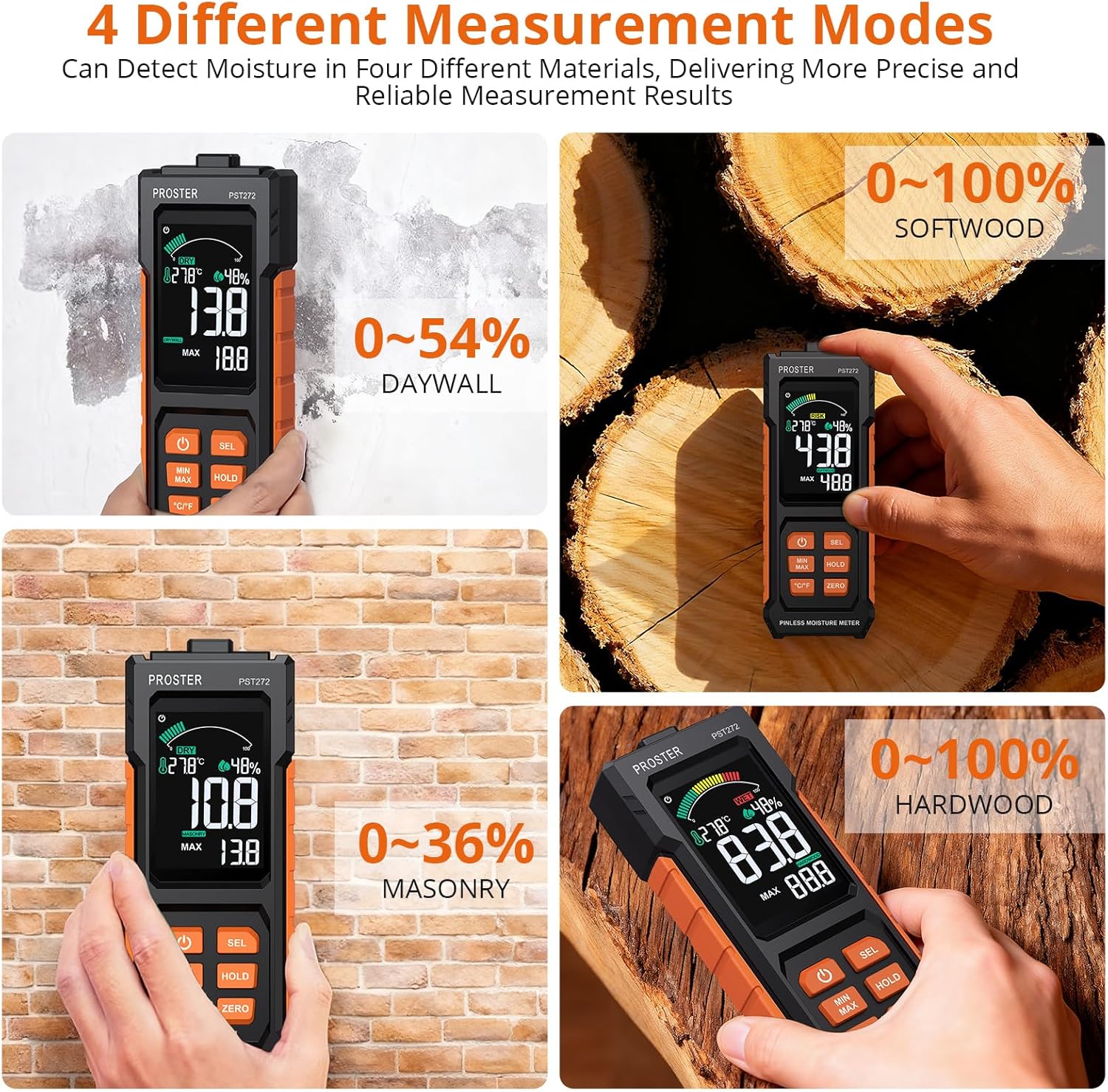
Image 3: The meter's display showing the four distinct measurement modes: Softwood, Drywall, Masonry, and Hardwood.
4.3. Measurement Technique
To obtain accurate readings, hold the instrument by its base and place the sensor area (located on the back of the device) flat against the surface of the material you wish to measure. Ensure the object's thickness is greater than 20mm and the area is greater than 40mm x 40mm for optimal results. Avoid placing fingers on the sensor area during measurement.
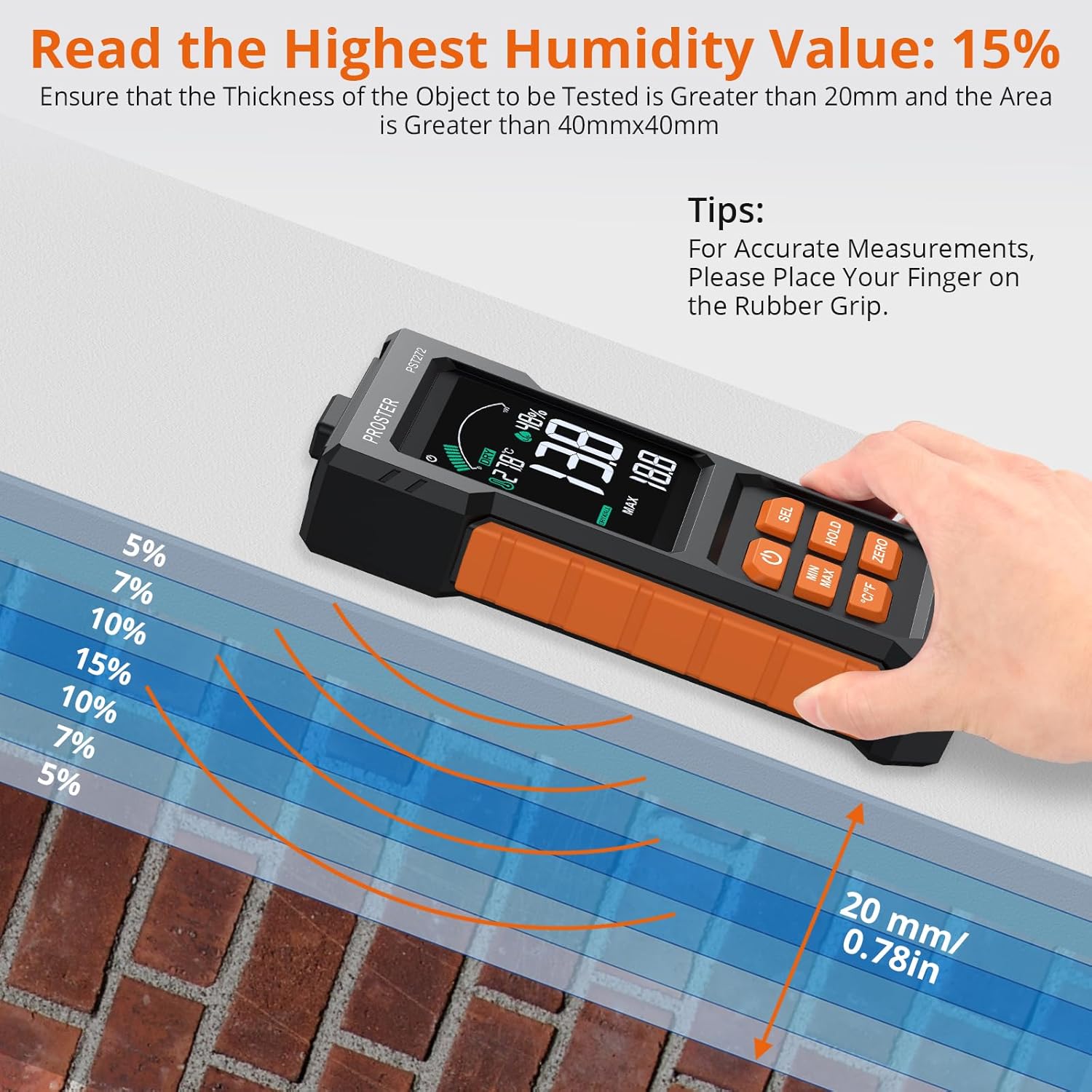
Image 4: The meter demonstrating its 20mm depth sensing capability on a wall, indicating optimal measurement conditions.
4.4. Reading the Display & Alarms
The large 2.7-inch anti-glare color LCD displays the moisture content as a digital readout and a 3-color bar graph:
- Green: Indicates a dry moisture level.
- Yellow: Indicates a risk level, suggesting moderate moisture.
- Red: Indicates a wet level, signifying high moisture content.
A customizable audio alarm will sound when the moisture level surpasses your preset threshold for the selected material mode.
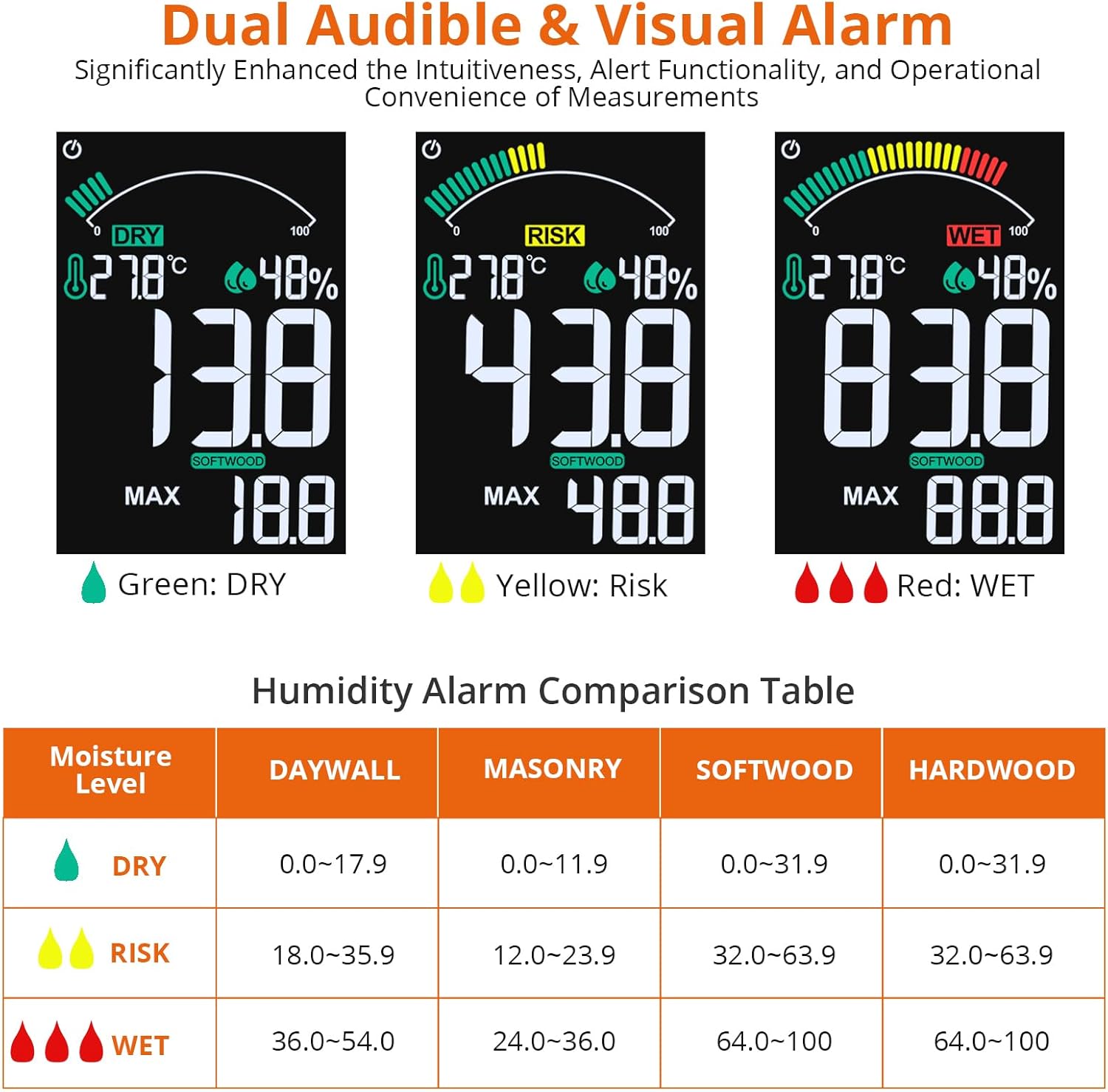
Image 5: The meter's display illustrating the three moisture level indicators (Dry, Risk, Wet) and their corresponding percentage ranges for different materials.
Video 2: A short demonstration of a pinless moisture meter (MT28C) in wall and wood modes, highlighting its non-destructive measurement capabilities and quick response.
4.5. Data Hold & MAX/MIN Functions
- Press the 'HOLD' button to freeze the current reading on the screen. Press it again to release.
- Use the 'MAX/MIN' function to record the highest and lowest moisture levels detected during a measurement session. This is useful for mapping the extent of a leak or monitoring drying progress over time.
4.6. Temperature and Humidity Display
The meter also displays ambient temperature (in °C or °F) and relative humidity, providing additional environmental context for your measurements. Press the '°C/°F' button to switch between Celsius and Fahrenheit.
5. Maintenance
- Keep the device clean and dry. Use a soft, damp cloth to wipe the exterior. Do not use abrasive cleaners or solvents.
- Store the meter in its storage bag in a cool, dry place when not in use.
- Remove batteries if the device will not be used for an extended period to prevent leakage.
6. Troubleshooting
- No Display/Power On: Check if the batteries are correctly installed and have sufficient charge. Replace if necessary.
- Inaccurate Readings: Ensure the sensor is placed flat against the material and that the correct material mode is selected. Avoid interference from nearby metal objects (steel bars, wires) or thin materials, as these can affect readings. Re-calibrate the device by holding it in the air and pressing the power button.
- Alarm Not Sounding: Verify that the alarm threshold is set appropriately for the material being measured.
7. Specifications
| Feature | Specification |
|---|---|
| Model Number | PST272 |
| Measurement Principle | High-frequency electromagnetic wave induction |
| Sensing Depth | Up to 20mm |
| Measurement Area | 40mm x 40mm |
| Material Modes | Drywall, Mortar, Hardwood, Softwood |
| Drywall Measurement Range | 0% - 54% |
| Mortar Measurement Range | 0% - 36% |
| Hardwood Measurement Range | 0% - 100% |
| Softwood Measurement Range | 0% - 100% |
| Display | 2.7-inch VA Color LCD with 3-color bar graph |
| Power Source | 3x AAA Batteries (included) |
| Auto-Off | 10 minutes of inactivity |
| Item Weight | 169 g |
| Manufacturer | Proster Trading Limited |
8. Warranty and Support
PROSTER offers a 2-year warranty for this product. For any product problems or concerns, please contact customer support. We are committed to providing the best solution within 24 hours.

