1. Introduction
Thank you for purchasing the Acerpure Cozy HF1 Foldable Hand Fan. This manual provides essential information for the safe and efficient operation of your device. Please read it thoroughly before use and retain it for future reference.
The Acerpure Cozy HF1 is a versatile personal cooling device featuring a powerful motor, 100-level adjustable speed, a cold compress function, and a portable, foldable design. Its integrated HD display provides real-time information on battery level, wind speed, and cooling mode.
2. Safety Information
To ensure safe operation and prevent damage, please observe the following precautions:
- Keep the fan away from water and other liquids. Do not operate with wet hands.
- Do not insert fingers or foreign objects into the fan blades or air inlets/outlets.
- Avoid dropping the fan or subjecting it to strong impacts.
- Do not disassemble, repair, or modify the fan yourself. Contact qualified service personnel for assistance.
- Keep out of reach of children and pets.
- Use only the provided charging cable or a certified DC 5V/2A USB-C charger.
- Do not expose the fan to extreme temperatures, direct sunlight, or high humidity.
- If the fan emits smoke, unusual odors, or makes abnormal noises, immediately turn it off and disconnect the power source.
3. Product Overview and Package Contents
3.1 Package Contents
Verify that all items are present in the package:
- Acerpure Cozy HF1 Foldable Hand Fan
- USB-C Charging Cable
- User Manual (this document)
- Neck Strap (if included with your model)
3.2 Product Components
Familiarize yourself with the different parts of your Acerpure Cozy HF1 fan.
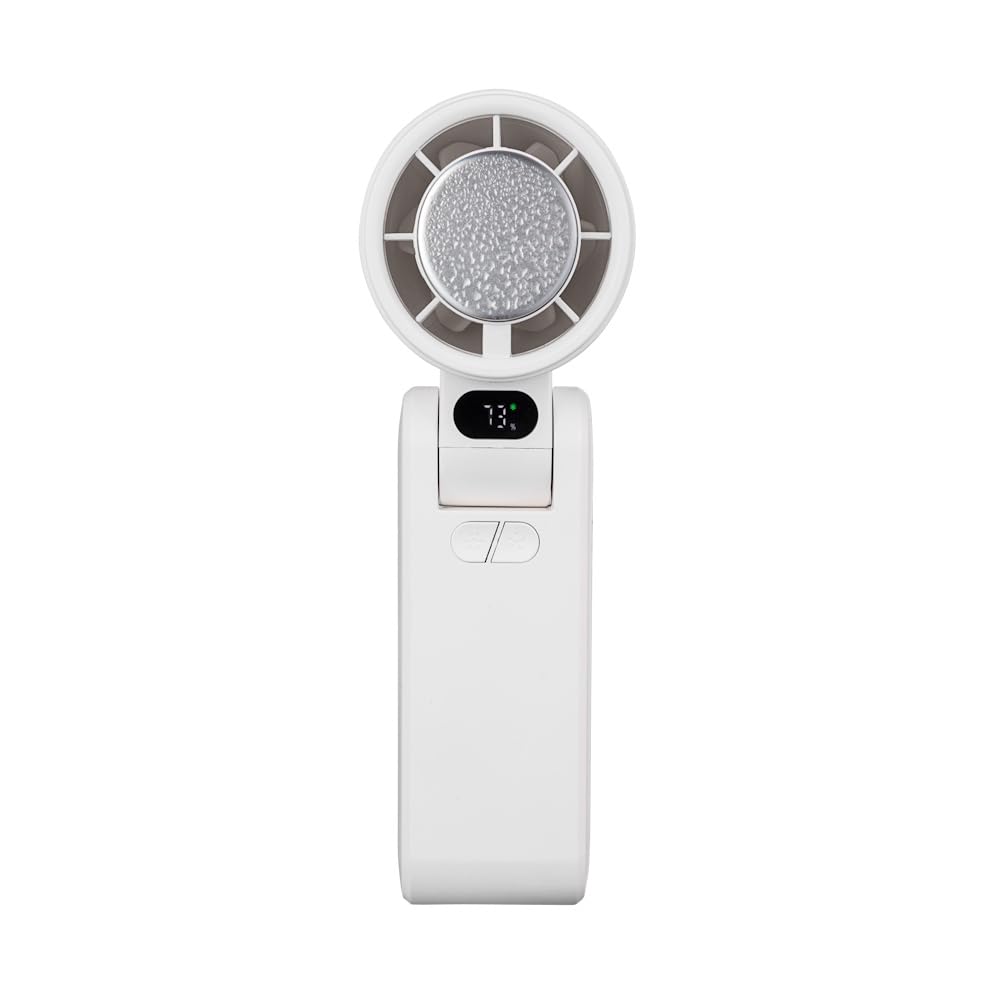
Figure 1: Front view of the Acerpure Cozy HF1 Hand Fan. This image displays the fan in its upright, unfolded position, highlighting the fan head, the digital display, control buttons, and the USB-C charging port on the side.

Figure 2: Side view of the Acerpure Cozy HF1 Hand Fan in its folded configuration. This view emphasizes the compact nature of the fan when folded, suitable for portability, and shows the display and USB-C port.
- Fan Head: Contains the fan blades and the cold compress plate.
- Digital HD Display: Shows battery level, wind speed, cooling mode, and charging status.
- Power/Speed Button: Controls power on/off and adjusts fan speed.
- Cooling Mode Button: Activates/deactivates the cold compress function.
- USB-C Charging Port: For charging the internal battery.
- Foldable Hinge: Allows the fan to be folded for compact storage or adjusted for various angles.
- Lanyard/Strap Attachment Point: For attaching the neck strap.
4. Setup
4.1 Initial Charging
Before first use, fully charge the fan. The fan is equipped with a 3600mAh rechargeable battery.
- Connect the provided USB-C charging cable to the fan's USB-C port.
- Connect the other end of the cable to a DC 5V/2A USB power adapter (not included) or a compatible USB port.
- The HD display will show the charging status. A full charge typically takes approximately 4 hours.
4.2 Unfolding and Positioning
The fan features a foldable design for versatile use.
- Gently unfold the fan head from the handle until it locks into the desired angle. The fan supports multi-angle adjustment.
- For handheld use, hold the fan by the handle.
- For desktop use, position the fan on a flat, stable surface.
- To wear around the neck, attach the neck strap to the designated attachment points and adjust for comfort.

Figure 3: The Acerpure Cozy HF1 fan being worn around the neck using the included strap, demonstrating its hands-free portability.

Figure 4: The Acerpure Cozy HF1 fan attached to a bag, illustrating its compact size and ease of transport for on-the-go use.

Figure 5: An illustration showing the Acerpure Cozy HF1 fan's multi-angle adjustment capabilities, allowing it to be positioned for different uses and scenarios.
5. Operating Instructions
5.1 Power On/Off and Fan Speed Adjustment
The fan offers 100 levels of adjustable wind speed.
- To Power On: Press and hold the Power/Speed button for approximately 2 seconds. The fan will start at a low speed, and the HD display will illuminate.
- To Adjust Speed: Briefly press the Power/Speed button repeatedly to cycle through the 100 speed levels. The current speed level will be shown on the HD display.
- To Power Off: Press and hold the Power/Speed button for approximately 2 seconds until the fan stops and the display turns off.

Figure 6: Illustration of the powerful airflow generated by the Acerpure Cozy HF1 fan, highlighting its 13,000 RPM motor and efficient design.
5.2 Cold Compress Function
The fan includes a built-in cold compress feature for rapid cooling.
- To Activate: With the fan powered on, briefly press the Cooling Mode button. A snowflake icon will appear on the HD display, indicating the cold compress is active.
- To Deactivate: Briefly press the Cooling Mode button again. The snowflake icon will disappear.
Note: Using the cold compress function will consume battery power more quickly.

Figure 7: The Acerpure Cozy HF1 fan demonstrating its instant cooling capability with the cold compress function, depicted with ice surrounding the fan head.
5.3 HD Display Information
The HD panel provides real-time operational status:
- Battery Level: Indicated by a percentage (e.g., "73%") and a battery icon.
- Wind Speed: Shown as a numerical value (1-100).
- Cooling Mode: A snowflake icon indicates the cold compress is active.
- Charging Status: A charging icon appears when connected to power.

Figure 8: Close-up of the Acerpure Cozy HF1's HD display, illustrating battery level (100%) and estimated working time (6 hours).
6. Maintenance
6.1 Cleaning
Regular cleaning helps maintain optimal performance.
- Ensure the fan is powered off and disconnected from any power source before cleaning.
- Wipe the exterior of the fan with a soft, dry, or slightly damp cloth.
- Do not use abrasive cleaners, solvents, or harsh chemicals, as these may damage the surface.
- Use a soft brush or compressed air to gently remove dust from the fan grille and blades. Do not attempt to remove the fan grille.
6.2 Storage
When not in use for extended periods:
- Fully charge the fan before storing.
- Fold the fan into its compact position.
- Store in a cool, dry place, away from direct sunlight and extreme temperatures.
7. Troubleshooting
If you encounter issues with your Acerpure Cozy HF1, refer to the following table:
| Problem | Possible Cause | Solution |
|---|---|---|
| Fan does not turn on. | Low battery. | Charge the fan fully. |
| Fan does not turn on. | Power button not pressed correctly. | Press and hold the Power/Speed button for 2 seconds. |
| Weak airflow. | Low fan speed setting. | Increase fan speed using the Power/Speed button. |
| Weak airflow. | Obstruction in air inlet/outlet. | Ensure air inlets and outlets are clear of debris. |
| Cold compress not working. | Function not activated. | Press the Cooling Mode button to activate (snowflake icon should appear). |
| Cold compress not working. | Low battery. | Charge the fan. The cold compress function may be limited when battery is low. |
| Fan not charging. | Cable or adapter issue. | Ensure USB-C cable is securely connected. Try a different USB-C cable or power adapter (DC 5V/2A recommended). |
If the problem persists, please contact customer support.
8. Specifications
| Model | HF1 |
| Brand | Acerpure |
| Motor Speed | Up to 13,000 RPM |
| Fan Speeds | 100 adjustable levels |
| Battery Capacity | 3600mAh |
| Charging Time | Approximately 4 hours |
| Working Time | 2-6 hours (depending on speed and cooling mode usage) |
| Cooling Time | 1-3 hours (when cold compress is active) |
| Charging Input | DC 5V/2A (USB-C) |
| Dimensions (Folded) | Approximately 5D x 6W x 17H cm |
| Item Weight | 234 g |
| Material | Plastic |
| Special Features | Foldable, Cold Compress Function, HD Display, Wearable |
9. Warranty and Customer Support
Acerpure products are manufactured to high quality standards. For information regarding warranty coverage, please refer to the warranty card included with your purchase or visit the official Acerpure website.
If you require technical assistance, troubleshooting beyond this manual, or have questions about your product, please contact Acerpure customer support through their official channels. Please have your product model number (HF1) and purchase details ready when contacting support.