
1. Important Safety Instructions
Please read all instructions carefully before using this electric fireplace. Failure to follow these instructions may result in electric shock, fire, or serious injury.
- Always plug the fireplace directly into a wall outlet. Never use with an extension cord or relocatable power tap.
- This fireplace is hot when in use. To avoid burns, do not let bare skin touch hot surfaces. Keep combustible materials, such as furniture, pillows, bedding, papers, clothes, and curtains at least 3 feet (0.9 m) from the front of the fireplace and keep them away from the sides and rear.
- Extreme caution is necessary when any heater is used by or near children or invalids and whenever the heater is left operating and unattended.
- Do not operate any heater with a damaged cord or plug or after the heater malfunctions, has been dropped or damaged in any manner.
- Do not use outdoors.
- To disconnect the fireplace, turn controls to OFF, then remove the plug from the outlet.
- Do not insert or allow foreign objects to enter any ventilation or exhaust opening as this may cause an electric shock or fire, or damage the heater.
- To prevent a possible fire, do not block air intakes or exhaust in any manner. Do not use on soft surfaces, like a bed, where openings may become blocked.
- This fireplace has hot and arcing or sparking parts inside. Do not use it in areas where gasoline, paint, or flammable vapors or liquids are used or stored.
- Use this fireplace only as described in this manual. Any other use not recommended by the manufacturer may cause fire, electric shock, or injury to persons.
- Always ensure the fireplace is placed on a stable, level surface. The anti-tip function is designed for safety, but proper placement is essential.
2. Product Overview
The TRESKO TKSFE Electric Fireplace combines efficient heating with a realistic LED flame effect, offering a modern and decorative alternative to traditional heating. It features smart control via the SmartLife app, a remote control, and an integrated LCD screen.

Image 1: Front view of the TRESKO TKSFE Electric Fireplace, showing the LED flame effect, along with the included remote control and a smartphone displaying the SmartLife app interface.
Key Features:
- Realistic LED Flame Effect: 4 adjustable light levels for a vivid flame display.
- Smart Control: Operate via SmartLife app, remote control, or integrated LCD screen.
- Powerful Heating: Up to 2000W fan heater with ECO, Night, and Continuous modes.
- Adjustable Thermostat: Temperature range from 5°C to 35°C.
- Integrated Timer: Program operating duration for convenience.
- Safety Features: Overheating protection and anti-tip function.
- Portable Design: Lightweight (11.5 kg) with a practical handle for easy movement.
3. Package Contents
Ensure all items are present and in good condition upon unpacking:
- TRESKO TKSFE Electric Fireplace Unit
- Remote Control
- User Manual (this document)
4. Specifications
| Brand: | TRESKO |
| Model Number: | TKSFE |
| Color: | Grey |
| Material: | Metal (Powder Coated) |
| Power Source: | Electric Cable |
| Maximum Power Output: | 2000W |
| Product Dimensions (D x W x H): | 26 cm x 38 cm x 56 cm |
| Item Weight: | 9 Kilograms |
| Temperature Range: | 5°C to 35°C |
| Special Features: | LED Flame Effect, Dimmer, Timer, Portable, SmartLife App Control, Remote Control, Overheating Protection, Anti-tip Function |

Image 2: Diagram illustrating the dimensions (38cm width, 56cm height, 26cm depth) and key specifications (2000W power, 240V tension, 11.5kg weight) of the TRESKO TKSFE Electric Fireplace, also showing the included remote control.
5. Setup
5.1 Placement
- Place the fireplace on a firm, level surface.
- Ensure there is at least 3 feet (0.9 m) clearance from combustible materials (furniture, curtains, etc.) to the front, sides, and rear of the unit.
- Do not place the fireplace directly below a fixed socket outlet.
- Ensure the air inlets and outlets are not obstructed.
5.2 Power Connection
- Ensure the fireplace is switched off (if applicable, check the main power switch).
- Plug the power cord directly into a grounded 240V wall outlet. Do not use extension cords or power strips.
5.3 SmartLife App Installation & Pairing
To control your fireplace via smartphone, download and set up the SmartLife app:
- Download the App: Search for "SmartLife" in your device's app store (App Store for iOS, Google Play Store for Android) or scan the QR code usually found in the quick start guide (not provided here, but common).
- Register/Log In: Open the SmartLife app and create a new account or log in with an existing one.
- Add Device:
- Ensure your fireplace is plugged in and powered on.
- In the SmartLife app, tap the "+" icon (usually in the top right corner) to add a device.
- Select "Heater" or "Fireplace" from the device list, or use the auto-scan function.
- Follow the on-screen instructions to connect the fireplace to your home Wi-Fi network. This usually involves putting the fireplace into pairing mode (refer to the LCD screen or remote control section for specific instructions on activating pairing mode, often by holding a button).
- Once connected, you can rename your device for easy identification.
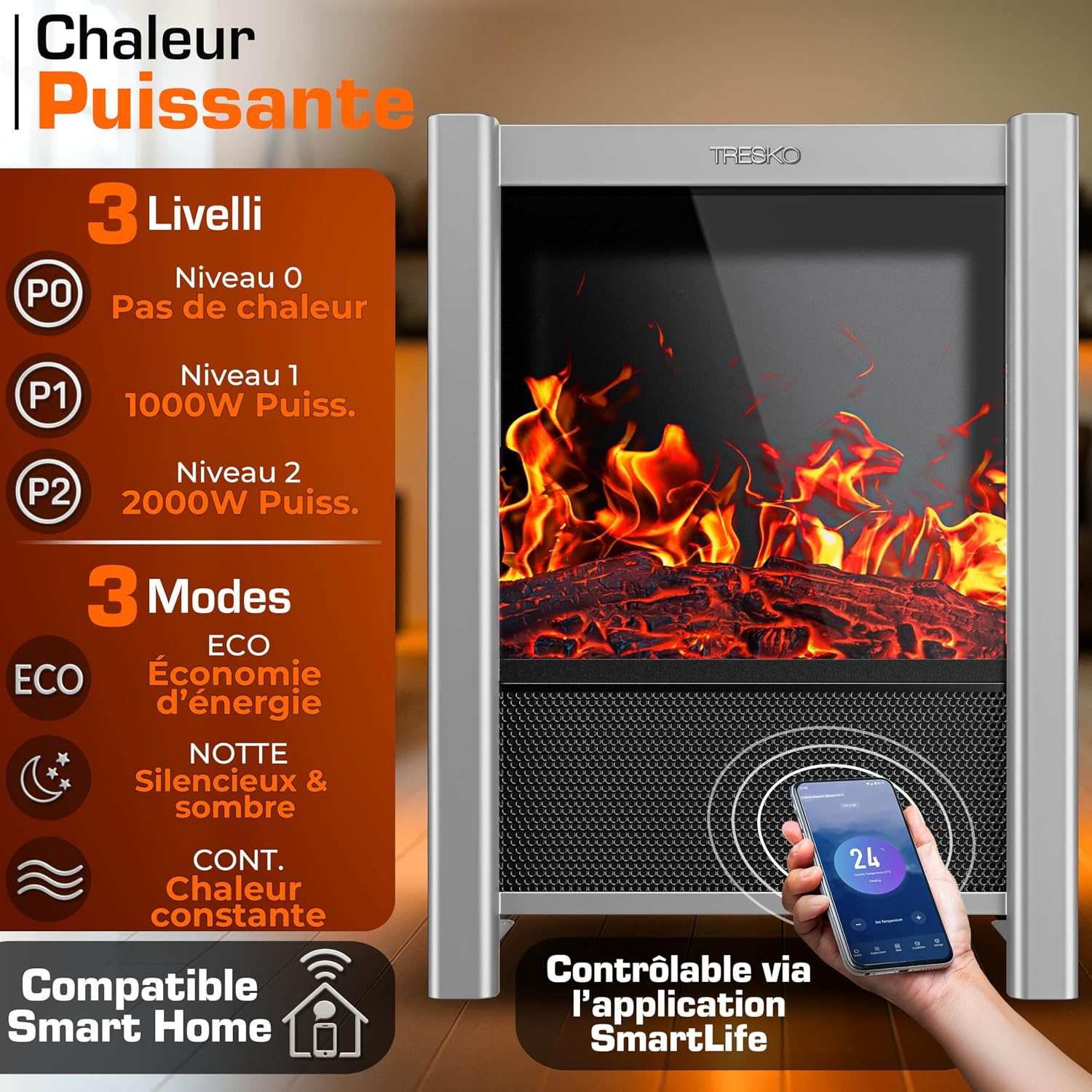
Image 3: The TRESKO TKSFE Electric Fireplace demonstrating its three heating levels (0W, 1000W, 2000W) and three modes (ECO, Night, Continuous), alongside a smartphone showing the SmartLife app interface for control.
6. Operating Instructions
6.1 Power On/Off
- Manual: Press the power button on the fireplace's control panel.
- Remote Control: Press the ⏻ (Power) button.
- SmartLife App: Tap the power icon within the app interface.
6.2 Using the Remote Control
The included remote control provides convenient access to all functions.

Image 4: Detailed view of the remote control for the TRESKO TKSFE Electric Fireplace, showing buttons for Power, Flame Brightness, Constant Heat Mode, ECO Mode/Thermostat Adjustment, Timer, and Child Lock. The image also highlights the 5-35°C temperature range and overheating protection.
- ⏻ (Power): Turns the fireplace ON or OFF.
- 🔆 (Flame Brightness): Adjusts the intensity of the LED flame effect (4 levels).
- 🌊 (Constant Heat Mode): Activates or deactivates continuous heating.
- 🌡️ (ECO Mode / Thermostat): Toggles ECO mode or allows adjustment of the thermostat temperature.
- ⏱️ (Timer): Sets the operating duration.
- 🔒 (Child Lock): Locks/unlocks the control panel and remote to prevent accidental changes.
6.3 Using the LCD Control Panel
The integrated LCD screen on the fireplace allows direct control of settings.

Image 5: A close-up of the TRESKO TKSFE Electric Fireplace's LCD control panel, showing temperature display (21°C) and various control icons. A person is shown relaxing in a room heated by the fireplace, indicating its effective heat output.
The LCD panel typically includes buttons for power, temperature adjustment, mode selection, and flame control. Refer to the icons on the panel for specific functions.
6.4 Adjusting Flame Effect
The flame effect can be adjusted to 4 different levels of intensity.

Image 6: Visual representation of the four adjustable LED flame effect levels on the TRESKO TKSFE Electric Fireplace, ranging from a subtle glow to a vibrant fire.
- Remote Control: Press the 🔆 (Flame Brightness) button repeatedly to cycle through the 4 levels.
- SmartLife App: Use the flame intensity slider or buttons within the app.
6.5 Setting Heating Modes
The fireplace offers three heating modes:
- ECO Mode: Energy-saving mode, optimizes power consumption.
- Night Mode: Ultra-quiet operation, suitable for sleeping environments.
- Continuous Mode: Provides consistent heat output.
Select modes via the LCD panel, remote control, or SmartLife app.
6.6 Setting Temperature and Timer
- Temperature: Use the thermostat controls on the remote, LCD panel, or SmartLife app to set your desired temperature between 5°C and 35°C. The fireplace will automatically adjust heating to maintain this temperature.
- Timer: Use the timer function on the remote, LCD panel, or SmartLife app to set a specific operating duration. The fireplace will automatically turn off after the set time.
7. Maintenance
Regular maintenance ensures optimal performance and longevity of your electric fireplace.
7.1 Cleaning
- Before Cleaning: Always unplug the fireplace from the power outlet and allow it to cool completely.
- Exterior: Wipe the exterior surfaces with a soft, damp cloth. Do not use abrasive cleaners, polishes, or chemical solvents as these may damage the finish.
- Air Vents: Use a vacuum cleaner with a brush attachment to gently clean dust from the air inlet and outlet vents. Ensure these are kept clear for proper airflow.
- Glass Panel: Clean the glass panel with a soft, lint-free cloth and a non-abrasive glass cleaner. Spray the cleaner onto the cloth, not directly onto the fireplace.
7.2 Storage
If storing the fireplace for an extended period, unplug it and store it in a cool, dry place, preferably in its original packaging to protect it from dust and damage.
8. Troubleshooting
If you encounter issues with your TRESKO TKSFE Electric Fireplace, refer to the following common problems and solutions:
| Problem | Possible Cause | Solution |
|---|---|---|
| Fireplace does not turn on. | No power supply. Main power switch off. Overheating protection activated. | Ensure the power cord is securely plugged into a live outlet. Check the main power switch on the unit. Unplug the unit, wait 10-15 minutes for it to cool down, then plug it back in. Ensure vents are not blocked. |
| No heat output. | Heating function is off. Thermostat set too low. ECO mode active. | Activate the heating function via remote, app, or control panel. Increase the thermostat setting. Switch to Continuous mode or adjust ECO settings. |
| Flame effect not working. | Flame effect is off. LEDs are faulty. | Activate the flame effect via remote, app, or control panel. If still not working, contact customer support. |
| Remote control not working. | Batteries are dead or incorrectly inserted. Obstruction between remote and fireplace. | Replace batteries, ensuring correct polarity. Remove any obstructions. Ensure you are within range. |
| SmartLife app cannot connect. | Wi-Fi issues. Fireplace not in pairing mode. Incorrect app setup. | Ensure your Wi-Fi network is active and the fireplace is within range. Restart your router. Follow app pairing instructions to put the fireplace into pairing mode. Re-attempt device pairing in the SmartLife app. Ensure app permissions are granted. |
9. Warranty and Support
TRESKO products are designed for quality and reliability. For any questions, technical support, or warranty claims, please contact your retailer or the manufacturer directly.
Please note that information regarding spare parts availability is not provided in the product specifications. Keep your purchase receipt as proof of purchase for warranty purposes.
For further assistance, please visit the official TRESKO website or contact their customer service.