1. Introduction
The eletechsup ET48A08 is an 8-channel Ethernet RS485 Relay Module designed for various control applications, including PLC output expansion, smart home systems, security monitoring, and motor control. This module supports both Modbus TCP and Modbus RTU protocols, offering flexible communication options via Ethernet or RS485 interfaces. It operates on a DC 12V power supply and provides robust relay switching capabilities for a wide range of loads.
2. Features
- Working Voltage: DC 12V
- Communication Interfaces: RS485 interface and Network (Ethernet) interface (optional configuration).
- Control Commands: Supports 6 distinct commands: 'Open', 'Close', 'Momentary', 'Self-locking', 'Interlock', and 'Delay'.
- MODBUS RTU Support: Compatible with Modbus RTU commands, supporting function codes 03, 06, and 16.
- Delay Command: Maximum delay configurable up to 255 seconds.
- MODBUS Command Mode: Capable of supporting up to 64 devices in parallel.
- Baud Rate: Default baud rate is 9600BPS. Configurable baud rates include 1200, 2400, 4800, 9600, and 19200 BPS.
- Data Transmission Timing: Data sending and returning time can be set, with a maximum value of 1000ms.
- Maximum Load: Each relay supports a maximum load of 10A / 250VAC, 10A / 125VAC, 10A / 30VDC, 10A / 28VDC, 10A / 12VDC.
- Applications: Suitable for PLC output expansion, smart home automation, PTZ CCTV camera control, security monitoring, identification systems, motor forward/backward control, and automatic curtain control.
3. Setup
This section details the physical connections and initial setup for the ET48A08 relay module.
3.1 Module Overview
The module features an 8-channel relay board with both RS485 and Ethernet communication ports, enclosed in a protective shell.
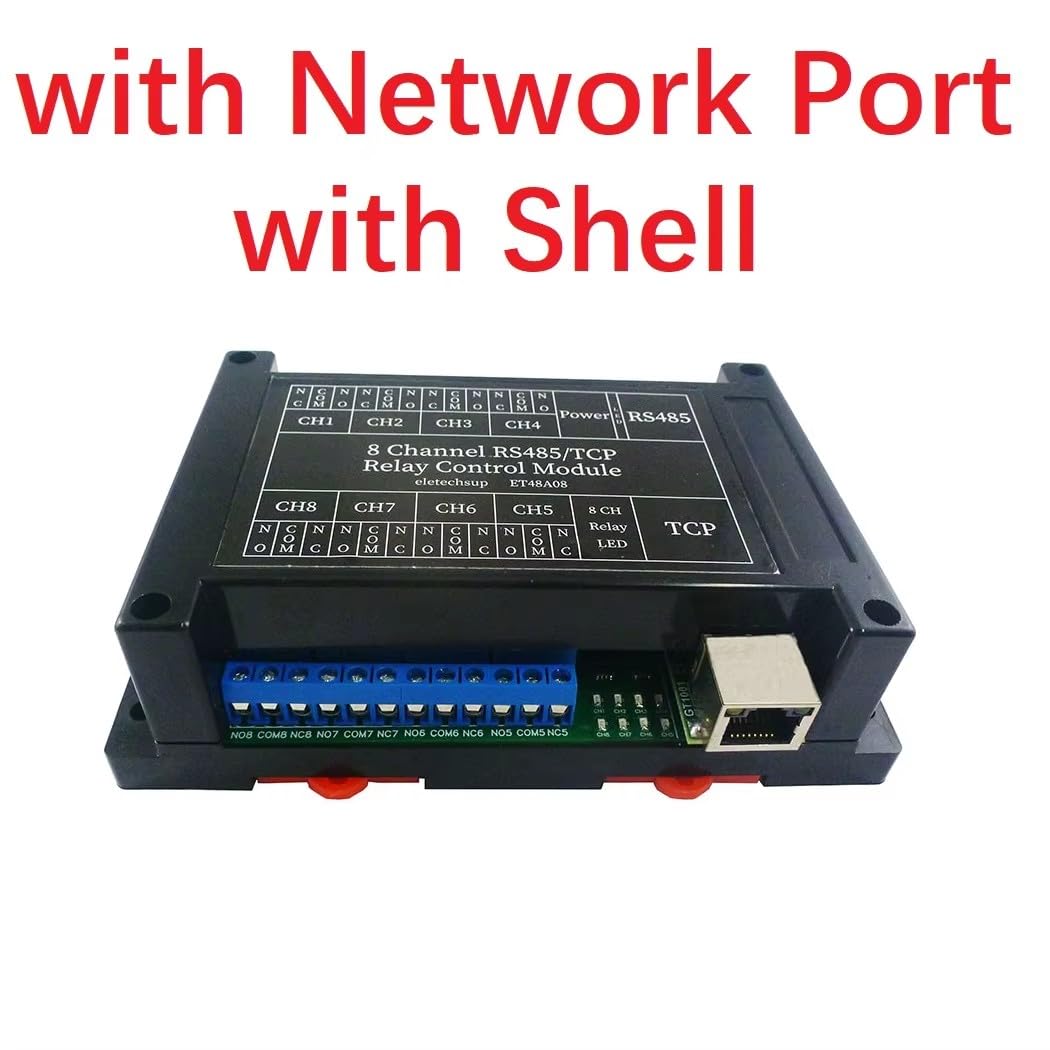
Figure 3.1: Front view of the eletechsup ET48A08 8-Channel Relay Module with Network Port and Shell. This image shows the overall appearance of the module, highlighting the network port and the protective casing.
3.2 Power and Communication Connections
Connect the DC 12V power supply to the designated terminals. For RS485 communication, connect the A+ and B- terminals. For Ethernet communication, connect an Ethernet cable to the network port. The relay output terminals (NC, NO, COM) are available for connecting your loads.

Figure 3.2: Detailed connection diagram for the eletechsup ET48A08 module. This image illustrates how to connect the DC 12V power, RS485 communication lines (A+, B-), the network port, and the load to the relay terminals (NC, NO, COM).
3.3 Network Connection Options
The module can be connected to a network in several ways:
3.3.1 Direct PC Connection
For direct control or configuration, the module can be connected directly to a PC using an Ethernet cable.

Figure 3.3: Illustration of a direct connection between the eletechsup ET48A08 module's Ethernet interface and a personal computer (PC) using an Ethernet cable.
3.3.2 Connection via Ethernet Switch
Multiple ET48A08 modules can be connected to a network through an Ethernet switch, allowing for centralized control and scalability. Each module can be assigned a unique Slave ID.
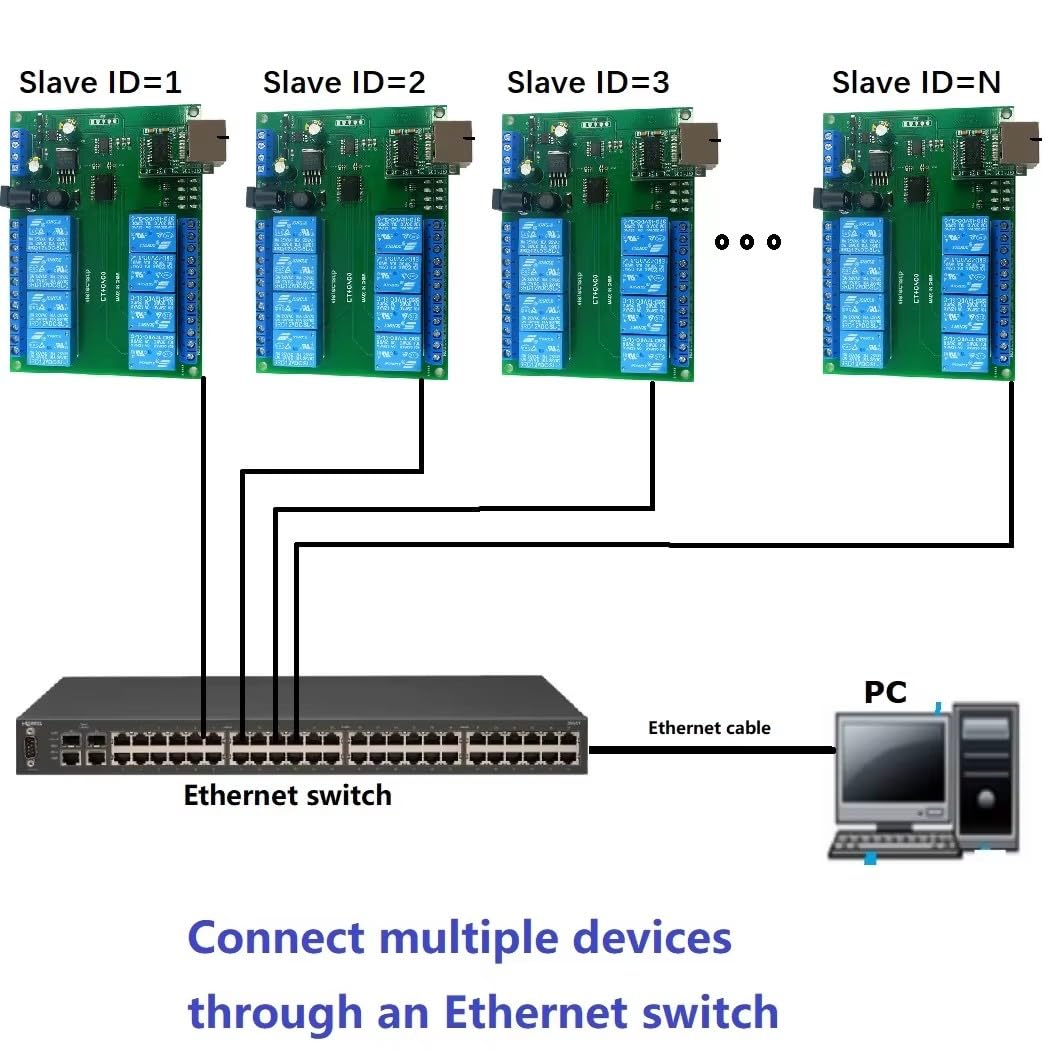
Figure 3.4: Diagram showing how to connect multiple eletechsup ET48A08 modules (Slave ID=1, Slave ID=2, Slave ID=3, etc.) to a single Ethernet switch, which then connects to a PC for control.
4. Operating Instructions
The ET48A08 module is controlled using MODBUS RTU commands, which can be sent via a serial assistant (HyperTerminal) or a dedicated Modbus Poll software.
4.1 MODBUS Commands
The module supports standard MODBUS RTU commands for controlling the relays. Refer to the MODBUS RTU protocol documentation for detailed command structures. The supported function codes are 03 (Read Holding Registers), 06 (Write Single Register), and 16 (Write Multiple Registers).
4.2 Relay Control Commands
The module offers six types of relay control commands:
- Open: Activates a relay.
- Close: Deactivates a relay.
- Momentary: Activates a relay for a brief period and then deactivates it automatically.
- Self-locking: Toggles the state of a relay with each command.
- Interlock: Ensures that only one relay in a group can be active at a time. Activating one relay will deactivate any other active relays in the group.
- Delay: Activates a relay for a specified duration (up to 255 seconds) before deactivating it.
4.3 Baud Rate Configuration
The default baud rate is 9600BPS. The baud rate can be changed using specific MODBUS commands to 1200, 2400, 4800, or 19200 BPS to match your communication setup.
4.4 Data Transmission Timing
The time for sending and receiving data can be adjusted, with a maximum setting of 1000ms. This can be useful for optimizing communication in different network environments.
5. Maintenance
The eletechsup ET48A08 module is designed for reliable operation with minimal maintenance. To ensure longevity and proper function:
- Keep the module in a clean, dry environment, away from excessive dust, moisture, and corrosive substances.
- Ensure proper ventilation to prevent overheating, especially when operating at maximum load.
- Regularly check all cable connections for secure fit and signs of wear.
- Avoid exposing the module to extreme temperatures or direct sunlight.
- Do not attempt to open the module's shell unless you are a qualified technician, as this may void any warranty and expose internal components to damage.
6. Troubleshooting
If you encounter issues with your ET48A08 module, consider the following troubleshooting steps:
- No Power: Verify that the DC 12V power supply is correctly connected and providing the specified voltage. Check power indicator LEDs on the module.
- No Communication (RS485):
- Ensure A+ and B- connections are correct and not reversed.
- Check that the baud rate settings on the module and your control device match.
- Verify the Slave ID of the module is correctly set and matches the command.
- No Communication (Ethernet):
- Check the Ethernet cable connection.
- Verify network settings (IP address, subnet mask) are correctly configured for the module and your network.
- Ensure there are no firewall restrictions blocking communication.
- Relay Not Switching:
- Confirm that the correct MODBUS command is being sent to the specific relay channel.
- Check the load connected to the relay; ensure it does not exceed the maximum load specifications.
- Inspect the wiring to the load (NC, NO, COM terminals) for proper connection.
- Intermittent Operation: Check for loose connections, power fluctuations, or electromagnetic interference. Ensure the module is adequately grounded if required by your application.
7. Specifications
| Parameter | Value |
|---|---|
| Working Voltage | DC 12V |
| Standby Current (All relays closed) | 13mA |
| Current (1 relay open) | 41mA |
| Current (8 relays open) | 226mA |
| Communication Interface | RS485 / Network (Ethernet) |
| Supported Commands | 'Open', 'Close', 'Momentary', 'Self-locking', 'Interlock', 'Delay' |
| MODBUS RTU Function Codes | 03, 06, 16 |
| Maximum Delay (Delay command) | 255 seconds |
| Maximum Parallel Devices (MODBUS) | 64 |
| Baud Rate Options | 1200, 2400, 4800, 9600 (default), 19200 BPS |
| Data Sending/Returning Time | Max 1000ms |
| Module Dimensions (with shell) | 145 x 90 x 40mm (5.71 x 3.54 x 1.57 inches) |
| Product Dimensions | 3.94 x 1.97 x 6.69 inches |
| Weight (PCB Board only) | 138g |
| Weight (with shell) | 230g (5.3 ounces) |
| Maximum Load per Relay | 10A / 250VAC, 10A / 125VAC, 10A / 30VDC, 10A / 28VDC, 10A / 12VDC |
| Model Number | ET48A08 |
8. Warranty
Warranty information for the eletechsup ET48A08 module is not explicitly provided in the product details. Please refer to the seller's or manufacturer's official website for specific warranty terms and conditions, or contact your point of purchase for details.
9. Support
For further assistance, technical support, or inquiries regarding the eletechsup ET48A08 8-Channel Ethernet RS485 Relay Module, please contact the manufacturer, eletechsup, or the vendor from whom you purchased the product. Refer to their official contact channels for the most up-to-date support information.