
1. Introduction
This manual provides essential instructions for the safe and effective use of your Nikon Aculon Al11 Laser Rangefinder. Please read this manual thoroughly before using the device to ensure proper operation and to prevent damage or injury. The Nikon Aculon Al11 is an ultra-compact and lightweight laser rangefinder designed for precise distance measurement in various outdoor activities, including hunting and target shooting.
2. Safety Precautions
Observe the following safety precautions to prevent injury or damage to the device:
- Do not look directly into the sun through the rangefinder. This can cause severe eye damage.
- Do not aim the laser at other people or animals. The laser emitted is invisible and can cause eye injury.
- Do not disassemble or attempt to repair the device. Unauthorized repairs can void the warranty and cause damage.
- Keep the device out of reach of children.
- Use only the specified battery type (CR2 Lithium). Incorrect battery types may cause malfunction or damage.
- Dispose of batteries properly. Follow local regulations for battery disposal.
3. Package Contents
Verify that all items are present in your package:
- Nikon Aculon Al11 Laser Rangefinder
- CR2 Lithium Battery
- Storage Pouch
- User Manual (this document)
4. Component Identification
Familiarize yourself with the parts of your rangefinder:
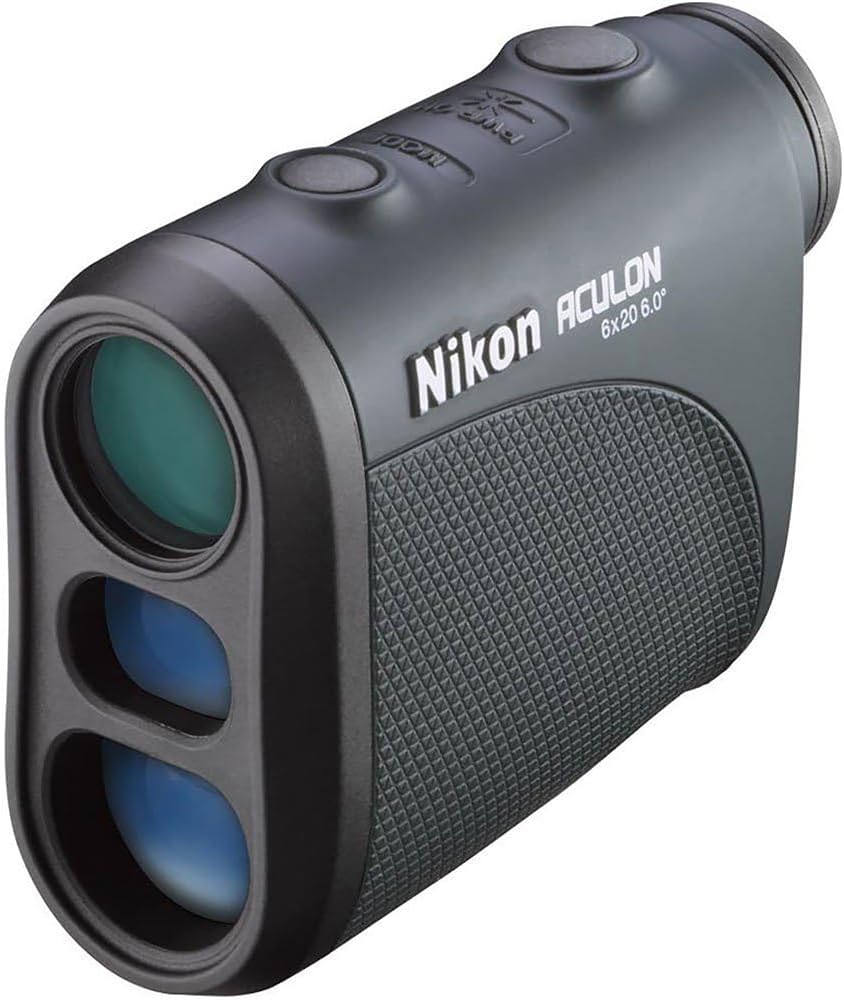
Figure 4.1: Front-side view of the Nikon Aculon Al11 Laser Rangefinder. This image displays the objective lens, eyepiece, and control buttons on the top surface.
- Objective Lens: The front lens through which the laser is emitted and received.
- Eyepiece: The lens through which you view the target.
- Power/Measurement Button: Used to power on the device and initiate distance measurements.
- Mode Button: Used to change measurement units (meters/yards) or other settings.
- Battery Compartment: Located on the side or bottom, houses the CR2 battery.
- Diopter Adjustment Ring: Located on the eyepiece, used to adjust focus for individual eyesight.
5. Setup
5.1. Battery Installation
- Locate the battery compartment cover, typically on the side or bottom of the rangefinder.
- Open the battery compartment cover by twisting or sliding it according to the markings.
- Insert one CR2 Lithium battery, ensuring the correct polarity (+/-) as indicated inside the compartment.
- Close the battery compartment cover securely.
5.2. Diopter Adjustment
The diopter adjustment allows you to focus the viewfinder for your individual eyesight, ensuring a clear image of the display and target.
- Look through the eyepiece.
- Rotate the diopter adjustment ring (located on the eyepiece) until the display and target appear sharp and clear.
6. Operating Instructions
6.1. Power On/Off
- To Power On: Press the Power/Measurement button once. The display will illuminate.
- To Power Off: The device automatically powers down after approximately 8 seconds of inactivity to conserve battery life.
6.2. Taking a Measurement
- Power on the rangefinder.
- Aim the crosshairs in the viewfinder at your desired target.
- Press and release the Power/Measurement button. The measured distance will be displayed instantly.
6.3. Distant Target Priority Mode
The Aculon Al11 is conveniently programmed with Distant Target Priority Mode. This mode is particularly useful when the target is partially obscured by foreground objects like grass or brush. When multiple objects are detected, the rangefinder will display the distance to the furthest target.
6.4. Changing Measurement Units (Meters/Yards)
While the device is powered on, press and hold the Mode button for a few seconds to toggle between meters (m) and yards (yd) display units.
7. Maintenance and Care
- Cleaning Lenses: Use a soft, clean cloth specifically designed for optical lenses. Gently wipe away dust and smudges. Avoid using abrasive materials or harsh chemicals.
- Cleaning Body: Wipe the body of the rangefinder with a soft, damp cloth. Do not use solvents or strong detergents.
- Storage: Store the rangefinder in its protective pouch in a cool, dry place when not in use. Remove the battery if storing for extended periods to prevent leakage.
- Avoid Extreme Conditions: Do not expose the device to extreme temperatures, high humidity, or direct sunlight for prolonged periods.
8. Troubleshooting
| Problem | Possible Cause | Solution |
|---|---|---|
| Device does not power on. | Dead or incorrectly installed battery. | Replace battery with a new CR2 Lithium battery, ensuring correct polarity. |
| Inaccurate or inconsistent readings. | Obstruction in front of target, highly reflective surface, or environmental conditions (fog, heavy rain). | Ensure clear line of sight. Aim at a less reflective target. Note that performance may be affected by adverse weather. |
| Display is blurry. | Diopter not adjusted correctly. | Adjust the diopter ring on the eyepiece until the display is clear. |
| No display after pressing button. | Auto-power off engaged, or battery issue. | Press the Power/Measurement button again. Check or replace battery if issue persists. |
9. Specifications

Figure 9.1: Dimensions of the Nikon Aculon Al11 Laser Rangefinder, showing its compact size of 3.6 inches (length), 2.9 inches (height), and 1.5 inches (width).
| Feature | Detail |
|---|---|
| Model Name | Aculon Al11 (CRTNKACULONRB) |
| Measurement Range | 6-550 yards |
| Increment Reading | 1 yard |
| Magnification | 6x |
| Objective Diameter | 20mm |
| Angular Field of View (Real) | 6 degrees |
| Angular Field of View (Apparent) | 43 degrees |
| Viewfinder Display | Meters/Yards |
| Eye Relief | 18mm |
| Exit Pupil | 3.3mm |
| Diopter Adjustment | +/-4 degrees |
| Power Source | 1 CR2 Lithium Battery |
| Size (L x W x H) | 3.6 x 1.5 x 2.9 inches |
| Weight (without batteries) | 4.4 oz (125 g) |
| Special Features | Multilayer Coatings, High-Eyepoint Design, Distant Target Priority Mode, Single Button Operation |
| Waterproof | No |
| UPC | 196641191907 |
10. Warranty and Support
This Nikon Aculon Al11 Laser Rangefinder is covered by a manufacturer's warranty. For specific details regarding warranty terms, duration, and claim procedures, please refer to the warranty card included with your product or visit the official Nikon website.
For technical support, service, or inquiries, please contact Nikon customer service through their official channels. Contact information can typically be found on the Nikon website or in the product packaging.
Note: As this product is listed as "Renewed," specific warranty terms may vary. Please consult the seller or Nikon for details on renewed product warranties.


