
1. Introduction
The Petcube GPS Tracker for Dogs is designed to help you monitor your dog's location and activity in real-time. This device utilizes cellular networks and GPS technology to provide accurate tracking, virtual fence alerts, and activity monitoring. It features a durable, water-resistant design with a glow-in-the-dark case and an extended battery life.
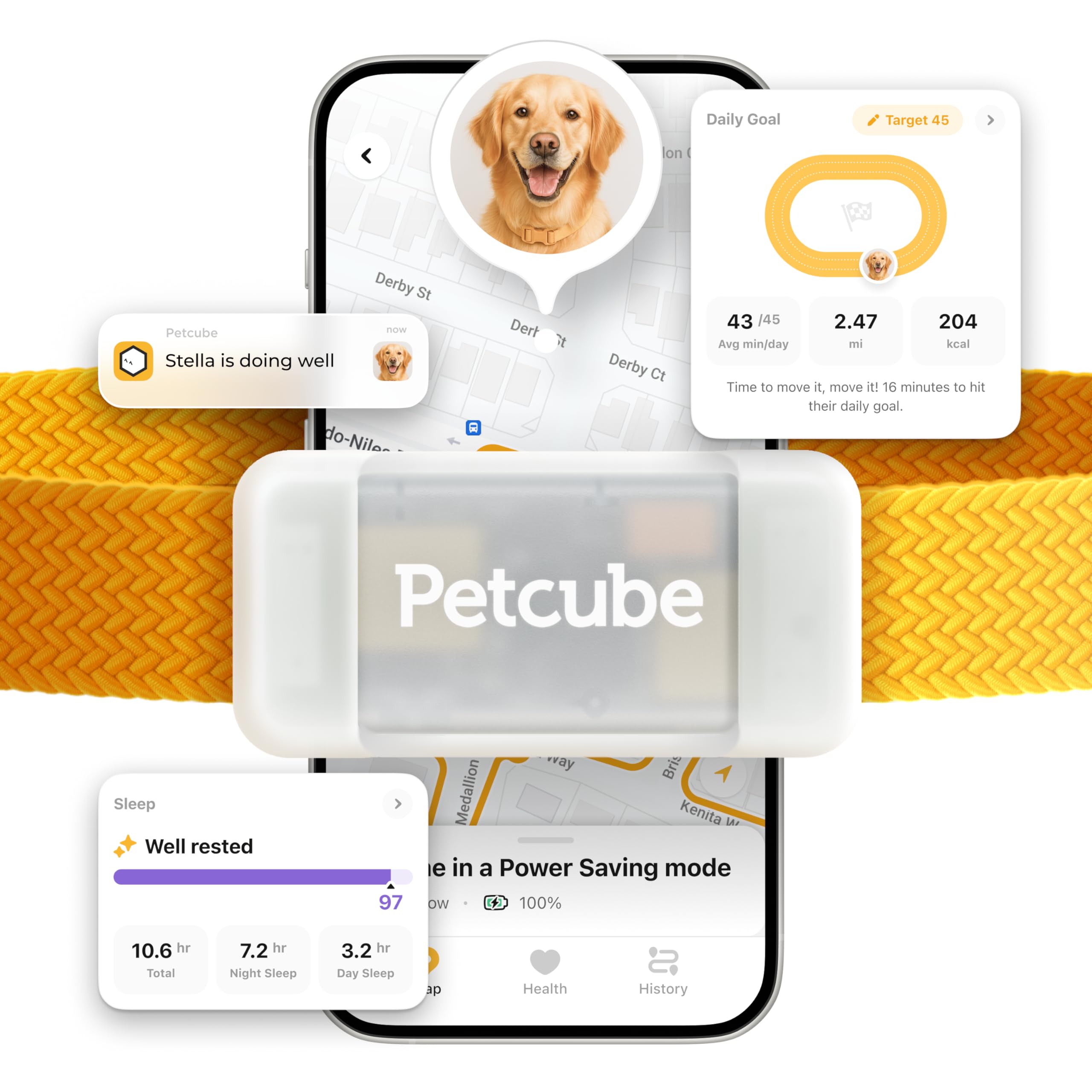
Image: The Petcube GPS Tracker device.
2. What's in the Box
- 1 x Petcube GPS Tracker
- 1 x Silicone Case (Glow-in-the-Dark)
- 1 x USB Charging Cable
- 1 x Quick Start Guide
3. Setup Guide
- Charge the Device: Before first use, fully charge your Petcube GPS Tracker using the provided USB charging cable. Connect the cable to the tracker and a standard USB power adapter. A full charge typically takes about 1 hour.
- Download the Petcube App: Search for 'Petcube' in the Apple App Store (for iOS 14 or higher) or Google Play Store (for Android 7.1 or higher) and download the official application.
- Create an Account: Open the Petcube app and follow the on-screen instructions to create a new account or log in if you already have one.
- Add Your Tracker: In the app, select the option to add a new device and choose the Petcube GPS Tracker. Follow the in-app pairing instructions. Ensure your smartphone's Bluetooth is enabled during this process.
- Attach to Collar: Insert the Petcube GPS Tracker into the provided silicone case. Securely attach the case to your dog's collar. Ensure the tracker is positioned comfortably and does not interfere with your dog's movement.
- Activate Subscription: A subscription plan is required for the GPS tracking functionality. Follow the prompts within the Petcube app to select and activate a suitable plan. Plans start at $5/month.

Image: The Petcube app displaying available subscription plans.
4. Operating Instructions
4.1 Real-Time GPS Tracking
The Petcube GPS Tracker provides continuous location updates every few seconds. To view your dog's live location:
- Open the Petcube app on your smartphone.
- Navigate to the main map interface. Your dog's current location will be displayed.

Image: A golden retriever wearing the Petcube GPS Tracker, illustrating real-time tracking.
4.2 Virtual Fences (Safe Zones)
Set up custom safe zones to receive instant alerts if your dog enters or leaves a designated area.
- In the Petcube app, go to the 'Virtual Fences' or 'Safe Zones' section.
- Use the map to draw and define your desired safe areas (e.g., your backyard, a park).
- Configure notification settings to receive alerts when your dog crosses these boundaries.

Image: An Irish Setter with a virtual fence graphic, demonstrating the escape alert feature.
4.3 Activity and Wellness Monitoring
Track your dog's daily activity levels, including steps taken, distance covered, and calories burned.
- Access the 'Activity' or 'Wellness' section within the Petcube app.
- Review historical data and trends to monitor your dog's health and fitness.

Image: A dog running with a person, representing the activity and wellness monitoring feature.
4.4 Lost Pet Mode (LED Light & Sound Alerts)
In situations where your pet is lost, activate the Lost Pet Mode for enhanced visibility and auditory cues.
- From the Petcube app, select 'Lost Pet Mode'.
- You can remotely activate the built-in LED light on the tracker to make your dog more visible, especially in low-light conditions.
- Activate the built-in beeper to generate sound, helping you locate your dog by sound.

Image: A dog wearing the Petcube GPS Tracker with its LED light activated, useful for locating in the dark.
Video: An official product video demonstrating the features and use of the Petcube GPS Tracker, including real-time tracking, virtual fences, and lost pet mode.
5. Maintenance
5.1 Charging
The tracker features a long battery life, up to 45 days in power-saving mode. Recharge the device when the battery indicator in the app shows low power. A full charge takes approximately 1 hour.
5.2 Cleaning
The Petcube GPS Tracker is water and dust resistant (IP67 certified). To clean, wipe the device and silicone case with a damp cloth. Avoid using harsh chemicals or abrasive materials.

Image: A dog in the rain wearing the Petcube GPS Tracker, showcasing its durable waterproof design.
5.3 Storage
When not in use for extended periods, store the tracker in a cool, dry place. Ensure it is partially charged to maintain battery health.
6. Troubleshooting
- Tracker Not Connecting: Ensure the tracker is charged, your phone's Bluetooth is on, and you are within range. Restart both the tracker and your phone.
- Inaccurate Location: GPS accuracy can be affected by dense urban areas, heavy tree cover, or indoor environments. Move to an open outdoor area for best results.
- No Alerts: Check your app's notification settings and your phone's system notification settings to ensure alerts are enabled for the Petcube app. Verify virtual fences are correctly set up.
- Short Battery Life: Ensure the tracker is fully charged. Battery life can vary based on usage frequency and signal strength. Using power-saving mode can extend battery duration.
- App Issues: Ensure your Petcube app is updated to the latest version. Try force-closing and reopening the app, or reinstalling it if problems persist.
7. Specifications
| Feature | Detail |
|---|---|
| Model Number | 854592007844 |
| Connectivity Technology | Cellular |
| GPS | Built-in GPS for real-time tracking |
| Battery Type | Lithium Polymer |
| Battery Life | Up to 45 days (in power-saving mode) |
| Battery Charge Time | Approximately 1 hour |
| Water Resistance Level | Water Resistant (IP67 certified) |
| Special Features | Geo-Fence, Location History, Real-Time Tracking, Rechargeable, Glow-in-the-Dark Case, LED Light, Sound Alerts |
| Compatible Devices | Smartphone (iOS 14+, Android 7.1+) |
| Metrics Measured | Distance, Step Count, Calories Burned |
| Material | Silicone (case) |
8. Warranty and Support
For warranty information, product registration, or technical assistance, please visit the official Petcube support website or contact customer service through the Petcube app. Keep your purchase receipt for warranty claims.
Online Support: Petcube Official Store