
1. Introduction
This manual provides instructions for the installation, use, and maintenance of your Futanwei Screen Protector for the Joautrial Smartwatch KW330A. This screen protector is designed to safeguard your smartwatch display from scratches, fingerprints, and daily wear while maintaining optimal touch sensitivity and visual clarity.

Image: The Futanwei Screen Protector shown on a Joautrial KW330A Smartwatch, highlighting its clear and protective nature.
2. Compatibility
This screen protector is specifically designed for the Joautrial KW330A Smart Watch (1.6 Inches). It is not compatible with FITVII H56 (1.7 Inches) Smart Watch or other devices.

Image: A Joautrial KW330A Smartwatch illustrating the compatible model for the screen protector.
3. Setup and Installation
Follow these steps for proper installation of the screen protector:
- Clean the Watch Surface: Use a dry and wet cloth to thoroughly clean the surface of your smartwatch screen. Ensure no dust, smudges, or debris remain.
- Remove Protective Layer: Carefully pull down the label to remove the first protective layer from the screen film. Avoid touching the adhesive side.
- Align and Place Film: Align the screen protector precisely with your smartwatch screen. Once aligned, gently place it onto the screen.
- Press and Secure: Press the protective film from one side to the other, gently pushing out any air bubbles towards the edges.
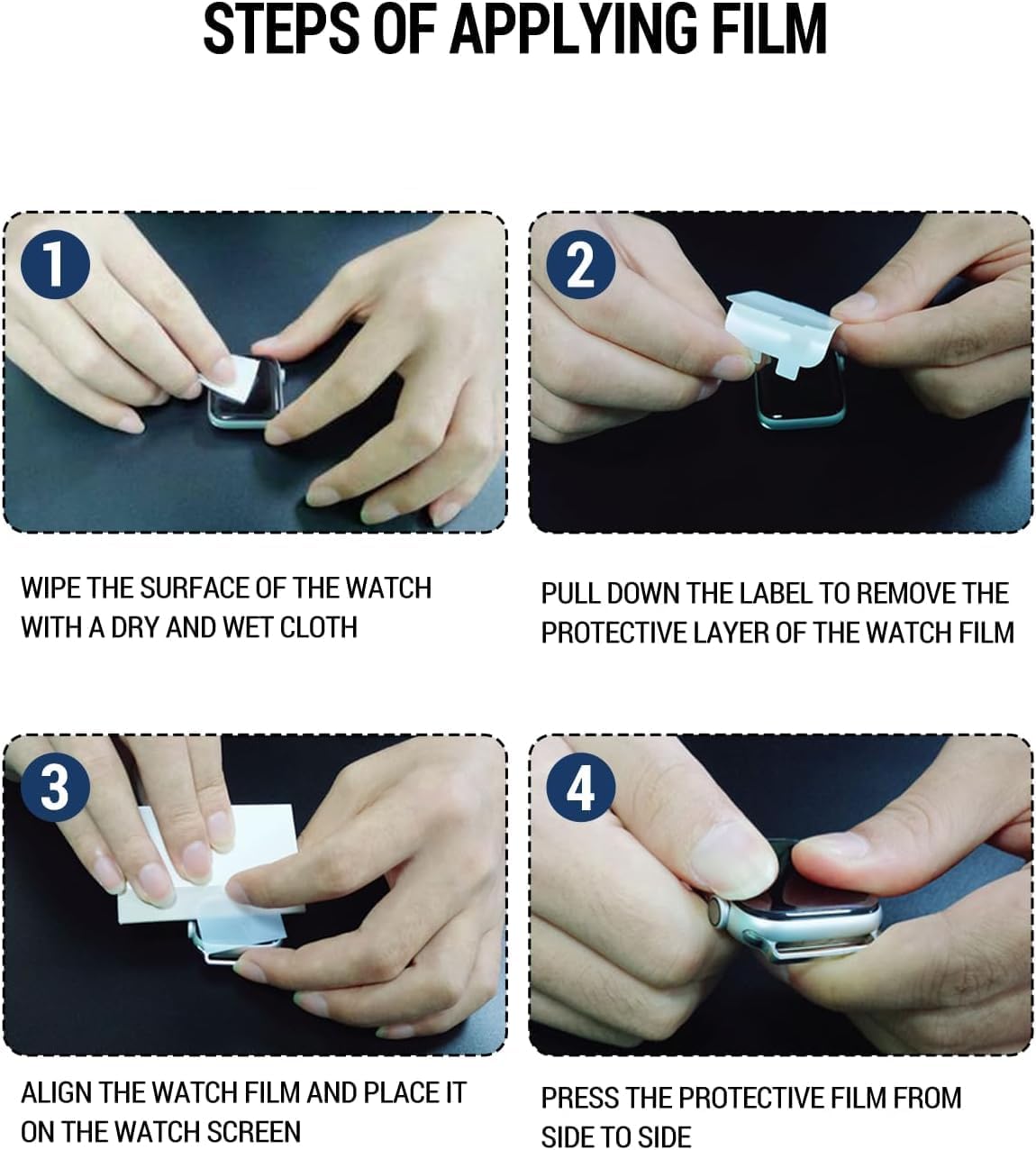
Image: A visual guide demonstrating the four steps for applying the screen protector to the smartwatch.
4. Key Features and Operating Benefits
- High Responsiveness & Touch Sensitivity: The ultra-thin design ensures 100% touch screen effect, maintaining the original touch sensitivity of your smartwatch screen.
- Oleophobic & Hydrophobic Coating: This coating protects against sweat and oil residue, reducing fingerprints on the KW330A smartwatch screen.
- Clear Picture Quality: With 99% high transparency, the screen protector provides bright and colorful image quality, preserving the original visual experience.
- Bubble Self-healing Film: Immediately after application, minor wavy marks or small air bubbles may be present. These will naturally disappear within a few hours due to the self-healing properties of the film.
- Maximum Coverage: The flexible material allows for coverage even on curved smartwatch screens, providing maximum screen protection.

Image: Depiction of the screen protector's touch sensitivity, showing a finger interacting with the smartwatch display.

Image: Illustration of the oleophobic coating and its anti-fingerprint properties.

Image: A graphic indicating the bubble-free application of the screen protector.

Image: Visual representation of the screen protector's self-healing capability over 24 hours.

Image: The screen protector providing maximum coverage on a smartwatch display.
5. Maintenance
To ensure the longevity and clarity of your Futanwei Screen Protector, follow these maintenance guidelines:
- Cleaning: Gently wipe the screen protector with a soft, lint-free cloth. For stubborn smudges, slightly dampen the cloth with water or a screen-safe cleaner.
- Avoid Harsh Chemicals: Do not use abrasive cleaners, alcohol, or solvents, as these can damage the oleophobic coating and the film material.
- Handling: Avoid sharp objects coming into direct contact with the screen protector to prevent deep scratches, although the film has self-healing properties for minor abrasions.
6. Troubleshooting
| Issue | Possible Cause | Solution |
|---|---|---|
| Small Air Bubbles After Installation | Normal during initial application. | These are typically self-healing and will disappear naturally within a few hours (up to 24 hours). Do not attempt to forcefully remove them. |
| Reduced Touch Sensitivity | Improper installation, trapped air, or dust. | Ensure the screen protector is fully adhered without large air pockets. If sensitivity remains low, re-application might be necessary after thorough cleaning. |
| Dust or Debris Under Film | Screen not cleaned thoroughly before application. | Carefully lift a corner of the film, use a dust-absorber sticker to remove debris, then re-apply. If persistent, consider using a new protector from the pack. |
| Film Not Adhering Properly | Oily residue on screen, or improper alignment. | Ensure the screen is completely clean and dry. Re-align the film carefully, pressing firmly from the center outwards. |
7. Specifications
- Compatible Model: Joautrial KW330A Smart Watch (1.6 Inches)
- Material: Thermoplastic Polyurethane (TPU)
- Features: HD Clear, Soft PET Film, Anti-Fingerprint, Anti-Scratch, Bubble Free, Oleophobic & Hydrophobic Coating, Self-Healing Protection, High Touch Sensitivity, Maximum Coverage.
- Product Dimensions: Approximately 3 x 2 x 0.5 inches (packaging)
- Item Weight: 0.32 ounces
- Package Content: 3 x Smartwatch Screen Protector
8. Warranty and Support
For warranty information and customer support regarding your Futanwei Screen Protector, please refer to the manufacturer's official website or contact the seller directly through your purchase platform. Specific warranty details are not provided within this manual.
For general inquiries or assistance, you may visit the Futanwei brand page on Amazon.