
1. Introduction
Thank you for choosing the WOOX MX0210 Carpet and Upholstery Cleaner. This powerful 1700W device features 15KPa high suction and hot steam technology for deep cleaning of carpets, upholstery, and other fabric surfaces. Please read this manual carefully before use to ensure safe and efficient operation and to maximize the lifespan of your appliance.

Image: The WOOX Carpet and Upholstery Cleaner in action on a carpet, highlighting its steam cleaning capabilities for home and automotive use.
2. Important Safety Instructions
To reduce the risk of fire, electric shock, or injury, please observe the following safety precautions:
- Read all instructions thoroughly before operating the appliance.
- Do not immerse the appliance in water or other liquids.
- Always unplug the appliance from the electrical outlet before cleaning, servicing, or when not in use.
- Do not use the appliance with a damaged cord or plug. If the cord or plug is damaged, contact customer support.
- Keep hair, loose clothing, fingers, and all parts of the body away from openings and moving parts.
- Use only as described in this manual. Use only manufacturer's recommended attachments and accessories.
- Do not use to pick up flammable or combustible liquids, such as gasoline, or use in areas where they may be present.
- Do not pick up anything that is burning or smoking, such as cigarettes, matches, or hot ashes.
- Exercise extreme care when cleaning on stairs to prevent falls or spills.
- Do not operate the appliance without both the clean and dirty water tanks securely in place.
- Always turn off this appliance before connecting or disconnecting the hose or any attachments.
- Store the appliance indoors in a cool, dry area, away from direct sunlight and extreme temperatures.
- This appliance is designed for household use only.
3. Package Contents
Please check the package carefully to ensure all items are present:
- WOOX MX0210 Main Unit
- Standard Brush Head (for sofas, car seats, and daily spot cleaning)
- Wide Brush Head (for larger surfaces like mattresses and carpets)
- Self-Cleaning Nozzle (for rinsing the hose)
- User Manual

Image: The WOOX MX0210 main unit displayed with its various brush heads and accessories, including the standard brush, wide brush, and self-cleaning nozzle.
4. Setup and Assembly
Follow these steps to prepare your WOOX MX0210 for first use:
- Unpack the Unit: Carefully remove all components from the packaging and place them on a flat, stable surface.
- Fill the Clean Water Tank:
- Remove the clean water tank (1200ml capacity) from the main unit.
- Fill it with clean tap water. For optimal steam cleaning and to prevent mineral buildup, using distilled or demineralized water is recommended.
- Do not exceed the MAX fill line indicated on the tank.
- Securely place the clean water tank back into the main unit, ensuring it clicks into place.

Image: A hand demonstrating the process of filling the clean water tank, showing the transparent tank and the water level indicator.
- Attach the Hose and Brush Head:
- Connect the flexible hose to the designated port on the main unit. Ensure it is firmly attached.
- Select the appropriate brush head (Standard or Wide) for your cleaning task and attach it firmly to the end of the hose until it locks.
- Power Connection: Plug the power cord into a suitable electrical outlet. The appliance is now ready for operation.
5. Operating Instructions
The WOOX MX0210 utilizes a highly effective 3-step cleaning process: Spray, Scrub, and Vacuum.

Image: A visual representation of the three-step cleaning process: spraying to dissolve stains, high-pressure steam for scrubbing, and vacuuming to remove residues.
5.1. General Cleaning Procedure
- Pre-treatment (Optional): For heavily soiled areas or stubborn stains, you may pre-treat the area with a suitable fabric cleaning solution. Always test on an inconspicuous area first for colorfastness.
- Activate Steam: Turn on the unit. The 1700W motor will rapidly heat the water, producing hot steam in approximately 15 seconds.
- Spray: Press the trigger on the brush head to spray hot water/steam onto the stained area. This action helps to dissolve dirt and grime deep within the fabric fibers.
- Scrub: Gently move the brush head back and forth over the stained area. The 100°C steam provides deep cleaning and disinfection, effectively eliminating mites and stubborn oil stains without the need for harsh chemicals.
- Vacuum: Release the spray trigger and continue moving the brush head over the wet area to vacuum up the dirty water. The powerful 15KPa high suction ensures efficient removal of liquid and dirt, significantly reducing drying time and preventing odors.
- Repeat: Repeat steps 3-5 as necessary until the area is visibly clean and the extracted water appears clearer.
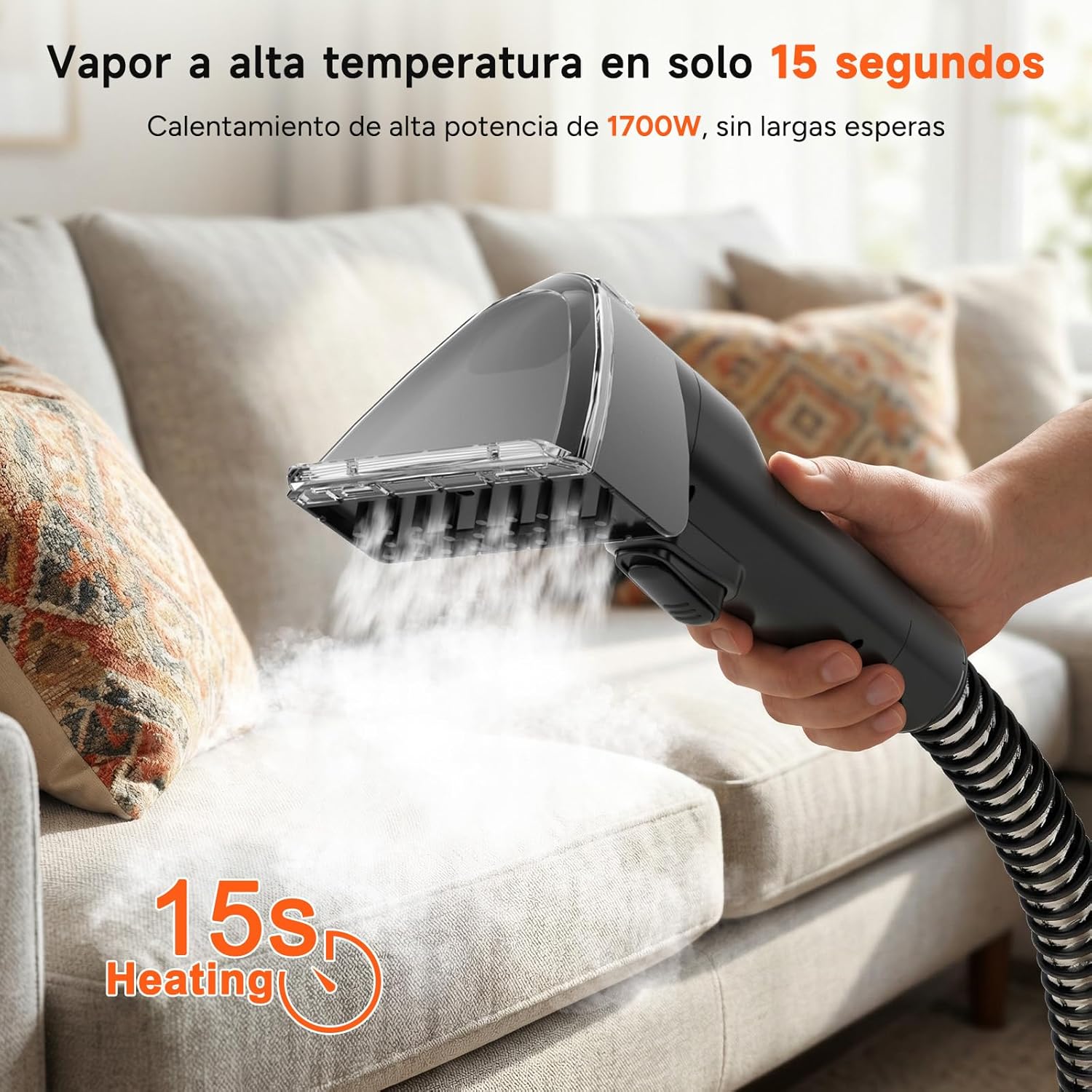
Image: A hand holding the cleaner's brush head, emitting steam onto a sofa cushion, illustrating the steam function for upholstery cleaning.

Image: The cleaner head being used on a carpet, with an overlay indicating 100°C steam for deep purification and sterilization, effectively removing dirt and grime.

Image: An illustrative diagram showing the powerful 15KPa suction pulling dirt and liquid from deep within fabric layers, highlighting the efficient cleaning mechanism.
5.2. Applications
This versatile cleaner is suitable for a wide range of fabric surfaces:
- Sofas and Upholstery: Use the standard brush head for targeted cleaning of furniture.
- Carpets and Rugs: The wide brush head is ideal for efficient cleaning of larger carpeted areas.
- Mattresses: Use the wide brush head for thorough cleaning and effective mite removal.
- Car Seats: The standard brush head is perfect for cleaning automotive interiors and removing spills.
- Stairs: Exercise caution and use the standard brush head for precise cleaning of carpeted stairs.

Image: The WOOX cleaner shown with its three professional accessories: standard brush, wide brush, and self-cleaning nozzle, indicating their uses for different cleaning needs.
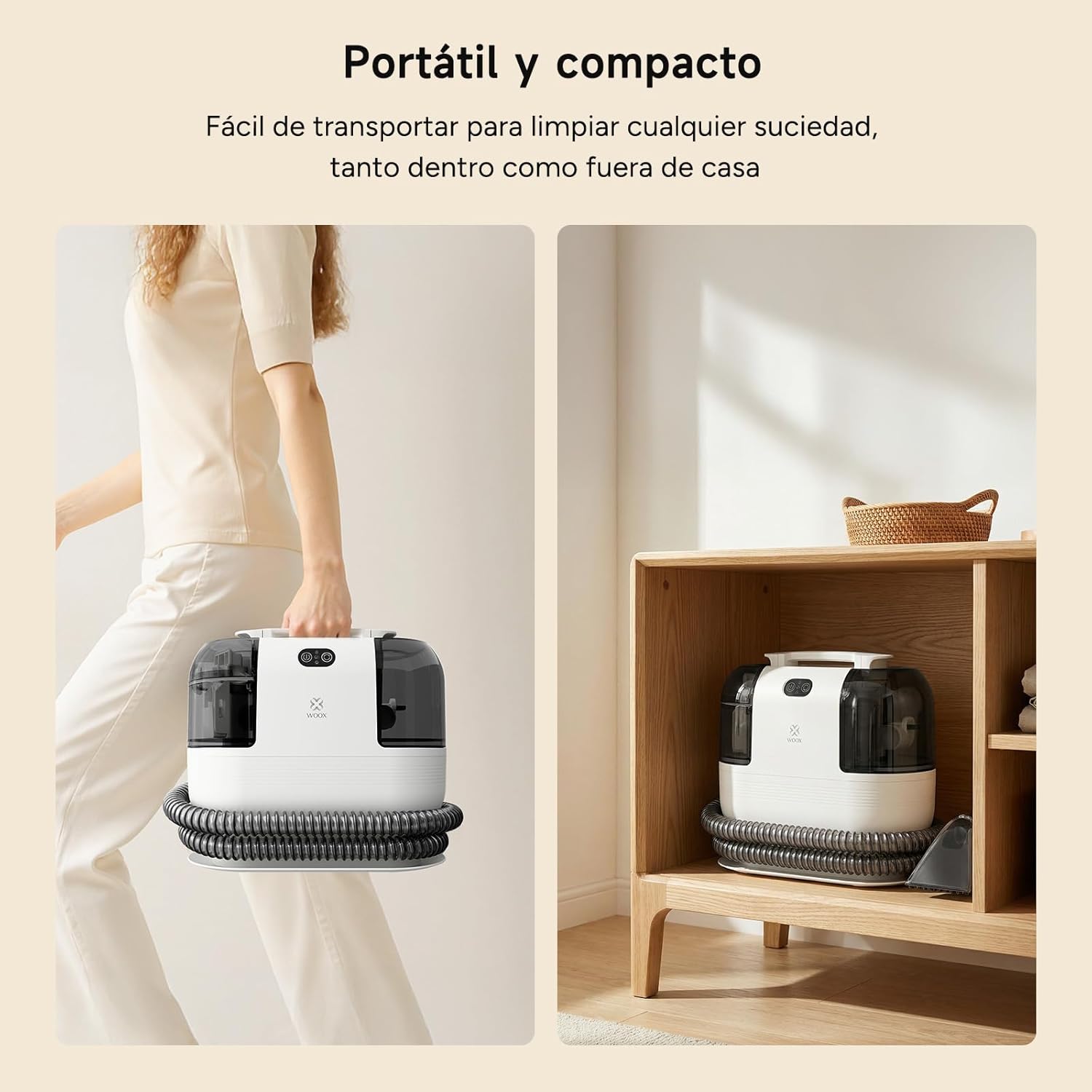
Image: A collage demonstrating the cleaner's versatility across multiple surfaces: carpet, furniture, stairs, and car interior, showcasing its multi-scene professional cleaning capability.
6. Maintenance and Care
6.1. Emptying and Cleaning Tanks
The unit features a dual-tank system with a 1200ml clean water tank and a 750ml dirty water tank to prevent cross-contamination and ensure hygienic cleaning.
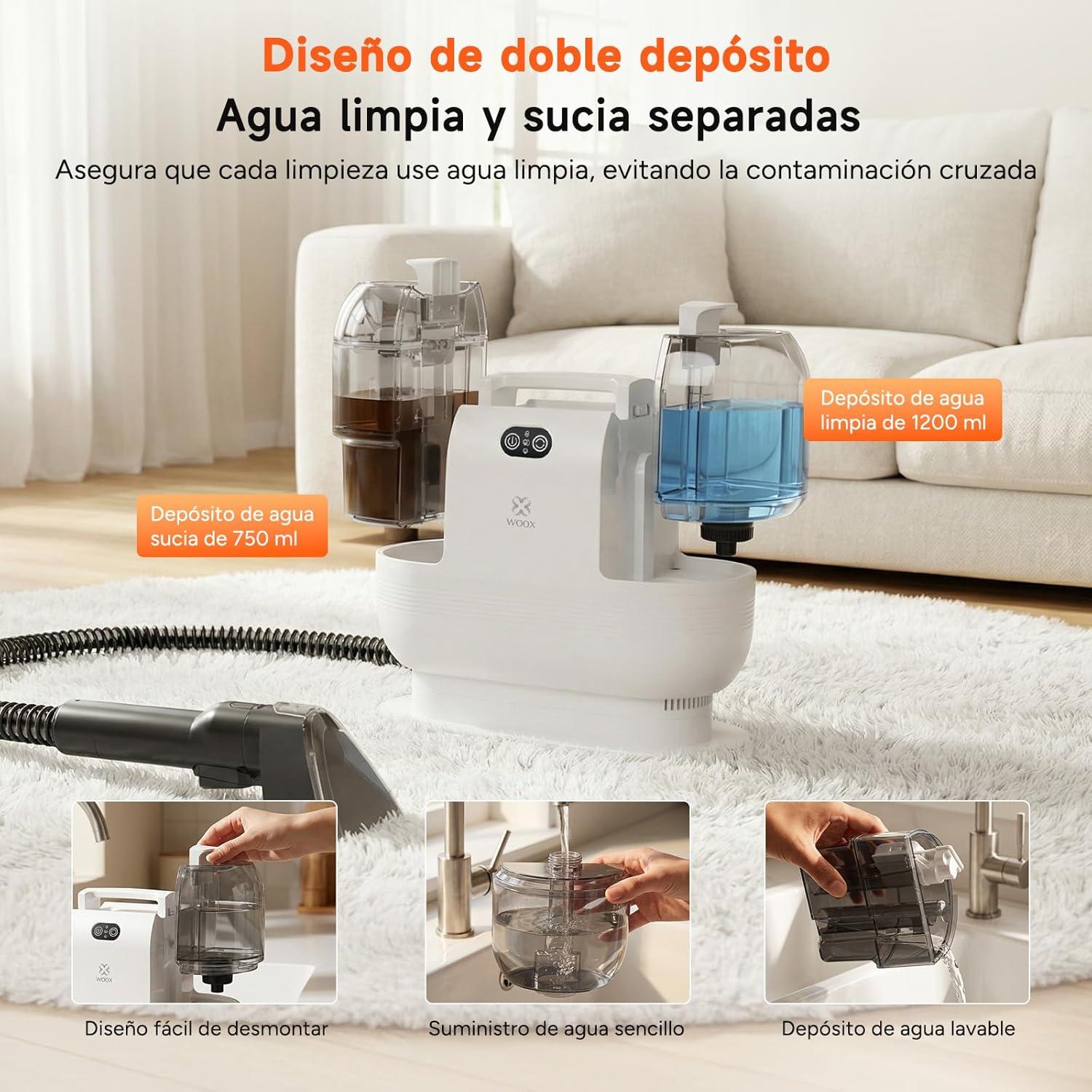
Image: The cleaner's dual-tank design, clearly showing the separate 1200ml clean water tank (with blue water) and 750ml dirty water tank (with brown water), emphasizing no cross-contamination.
- Dirty Water Tank: After each use, carefully remove the dirty water tank. Empty its contents into a drain. Rinse the tank thoroughly with clean water to remove any residue.
- Clean Water Tank: Empty any remaining clean water from the tank and rinse it.
- Drying: Allow both tanks to air dry completely before reassembling them into the main unit. This prevents mold and odor buildup.
6.2. Cleaning the Hose and Brush Heads
- Self-Cleaning Nozzle: Attach the self-cleaning nozzle to the hose. Place the nozzle in a sink or bucket. Activate the spray function to run clean water through the hose until the water runs clear. This flushes out any internal debris.
- Brush Heads: Detach the brush heads from the hose. Rinse them under running water, ensuring to remove any trapped debris, hair, or fabric fibers.
- Drying: Allow all cleaned components to air dry completely before storing them.
6.3. Storage
The WOOX MX0210 features a compact design for convenient storage:
- Wrap the power cord neatly around its designated storage hooks on the unit.
- Coil the flexible hose and secure it in its storage position.
- The brush heads can be hung on the integrated hooks for organized storage.
- Store the appliance in a dry, safe place, such as under a sink or in a cabinet.

Image: A visual demonstrating the compact design of the WOOX cleaner, showing it being carried easily and stored neatly in a cabinet, highlighting its portability and space-saving features.
7. Troubleshooting
If you encounter any issues with your WOOX MX0210, please refer to the table below for common problems and solutions:
| Problem | Possible Cause | Solution |
|---|---|---|
| No power to the unit | Power cord not securely plugged in; electrical outlet is not functioning. | Ensure the power cord is securely plugged into a working electrical outlet. Test the outlet with another appliance. |
| No spray or low spray pressure | Clean water tank is empty; spray nozzle is clogged; pump issue. | Refill the clean water tank. Clean the spray nozzle to remove any blockages. If the issue persists, contact customer support as there might be a pump malfunction. |
| Low suction power | Dirty water tank is full; hose or brush head is clogged; tanks are not properly sealed. | Empty the dirty water tank. Clear any clogs in the hose or brush head. Ensure both the clean and dirty water tanks are correctly seated and sealed. (Note: Overfilling the clean water tank beyond the MAX line can also lead to reduced suction). |
| Water leaking from the unit | Water tanks are not properly seated or sealed; seals or gaskets are damaged. | Check that both water tanks are correctly positioned and securely sealed. Inspect seals and gaskets for any visible damage. If damaged, contact customer support for replacement parts. |
8. Specifications
- Brand: WOOX
- Model Number: MX0210
- Power: 1700W
- Suction Power: 15KPa
- Clean Water Tank Capacity: 1200ml
- Dirty Water Tank Capacity: 750ml
- Hose Length: 1.6m
- Power Cord Length: 3.7m
- Steam Temperature: Up to 100°C
- Power Source: Corded Electric
- Color: Dark Grey
- Country of Origin: China
9. Warranty and Support
WOOX products are manufactured to high-quality standards and are designed for durability and performance. For detailed warranty information, please refer to the warranty card included with your purchase. It is important to retain your purchase receipt as proof of purchase for any warranty claims.
For technical assistance, troubleshooting beyond what is covered in this manual, or to inquire about replacement parts, please visit the official WOOX website or contact our dedicated customer service department. Contact details can typically be found on the product packaging or on the official brand website.