
1. Introduction
This manual provides detailed instructions for the NEEWER QZ-F TTL Wireless Flash Trigger, designed for Fujifilm cameras. It covers product features, setup, operation, maintenance, and troubleshooting to ensure optimal performance and user experience. Please read this manual thoroughly before using the device.
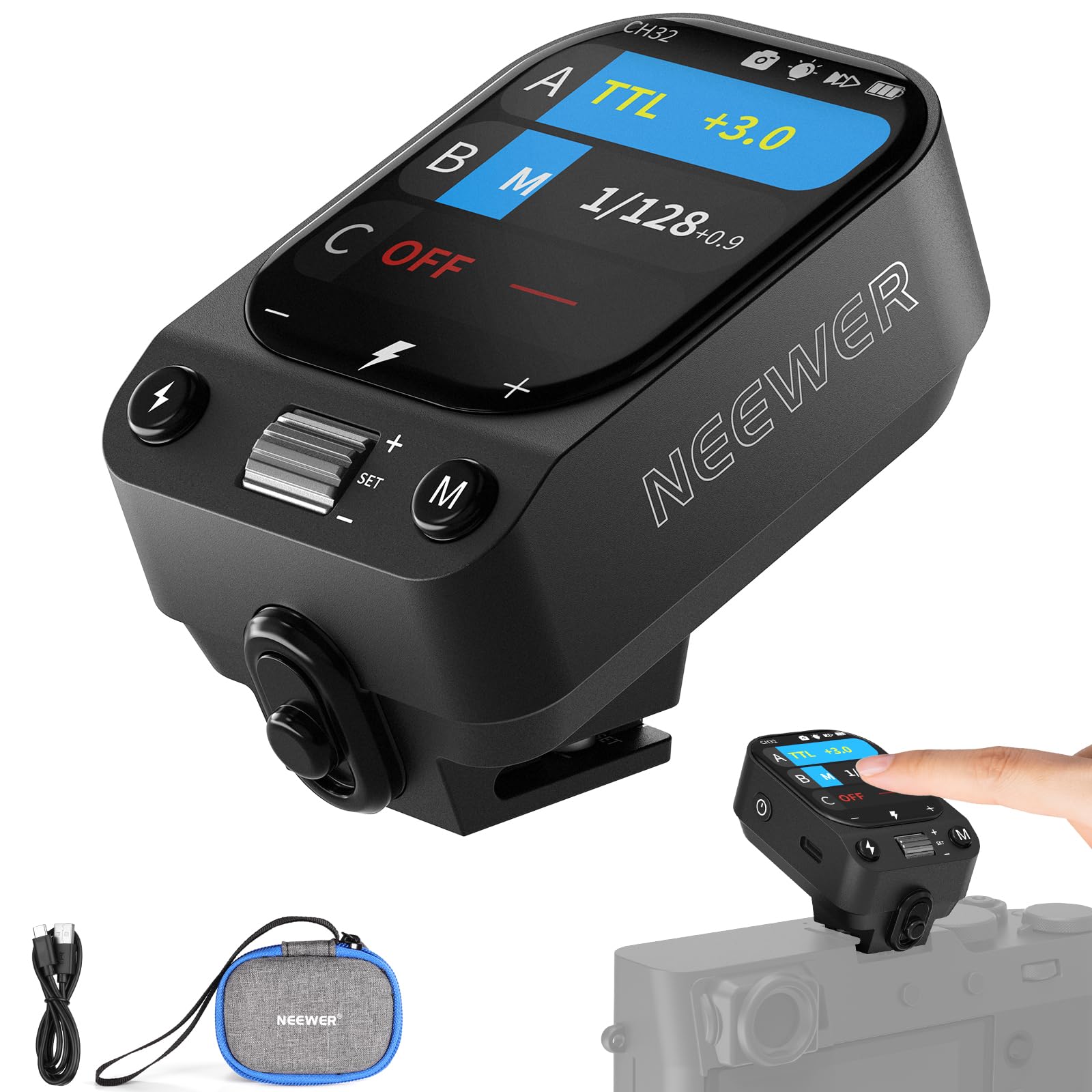
Image 1.1: NEEWER QZ-F TTL Wireless Flash Trigger
2. Product Overview
2.1 Key Features
- OLED Touch Screen: Dimmable OLED touch screen for intuitive control.
- High-Speed Sync (HSS): Supports shutter speeds up to 1/8000s.
- Versatile Flash Modes: Includes TTL, Manual (M), TCM, and Stroboscopic modes.
- Exposure Compensation: ±3EV adjustable in 1/3EV steps.
- Flash Output: Adjustable from 1/256 to 1/1.
- 2.4G Q System: Wireless control with 5 groups, 32 channels, and 01-99 IDs.
- Built-in Battery: 3.7V 1000mAh lithium battery with 2.5-hour charging time and 6-10 hours operating time.
- Compact and Lightweight: Weighs approximately 60g with dimensions of 64 x 41 x 38mm.
- Firmware Upgradable: Via USB-C interface.
2.2 Package Contents
Verify that all items are present in the package:
- 1x NEEWER QZ-F Flash Trigger
- 1x USB Type-C Cable
- 1x Storage Case

Image 2.1: NEEWER QZ-F Package Contents
2.3 Component Identification
Refer to the diagram below for identification of the flash trigger's components and controls.

Image 2.2: Component Diagram of QZ-F Flash Trigger
- Display Screen
- Power Button (Long press to power on/off, short press to lock/unlock screen)
- USB Type-C Charging Port
- Flash Trigger Button
- Mode/Menu Button (Short press to switch modes, long press to enter menu)
- Dial (Rotate to adjust parameters, press to confirm)
- Quick Release Lock
- Hot Shoe Mount
3. Setup
3.1 Charging the Battery
The NEEWER QZ-F features a built-in 1000mAh lithium battery. Before first use, fully charge the device.
- Connect the supplied USB Type-C cable to the charging port (3) on the flash trigger.
- Connect the other end of the cable to a USB power adapter (not included).
- The charging indicator on the screen will show charging status. A full charge takes approximately 2.5 hours.

Image 3.1: Charging the QZ-F Flash Trigger
3.2 Mounting on Camera
To use the flash trigger, mount it onto your Fujifilm camera's hot shoe.
- Slide the flash trigger onto the camera's hot shoe.
- Slide the quick release lock (7) to secure the trigger in place.
- Ensure the trigger is firmly attached to prevent accidental detachment.

Image 3.2: Mounting the QZ-F on a Camera
3.3 Powering On/Off
- To power on, long press the power button (2).
- To power off, long press the power button (2) again.
- Note: Simultaneously pressing and holding the power button and the flash trigger button (4) will force a shutdown.
4. Operating Instructions
4.1 OLED Touch Screen Operation
The QZ-F features an intuitive OLED touch screen for easy navigation and setting adjustments.
- Swiping: Swipe across the screen to navigate between different settings and menus.
- Tapping: Tap on icons or values to select or adjust them.
- Lock Screen: Short press the power button (2) to lock the screen and prevent accidental changes during shooting. Short press again to unlock.
- Brightness Adjustment: Access the menu to adjust screen brightness for various lighting conditions.

Image 4.1: OLED Touch Screen Interface
4.2 Flash Modes
The QZ-F supports multiple flash modes for diverse photographic needs:
- TTL (Through-The-Lens) Mode: Automatic flash exposure control. The camera measures the light and sets the flash output accordingly.
- Manual (M) Mode: Allows manual adjustment of flash output from 1/256 to 1/1.
- TCM (TTL Converted to Manual) Mode: Converts the TTL exposure value into a manual output value, offering the convenience of TTL with the precision of manual control.
- Stroboscopic Mode: Fires multiple flashes during a single exposure to capture motion.
- S1/S2 Mode: Optical slave modes for triggering off-camera flashes.

Image 4.2: TCM Conversion Feature
4.3 2.4G Wireless Q System
The QZ-F integrates with the NEEWER 2.4G Q System for wireless control of compatible NEEWER flashes and studio strobes.
- Groups: Control up to 5 groups (A, B, C, D, E) of flashes.
- Channels: Select from 32 channels to avoid interference.
- Wireless ID: Set IDs from 01-99 or OFF for secure and interference-free communication.
- Transmission Range: Effective wireless transmission up to 100 meters.

Image 4.3: 2.4G Wireless Q System in Use
4.4 Advanced Features
- High-Speed Sync (HSS): Enables flash synchronization with shutter speeds faster than the camera's native sync speed, useful for freezing action or overpowering ambient light.
- Front/Rear Curtain Sync: Synchronizes the flash with the opening or closing of the shutter curtain for creative effects.
- Zoom Adjustment: Auto or manual zoom control (20-200mm) to match the flash coverage with your lens focal length.
- Modeling Lamp Control: The flash trigger can control the modeling lamp on compatible NEEWER flashes.

Image 4.4: High-Speed Sync and TTL Capabilities
5. Maintenance
5.1 Cleaning
- Use a soft, dry cloth to clean the exterior of the flash trigger.
- For the OLED screen, use a microfiber cloth specifically designed for electronics.
- Avoid using harsh chemicals, solvents, or abrasive cleaners.
5.2 Battery Care
- Charge the battery regularly, even if not in use, to maintain battery health.
- Avoid fully discharging the battery frequently.
- Store the device in a cool, dry place when not in use for extended periods.
5.3 Firmware Updates
Periodically check the NEEWER official website for firmware updates. Updates can improve performance, add new features, or fix bugs.
- Connect the QZ-F to a computer using the USB Type-C cable.
- Follow the instructions provided with the firmware update file from the NEEWER website.
6. Troubleshooting
| Problem | Possible Cause | Solution |
|---|---|---|
| Device does not power on. | Battery is depleted. | Charge the battery using the USB Type-C cable. |
| Flash trigger not firing. | Incorrect hot shoe mounting. Incorrect channel/group/ID settings. Flash unit not powered on or out of range. | Ensure the trigger is securely mounted. Verify channel, group, and ID settings match the flash unit. Power on the flash unit and ensure it's within 100m range. |
| Inconsistent flash exposure. | Incorrect flash mode or exposure compensation. Ambient light interference. | Adjust flash mode (TTL/M) and exposure compensation. Check for strong ambient light sources. |
| Screen is unresponsive. | Screen is locked. Temporary software glitch. | Short press the power button to unlock the screen. Power off and restart the device. |
| Forced shutdown occurs. | Accidental simultaneous press of power and test buttons. | This is a normal function. Avoid pressing both buttons simultaneously unless a forced shutdown is desired. |
7. Specifications
| Feature | Detail |
|---|---|
| Model | QZ-F |
| Brand | NEEWER |
| Compatibility | Fujifilm cameras (e.g., X-T50, X-S20, X-T5, X-H2, X-H2S, X-T30 II, GXF100S, X-E4, X-S10, X-T30, GFX50R, X-T3, X-H1, X-T20, GFX50S, X-T10, X100VI, X100V, X100S) |
| Built-in Battery | 3.7V 1000mAh 3.7Wh Lithium Battery |
| Charging Time | Approx. 2.5 hours |
| Operating Time | Approx. 6-10 hours |
| Flash Modes | TTL, Manual (M), TCM, Stroboscopic, S1/S2 |
| Sync Modes | Front Curtain Sync, Rear Curtain Sync, High-Speed Sync (HSS) up to 1/8000s |
| Exposure Compensation | ±3EV in 1/3EV steps |
| Flash Output | 1/256 - 1/1 |
| Zoom Setting | Auto / Manual (20-200mm) |
| Wireless System | 2.4G Q System |
| Transmission Range | 0-100m |
| Channels | 32 |
| Wireless ID | OFF, 01-99 |
| Groups | A, B, C, D, E |
| Display | OLED Touch Screen with adjustable brightness |
| Interface | USB Type-C for charging and firmware updates |
| Dimensions | 64 x 41 x 38mm |
| Weight | Approx. 60g |
8. Warranty and Support
For warranty information and technical support, please refer to the warranty card included with your product or visit the official NEEWER website. You can also contact NEEWER customer service for assistance with product inquiries, troubleshooting, and service requests.
Official Website: www.neewer.com