
Introduction
Thank you for choosing the Homtronics 25L/Day Dehumidifier. This appliance is designed to effectively remove excess moisture from your indoor environment, creating a more comfortable and healthier living space. Please read this manual thoroughly before operating the unit to ensure safe and optimal performance. Keep this manual for future reference.
This dehumidifier is capable of extracting up to 25 liters of moisture per day under conditions of 90% humidity and 35°C. It is suitable for various spaces including rooms, offices, bathrooms, closets, bedrooms, and basements.

Safety Instructions
To prevent injury to the user or others and property damage, the following instructions must be followed. Incorrect operation due to ignoring instructions may cause harm or damage.
- Always place the unit on a stable, level surface.
- Do not operate the unit with a damaged power cord or plug.
- Ensure the power supply matches the voltage specified on the unit's rating label.
- Keep the unit at least 20 cm (8 inches) away from walls or other objects to ensure proper airflow.
- Do not insert fingers or foreign objects into the air inlet or outlet.
- Unplug the unit before cleaning or performing any maintenance.
- Do not use the unit in areas where flammable gases or liquids are stored.
- This appliance is not intended for use by persons (including children) with reduced physical, sensory or mental capabilities, or lack of experience and knowledge, unless they have been given supervision or instruction concerning use of the appliance by a person responsible for their safety.
- Children should be supervised to ensure that they do not play with the appliance.
Product Overview
Familiarize yourself with the components and control panel of your Homtronics dehumidifier.
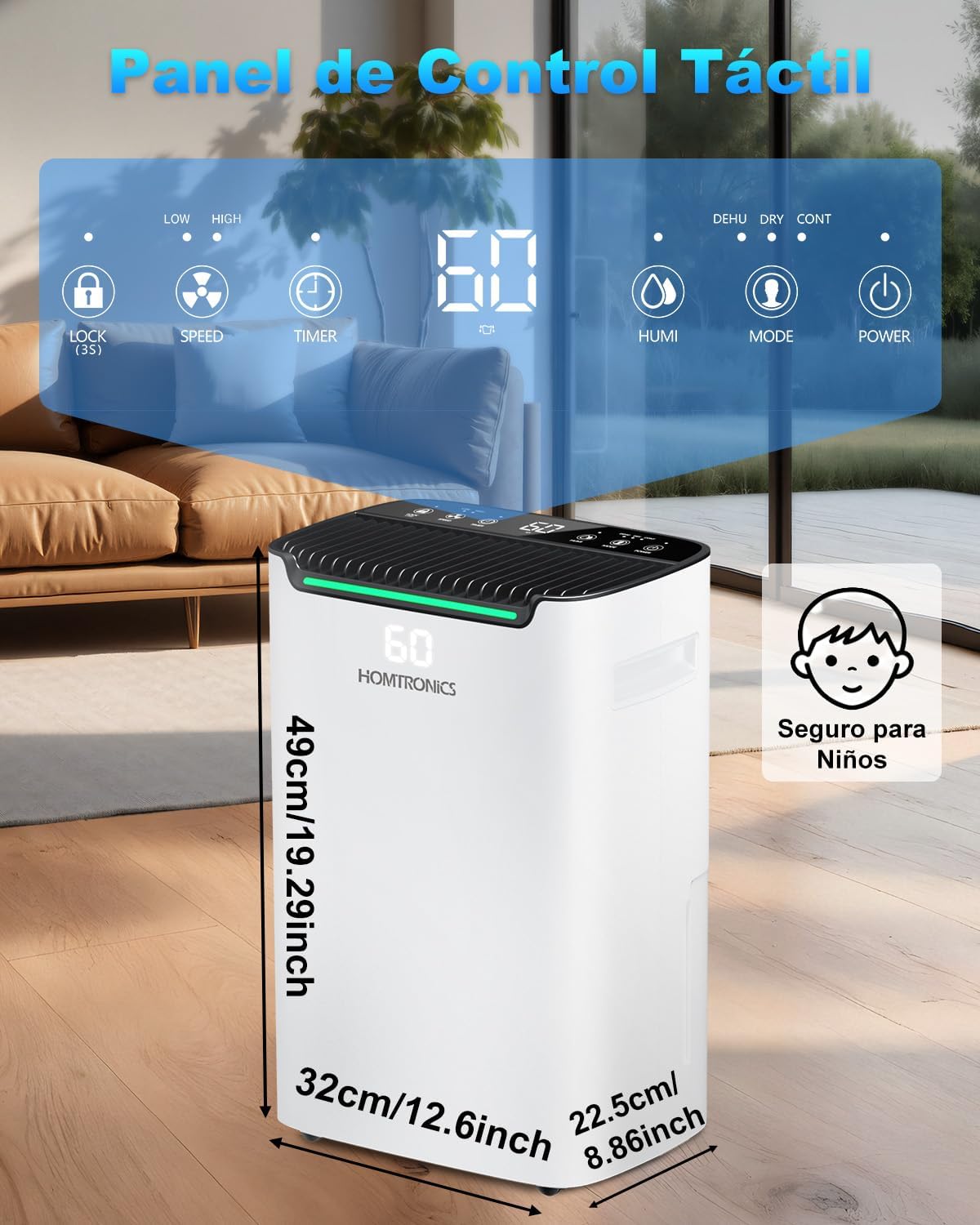
Control Panel Functions:
- Child Lock (LOCK): Press and hold to activate/deactivate. Prevents accidental changes to settings.
- Fan Speed (SPEED): Adjusts fan speed between low and high.
- Timer (TIMER): Sets the auto-off timer from 1 to 24 hours.
- Humidity Setting (HUMI): Adjusts the desired humidity level (30%-80%).
- Mode (MODE): Selects between Normal, Clothes Drying, and Continuous dehumidification modes.
- Power (POWER): Turns the unit on or off.
Setup
1. Placement
Place the dehumidifier in a location where it can operate most effectively. Ensure there is adequate space around the unit for proper air circulation. The unit is equipped with 360° swivel wheels and a recessed side handle for easy transport.

2. Drainage Options
Your dehumidifier offers two methods for water drainage:
- Water Tank: The unit collects water in its internal 2.5-liter water tank. When the tank is full, the unit will automatically shut off and an indicator will alert you to empty it.
- Continuous Drainage: For extended operation without needing to empty the tank, connect the included 2-meter drain hose to the continuous drainage port. Route the hose to a suitable drain point, ensuring it is sloped downwards for gravity drainage.

Operating Instructions
1. Power On/Off
Plug the unit into a grounded electrical outlet. Press the Power button to turn the dehumidifier on or off.
2. Setting Desired Humidity
Press the HUMI button to adjust the desired humidity level. The humidity can be set between 30% and 80% Relative Humidity (RH) in 5% increments. The unit will operate until the set humidity level is reached, then cycle on and off to maintain it.

3. Dehumidification Modes
Press the MODE button to cycle through the available modes:
- Normal Dehumidification Mode: Adjust the desired humidity level between 30% and 80% RH. The unit will maintain this level.
- Clothes Drying Mode: Accelerates the drying of clothes indoors by continuously running the fan and compressor at high power.
- Continuous Mode: The unit operates continuously regardless of the ambient humidity level, ideal for very damp environments.

4. Fan Speed
Press the SPEED button to select between low and high fan speeds. Higher fan speed results in faster dehumidification but may produce more noise.
5. Timer Function
Press the TIMER button to set an automatic shut-off time. You can set the timer from 1 to 24 hours. The unit will turn off automatically after the set time has elapsed.

6. Child Lock
To prevent children from accidentally changing settings, press and hold the LOCK button for 3 seconds to activate or deactivate the child lock function. When activated, the control panel buttons will be unresponsive.
7. How to Use Video
Watch this video for a visual guide on how to use the dehumidifier and its functions.
Video: A demonstration of the dehumidifier's functions and how to operate it.
Maintenance
1. Emptying the Water Tank
When the water tank is full, the unit will stop operating and an indicator light will illuminate. Carefully remove the water tank from the unit and empty the collected water. Reinsert the tank firmly until it clicks into place.
2. Cleaning the Air Filter
The air filter should be cleaned regularly (every two weeks or more often depending on usage) to ensure efficient operation. A dirty filter can reduce airflow and dehumidification performance.
- Turn off the unit and unplug it from the power outlet.
- Locate and remove the air filter (refer to the product diagram for exact location).
- Clean the filter with warm, soapy water or use a vacuum cleaner to remove dust.
- Rinse the filter thoroughly and allow it to air dry completely before reinserting it into the unit.
3. Storage
If the unit will not be used for an extended period:
- Empty the water tank and ensure it is clean and dry.
- Clean the air filter.
- Store the unit in a cool, dry place, away from direct sunlight and extreme temperatures.
Troubleshooting
| Problem | Possible Cause | Solution |
|---|---|---|
| Unit does not turn on. | No power supply; Power cord not plugged in; Water tank full or not properly inserted. | Check power connection; Ensure tank is empty and correctly seated. |
| No water collected. | Ambient humidity too low; Temperature too low; Air filter clogged; Unit in fan-only mode. | Check humidity settings; Clean air filter; Ensure unit is in a dehumidification mode. |
| Unit is noisy. | Unit not on a level surface; Air filter clogged; Fan speed set to high. | Place on a level surface; Clean air filter; Reduce fan speed. |
| Child Lock is active. | Child Lock function is engaged. | Press and hold the LOCK button for 3 seconds to deactivate. |
If the problem persists after trying the above solutions, please contact customer support.
Specifications
- Model Name: KDM06-N
- Brand: Homtronics
- Color: White
- Dehumidification Capacity: 25 Liters/day (at 90% RH, 35°C)
- Water Tank Volume: 2.5 Liters
- Drainage Options: 2.5L Tank, Continuous Drain Hose (2m included)
- Special Features: Child Lock, Continuous Drainage, LED Power Indicator, Silent Operation, 24H Timer
- Operating Modes: Normal, Clothes Drying, Continuous
- Humidity Setting Range: 30% - 80% RH
- Fan Speeds: 2
- Dimensions (D x W x H): 37 cm x 26 cm x 50 cm
- Material: Acrylonitrile Butadiene Styrene (ABS)
- Refrigerant: R290
- Country of Origin: China
Warranty and Support
For warranty information and customer support, please refer to the warranty card included with your product or visit the official Homtronics website. Keep your purchase receipt as proof of purchase for any warranty claims.
Typical warranty periods for home improvement products like this dehumidifier often range from 1 to 2 years for parts and labor, with some components like the compressor potentially having a longer warranty (e.g., 6 years). Please consult your specific warranty documentation for precise details.
If you encounter any issues not covered in the troubleshooting section, or require further assistance, please contact Homtronics customer service through their official channels.