
1. Safety Information
Read all instructions carefully before installation and use. Retain this manual for future reference.
- Electrical Safety: Ensure power is disconnected at the circuit breaker before installation or servicing. All wiring must comply with national and local electrical codes. If unsure, consult a qualified electrician.
- Mounting: The ceiling fan must be mounted to a structurally sound ceiling joist or outlet box capable of supporting at least 35 lbs (15.9 kg). Use only the hardware provided.
- Blade Clearance: Maintain a minimum clearance of 7 feet (2.13 meters) from the floor to the fan blades. Ensure blades do not obstruct any objects or walls during operation.
- Light Source: Do not look directly into the LED light source when it is operating.
- Cleaning: Always turn off the fan and disconnect power before cleaning. Use a soft, damp cloth; avoid harsh chemicals.
2. Package Contents
Verify that all components are present before beginning installation. If any parts are missing or damaged, contact customer support.
- Ceiling Fan Motor Housing with Integrated LED Light
- Retractable Fan Blades (3)
- Downrods (5-inch and 8-inch options)
- Mounting Bracket
- Canopy and Canopy Ring
- Remote Control with Wall Mount Holder
- Hardware Pack (screws, wire nuts, washers)
- Instruction Manual
3. Specifications
| Feature | Detail |
|---|---|
| Brand | LEDIARY |
| Model Number | Y25FSD0024-2801 |
| Color | Satin Nickel |
| Fan Size | 42 Inch (when blades extended) |
| Light Source | Integrated 36W LED |
| Color Temperature | 3000K (Warm White) to 6000K (Clear White) |
| Brightness | 10% to 100% Dimmable |
| Motor Type | DC Motor (30W) |
| Fan Speeds | 6 Speeds |
| Noise Level | Max 30dB |
| Control Method | Remote Control, APP Control (Bluetooth) |
| Timer Settings | 2H, 4H |
| Mounting Type | Downrod Mount (Flat or Sloped Ceiling ≤15°) |
| Recommended Room Size | 100-144 sqft |
4. Setup and Installation
Follow these steps for proper installation. Professional installation is recommended if you are unfamiliar with electrical wiring.
4.1 Mounting Options and Dimensions
The fan supports both flat and sloped ceilings (up to 15 degrees). Two downrod lengths are provided for flexible installation.
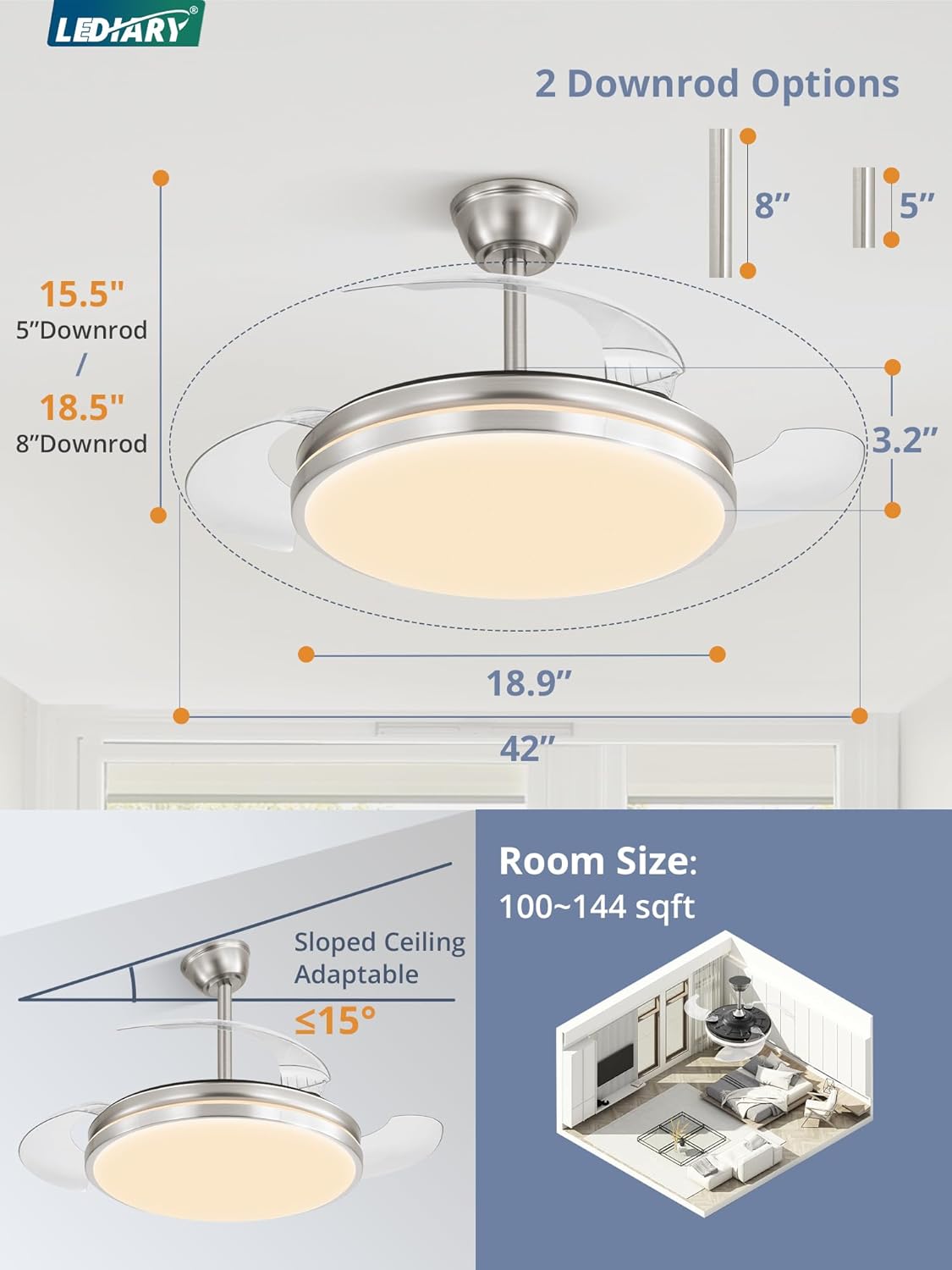
This image illustrates the fan's dimensions, including the 18.9-inch body diameter and 42-inch span with blades extended. It also shows the two downrod options (5-inch and 8-inch) and indicates suitability for rooms between 100-144 square feet, as well as adaptability for sloped ceilings up to 15 degrees.

This image demonstrates the two available downrod lengths (5-inch and 8-inch) and shows the fan installed on both flat and sloped ceilings, highlighting its versatile mounting options.
4.2 Electrical Connection
- Ensure the main power supply is turned off at the circuit breaker.
- Connect the fan's wires to the household electrical wires according to the wiring diagram provided in the separate installation guide. Typically, this involves connecting live, neutral, and ground wires.
- Secure all wire connections with wire nuts.
4.3 Blade Installation
The fan features retractable blades that deploy when the fan is turned on and retract when turned off.

This image demonstrates the retractable blade feature. When the fan is off, the blades are hidden, giving it the appearance of a standard light fixture. When the fan is on, the three transparent blades extend to circulate air.
5. Operating Instructions
Your LEDIARY ceiling fan can be controlled via the included remote control or a smartphone application.
5.1 Remote Control and APP Functions
The remote control and APP offer comprehensive control over the fan and light functions.

This image illustrates the various functions available via both the remote control and the smartphone application, including night light mode, adjustable brightness, timing settings, color temperature control, reverse function for airflow, and 6 fan speeds. Note: APP control requires Bluetooth connection.
5.2 Fan Speed Control
The fan offers 6 distinct speed settings to suit your comfort needs.

This graphic depicts the 6-speed control feature, allowing users to adjust airflow from a gentle breeze to a powerful circulation.
5.3 Dimmable LED Lighting and Color Temperature
Customize your lighting experience with adjustable brightness and color temperature.

This image demonstrates the adjustable lighting features, allowing users to select color temperatures from warm white (3000K) to clear white (6000K) and adjust brightness from 10% to 100%.

This graphic further details the color temperature range (3000K Warm White, 4500K Cool White, 6000K Clear White) and the 10%-100% brightness adjustment capability.
5.4 Reversible Motor for Seasonal Use
The reversible DC motor allows for year-round comfort by changing airflow direction.

This image illustrates the reversible motor function. In Summer Mode, the fan creates a downward airflow for a cooling effect. In Winter Mode, it creates an upward airflow to circulate warm air trapped near the ceiling.
5.5 Timer Settings
Set the fan to automatically turn off after a specified duration.

This graphic highlights the available timer settings, allowing the user to set the fan to turn off after 2 or 4 hours.
5.6 Memory Function
The fan remembers your last settings for light color temperature, brightness, and fan speed when turned off and on again.
5.7 Quiet Operation
The DC motor is designed for powerful airflow with minimal noise.

This image emphasizes the fan's quiet operation, with a maximum noise level of 30dB, ensuring a peaceful environment.

This graphic visually compares the fan's low running noise (≤30dB) to common sound levels, highlighting its quiet performance.
6. Maintenance
Regular maintenance ensures optimal performance and longevity of your ceiling fan.
- Cleaning: Periodically clean the fan and light fixture. Ensure power is off before cleaning. Use a soft, lint-free cloth. For stubborn dirt, a slightly damp cloth with mild soap can be used, followed by a dry cloth. Do not use abrasive cleaners or solvents.
- Blade Care: The retractable blades are made of transparent material. Handle them gently during cleaning to avoid scratches.
- Tighten Fasteners: Check all screws and fasteners annually to ensure they are secure. Loose connections can cause noise or malfunction.
- LED Light Source: The integrated LED light source is designed for long life and is not user-replaceable. If the light malfunctions, contact customer support.
7. Troubleshooting
Refer to this section for common issues and their solutions.
| Problem | Possible Cause | Solution |
|---|---|---|
| Fan does not start | No power supply Loose wire connections Remote control battery low | Check circuit breaker and wall switch Verify all wire connections are secure (power off first) Replace remote control batteries |
| Light does not work | No power supply Loose wire connections LED driver issue | Check circuit breaker and wall switch Verify all wire connections are secure (power off first) Contact customer support |
| Fan makes excessive noise | Loose mounting screws Unbalanced blades Motor issue | Ensure all mounting hardware is tight Check if blades are properly seated and not damaged Contact customer support |
| Remote control not working | Battery low or dead Remote not paired Obstruction between remote and receiver | Replace batteries Refer to pairing instructions in the full manual (if applicable) Ensure clear line of sight |
| APP control not connecting | Bluetooth not enabled Fan not in pairing mode APP outdated | Ensure Bluetooth is active on your device Follow APP pairing instructions Update the APP to the latest version |
8. Warranty and Customer Support
LEDIARY offers a 2-year customer support for this product. If you encounter any issues or have questions regarding your LEDIARY 42-Inch Retractable Ceiling Fan, please contact our customer service team.
For assistance, please refer to the contact information provided with your purchase or visit the official LEDIARY website.


