
Introduction
The Silva Seek 420 is a versatile headlamp designed for daily use and outdoor activities. It features a compact design, 420 lumens of light output, and a night vision mode. This manual provides instructions for the proper setup, operation, maintenance, and troubleshooting of your Silva Seek 420 Headlamp.

Figure 1: The Silva Seek 420 Headlamp. This image shows the compact design of the headlamp unit and its adjustable headband.
Setup
1. Unpacking
Carefully remove all components from the packaging. The package should contain the headlamp unit, the headband, and a quick start guide. Batteries are not included and must be purchased separately.
2. Battery Installation
The Seek 420 headlamp is compatible with either 3x AAA alkaline batteries or a rechargeable Silva Hybrid battery (both sold separately).
- Locate the battery compartment on the headlamp unit.
- Open the battery compartment cover.
- Insert 3x AAA batteries, ensuring correct polarity (+/-) as indicated inside the compartment, or insert the Silva Hybrid battery.
- Close the battery compartment cover securely to maintain water resistance.
3. Headband Adjustment
The headlamp unit can be detached from the headband. The headband features integrated buckles for easy adjustment.
- Attach the headlamp unit to the headband if it is detached.
- Place the headband on your head.
- Adjust the length of the headband using the buckles until it fits comfortably and securely.
Operating Instructions
1. Power On/Off and Brightness Modes
The headlamp features a single button for controlling power and brightness levels.
- To Turn On: Press the power button once. The headlamp will typically turn on in the last used white light mode.
- To Cycle Brightness: While the headlamp is on, press the power button repeatedly to cycle through the white light modes: Max (420 lm) → Medium (200 lm) → Min (10 lm).
- To Turn Off: Press and hold the power button for approximately 1 second.

Figure 2: Illustration of the three white light brightness levels (Max, Medium, Min) emitted by the Silva Seek 420 Headlamp.
2. Red Light Mode
The red light mode is designed to preserve night vision.
- To Activate Red Light: From the OFF state, press and hold the power button for approximately 2 seconds.
- To Switch Back to White Light: Press the power button once.
- To Turn Off from Red Light: Press and hold the power button for approximately 1 second.
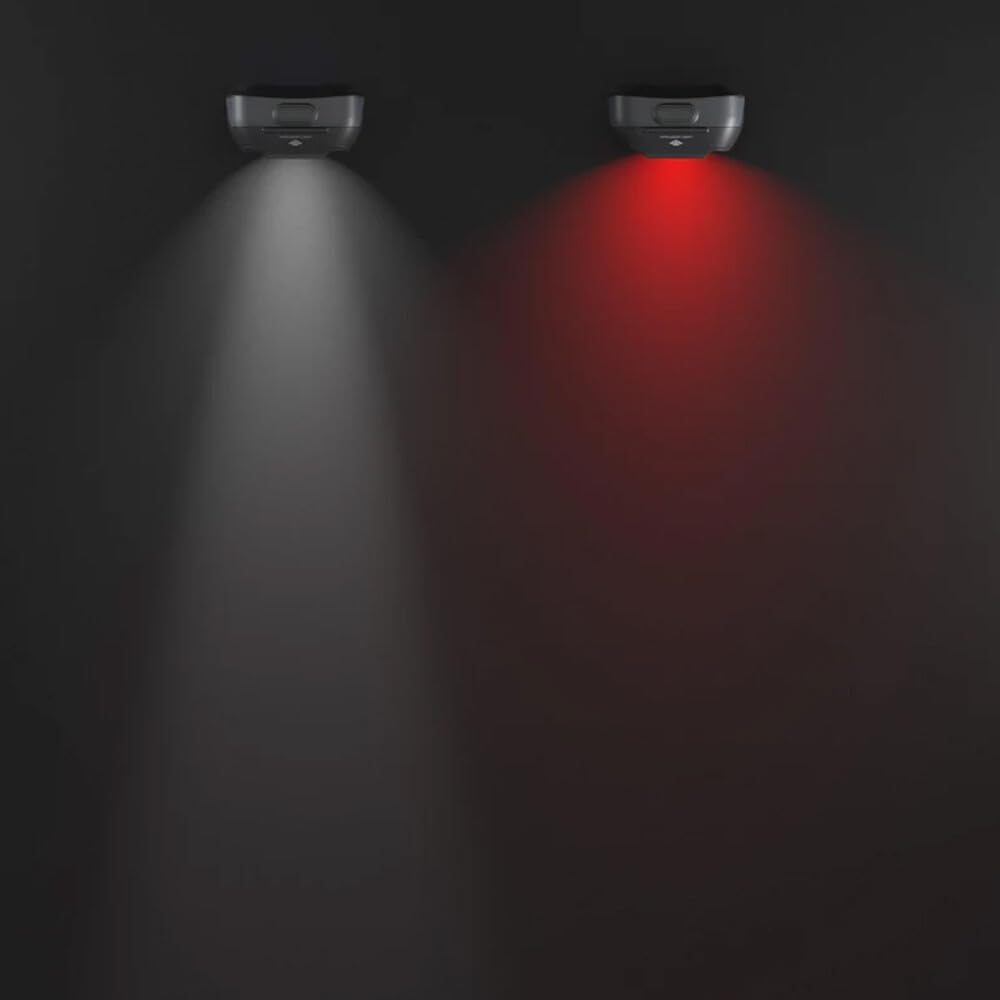
Figure 3: The Silva Seek 420 Headlamp demonstrating both its white light and red light modes. The red light is useful for maintaining night vision.
3. Locking Function
The integrated locking function prevents accidental activation of the headlamp, especially when stored in a backpack.
- To Lock: While the headlamp is OFF, press and hold the power button for approximately 5 seconds until the light blinks.
- To Unlock: Press and hold the power button for approximately 5 seconds until the light blinks again and turns on.
4. Battery Indicator
The Seek 420 headlamp includes a battery level indicator. When the headlamp is turned on or off, a small LED will illuminate:
- Green Light: Battery level is good.
- Red Light: Battery level is low and requires replacement or recharging.
5. Silva Intelligent Light
The Silva Intelligent Light technology combines a focused long-distance spot beam with a wide floodlight. This design aims to reduce head movements, minimize fatigue, and improve balance during activities by providing clear vision both far ahead and in the immediate surroundings.
Maintenance
- Cleaning: Wipe the headlamp unit and headband with a damp cloth. Do not use harsh chemicals or abrasive materials.
- Storage: Store the headlamp in a cool, dry place when not in use. If storing for extended periods, remove alkaline batteries to prevent leakage.
- Water Resistance: The Seek 420 is IPX5 rated, meaning it is resistant to heavy rain and splashing water from all directions. It is not designed for submersion. Ensure the battery compartment is securely closed to maintain water resistance.
Troubleshooting
| Problem | Possible Cause | Solution |
|---|---|---|
| Headlamp does not turn on. |
|
|
| Light is dim. | Low battery level. | Replace batteries or recharge Silva Hybrid battery. |
| Headband detaches from lamp unit. | Improper attachment or wear over time. | Re-attach the lamp unit securely to the headband. Ensure the attachment mechanism is clean and free of debris. |
Specifications
Below are the technical specifications for the Silva Seek 420 Headlamp:
- Model: Seek 420
- Light Output: Up to 420 Lumens
- Light Modes: Max, Medium, Min (White Light), Red Light
- Light Source: LED
- Battery Compatibility: 3x AAA alkaline batteries or Silva Hybrid rechargeable battery (not included)
- Water Resistance: IPX5 (resistant to heavy rain and splashing)
- Weight (lamp unit + headband): 92 grams
- Product Dimensions: Approximately 10 x 7 x 9 cm
- Material: Recycled materials
- Included Components: Headlamp unit, headband, quick start guide
Performance Data (ANSI FL1 Standard)

Figure 4: Detailed performance data for the Silva Seek 420 Headlamp, including brightness levels, optimal use, beam pattern, burn time, and light distance for Max, Medium, and Min modes. Values are measured according to the ANSI FL1 Standard.
| Brightness Level | True Lumen (ANSI) | Optimal For | Burn Time (Hybrid/AAA) | Light Distance (ANSI) |
|---|---|---|---|---|
| Max | 420 lm | Medium range use | 3 h / 3 h | 87 m / 285 ft |
| Medium | 200 lm | Close range use | 5 h / 6 h | 67 m / 219 ft |
| Min | 10 lm | Ambience/reading | 90 h / 110 h | 15 m / 49 ft |
Note: True lumen output is measured after 30 seconds. Burn time is from power-on until lumen output reaches 10% of initial value.
Warranty Information
Silva products are manufactured to high quality standards. For specific warranty terms and conditions, please refer to the official Silva website or the warranty card included with your product. Keep your proof of purchase for any warranty claims.
Support
If you encounter any issues not covered in this manual or require further assistance, please contact Silva customer support through their official website. You can typically find contact information, FAQs, and additional resources on their support pages.
Website: www.silva.se (This is a placeholder link, please refer to the actual manufacturer's website for support.)


