
Introduction
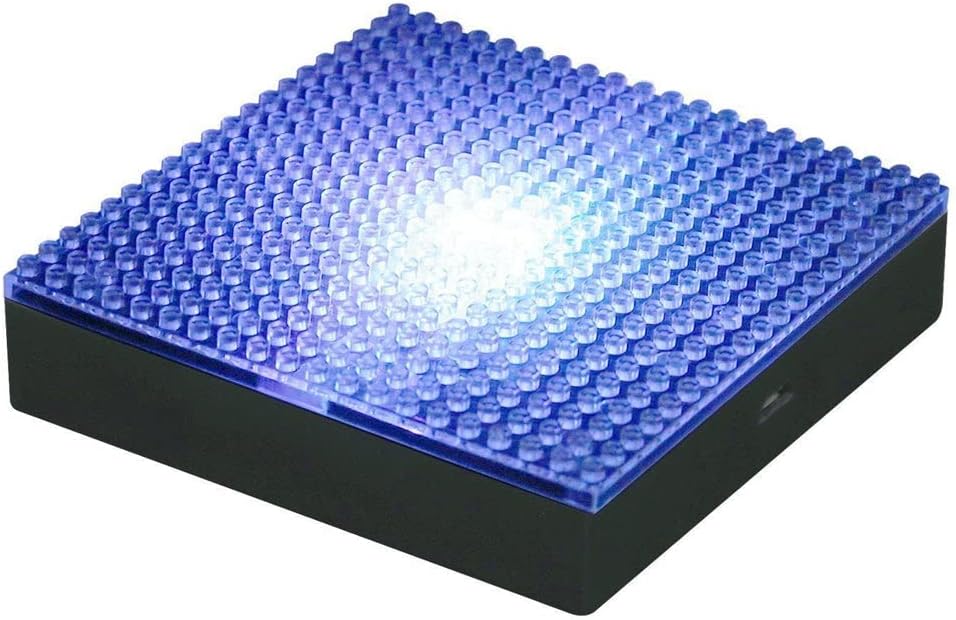
The KAWADA Nanoblock LED Display Base, model NB026, is designed to illuminate and enhance your Nanoblock creations. This display base provides dynamic, color-changing LED lighting to showcase your micro-building block models with added visual appeal. Its compact size makes it suitable for display on desks or shelves.
This manual provides essential information for the proper setup, operation, and maintenance of your LED Display Base.
Setup
1. Unpacking
Carefully remove the LED Display Base from its packaging. Ensure all components are present: the LED Display Base unit.
2. Powering the Device
The LED Display Base can be powered using two (2) AAA batteries (not included) or via a USB connection.
- Battery Installation: Locate the battery compartment on the underside of the base. Open the compartment, insert two AAA batteries, ensuring correct polarity (+/-), and close the cover securely.
- USB Power: Connect a standard USB cable (not included) to the USB port on the side of the display base and to a compatible USB power source (e.g., computer, USB wall adapter).
3. Placing Your Nanoblock Creation
The display base features a 4 x 4 inch (approximately 10.2 x 10.2 cm) brick plate on its top surface. Align your Nanoblock model with the studs on the plate and gently press it into place to secure it for display.

Operating Instructions
1. Power On/Off
Locate the power switch on the side of the display base. Flip the switch to the 'ON' position to activate the LED lights. Flip it to 'OFF' to turn off the lights.
2. LED Light Function
Upon activation, the internal LEDs will automatically cycle through a sequence of colors, including red, green, blue, and white. The lights are designed to provide a dynamic and changing illumination effect for your Nanoblock creations. The color cycling is automatic and cannot be set to a single static color.


Maintenance
1. Cleaning
To clean the display base, gently wipe the surfaces with a soft, dry cloth. Avoid using abrasive cleaners or solvents, as these may damage the plastic or electronic components.
2. Battery Replacement
If the lights dim or stop working when using battery power, it is time to replace the AAA batteries. Follow the battery installation steps outlined in the Setup section.
Troubleshooting
- Lights are not turning on:
- Ensure the power switch is in the 'ON' position.
- If using batteries, check that they are correctly installed and not depleted. Replace with fresh batteries if necessary.
- If using USB power, ensure the USB cable is securely connected to both the base and a working power source.
- Lights appear dim:
- If using batteries, they may be low. Replace them with fresh AAA batteries.
- The brightness of the LEDs is designed to illuminate the center of the base. Larger or denser Nanoblock models may diffuse the light, making it appear less bright.
- Lights are cycling colors, but I want a single color:
- The Nanoblock LED Display Base is designed for automatic color cycling through red, green, blue, and white. It does not support selecting or locking a single color.
Specifications
| Feature | Detail |
|---|---|
| Brand | KAWADA |
| Model Number | NB026 |
| Manufacturer | Schylling |
| Dimensions (L x W x H) | 10.2 x 10.2 x 2.5 cm (approx. 4 x 4 inches) |
| Color | Black (base) |
| Power Source Type | Battery / USB |
| Battery Type | 2 x AAA batteries (not included) |
| Operation | Automatic color cycling |
| Components Included | Display Base |
| Material | Plastic |
Warranty and Support
For product support, inquiries, or to report any issues, please contact the retailer or manufacturer directly. This product may be eligible for a 30-day free return policy, depending on the purchase terms.
Please retain your proof of purchase for any warranty or return claims.