
1. Product Overview
The Viladepot Smart Fingerprint Door Lock Model D6 offers a versatile 5-in-1 keyless entry solution designed for enhanced security and convenience in homes and offices. This lock integrates multiple access methods including fingerprint recognition, secure passcodes, smartphone application control, IC cards, and traditional mechanical backup keys.
Key features include a fast 0.3-second biometric sensor, management via the Tuya app for user access and activity logs, and emergency power options to prevent lockout situations.
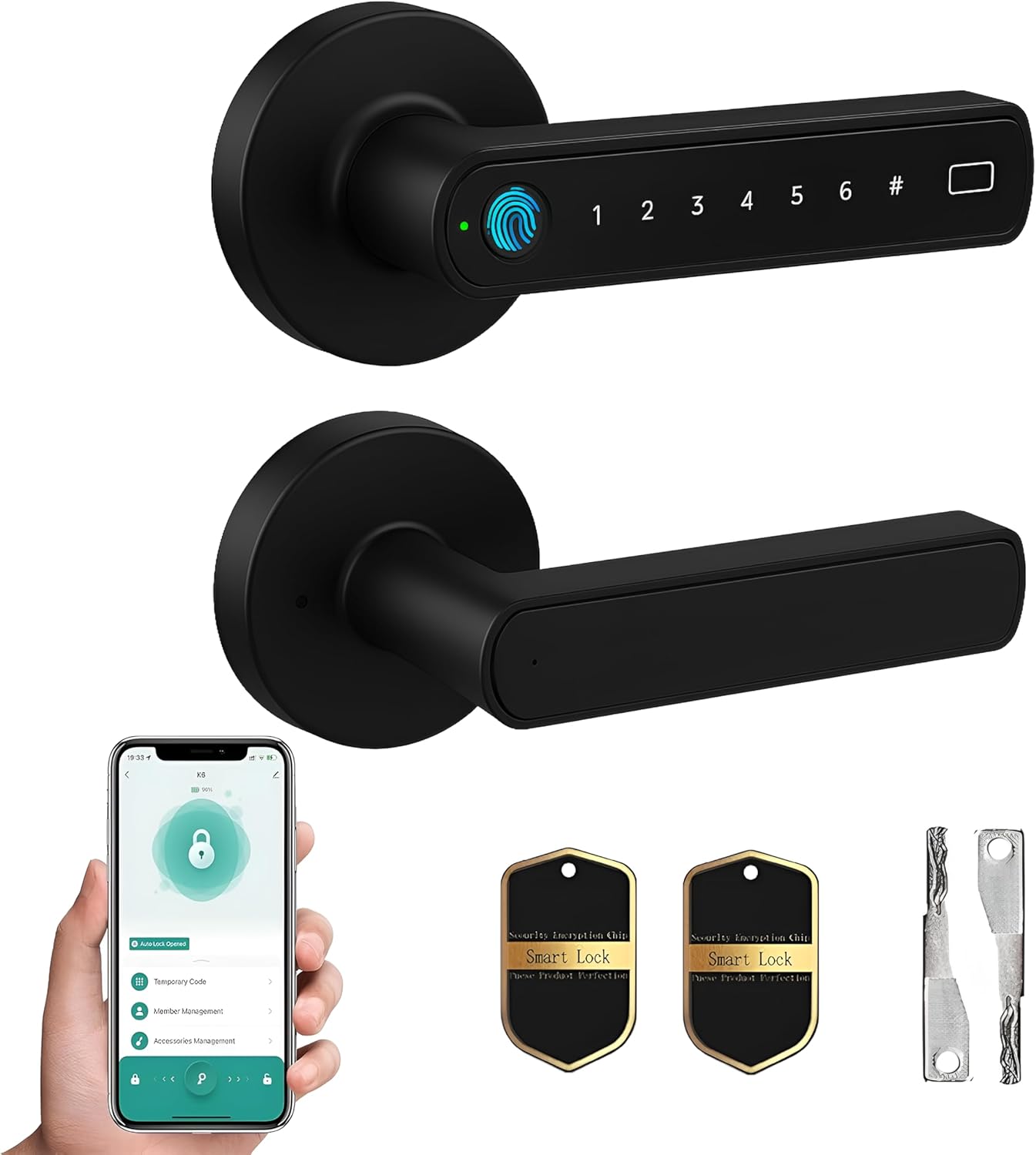
Figure 1: Viladepot Smart Fingerprint Door Lock (Model D6) with included accessories.

Figure 2: Overview of the multiple unlocking methods available for the smart lock.
2. Setup and Installation
2.1 Package Contents
Before beginning installation, verify that all components are present in the package:
- Exterior assembly
- Interior assembly
- Latch bolt
- Latch screws (x4)
- Strike plate
- Plastic box
- Lock fixing column
- Fixing columns (x2)
- Fixing posts (x2)
- Spring
- Fob cards (x2)
- Backup keys (x2)
- User manual with installation guide

Figure 3: Door compatibility guide for the Viladepot Smart Lock.
2.2 Door Compatibility
The Viladepot Smart Fingerprint Door Lock is designed to fit most US standard interior or bedroom doors with a thickness ranging from 30mm to 55mm (1.18" to 2.17"). The handle is reversible, allowing for installation on both left-handed and right-handed doors.
2.3 Installation Steps
Installation is designed to be a straightforward DIY process, typically taking minutes with basic tools and requiring no drilling or wiring. Refer to the included user manual for detailed, step-by-step instructions and diagrams.

Figure 4: Simplified installation guide with key measurements for door preparation.
3. Operating Instructions
3.1 Unlocking Methods
The Viladepot Smart Lock offers five distinct ways to unlock your door:
- Fingerprint Recognition: The advanced 160x160 DPI biometric sensor provides a 0.3-second unlock speed. Simply place your registered finger on the sensor.
- Passcode Entry: Enter a secure 6-digit passcode on the integrated keypad. The virtual password anti-snooping feature allows you to enter random numbers before or after your actual code to prevent others from guessing it.
- Smartphone App Control: Use the Tuya app on your smartphone to remotely unlock or lock the door via Bluetooth.
- IC Cards: Tap the provided IC cards on the designated area of the lock for quick access.
- Backup Keys: In case of electronic failure or dead batteries, use the traditional mechanical backup keys provided.

Figure 5: Virtual password anti-snooping feature for enhanced passcode security.
3.2 Smart App Features
The Tuya app provides comprehensive control and monitoring capabilities for your smart lock:
- User Management: Add or remove fingerprints, passcodes, and IC cards for family members, guests, or staff.
- Temporary Access: Generate permanent, one-time, or temporary codes for visitors or deliveries.
- Activity Logs: Review unlock records to track who entered and exited the premises and at what time.
- Silent Mode: Enable silent mode for discreet access, disabling audible prompts.
4. Maintenance
4.1 Battery Replacement
The Viladepot Smart Lock is powered by 4x AAA batteries (not included). The lock features low-battery warnings to alert you when replacement is needed. To replace batteries, simply slide open the battery compartment cover on the interior handle. No tools are required for this process.
In the event of completely depleted batteries, a USB emergency charging port is available on the exterior handle, allowing temporary power to be supplied via a power bank to unlock the door.

Figure 6: Emergency power options including USB charging and backup keys.
5. Troubleshooting
If you encounter any issues with your Viladepot Smart Fingerprint Door Lock, please consider the following common solutions:
- Lock Not Responding: Check battery levels. If batteries are low or depleted, replace them or use the USB emergency charging port.
- Fingerprint Not Recognized: Ensure your finger is clean and dry. Try re-registering your fingerprint in the app if issues persist.
- Passcode Issues: Verify the correct passcode is being entered. Remember to utilize the virtual password anti-snooping feature correctly.
- App Connectivity Problems: Ensure Bluetooth is enabled on your smartphone and that you are within range of the lock. Restart the app or your phone if necessary.
- Mechanical Key Not Working: Ensure the key is fully inserted and turned correctly. Do not force the key.
For persistent problems, refer to the detailed troubleshooting section in the full user manual or contact customer support.
6. Product Specifications
| Feature | Detail |
|---|---|
| Brand | Viladepot |
| Model Name | D6 |
| Lock Type | Biometric, Combination Lock, Keypad |
| Unlock Methods | Fingerprint, Passcode, Bluetooth App, IC Card, Mechanical Key |
| Fingerprint Sensor | 160x160 DPI, 0.3-second unlock |
| Material | Aluminum |
| Color | Black |
| Finish Type | Matte |
| Product Dimensions | 5.5 x 2.5 x 2.5 inches |
| Door Thickness Compatibility | 30mm – 55mm (1.18" – 2.17") |
| Power Source | 4x AAA Batteries (not included) |
| Emergency Power | USB Charging Port |
| Connectivity Protocol | Bluetooth |
| Controller Type | App, Card, Key, Touch |
| Recommended Uses | Home Security |
7. Warranty and Support
The Viladepot Smart Fingerprint Door Lock Model D6 comes with a 30-day money-back guarantee. For any questions, technical assistance, or warranty claims, please contact Viladepot customer support. Contact information can typically be found on the product packaging or the official Viladepot website.


