
Product Overview
The Life Fitness 95Ti Treadmill is a commercial-grade fitness machine designed for performance and durability. This manual provides essential information for the safe and effective use of your refurbished 95Ti treadmill. It covers setup, operation, maintenance, and troubleshooting.
Key features include the FlexDeck Shock Absorption System, a 4-HP direct-drive AC motor, and a spacious 20" x 60" running belt. This unit has been professionally refurbished to ensure reliable function and extended product life.
Setup Guide
Unpacking and Placement
The treadmill weighs approximately 431 pounds and measures 83"D x 37"W x 64"H. Ensure adequate space for operation and maintenance, allowing at least 2 feet of clearance on the sides and 6 feet behind the treadmill.
Included Components:
- Life Fitness 95Ti Treadmill Unit
- Reading Rack
- Water Bottle Holder
Power Requirements
The treadmill requires an AC electric (120v, 20-amp dedicated circuit, NEMA 5-20R plug) power source. Ensure the electrical outlet meets these specifications and is not shared with other high-power appliances.

Image: Full view of the Life Fitness 95Ti Treadmill, showcasing its robust frame and running deck.
Operating Your Treadmill
Console Overview
The console provides various controls and displays for your workout. Familiarize yourself with the buttons and screen layout before starting any exercise program.
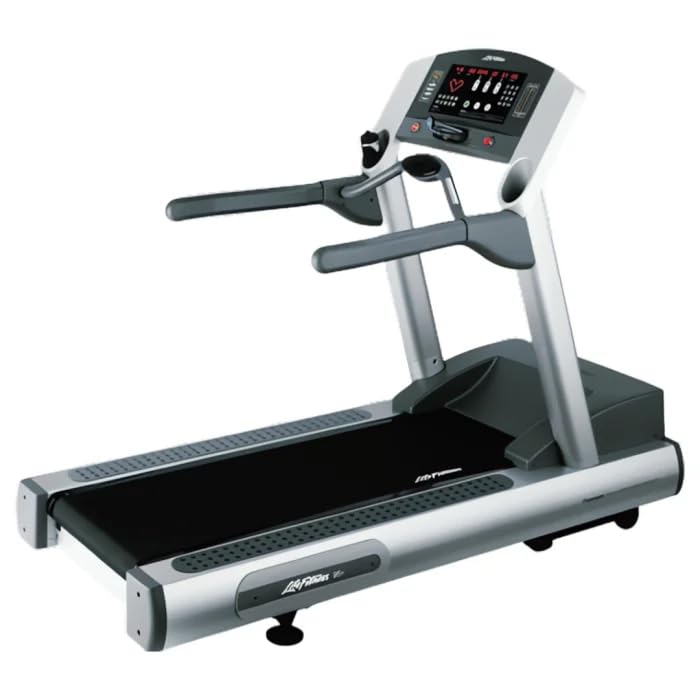
Image: Close-up of the Life Fitness 95Ti Treadmill console, showing the display, control buttons, and heart rate sensors.
Starting a Workout
- Step onto the treadmill belt, ensuring you are centered and stable.
- Press the "Quick Start" button to begin a manual workout, or select a pre-set program from the console menu.
- The belt will begin to move at a low speed. You can then adjust the intensity.
Adjusting Speed and Incline
Use the dedicated speed and incline control buttons on the console to adjust your workout intensity. Speed can be adjusted from 0.5 to 12 mph, and incline from 0% to 15%.
Using Pre-set Programs
The console includes various pre-set programs such as Heart Rate Zone Training, Speed Intervals, Custom Workouts, and Military Fitness Tests. Select your desired program from the console menu and follow the on-screen prompts.
Heart Rate Monitoring
The treadmill features integrated Lifepulse contact sensors on the handlebars for immediate heart rate feedback. It is also compatible with Polar telemetry for wireless heart rate monitoring using a compatible chest strap (sold separately).
Stopping a Workout
To stop the treadmill, press the large "STOP" button on the console. The belt will gradually slow down and come to a complete stop. Always ensure the treadmill has fully stopped before dismounting.
Video: An instructional video demonstrating the features and operation of the Life Fitness 95Ti Treadmill.
Maintenance Guidelines
Regular maintenance ensures the longevity and optimal performance of your treadmill. Adhere to the recommended maintenance schedule to prevent issues and ensure safe operation.
Cleaning
Wipe down the console and exterior surfaces with a damp cloth after each use. Avoid using abrasive cleaners or solvents, as these can damage the finish and electronic components.
Belt Lubrication and Adjustment
Refer to the detailed maintenance schedule for belt lubrication and tension adjustments. Proper belt maintenance is crucial for smooth operation, to prevent premature wear, and to ensure user safety. Consult a qualified technician if you are unsure about these procedures.
Auto Alert Diagnostics
The treadmill features Auto Alert Diagnostics to simplify maintenance by tracking service needs. Pay attention to any alerts displayed on the console and address them promptly.
Troubleshooting Common Issues
This section addresses common operational issues you might encounter. For problems not listed here, or if solutions do not resolve the issue, contact customer support.
| Issue | Possible Cause | Solution |
|---|---|---|
| Treadmill does not power on. | Power cord not connected, circuit breaker tripped, or power outlet issue. | Ensure power cord is securely plugged in. Check the circuit breaker. Verify the outlet is functional with another device. |
| Belt slips or hesitates during use. | Running belt tension too loose or insufficient lubrication. | Adjust belt tension according to maintenance instructions. Apply lubricant if needed, following manufacturer guidelines. |
| Inaccurate heart rate reading. | Hand placement incorrect or sensors are dirty. | Ensure firm and consistent contact with hand sensors. Clean sensors with a damp cloth. |
| Unusual noise during operation. | Loose components or worn parts. | Inspect for loose bolts or screws and tighten if necessary. If noise persists, contact customer support. |
Technical Specifications
| Feature | Detail |
|---|---|
| Model Name | Life Fitness 95Ti Treadmill |
| Product Dimensions (LxWxH) | 83"D x 37"W x 64"H |
| Item Weight | 431 Pounds |
| Maximum User Weight | 400 Pounds |
| Motor | 4-HP Direct-Drive AC Motor |
| Speed Range | 0.5 – 12 mph |
| Incline Range | 0 – 15% |
| Running Belt Dimensions | 20" x 60" |
| Shock Absorption | FlexDeck Shock Absorption System |
| Power Source | AC electric (120v, 20-amp dedicated circuit, NEMA 5-20R plug) |
| Heart Rate Monitoring | Lifepulse contact sensors, Polar telemetry compatible |
| Frame Material | Alloy Steel |
| Included Components | Reading rack, Water bottle holder |
Warranty and Customer Support
This refurbished Life Fitness 95Ti Treadmill includes a 6-month commercial parts and labor warranty. Optional extended coverage may be available; please inquire with your seller for details.
For warranty claims, technical assistance, or service inquiries, please contact the seller or manufacturer directly using the contact information provided at the time of purchase.
Buyer's remorse returns for refurbished cardio and LTL freight items must be initiated via Amazon. Refunds may be reduced as permitted by Amazon policy, including any paid outbound shipping, return freight/label costs, and partial refunds for late returns or items returned used/assembled, damaged, or missing parts (to cover repair/replacement/restock costs).

Image: A gold badge indicating "Certified Pre-Owned", signifying the quality assurance for this refurbished product.


