
Meoilkolnm H88
Meoilkolnm H88 4K Mini Body Camera User Manual
Model: H88
1. Introduction
This manual provides detailed instructions for the proper use and maintenance of your Meoilkolnm H88 4K Mini Body Camera. Please read this manual thoroughly before operating the device to ensure optimal performance and longevity.
2. Package Contents
Verify that all items listed below are included in your package:
- 1 x H88 4K Mini Body Camera (128GB)
- 1 x Magnet Pendant
- 1 x Safety Cord
- 1 x Portable Back Clip
- 1 x USB Cable
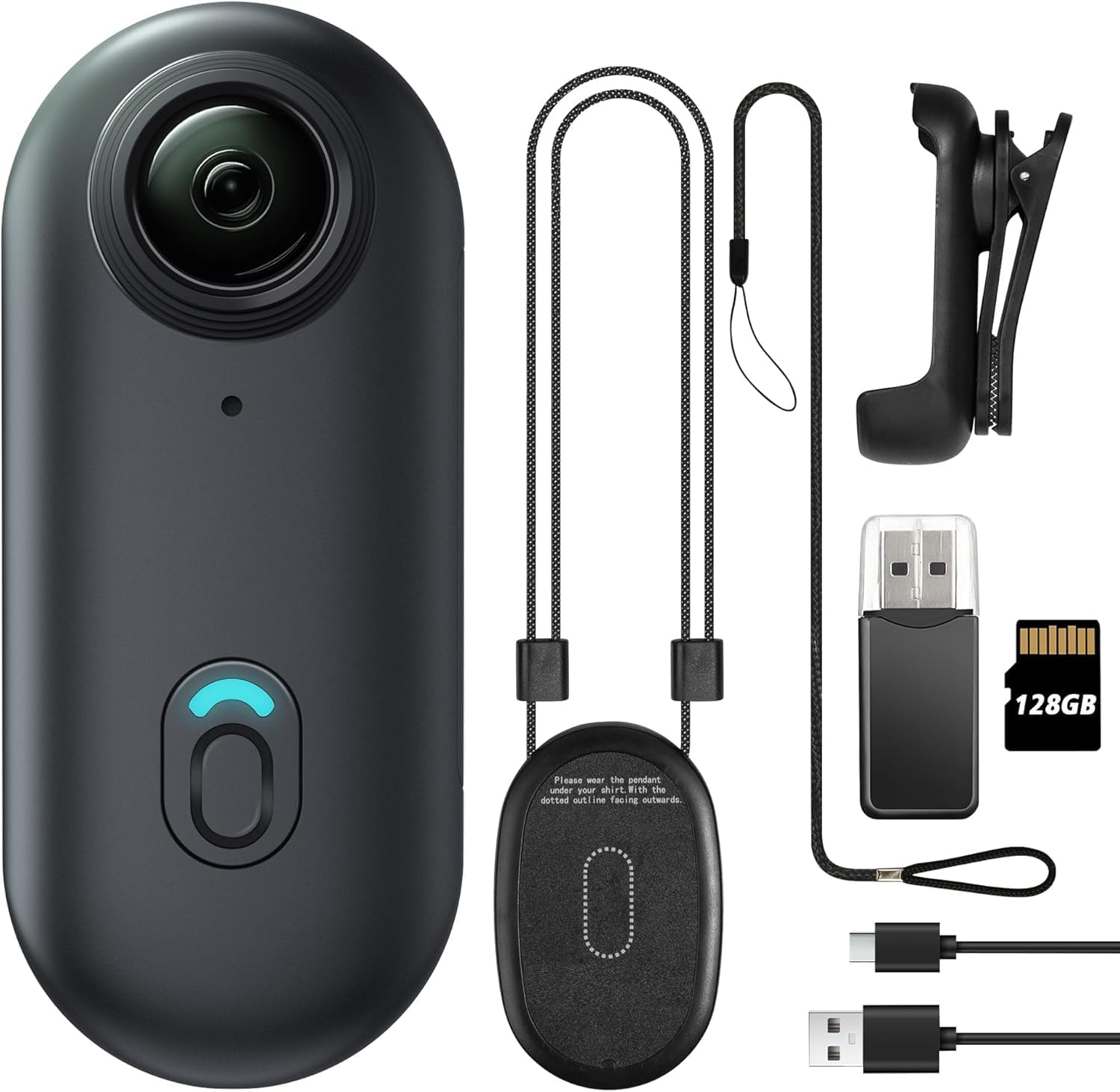
Image 2.1: Contents of the Meoilkolnm H88 4K Mini Body Camera package, including the camera, magnet pendant, safety cord, portable back clip, and USB cable.
3. Product Overview
The Meoilkolnm H88 is a compact and lightweight body camera designed for hands-free recording. Its small form factor allows for versatile mounting options.
3.1 Physical Dimensions and Weight
The camera measures approximately 64.5 x 28 x 20mm and weighs 5.6 ounces (approximately 1.27 oz or 35.95g for the camera unit itself). Its compact design makes it easy to carry and conceal.

Image 3.1: The Meoilkolnm H88 camera shown in a hand, highlighting its small and lightweight design.

Image 3.2: A visual representation of the camera's dimensions (2.5 in length, 1.1 in width, 0.7 in thickness) and its approximate 180-minute recording time on a full charge (Wi-Fi off).
3.2 Key Features
- User-Friendly Operation: Features a single button for easy recording initiation.
- Hands-Free Recording: Designed for convenient, unencumbered video capture.
- Versatile Mounting: Includes a magnet pendant and a 360° adjustable back clip for various attachment options.
4. Setup
4.1 Charging the Camera
Before first use, fully charge the camera. Connect the provided USB cable to the camera's charging port and to a standard USB power source (e.g., computer, wall adapter). The indicator light will show charging status.
4.2 Inserting the Memory Card
The camera supports Micro SD cards. Gently insert the Micro SD card into the designated slot until it clicks into place. Ensure the camera is powered off before inserting or removing the memory card.
5. Operating Instructions
5.1 Powering On/Off
- To Power On: Press and hold the main button until the indicator light illuminates.
- To Power Off: Press and hold the main button until the indicator light turns off.
5.2 Basic Recording
The camera features a simple one-button operation for recording.
- To Start Recording: With the camera powered on, press the main button once. The indicator light will change to confirm recording has started.
- To Stop Recording: Press the main button once again. The indicator light will change to confirm recording has stopped and the file is saved.

Image 5.1: Demonstrates pressing the main button on the camera to initiate or stop recording.
5.3 Connecting to Mobile App (Live Preview & Playback)
For live preview, playback, and downloading content, connect the camera to its dedicated mobile application. Refer to the app's instructions for specific pairing procedures. It is recommended to use the app within 32 feet (10 meters) of the camera for optimal connection.

Image 5.2: The camera connected to a smartphone, showing the live preview and playback functionality via the mobile application.
5.4 Transferring Files
You can transfer recorded videos and images to your phone or computer using the provided USB cable.
- To Phone: Connect the camera to your phone using a compatible USB-C to USB-C or Lightning to USB-C cable.
- To Computer: Connect the camera to your computer using the provided USB-A to USB-C cable. The camera will appear as a removable storage device.

Image 5.3: Instructions for connecting the camera to a phone (left) and a computer (right) to transfer recorded files.
5.5 Mounting Options
The Meoilkolnm H88 offers flexible mounting solutions for various scenarios:
- Magnet Pendant: Attach the camera to the magnet pendant and wear it around your neck with the safety cord for secure, hands-free recording.
- Portable Back Clip: Use the 360° adjustable back clip to attach the camera to clothing, bags, or other surfaces, allowing for diverse recording angles.

Image 5.4: Examples of mounting the camera in different environments, such as on a shirt, a pet's collar, or a helmet, utilizing its magnetic and clip attachments.
6. Maintenance
- Cleaning: Use a soft, dry cloth to clean the camera body. Do not use liquid cleaners or solvents.
- Storage: Store the camera in a cool, dry place away from direct sunlight and extreme temperatures.
- Battery Care: For optimal battery life, avoid fully discharging the battery frequently. Charge the camera regularly, even if not in use for extended periods.
7. Troubleshooting
- Camera Not Turning On: Ensure the battery is charged. Connect to a power source and try again.
- Recording Issues (e.g., static, poor quality):
- Check if the memory card is properly inserted and has sufficient free space.
- Ensure the camera's battery is adequately charged.
- Verify that the lens is clean and free from obstructions.
- App Connection Problems: Ensure the camera's Wi-Fi is enabled and you are within the recommended range (10 meters). Restart both the camera and your mobile device.
- Files Not Transferring: Ensure the USB cable is securely connected to both the camera and the device. Try a different USB port or cable if necessary.
8. Specifications
| Feature | Specification |
|---|---|
| Model Number | H88 |
| Product Dimensions | 0.12 x 0.1 x 0.23 inches (64.5 x 28 x 20mm) |
| Item Weight | 5.6 ounces |
| Video Capture Resolution | 4K |
| Photo Sensor Technology | CMOS |
| Flash Memory Type | Micro SD (128GB included) |
| Video Capture Format | AVI |
| Supported Audio Format | MP4 |
| Connectivity Technology | USB |
| Battery | 1 A battery (included) |
9. Warranty and Support
For warranty information and customer support, please refer to the product packaging or contact Meoilkolnm directly through their official channels. Keep your purchase receipt for warranty claims.
Ask a question about this manual
Ask about setup, troubleshooting, compatibility, parts, safety, or missing instructions. Manuals+ will review the question and use this page’s manual context to help answer it.