
ORICO D10-2230
ORICO D10-2230 M.2 NVMe SSD 512GB Instruction Manual
Model: D10-2230 | Brand: ORICO
1. Product Overview
The ORICO D10-2230 M.2 NVMe SSD is a compact solid-state drive designed for high-performance storage solutions. It features a PCIe 3.0 interface and TLC NAND flash, offering enhanced speed and durability. This SSD is particularly suitable for devices with limited space, such as handheld gaming consoles, ultra-thin laptops, and mini PCs.
Key features include:
- Compact 2230 Form Factor: Ideal for space-constrained devices.
- PCIe 3.0 Interface: Delivers read speeds up to 3000MB/s and write speeds up to 2500MB/s.
- TLC NAND Flash: Ensures reliable performance and data integrity with dynamic caching and ECC technology.
- Effective Heat Dissipation: Equipped with a copper heat sink and graphene heat spreader to maintain stable operation.

Image 1.1: The ORICO D10-2230 M.2 NVMe SSD, showcasing its compact design and branding.

Image 1.2: The ORICO D10-2230 SSD demonstrating its compatibility with various small devices like the Steam Deck, Microsoft Surface, and Mini PCs, highlighting its use for storage upgrades.
2. Package Contents
Please verify that all items are present in the package:
- ORICO D10-2230 M.2 NVMe SSD (512GB)
- Copper Cooling Vest
- Screwdriver
- Mounting Screw
- User Manual

Image 2.1: Illustration of the ORICO D10-2230 SSD package contents, including the SSD, copper cooling vest, screwdriver, screw, and user manual.
3. Installation Guide
This section provides general guidance for installing the ORICO D10-2230 M.2 NVMe SSD. Specific installation steps may vary depending on your device (e.g., Steam Deck, Microsoft Surface, Mini PC, or laptop). Always refer to your device's official service manual for detailed instructions and safety precautions.
3.1 Safety Precautions
- Ensure your device is powered off and disconnected from all power sources before installation.
- Discharge any static electricity by touching a grounded metal object.
- Handle the SSD by its edges to avoid touching the gold connectors or components.
- Use appropriate tools, such as the provided screwdriver.
3.2 General Installation Steps
- Locate the M.2 slot on your device's motherboard. This may require opening the device casing.
- If applicable, remove any existing SSD or placeholder screw from the M.2 slot.
- Gently insert the ORICO D10-2230 SSD into the M.2 slot at a 30-degree angle. The gold connectors should slide in smoothly.
- Press the SSD down until it is parallel with the motherboard. Secure it with the provided mounting screw.
- For optimal thermal performance, apply the copper cooling vest and graphene heat spreader to the SSD as instructed in the package.
- Close your device casing and reassemble it carefully.
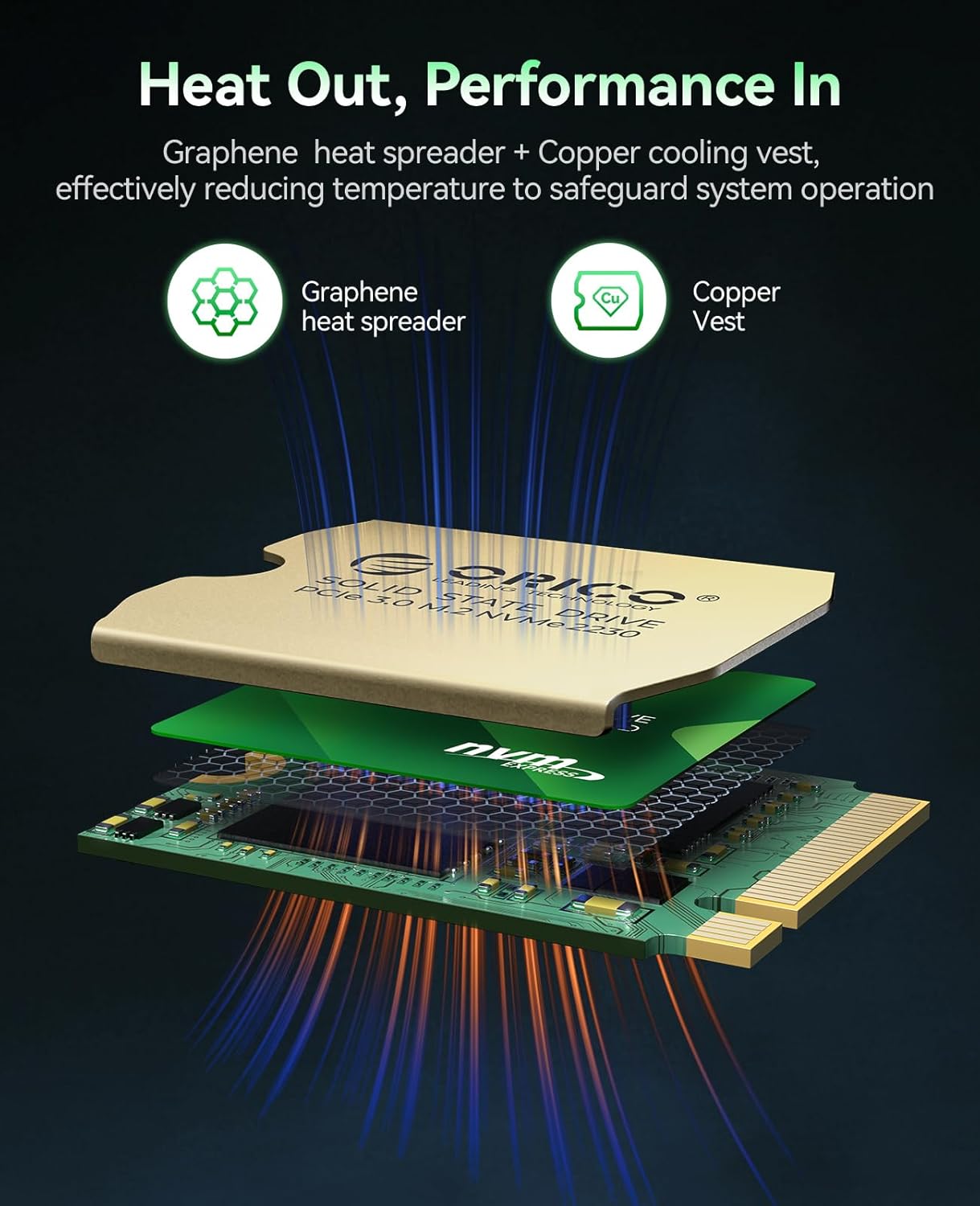
Image 3.1: Exploded view of the ORICO D10-2230 SSD, illustrating the graphene heat spreader and copper cooling vest for effective heat dissipation.
4. Operating Instructions: Formatting and Partitioning
After physical installation, the new SSD must be initialized, formatted, and partitioned before it can be used for storage. The process varies slightly between Windows and Mac operating systems.
4.1 For Windows Systems
Follow these steps to format and partition your ORICO D10-2230 SSD in Windows:
- Right-click on the "This PC" icon on your desktop and select "Manage".
- In the Computer Management window, navigate to "Storage" > "Disk Management".
- You will see a prompt to initialize the disk. Select the new SSD (e.g., Disk 2) and choose "GPT (GUID Partition Table)", then click "OK".
- Locate the newly initialized disk, which will show as "Unallocated" space. Right-click on this unallocated space and select "New Simple Volume".
- Follow the New Simple Volume Wizard: Click "Next", specify the volume size (usually the maximum available), assign a drive letter, and then choose a file system (e.g., NTFS for Windows compatibility). Click "Next" and then "Finish".
- The new volume will now appear under "This PC" and be ready for use.
4.2 For Mac OS Systems
Follow these steps to format and partition your ORICO D10-2230 SSD in Mac OS:
- From the Finder menu, click "Go", then "Utilities".
- Open "Disk Utility".
- In Disk Utility, locate and select your external ORICO SSD from the sidebar. It might be listed under "External" or as an uninitialized drive.
- Click the "Erase" button in the toolbar.
- In the Erase dialog, provide a name for the drive. For the format, select "ExFat" for compatibility with both Mac OS and Windows systems. If you only plan to use the SSD with Mac devices, you can choose a Mac-specific format like APFS. For the scheme, select "GUID Partition Map".
- Click "Erase" again to confirm. Once the process is complete, click "Done".
- The formatted SSD will now appear on your desktop and be ready for use.
Video 4.1: An instructional video demonstrating how to format and partition a new SSD in both Windows and Mac OS systems, addressing common issues like drives not being recognized before initial use.
5. Maintenance and Best Practices
To ensure the longevity and optimal performance of your ORICO D10-2230 M.2 NVMe SSD, consider the following maintenance tips:
- Enable TRIM: Ensure TRIM is enabled in your operating system. TRIM helps the SSD manage data blocks more efficiently, preventing performance degradation over time. Most modern operating systems enable TRIM by default for SSDs.
- Avoid Defragmentation: Unlike traditional hard disk drives, SSDs do not benefit from defragmentation. Defragmenting an SSD can reduce its lifespan without improving performance.
- Maintain Sufficient Free Space: Try to keep at least 10-15% of the SSD's capacity free. This allows the SSD's wear-leveling algorithms to function effectively and maintain performance.
- Keep Firmware Updated: Periodically check the ORICO website for any firmware updates for your SSD. Firmware updates can improve performance, stability, and compatibility.
- Monitor Temperature: While the SSD includes heat dissipation features, ensure your device has adequate airflow to prevent excessive heat buildup, especially during intensive operations.
6. Troubleshooting
If you encounter issues with your ORICO D10-2230 M.2 NVMe SSD, refer to the following common troubleshooting steps:
- SSD Not Detected:
- Ensure the SSD is correctly seated in the M.2 slot.
- Check your device's BIOS/UEFI settings to confirm the M.2 slot is enabled and configured correctly (e.g., NVMe mode).
- Verify that the SSD is initialized and formatted as described in Section 4. New SSDs will not appear in "This PC" (Windows) or Finder (Mac) until this step is completed.
- Test the SSD in another compatible device or an external M.2 enclosure to rule out a device-specific issue.
- Slow Performance:
- Confirm that your device's M.2 slot supports PCIe 3.0 x4 speeds. Older slots or SATA M.2 slots will limit performance.
- Ensure TRIM is enabled (see Section 5).
- Check for sufficient free space on the SSD (see Section 5).
- Monitor the SSD's temperature. Overheating can cause performance throttling.
- Update your device's chipset drivers and SSD firmware.
- Data Corruption or Instability:
- Run a disk check utility (e.g., `chkdsk` on Windows, Disk Utility First Aid on Mac).
- Ensure the SSD is securely installed and not experiencing intermittent connections.
- Check for system stability issues unrelated to the SSD.
7. Product Specifications
Detailed specifications for the ORICO D10-2230 M.2 NVMe SSD 512GB:
| Feature | Detail |
|---|---|
| Model | D10-2230 |
| Digital Storage Capacity | 512 GB |
| Hard Drive Interface | PCIE x 4 |
| Connectivity Technology | PCIe |
| Read Speed | Up to 3000 MB/s |
| Write Speed | Up to 2500 MB/s |
| NAND Flash Type | TLC NAND |
| Form Factor | M.2 2230 |
| Special Features | Shock Resistant, TRIM Support, Copper Heat Sink, Graphene Heat Spreader |
| Compatible Devices | Gaming Console (e.g., Steam Deck), Laptop (e.g., Microsoft Surface), Mini PCs |
| Item Weight | 1.41 ounces |
| Package Dimensions | 5.04 x 3.46 x 0.75 inches |

Image 7.1: A visual representation of the ORICO D10-2230 SSD's key specifications, including model, capacity, read/write speeds, TBW, and service support.
8. Warranty and Support
ORICO provides comprehensive support for its products.
- Warranty Coverage: The ORICO D10-2230 M.2 NVMe SSD comes with a 3-year limited warranty or 240TBW (Total Bytes Written) for the 512GB model, whichever comes first. This warranty covers defects in materials and workmanship under normal use.
- Technical Support: For technical assistance, troubleshooting beyond this manual, or warranty claims, please visit the official ORICO website or contact their customer service.
- Online Resources: Additional resources, FAQs, and driver updates may be available on the ORICO support page.
Ask a question about this manual
Ask about setup, troubleshooting, compatibility, parts, safety, or missing instructions. Manuals+ will review the question and use this page’s manual context to help answer it.