
1. Introduction
The Bextgoo Q16-04 is a versatile 4K mini surveillance camera designed for both indoor and outdoor monitoring. It offers flexible operation with or without Wi-Fi connectivity, featuring high-definition video recording, night vision, motion detection, and a wide-angle view. This manual provides detailed instructions for setting up, operating, and maintaining your camera to ensure optimal performance.

Image 1.1: Versatile Applications. The Bextgoo Q16-04 camera can be used in various settings such as home, office, car, and outdoor environments for comprehensive surveillance.
2. Package Contents
Please check the package to ensure all items are present:
- 1 x Bextgoo Q16-04 Mini Wi-Fi Camera
- 1 x Magnetic Mount
- 1 x 32 GB Micro SD Memory Card (pre-installed)
- 1 x User Manual
- 1 x Flexible USB Metal Cable
- 1 x Standard USB Cable
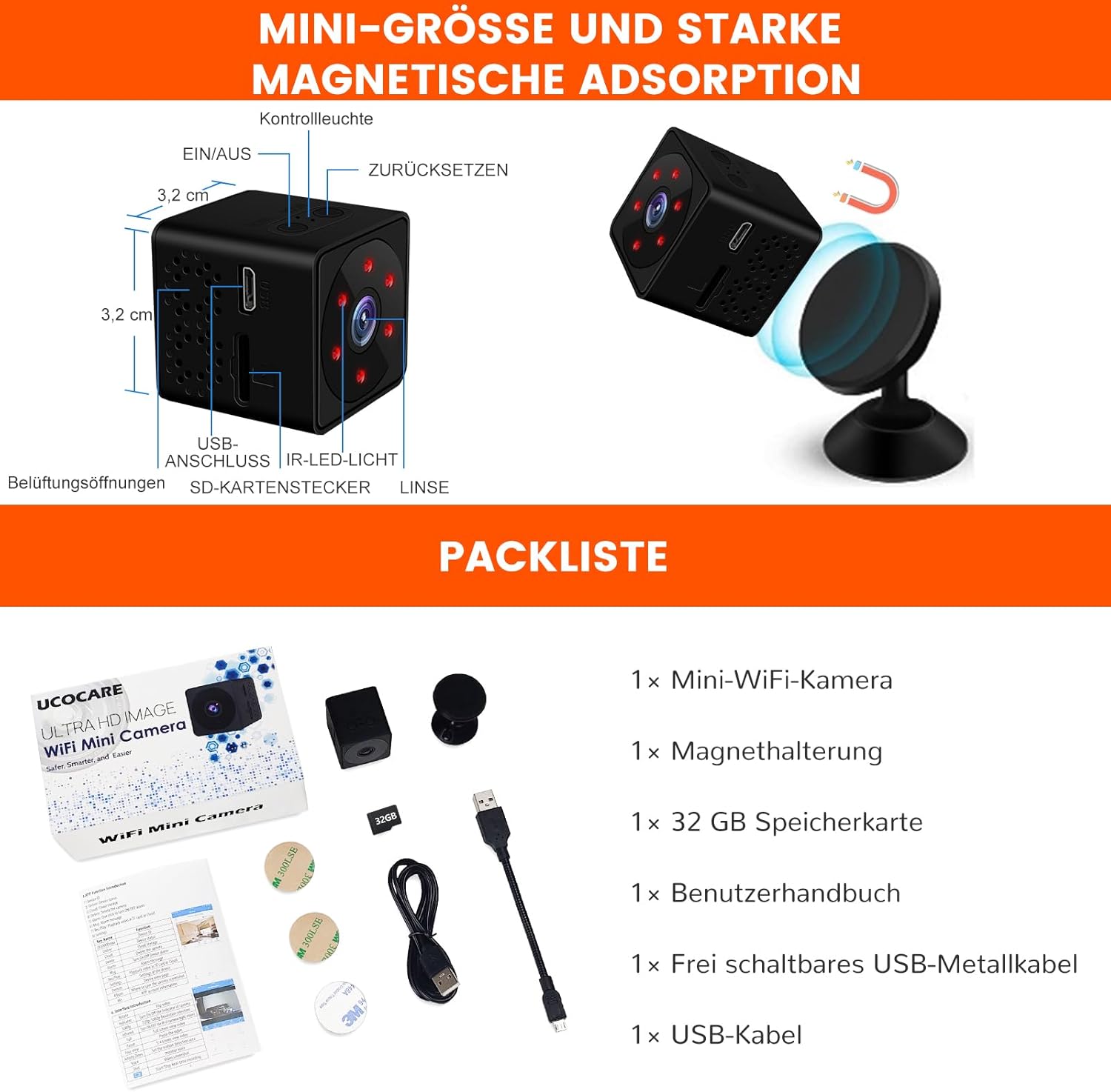
Image 2.1: Product Components and Package List. This image illustrates the camera's physical features and lists all items included in the package, such as the camera, magnetic mount, 32GB SD card, and various cables.
3. Product Overview
Familiarize yourself with the camera's main parts and controls:
- Lens: Captures video footage.
- IR LED Lights: Provide illumination for night vision.
- USB Port: For charging and data transfer.
- SD Card Slot: Insert the Micro SD card for local storage.
- ON/OFF Button: Powers the camera on or off.
- Reset Button: Used to restore factory settings.
- Indicator Light: Displays camera status.

Image 3.1: Camera Features. This image highlights the compact design of the Bextgoo Q16-04 camera, its lens, IR lights, and the included 32GB SD card, demonstrating its readiness for use.
4. Setup
Follow these steps for initial setup:
- Charge the Camera: Before first use, fully charge the camera using the provided USB cable and a standard USB power adapter (not included) or a computer USB port. The indicator light will typically change color or turn off when fully charged. A full charge provides 5 to 6 hours of operation.
- Insert SD Card: The 32GB Micro SD card is pre-installed. If you need to replace it, ensure the camera is off, then gently insert a compatible Micro SD card (8GB to 128GB, Class 10 or higher) into the SD card slot until it clicks into place.
- Power On: Press and hold the ON/OFF button to power on the camera. The indicator light will illuminate.
5. Operating Modes
The Bextgoo Q16-04 camera supports two primary operating modes:
5.1. No Wi-Fi Mode (Local Recording)
This mode allows the camera to record video directly to the inserted Micro SD card without requiring a Wi-Fi connection. It is ideal for portable use, travel, or situations where Wi-Fi is unavailable.
- Operation: Simply power on the camera. It will automatically begin recording to the 32GB Micro SD card.
- Note: Remote monitoring via an application is not available in this mode.
5.2. Wi-Fi Mode (Live View & Remote Access)
Connect the camera to a 2.4G Wi-Fi network to enable live video streaming, remote access, instant notifications, and app-based control.
- Download App: Download the dedicated mobile application (refer to the manual for app name and QR code, if available).
- Connect to Wi-Fi: Follow the in-app instructions to connect the camera to your 2.4G Wi-Fi network.
- Features: Once connected, you can view live video, receive motion detection alerts, play back recorded footage, and adjust alarm settings directly from your smartphone.

Image 5.1: Dual Operating Modes. This image clarifies the two ways to use the camera: either for direct local recording onto the included 32GB SD card without Wi-Fi, or connected to a 2.4G Wi-Fi network for real-time monitoring via a mobile application.
6. Key Features
6.1. 4K Resolution and Night Vision
The camera records in 4K Full HD resolution, ensuring clear and detailed video footage. Equipped with IR LED lights, it provides crystal-clear night vision up to 20 meters, allowing for effective monitoring in low-light or complete darkness.
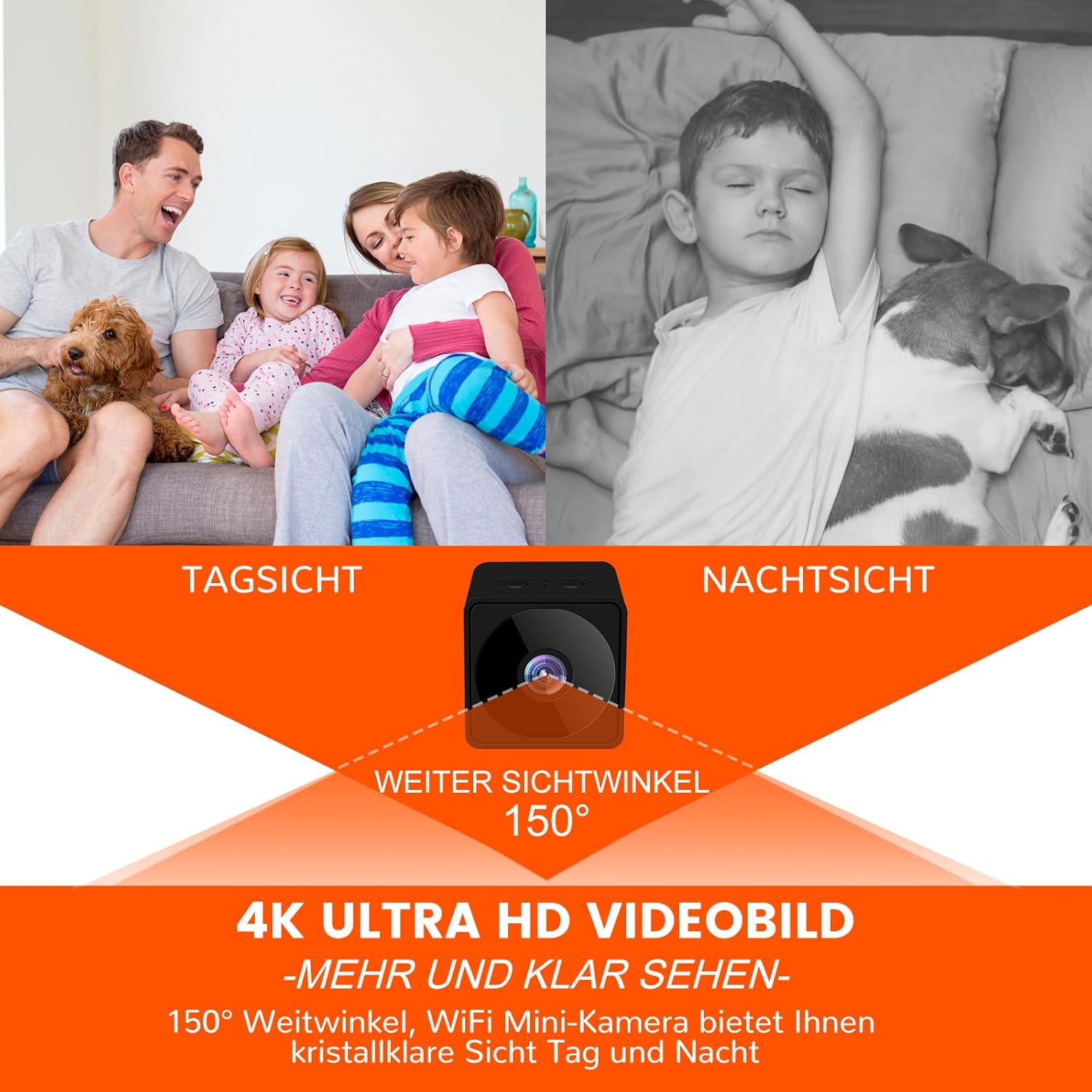
Image 6.1: 4K Resolution and Night Vision. This visual demonstrates the camera's ability to capture clear 4K video both during the day and at night, along with its 150-degree wide viewing angle.
6.2. Storage and Loop Recording
The camera supports Micro SD cards from 8GB to 128GB (a 32GB card is included). It features loop recording, which automatically overwrites the oldest files when the memory card is full, ensuring continuous recording without manual intervention. Cloud storage options may also be available via the app.
6.3. Long Battery Life
Equipped with a 1000 mAh battery, the camera provides approximately 5 to 6 hours of continuous operation on a full charge. It can also be used while charging, allowing for uninterrupted surveillance.

Image 6.2: Extended Battery Life and Charging Options. This image illustrates the camera's 6-hour battery duration and its capability for 24/7 operation when connected to a power source like a power bank, wall charger, or PC.
6.4. 150° Wide-Angle View
The camera features a 150-degree wide-angle lens, capturing a broad field of view to minimize blind spots and ensure comprehensive coverage of the monitored area.
6.5. Motion Detection and Real-time Alarms
With advanced AI and a PIR sensor, the camera detects motion and sends instant notifications to your mobile phone. You can view live events in the app and customize detection zones and sensitivity to reduce false alerts.

Image 6.3: Motion Detection and Instant Alarms. This image demonstrates how the camera's PIR motion detection triggers an immediate alarm notification on your phone, capturing critical moments.
7. Viewing Recordings
You have two methods to access recorded footage:
- Via Mobile Application: If the camera is in Wi-Fi mode, you can view recorded videos directly through the dedicated app on your smartphone.
- Via Card Reader: Power off the camera, remove the Micro SD card, and insert it into a card reader connected to a PC or mobile phone. You can then access and play the video files.
8. Maintenance
To ensure the longevity and optimal performance of your Bextgoo Q16-04 camera, follow these maintenance guidelines:
- Cleaning: Use a soft, dry cloth to clean the camera lens and body. Avoid abrasive cleaners or solvents.
- Storage: When not in use for extended periods, store the camera in a cool, dry place.
- Battery Care: Recharge the battery periodically if storing for a long time to prevent deep discharge.
- Firmware Updates: Check the mobile application regularly for any available firmware updates to improve performance and add new features.
9. Troubleshooting
If you encounter issues with your camera, refer to the following common problems and solutions:
| Problem | Possible Cause | Solution |
|---|---|---|
| Camera does not power on | Low battery; Faulty power button | Charge the camera fully; Press and hold the ON/OFF button for several seconds; If still unresponsive, try resetting. |
| Cannot connect to Wi-Fi | Incorrect Wi-Fi password; Not a 2.4G network; Camera too far from router | Ensure correct password; Verify your Wi-Fi is 2.4G; Move camera closer to router; Reset camera and try again. |
| No recording on SD card | SD card full; SD card not inserted correctly; SD card corrupted; Camera not in recording mode | Check SD card capacity (loop recording should manage this); Reinsert SD card; Format SD card (backup data first); Ensure camera is powered on. |
| Poor video quality | Dirty lens; Low light conditions (without night vision); Incorrect resolution settings | Clean the lens; Ensure night vision is active in low light; Check app settings for resolution. |
| Motion detection not working | Sensitivity too low; Detection zone not set; Obstructions | Adjust sensitivity in the app; Define detection zones; Ensure clear line of sight for the PIR sensor. |
10. Specifications
| Feature | Detail |
|---|---|
| Model Name | Q16-04 |
| Video Recording Resolution | 4K |
| Connectivity Technology | No Wi-Fi, or Wi-Fi 2.4G |
| Viewing Angle | 150 Degrees |
| Night Vision Range | 20 Meters |
| Storage Support | Micro SD Card (8GB-128GB), 32GB included |
| Battery Type | Lithium-polymer (1000 mAh) |
| Battery Life | 5-6 hours (fully charged) |
| Power Source | Battery Powered (can operate while charging) |
| Special Features | 32GB Memory Card Included, Motion Detection & Real-time Notifications, Long Battery Life, Supports Use While Charging, Direct View via App or Card Reader |
| Dimensions (L x W x H) | 14 x 9 x 4 cm |
| Weight | 180 grams |
| Mounting Type | Wall Mount, Table Mount, Clip Mount |
| Indoor/Outdoor Use | Outdoor (Note: Product title suggests both indoor and outdoor use, but specifications list 'Outdoor') |


