
1. Introduction
Thank you for choosing the TESSAN Small Flat Plug Power Strip. This device is designed to provide convenient power access for multiple electronic devices simultaneously, featuring a compact design, multiple outlets, and a retractable USB-C cable. Please read this manual carefully before use to ensure safe and optimal operation.
2. Key Features
- 7-in-1 Power Solution: Equipped with 3 standard AC outlets, 2 USB-A ports, 1 USB-C port, and 1 retractable USB-C cable, allowing up to 7 devices to be charged concurrently.
- Ultra-Thin Flat Plug & Cord: Features a 0.35-inch flat head plug and a 5-foot ultra-thin extension cord, designed to fit in tight spaces behind furniture and maintain a neat appearance. The 45-degree angled plug prevents blocking adjacent outlets.
- 20W USB-C Fast Charging: The retractable USB-C cable supports PD20W for rapid phone charging. The USB-A ports provide up to 2.4A (12W Max), and the fixed USB-C port provides up to 3A (15W Max).
- Cruise Ship Approved: This power strip is designed without surge protection, making it compliant with cruise ship regulations.
- Mountable Design: Includes a mounting hole for secure installation on walls, workbenches, or under counters. Four rubber feet on the base prevent slipping.
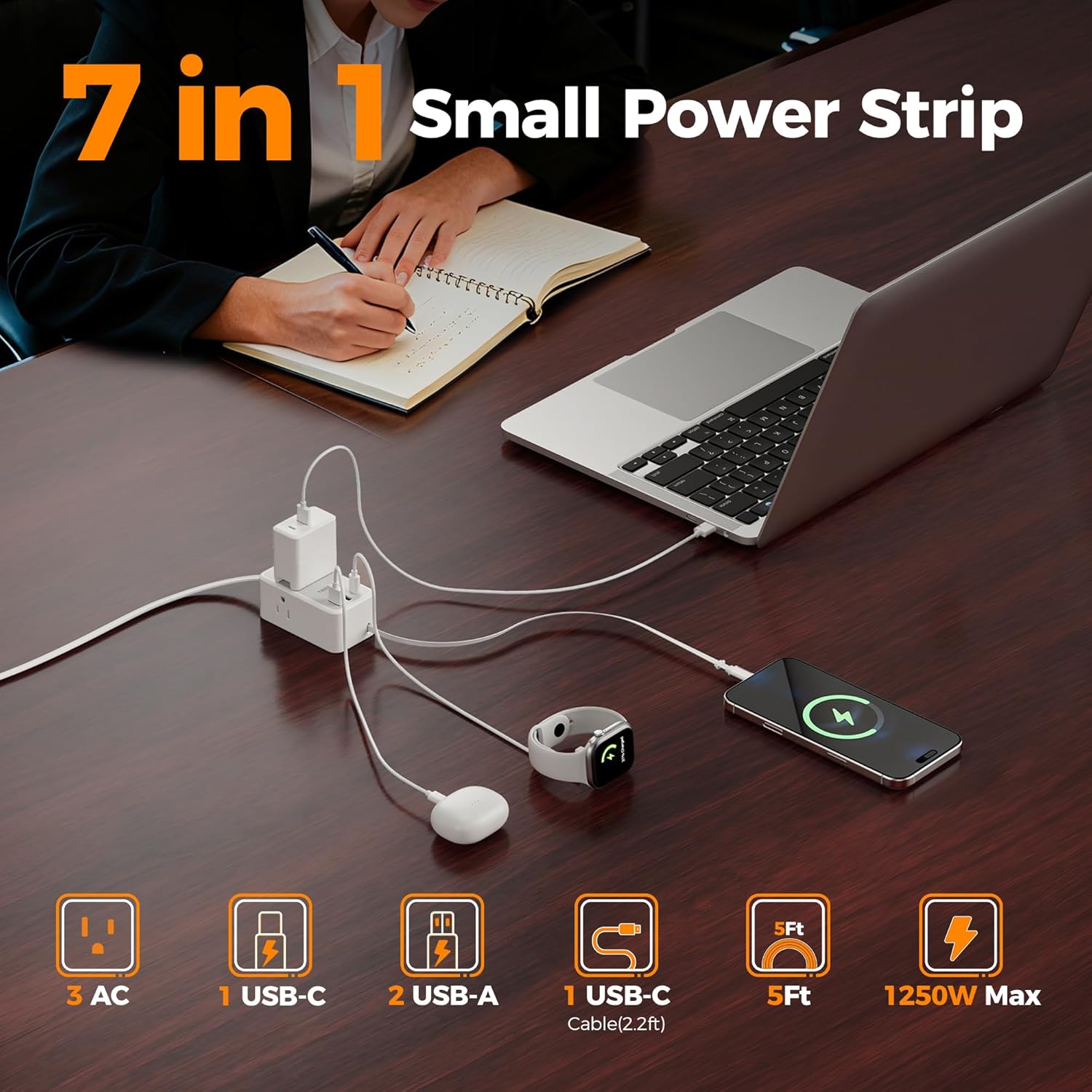
Figure 1: Overview of the 7-in-1 TESSAN Power Strip.

Figure 2: The power strip efficiently charging various devices simultaneously.
3. Safety Instructions
- Do not exceed the maximum power rating of 1250W (10A, 125V).
- This device is for indoor use only. Avoid exposure to moisture or wet conditions.
- Do not disassemble or modify the power strip.
- Keep out of reach of children.
- Ensure the plug is fully inserted into the wall outlet.
- Do not use with appliances that require more power than the unit can provide.
- This power strip does not offer surge protection.
4. Package Contents
- TESSAN Small Flat Plug Power Strip (Model: TS-PS10US00)
- User Manual
5. Setup Instructions
- Unpack: Carefully remove the power strip from its packaging.
- Plug In: Insert the flat plug of the power strip into a standard 3-prong wall outlet. The ultra-thin design allows it to fit behind furniture.
- Verify Power: A small LED indicator light on the power strip will illuminate, confirming that the unit is receiving power and is ready for use.
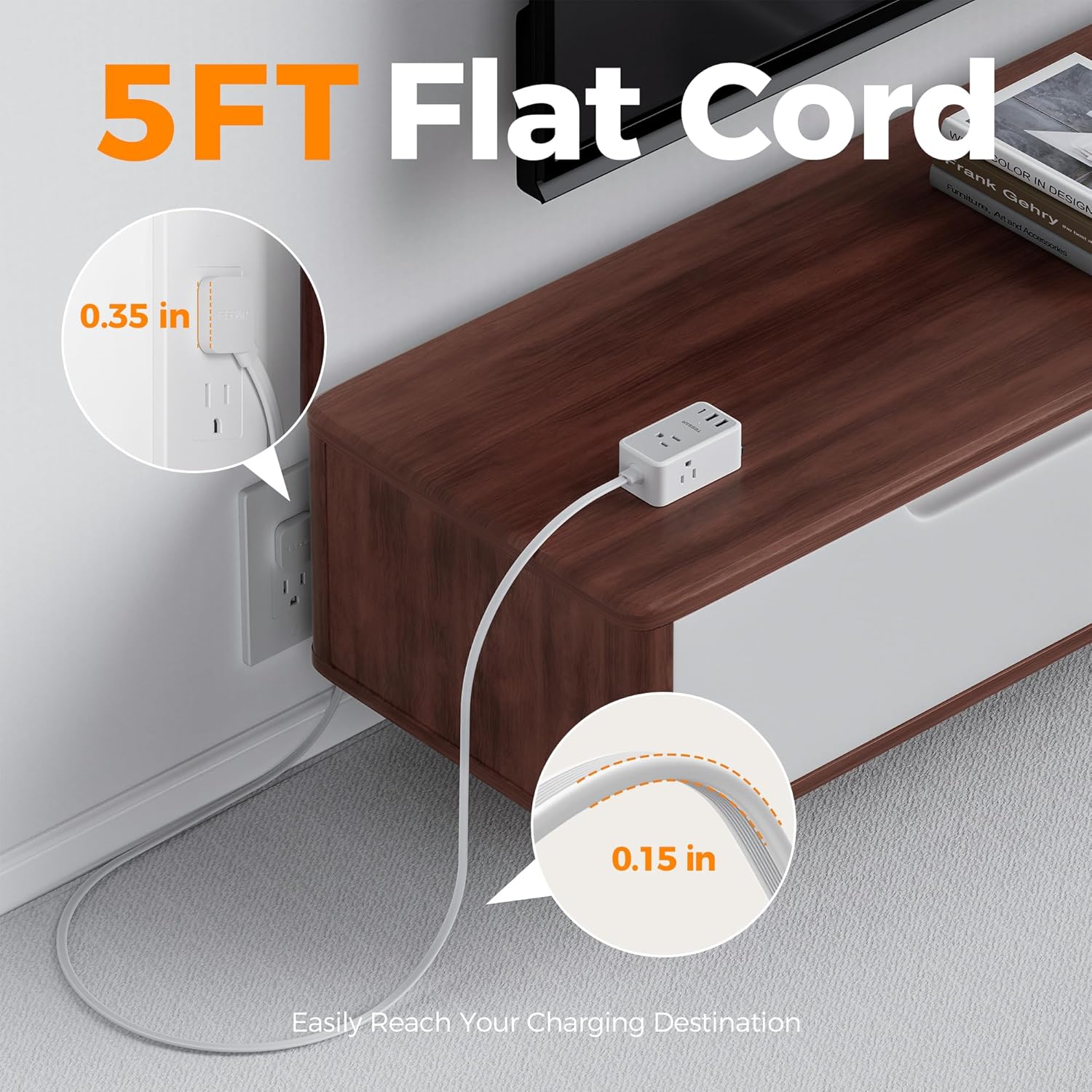
Figure 3: The 5-foot flat cord and plug designed to fit discreetly behind furniture.

Figure 4: The ultra-thin profile of the extension cord.

Figure 5: The 45-degree angled flat plug design.
Video 1: Demonstration of how the flat plug and thin cord can easily fit behind furniture like dressers, beds, and couches.
6. Operating Instructions
- Using AC Outlets: Plug your devices directly into any of the 3 AC outlets. Ensure the device's power requirements do not exceed the power strip's maximum rating.
- Using USB Ports:
- USB-A Ports: Connect your USB-A compatible devices to the two USB-A ports for charging. Each port provides up to 2.4A.
- USB-C Port: Connect your USB-C compatible devices to the dedicated USB-C port for charging. This port provides up to 3A.
- Retractable USB-C Cable:
- To Extend: Gently pull the retractable USB-C cable to the desired length. It will lock in place. The cable extends up to 2.2 feet (70cm).
- To Retract: Gently pull the cable slightly beyond its current length (no more than half an inch), then release it. The cable will automatically retract into the unit.
- Charging Multiple Devices: The power strip is designed to charge multiple devices simultaneously. The total power output for all ports combined should not exceed 1250W.
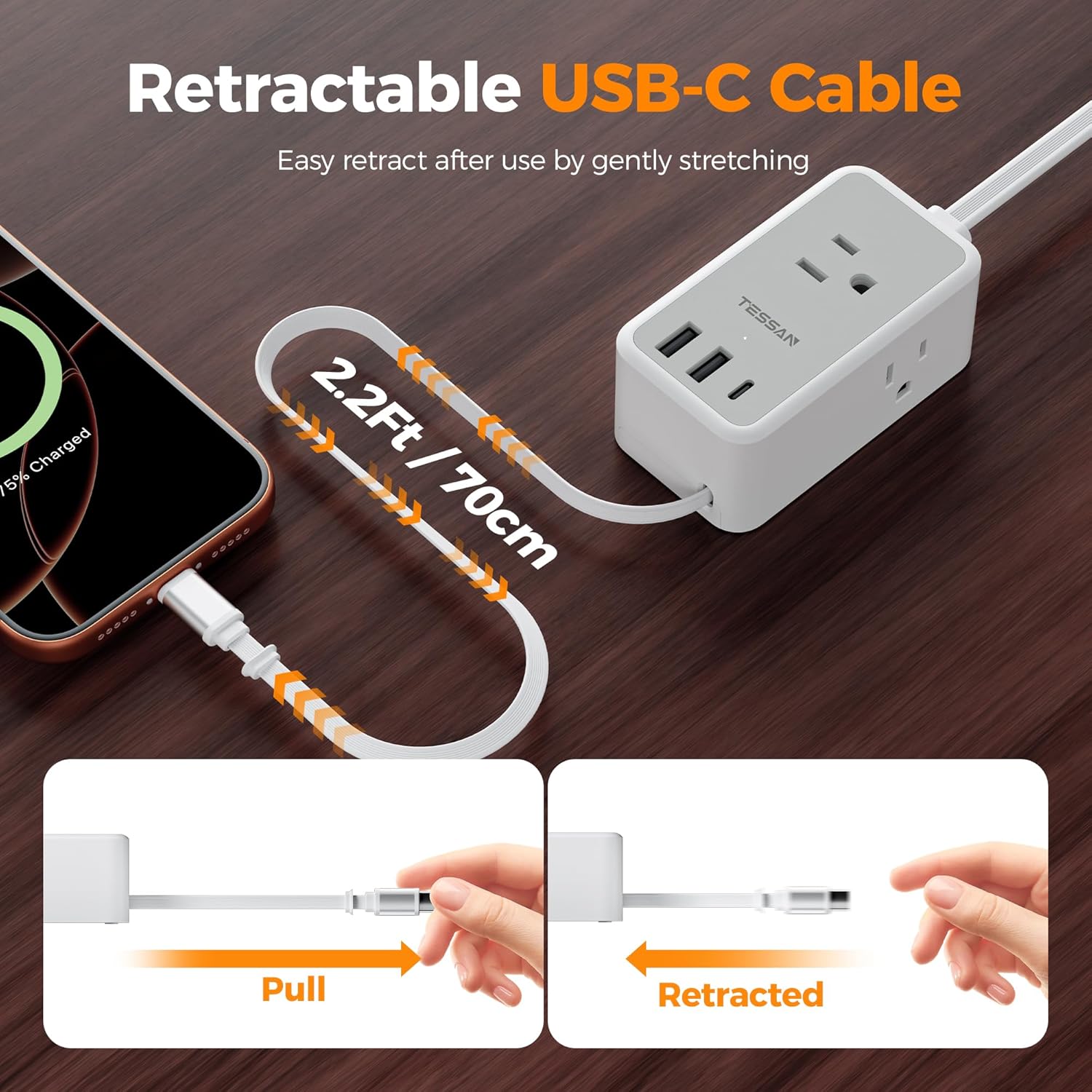
Figure 6: The retractable USB-C cable in use, showing extension and retraction steps.

Figure 7: Visual instructions for operating the retractable USB-C cable.

Figure 8: USB-C PD 20W fast charging capabilities.
Video 2: A demonstration of the TESSAN power strip's slim design and multiple charging options in action.
7. Maintenance
- Cleaning: Disconnect the power strip from the wall outlet before cleaning. Use a dry, soft cloth to wipe the surface. Do not use liquid cleaners or sprays.
- Storage: When not in use, store the power strip in a cool, dry place away from direct sunlight and moisture. Ensure the retractable cable is fully retracted.
8. Troubleshooting
- No Power Indicator Light:
- Ensure the power strip is securely plugged into a functional wall outlet.
- Check if the wall outlet itself is working by plugging in another device.
- Device Not Charging:
- Verify that the power strip is receiving power (LED indicator is on).
- Ensure your device's charging cable is properly connected to both the power strip and your device.
- Check if the device's power requirements exceed the power strip's capacity or the individual port's output.
- For the retractable USB-C cable, ensure it is fully extended and locked before connecting your device. If issues persist, try retracting and re-extending the cable.
- Retractable Cable Not Working Properly:
- If the cable does not extend, gently pull it out slowly.
- If the cable does not retract, gently pull it out slightly further (about half an inch) and then release it to trigger the retraction mechanism. Avoid forcing the cable.
9. Specifications
| Feature | Specification |
|---|---|
| Brand | TESSAN |
| Model Number | TS-PS10US00 |
| Color | Gray |
| Total AC Outlets | 3 |
| USB-A Ports | 2 (2.4A Max per port) |
| USB-C Port | 1 (3A Max) |
| Retractable USB-C Cable | 1 (2.2ft / 70cm, PD20W) |
| Voltage | 125 Volts |
| Maximum Current | 10 Amps |
| Maximum Power | 1250W |
| Plug Type | Type A (Flat Plug, 45-degree angle) |
| Cord Length | 5 feet |
| Item Dimensions (L x W) | 3.74"L x 2.08"W |
| Special Features | Cruise Ship Approved, Retractable Cord, Mountable |
| Compatible Devices | Laptop, Small Appliance, Smartphone, Tablet |
10. Warranty and Support
TESSAN products are designed for reliability and performance. For warranty information, technical support, or customer service inquiries, please refer to the contact details provided on the product packaging or visit the official TESSAN website. Please retain your purchase receipt for warranty claims.