Introduction
This instruction manual provides detailed guidance for assembling and operating your Mavo brix V8 Engine Building Set, Model 36302. This 1189-piece model kit allows you to construct a realistic V8 engine replica with functional moving parts, including pistons, crankshaft, and a motor for dynamic display. Please read all instructions carefully before beginning assembly.
Safety Information
Warning: Choking Hazard - Small Parts. Not suitable for children under 3 years.
This product contains small parts that may pose a choking hazard. Keep all components out of reach of small children. Adult supervision is recommended during assembly, especially for younger builders. Ensure a clean and organized workspace to prevent loss of small pieces.
Package Contents
Your Mavo brix V8 Engine Building Set includes:
- 1189 building block pieces
- 1 Motor unit
- 1 Battery compartment (requires 6 AAA batteries, not included)
- 1 Detailed instruction manual
Please verify all components are present before starting assembly. If any parts are missing or damaged, contact Mavo brix customer support.
Assembly Instructions
Follow the step-by-step diagrams provided in the included instruction manual. Each step illustrates the required pieces and their placement. Pay close attention to the orientation of parts to ensure correct functionality.

Image: A person carefully assembling the Mavo brix V8 Engine Building Set, demonstrating the hands-on building process.
The assembly process is designed to be engaging and educational, allowing you to understand the internal structure and operating principles of a V8 engine. Take your time and ensure each connection is secure.

Image: Detailed view of the V8 engine model's internal components, with key parts like the valve chamber cover, red piston connecting rods, and red cylinder bank labeled for clarity during assembly.

Image: An exploded view of various parts of the V8 engine model, including the grey gear set, silver drive shaft, and drive wheel, illustrating how they fit together.
Once assembled, the model accurately simulates piston movement, a turbocharger, and other characteristics of a real V8 engine.
Video: Official Mavo brix video demonstrating the assembly process and the functional aspects of the V8 Engine Model Kit.
Operating Instructions
The V8 engine model is equipped with a motor for dynamic operation. To activate the motor:
- Battery Installation: Open the battery compartment and insert 6 AAA batteries, ensuring correct polarity. Batteries are not included.
- Motor Connection: Connect the motor cable from the engine model to the battery compartment.
- Power On: Locate the power switch on the battery compartment and turn it to the 'ON' position.
- Direction Control: The motor allows for both forward and reverse rotation. Use the designated control (if present on your model's battery compartment) to switch between directions. Observe the pistons stroking, crankshaft rotating, and valve timing working together.
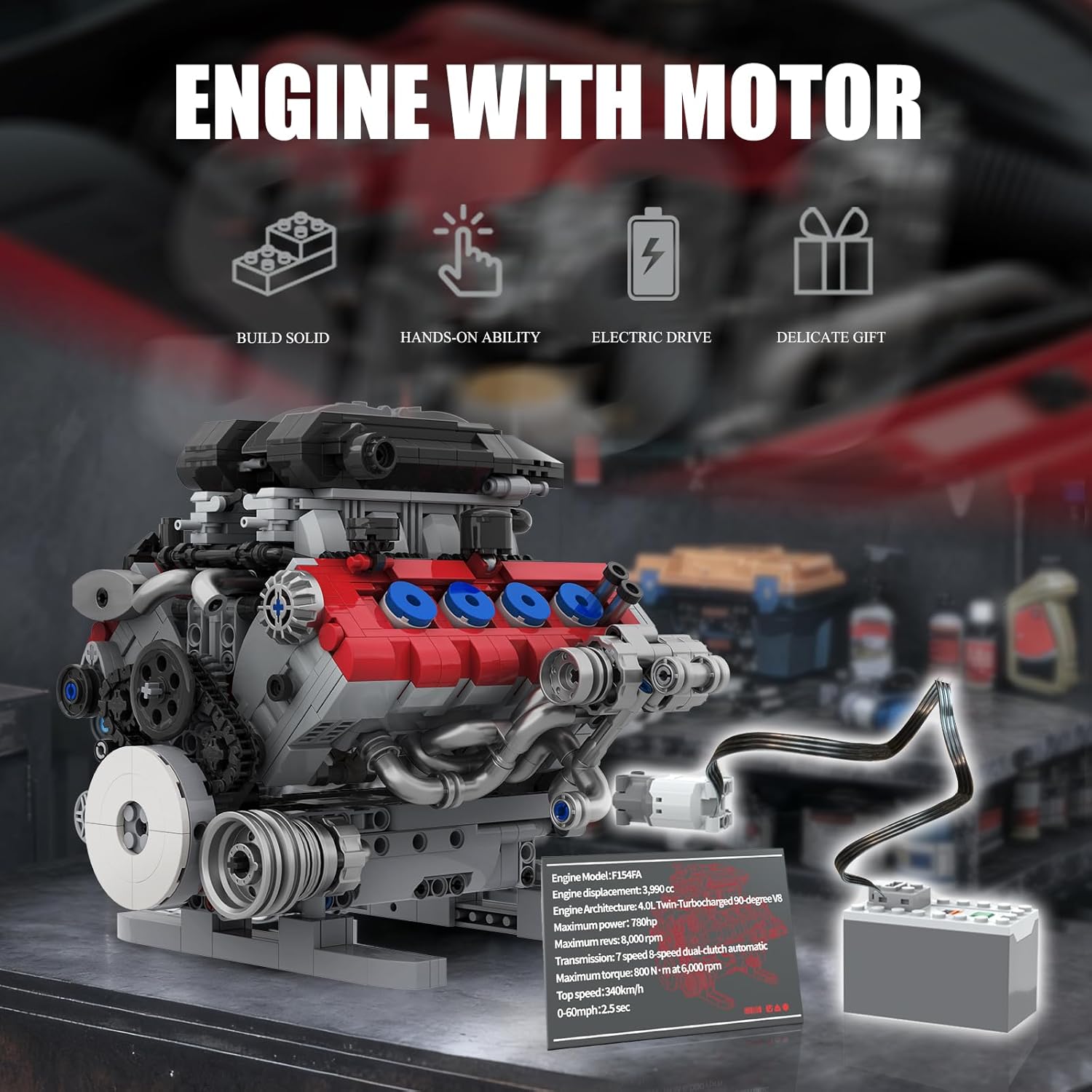
Image: The Mavo brix V8 Engine Model Kit, showcasing its motor-driven functionality and the connection to the external battery compartment.
Maintenance
To ensure the longevity and optimal performance of your Mavo brix V8 Engine Building Set, follow these maintenance guidelines:
- Cleaning: Use a soft, dry cloth to gently wipe down the model. Avoid using harsh chemicals or abrasive materials, which can damage the plastic.
- Storage: Store the model in a cool, dry place away from direct sunlight and extreme temperatures. Keep it in a dust-free environment to prevent debris from affecting moving parts.
- Battery Replacement: If the motor's performance diminishes, replace the AAA batteries in the battery compartment. Always use fresh batteries and dispose of old ones responsibly.
- Inspection: Periodically inspect all connections and moving parts to ensure they are secure and functioning correctly. Re-attach any loose pieces as needed.
Troubleshooting
If you encounter issues with your Mavo brix V8 Engine Building Set, refer to the following common solutions:
- Motor Not Running:
- Check if the batteries are correctly installed and fully charged. Replace if necessary.
- Ensure the motor cable is securely connected to both the engine and the battery compartment.
- Verify the power switch on the battery compartment is in the 'ON' position.
- Parts Not Fitting:
- Double-check the instruction manual for the correct orientation and placement of the pieces.
- Ensure you are using the correct pieces for the current step. Some pieces may appear similar.
- Apply gentle, even pressure when connecting pieces. Avoid excessive force.
- Moving Parts Are Stiff:
- Inspect for any misaligned or incorrectly placed pieces that might be causing friction.
- Ensure all gears and belts are properly seated and not obstructed.
If problems persist, please contact Mavo brix customer support for further assistance.
Specifications
- Product Dimensions: 1 x 1 x 1 inches (Assembled model dimensions are approximately 6.93 inches high, 9.01 inches wide, and 7.31 inches deep)
- Item Weight: 2.46 pounds
- Model Number: 36302
- Manufacturer Recommended Age: 6 years and up (Recommended for ages 14+ for optimal building experience)
- Material: ABS Plastic
- Power Source: 6 AAA batteries (not included)

Image: The assembled Mavo brix V8 Engine Model, illustrating its approximate dimensions: 6.93 inches in height, 9.01 inches in width, and 7.31 inches in depth.
Warranty and Support
Mavo brix is committed to providing high-quality products. If you have any questions, concerns, or require assistance with your V8 Engine Building Set, please contact our customer support team. Information regarding warranty coverage and support channels can typically be found on the Mavo brix official website or through your purchase platform.


