
1. Introduction
Thank you for choosing the ANDELI OPTIM-600LB-NMB Auto-Darkening Welding Helmet. This manual provides essential information for the safe and effective use, setup, operation, and maintenance of your welding helmet. Please read it thoroughly before use and keep it for future reference.
2. Safety Information
Welding and cutting processes can be hazardous. Always follow safety precautions to prevent personal injury. This welding helmet is designed to protect your eyes and face from sparks, spatter, and harmful ultraviolet (UV) and infrared (IR) radiation under normal welding conditions. It is crucial to understand that this helmet does not provide unlimited protection.
- Always wear appropriate eye protection (safety glasses) under the welding helmet.
- Ensure the helmet is correctly adjusted for your head size and viewing angle before starting any work.
- Do not use the helmet if any part is damaged or if the auto-darkening function is not working correctly.
- Avoid exposing the helmet to extreme temperatures or moisture.
- This helmet is not suitable for laser welding or overhead welding applications.
3. Product Overview and Features
The ANDELI OPTIM-600LB-NMB welding helmet offers advanced features for enhanced safety and comfort during various welding tasks.
3.1. Ultra-Wide Viewing Area
The central viewing area measures 115mm x 82mm, providing a clear and expansive view of your work. Non-auto-darkening side areas further enhance peripheral vision. The lens boasts 1/1/1/2 optical clarity for true color recognition.
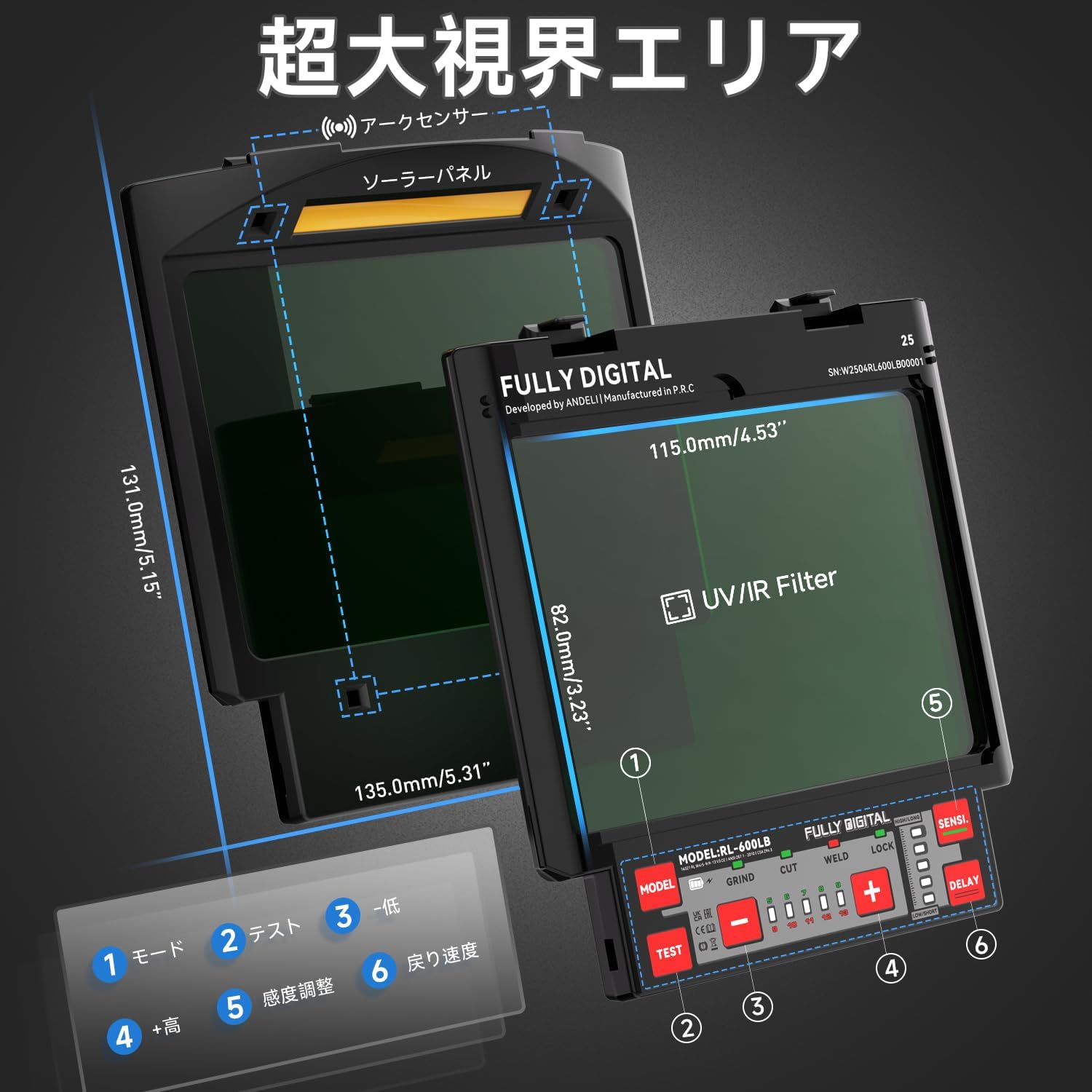
Figure 1: Ultra-Wide Viewing Area
3.2. Type-C Rechargeable Battery
Equipped with a high-quality 500mAh internal battery, rechargeable via a Type-C port. This provides approximately 2.5 times the operating time compared to CR2032 button cells, eliminating the need for frequent battery replacements and offering an economical solution.

Figure 2: Type-C Charging Feature
3.3. 4 Arc Sensors and Fast Response
The helmet features four high-quality arc sensors and solar panel technology, ensuring a shading speed of less than 1/30000 seconds. This high-sensitivity probe instantly darkens the screen upon arc ignition, providing immediate eye protection. The design is optimized for eye comfort.

Figure 3: 4 Arc Sensors and Rapid Shading
3.4. Lightweight and Comfortable Design
Weighing approximately 560g, the helmet utilizes upgraded lightweight PA material. Its 4-point headgear design with multiple support points and a pivot structure reduces fatigue during extended work periods, making it both lightweight and practical.

Figure 4: Lightweight Design
3.5. Multi-Layer Lens Structure
The helmet features a multi-layer protective lens structure that effectively shields your eyes from UV, IR, and arc light. This design ensures optimal protection and durability.
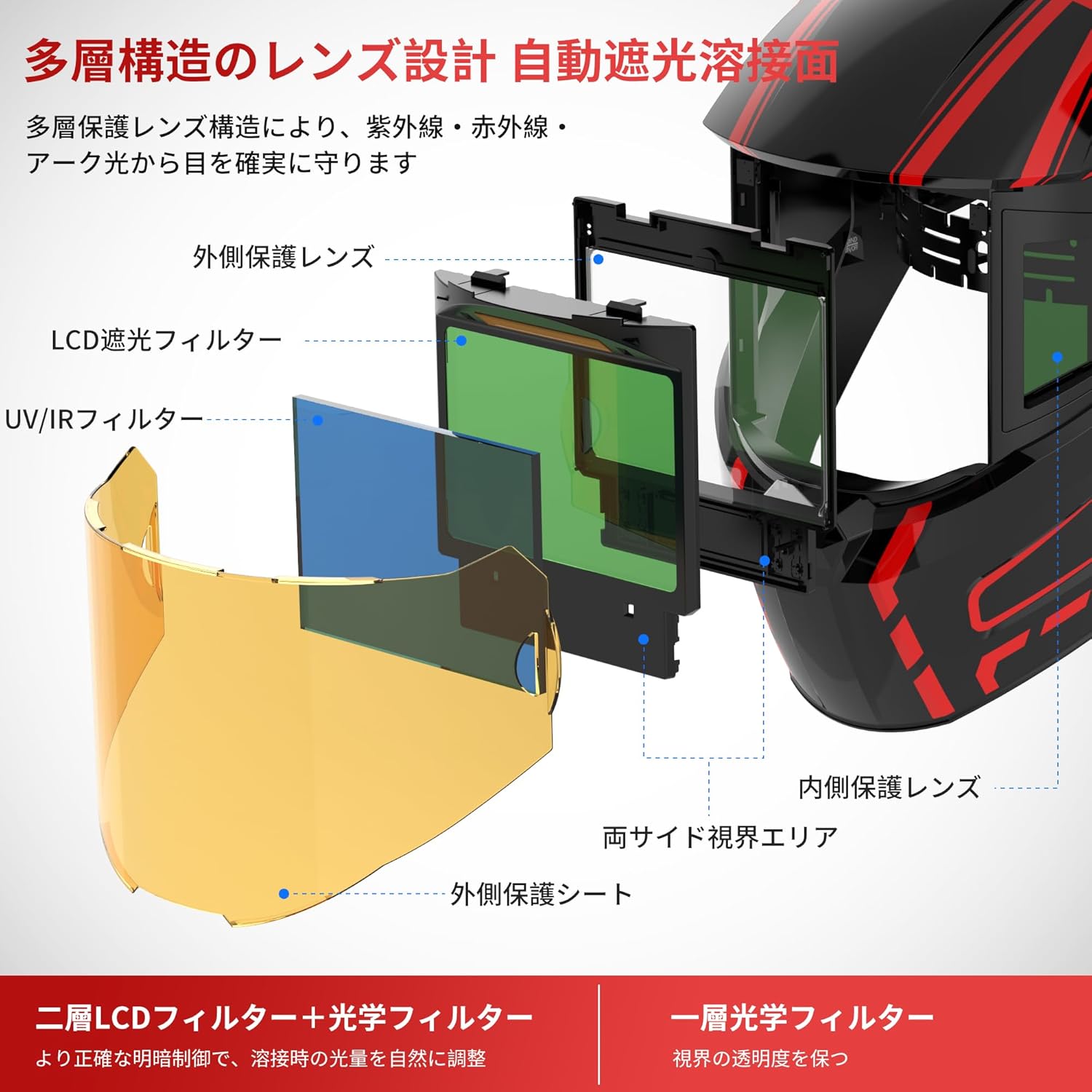
Figure 5: Multi-Layer Lens Design
4. Setup
4.1. Headgear Adjustment
Adjust the headgear to ensure a secure and comfortable fit. The 4-point headgear design allows for multiple points of adjustment to suit various head sizes and preferences.
- Size Adjustment: Use the knob at the back of the headgear to adjust the circumference for a snug fit.
- Angle Adjustment: Adjust the pivot points on the sides of the helmet to set the desired angle when the helmet is in the down position.
- Distance Adjustment: Ensure the distance between your face and the auto-darkening filter is appropriate for clear vision and comfort.

Figure 6: Headgear Adjustment Points
4.2. Initial Charging
Before first use, fully charge the internal 500mAh battery using the provided Type-C charging cable. Connect the cable to the Type-C port on the helmet and a suitable USB power source. The helmet also features solar charging, which helps maintain the battery level during use.
5. Operating Instructions
The OPTIM-600LB-NMB helmet is designed for ease of use with digital controls for various settings.
5.1. Power On/Off and Mode Selection
The helmet typically powers on automatically when exposed to light or when an arc is detected. Use the mode selection buttons to choose the appropriate setting for your task:
- WELD Mode: For general welding applications. Adjustable shade levels from DIN 9 to DIN 13.
- CUT Mode: For plasma cutting. Adjustable shade levels from DIN 5 to DIN 8.
- GRIND Mode: For grinding operations. The auto-darkening function is deactivated, and the lens remains in the light state (DIN 3) for clear visibility.

Figure 7: Mode Selection and Shade Adjustment
5.2. Shade Level Adjustment
In WELD or CUT mode, use the digital adjustment buttons (often labeled '+' and '-') to select the desired shade level (DIN 5-8 or DIN 9-13). Refer to welding standards for appropriate shade levels based on your welding process and current.
5.3. Sensitivity Adjustment
The sensitivity control (digital adjustment button) allows you to adjust how easily the sensors detect the welding arc. Increase sensitivity for low-amp TIG welding or when the arc is partially obscured. Decrease sensitivity to avoid false triggering from ambient light.
5.4. Delay Adjustment
The delay control (digital adjustment button) sets the time the lens remains dark after the welding arc stops. A shorter delay is suitable for tack welding, while a longer delay helps protect eyes from afterglow and reduces eye strain during continuous welding.
5.5. Test Function
Before each use, press the 'TEST' button to verify the auto-darkening function. The lens should momentarily darken and then return to the light state. If it does not function correctly, do not use the helmet for welding.
6. Maintenance
6.1. Cleaning
- Clean the helmet shell with mild soap and water. Avoid harsh solvents.
- Wipe the auto-darkening filter and protective lenses with a soft, clean cloth. Do not use abrasive materials.
- Keep the solar panel clean to ensure efficient charging.
6.2. Battery Care
The internal 500mAh lithium polymer battery is designed for long life. Recharge it regularly, especially if the helmet has been stored for an extended period. A low battery indicator will alert you when charging is needed.
6.3. Storage
Store the helmet in a dry, cool place, away from direct sunlight and extreme temperatures (-20°C to +70°C). Use the included cloth bag for protection against dust and scratches.
6.4. Replacing Protective Sheets
The outer and inner protective sheets are consumable parts. Replace them when they become scratched, pitted, or too dirty to ensure clear vision and proper function of the auto-darkening filter. Replacement is simple and does not require special tools.
7. Troubleshooting
If you encounter issues with your welding helmet, refer to the following common problems and solutions:
- Lens not darkening: Ensure the battery is charged. Check if the arc sensors are clean and unobstructed. Verify the sensitivity setting is appropriate for your welding current.
- Poor visibility: Clean the protective lenses and the auto-darkening filter. Ensure the correct shade level is selected for your application. Replace scratched protective sheets.
- Inconsistent darkening: Check for proper sensitivity settings. Ensure the arc sensors are not blocked.
- Helmet feels uncomfortable: Re-adjust the headgear for a better fit, including circumference, angle, and distance from the lens.
If the problem persists after attempting these solutions, contact customer support.
8. Specifications
| Feature | Specification |
|---|---|
| Product Model | OPTIM-600LB-NMB |
| Viewing Area (Central) | 115mm × 82mm |
| Protective Plate Size (Outer) | 131mm × 135mm × 10mm |
| Arc Sensors | 4 |
| UV/IR Protection Level | DIN 16 |
| Light State (Shade) | DIN 3 |
| Dark State (Shade) | DIN 5-8 / 9-13 |
| Shading Speed | 1/30000s |
| Operating Temperature | -5°C to +55°C |
| Storage Temperature | -20°C to +70°C |
| Battery Capacity/Charging Port | 500mAh (Type-C) |
| Power Source | Solar battery + Lithium polymer battery |
| Minimum Welding Current | AC/DC 5A |
| Weight (approx.) | 560g |
| Package Size | 30 x 25 x 25 cm |
| Accessories Included | Cloth bag, Outer protective sheet, Inner protective sheet, Type-C charging cable |

Figure 8: Product Specifications and Accessories
9. Warranty and Support
The ANDELI OPTIM-600LB-NMB welding helmet comes with a 1-year manufacturer's warranty from the date of purchase. This warranty covers defects in materials and workmanship under normal use. Please retain your proof of purchase for warranty claims.
For technical support, troubleshooting assistance, or warranty service, please contact the ANDELI Official Store JP customer service through the platform where you purchased the product. Provide your model number (OPTIM-600LB-NMB) and a detailed description of the issue to expedite service.