
1. Introduction
This manual provides detailed instructions for the safe and efficient operation and maintenance of your Gimars Open-top Smart Cat Litter Box. Please read this manual thoroughly before initial use and retain it for future reference.
2. Safety Instructions
To ensure the safety of your pet and household, observe the following precautions:
- Do not allow children to play with or operate the litter box.
- Ensure the litter box is placed on a stable, level surface.
- Keep the area around the litter box clear of obstructions.
- The unit is equipped with 12 intelligent sensors (infrared, waste bin infrared, entry radar, and precision weight sensing). These sensors automatically pause operation if a cat approaches or enters the unit during a cleaning cycle. Do not attempt to bypass or disable these safety features.
- This litter box is designed for cats weighing between 1.5 kg and 10 kg. Do not use with pets outside this weight range.
- Unplug the unit before cleaning or performing any maintenance.
- Do not immerse the main unit in water.

Figure 2.1: Triple Precision Safety Sensor System
The safety sensor system includes infrared rays to stop cleaning when a cat approaches, a sensor to monitor the cat's location, and weight sensors to prevent cleaning if a cat is inside.
3. Package Contents
Verify that all items are present in the package:
- Gimars Open-top Smart Cat Litter Box Main Unit
- Waste Bin
- EVA Litter Mat
- Power Adapter
- Trash Bags (2 rolls)
- User Manual (This document)
4. Product Overview
The Gimars Open-top Smart Cat Litter Box is designed for convenience and hygiene. It features an open-top design, smart app control, and multiple safety sensors.
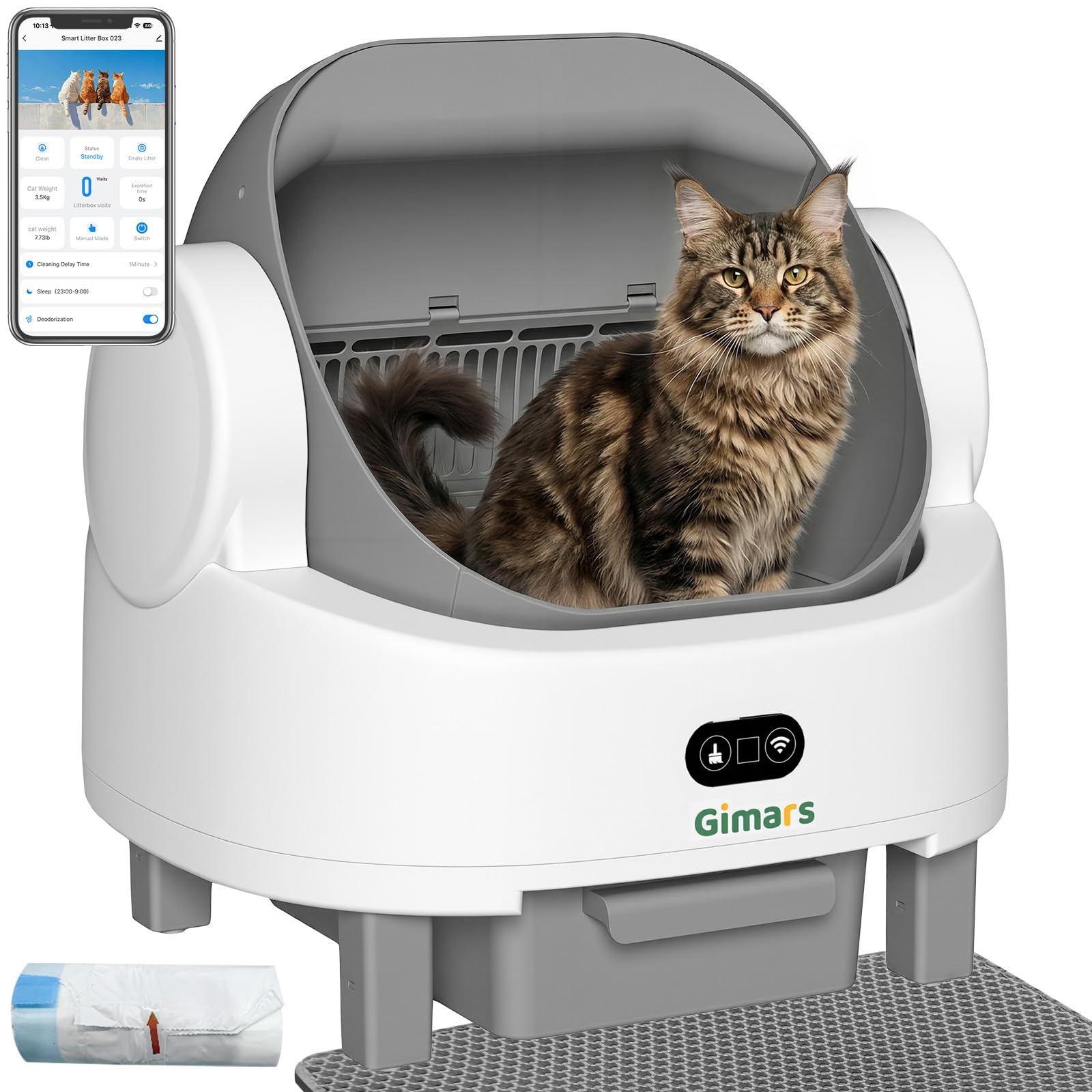
Figure 4.1: Product Overview
The unit measures 56.8 cm (L) x 54.4 cm (W) x 50 cm (H) and features a 37 cm wide entry, suitable for various cat sizes and breeds. The large 8-liter sealed waste bin can hold waste for up to 12 days, reducing the frequency of emptying.

Figure 4.2: Open Design Benefits
The open-top design promotes natural entry and exit, reducing stress for cats, especially larger or older ones who may dislike enclosed spaces.
5. Setup
- Placement: Place the litter box on a firm, level surface in a well-ventilated area. Ensure there is sufficient space around the unit for proper operation and maintenance.
- Install Waste Bag:
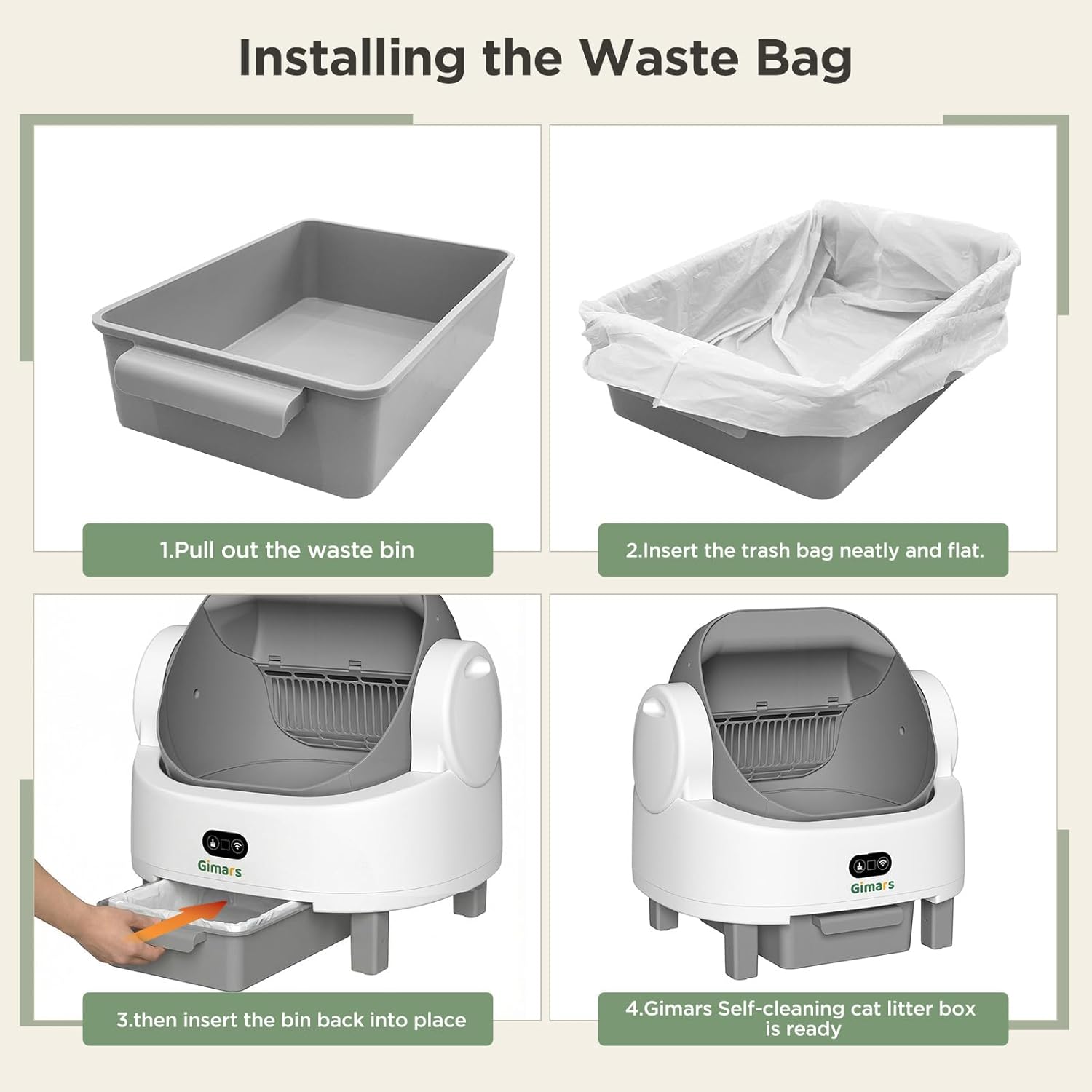
Figure 5.1: Installing the Waste Bag
- Pull out the waste bin from the bottom of the unit.
- Insert a trash bag neatly and flat into the waste bin.
- Slide the waste bin back into its designated slot until it clicks into place.
- Add Litter: Fill the litter compartment with clumping cat litter. Ensure the litter level is between the minimum and maximum fill lines indicated inside the unit.
- Power Connection: Connect the power adapter to the unit and then plug it into a standard electrical outlet. The unit will perform an initial calibration cycle.
6. Operating Instructions
6.1 Basic Operation (Manual Cleaning)
The unit can be operated manually using the control panel on the front.

Figure 6.1: One-Click Cleaning Process
- Remove Only Cat Litter: Press the cleaning button once to initiate a cleaning cycle that sifts and deposits waste into the bin.
- Remove All Cat Litter: Press and hold the cleaning button for 5 seconds to empty all litter from the main compartment into the waste bin, useful for full litter changes.
6.2 App Control
The Gimars Smart Cat Litter Box can be controlled remotely via a dedicated mobile application (compatible with iOS and Android) connected via 2.4GHz WiFi.

Figure 6.2: App Control Interface
- Download App: Search for the 'Gimars Smart' app in your device's app store.
- Connect to WiFi: Follow the in-app instructions to connect your litter box to your home's 2.4GHz WiFi network.
- Remote Cleaning: Initiate automatic cleaning cycles from anywhere.
- Automatic Cleaning: Set the unit to automatically clean after each use.
- Health Monitoring: The app provides an activity log, tracking litter box visits, excretion times, and cat weight, offering insights into your cat's health.
6.3 Sensor Functionality
The integrated sensor system ensures safe operation:
- Cat Detection: If a cat enters or approaches the litter box during a cleaning cycle, the sensors will detect its presence and immediately pause the operation to prevent injury.
- Weight Sensing: Precision weight sensors identify your cat's weight, contributing to accurate health monitoring and ensuring cleaning only occurs when the box is empty.

Video 6.1: Gimars Open-top Smart Cat Litter Box Demonstration
This video demonstrates the key features and automatic cleaning process of the Gimars Smart Cat Litter Box, including its spacious design, safety sensors, and hands-free waste disposal.
7. Maintenance
7.1 Waste Bin Emptying
The 8L sealed waste bin can hold waste for up to 12 days. When full, the app may notify you, or you can visually check.
- Pull out the waste bin.
- Lift the trash bag out and dispose of it responsibly.
- Insert a new trash bag and slide the bin back into place.
7.2 Cleaning the Unit
Regular cleaning ensures optimal performance and hygiene.

Figure 7.1: Easy Disassembly for Cleaning
- Unplug the litter box from the power outlet.
- Disassemble the main components (e.g., inner chamber, sifting screen) as shown in the diagram.
- Wash removable parts with mild soap and water. Rinse thoroughly and ensure they are completely dry before reassembly.
- Wipe down the exterior of the main unit with a damp cloth. Do not use abrasive cleaners or immerse electrical components in water.
- Reassemble all components securely.
7.3 Odor Control
The unit is equipped with an aroma box design to help manage odors.
- Locate the aroma box compartment (often a small pull-out drawer).
- Insert a deodorizer or aroma soap into the compartment.
- Close the compartment securely.
8. Troubleshooting
| Problem | Possible Cause | Solution |
|---|---|---|
| Unit not powering on | Power adapter not connected; Power outlet issue | Ensure power adapter is securely plugged in; Try a different outlet. |
| Cleaning cycle not starting | Cat detected inside; Waste bin full; Litter level incorrect | Ensure no cat is in the box; Empty waste bin; Adjust litter level. |
| App not connecting | Incorrect WiFi network (not 2.4GHz); Poor WiFi signal; App not updated | Verify 2.4GHz WiFi; Move unit closer to router; Update app to latest version. |
| Odor persists | Waste bin full; Deodorizer needs replacement; Unit needs cleaning | Empty waste bin more frequently; Replace deodorizer; Perform thorough cleaning. |
9. Specifications
- Model: CH-ICB023
- Brand: Gimars
- Color: White
- Dimensions (L x W x H): 56.8 x 54.4 x 50 CM (22.36 x 21.42 x 19.69 inches)
- Item Weight: 24.3 pounds
- Waste Bin Capacity: 8 Liters
- Recommended Cat Weight: 1.5 - 10 KG
- Noise Level: ≤32dB (during cleaning)
- Connectivity: 2.4GHz WiFi (for app control)
- Material: Polyester (referring to the litter mat, main unit is typically plastic)
- UPC: 810177902485

Figure 9.1: Cat Weight Suitability
10. Warranty and Support
For warranty information, product support, or to purchase replacement parts, please refer to the official Gimars website or contact customer service through the details provided on your purchase receipt. Keep your proof of purchase for warranty claims.