
1. Introduction
The WANLUTECH LT-600M is a versatile, rechargeable network cable tester designed for comprehensive network and fiber optic testing. It integrates multiple functions including a Digital Multimeter (DMM), Optical Power Meter (OPM), Visual Fault Locator (VFL), network cable testing (tone tracing, wire map, TDR), PoE testing, and various network diagnostic tools. This manual provides detailed instructions for the proper setup, operation, and maintenance of your LT-600M device.
2. Package Contents and Product Overview
Before using the device, please ensure all components are present and familiarize yourself with the main unit and its accessories.
2.1 Package Contents
- WANLUTECH LT-600M Digital Tone Generator (Main Unit)
- Probe (Receiver Unit)
- Accessories (various cables and connectors)
- Carrying Case
- Charging Cable (Type-C)
2.2 Product Components
The following image illustrates the main components included with your LT-600M tester.

Image 2.1: WANLUTECH LT-600M Main Unit, Probe, and various accessories including cables, connectors, and carrying case.
2.3 Tone Generator (Main Unit) Port Introduction
Familiarize yourself with the ports and buttons on the main tone generator unit.

Image 2.2: Front and top view of the Tone Generator, highlighting the Power Button, Back button, VΩ jack, COM jack, OPM port, VFL port, Light, Type-C charging port, Reset button, UTP/SCAN port, and LAN port/RJ45 TDR test/PoE Detector/Port Flashing port.
2.4 Probe (Receiver Unit) Port Introduction
Understand the functions of the ports and indicators on the probe unit.

Image 2.3: Detailed view of the Probe, showing the Light, Power Indicator, Earphone Jack, PD PoE Detection port, USB Type-C charging port, SNCV/Mute Mode button, Power Button, MODE button, Light Switch Button, Cable Type Indicator (Direct/Cross/Other), 1000M/100M indicator, UTP Cable Test Port, Wire Mapping/Continuity Testing/Signal Strength Indicator, Shield Continuity LED, SCAN mode, NCV mode, and RJ45 test function.
3. Setup and Charging
3.1 Initial Charging
The LT-600M is equipped with a rechargeable Lithium Ion battery. Before first use, fully charge the device.
- Connect the provided Type-C charging cable to the Type-C port on the main unit (DC5V 2A charging port).
- Connect the other end of the cable to a suitable USB power adapter (not included) or a computer's USB port.
- The power button indicator light will be red during charging and turn green when fully charged.
- The probe unit also has a USB Type-C charging port (5V/1A input). Charge it similarly.
Note: Use the charging cable included in the packaging for charging. For file transfer, a different Type-C cable may be required (see Section 4.10).
4. Operating Instructions
4.1 Digital Multimeter (DMM)
The built-in Digital Multimeter automatically detects DC Voltage, AC Voltage, Resistance, and Buzzer Mode. It also records max/min values of the current test when Voltage/Resistance Mode is selected.
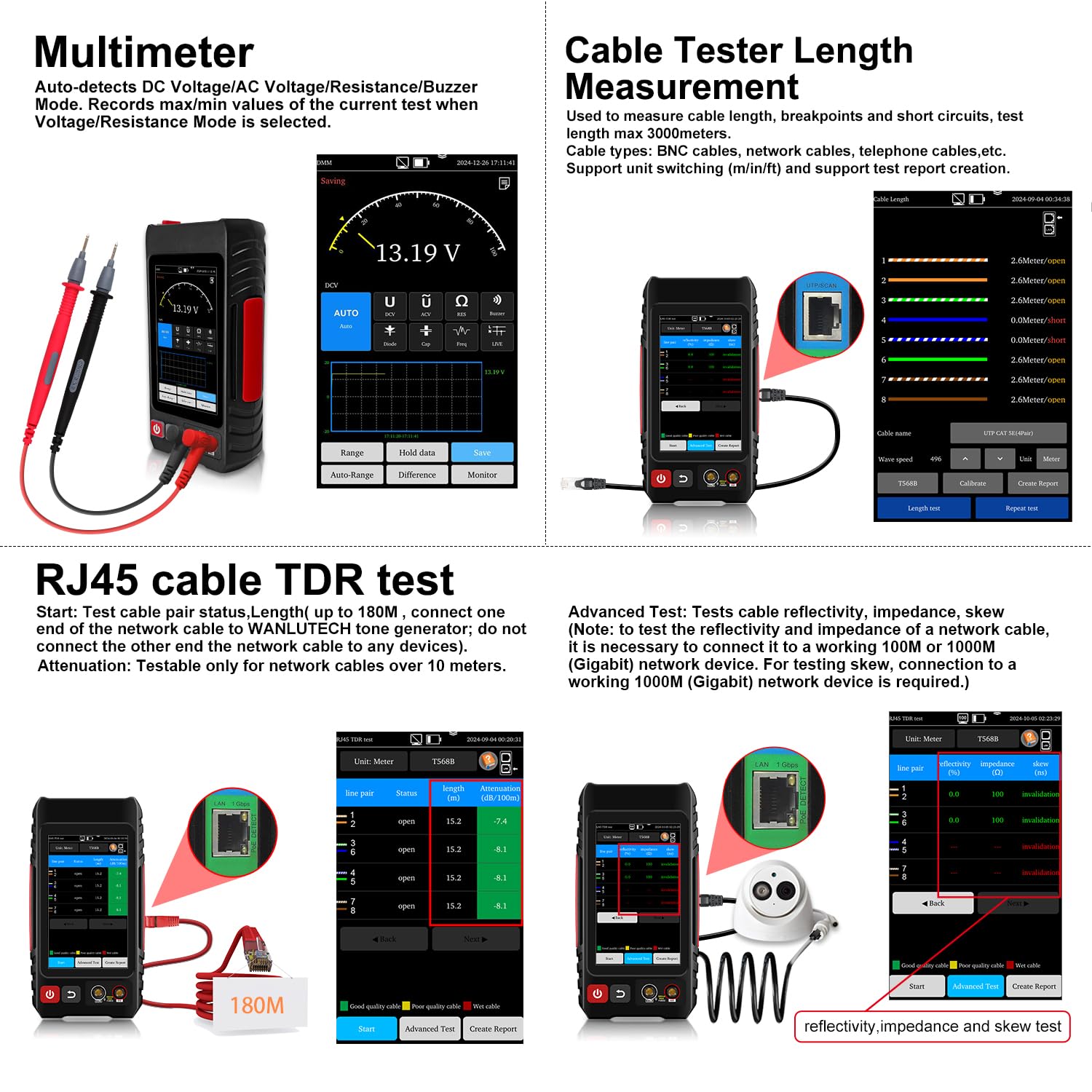
Image 4.1: The Multimeter function displaying a voltage reading.
4.2 Optical Power Meter (OPM)
The OPM supports calibrated wavelengths including 850/980/1270/1300/1310/1490/1550/1577/1625/1650nm, with a power range of -70 to +6dBm.

Image 4.2: The Optical Power Meter interface showing a power reading in dBm.
4.3 Visual Fault Locator (VFL)
The VFL emits a visible red light (650nm wavelength) to detect faults in fiber optic lines such as breakage, cracking, or bending.
Image 4.3: The Visual Fault Locator in operation, showing red light emission from a fiber optic cable.
4.4 Network Cable Testing
4.4.1 Digital Tone Cable Tracer
This function allows for searching BNC, network, and telephone cables within cluttered bundles. It also supports searching shielded network cables. Rotate the knob on the probe to adjust the wire tracing sensitivity.
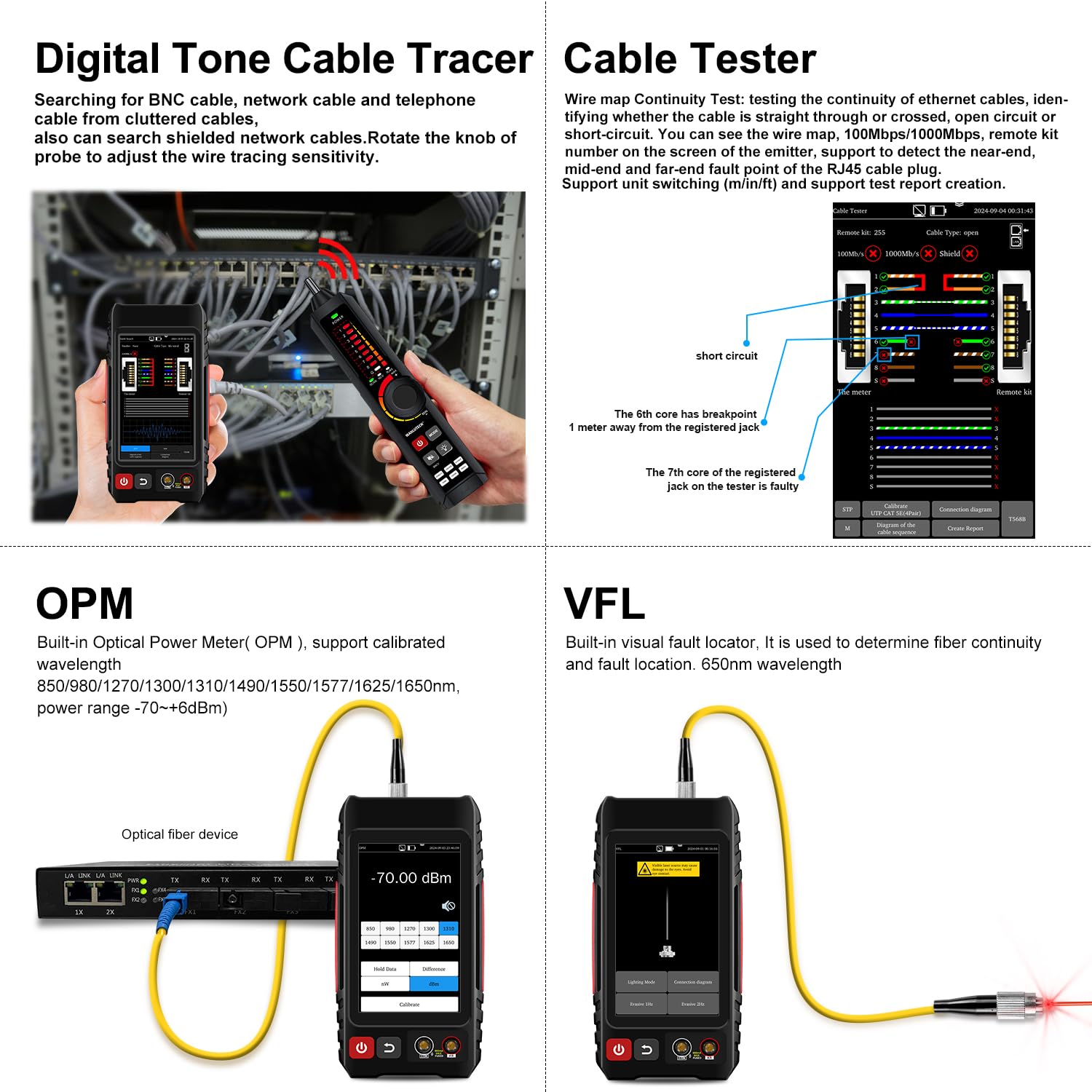
Image 4.4: The Digital Tone Cable Tracer being used to locate a cable in a bundle.
4.4.2 Wire Map Continuity Test
Test the connection status of UTP cables and display the results on the screen. It can detect near-end, mid-end, and far-end fault points of the RJ45 cable plug. Supports switching between 10M/100M/1000M speeds.
Image 4.5: The Cable Tester interface showing wire map results and fault location.
4.4.3 RJ45 Cable TDR Test
This function tests cable pair status, length (up to 180m without connecting the other end to the tone generator), attenuation, reflectivity, impedance, and skew. For advanced tests requiring reflectivity, impedance, and skew measurements, connect to a working 100M or 1000M (Gigabit) network device.

Image 4.6: The RJ45 Cable TDR Test interface displaying cable length, attenuation, and advanced test parameters like reflectivity, impedance, and skew.
4.4.4 Cable Length Measurement
Measure cable length, identify breakpoints, and short circuits. The maximum test length is 3000 meters. This function supports various cable types including BNC, network, and telephone cables.
Image 4.7: The Cable Length Measurement interface showing cable pair status and length.
4.5 PoE Checker & Network Testing Tools
4.5.1 PoE Checker (PD Power Detection)
Detect whether the connected Power Sourcing Equipment (PSE) is standard or non-standard PoE. It supports standard IEEE 802.3af/at/bt detection and identifies the pins used for power supply. If the power indicator lights are solid, it's non-standard PoE. If they are blinking, it indicates standard IEEE 802.3af/at/bt PoE.
Image 4.8: The PD Power Detection feature showing power delivery status and pin identification.
4.5.2 Quick IP Discovery
Click "Start Scan" to search the entire network segment for IP addresses of IP cameras or other devices connected to the tester.
Image 4.9: The IP Discovery interface displaying discovered IP addresses, MAC addresses, and manufacturers.
4.5.3 Ping Test
Connect the network cable to the tester's LAN port to perform a Ping test. This verifies network connectivity and measures response times.
Image 4.10: The Ping Test interface showing ping results and network statistics.
4.5.4 IP Scan (IP Address Scanning)
Used to quickly find the IP addresses of IP cameras or other devices connected to the tester. Supports scanning of MAC addresses and camera manufacturers.
Image 4.11: The IP Address Scanning interface for discovering network devices.
4.5.5 LLDP/CDP (Switch Port Detection)
This feature allows for detecting switch port information using LLDP (Link Layer Discovery Protocol) or CDP (Cisco Discovery Protocol).
Image 4.12: The LLDP/CDP interface displaying detailed switch port information.
4.5.6 Port Flashing
The switch port connected to the emitter will flash at a fixed frequency, allowing for easy identification. The screen on the emitter will also display the port rate (100Mbps/10Mbps).
Image 4.13: The Port Flashing feature indicating the connected port on a network switch.
4.6 Non-contact Voltage (NCV) Detection
When the tone probe detects AC voltage, the power-seeking indicator on the probe will flash and emit a beep alarm. Indicators 1-5 on the probe will flash to show the current signal strength.
4.7 File Transfer Methods
The LT-600M supports two methods for file transfer:
- FTP Server: This allows exporting files (e.g., test reports) from the tester and copying update files to its memory without needing an SD card or card reader.
- Type-C Cable: Use a Type-C cable (different from the charging cable, if necessary) to connect the tester's Type-C port (DC5V 2A charging port) to a PC's USB port. This enables accessing the device's internal storage for fast transfer of test data, images, and PDFs.
Image 4.14: The Type-C cable connection for file transfer between the tester and a computer.
5. Maintenance
- Keep the device clean and free from dust and moisture.
- Store the device in its carrying case when not in use to prevent damage.
- Avoid exposing the device to extreme temperatures or direct sunlight.
- Regularly check cables and connectors for wear and tear.
- Ensure the battery is charged periodically, even if not in regular use, to maintain battery health.
6. Troubleshooting
If you encounter issues with your WANLUTECH LT-600M, consider the following basic troubleshooting steps:
- Device not powering on: Ensure the battery is fully charged. Connect the charger and try again.
- Inaccurate readings: Check all cable connections for proper seating and integrity. Ensure the correct test mode is selected.
- Tone tracing issues: Adjust the sensitivity knob on the probe. Ensure the cable is properly connected to the tone generator.
- Display problems: Try restarting the device. If the issue persists, contact support.
- Connectivity issues (IP Discovery, Ping): Verify that the network cable is correctly connected to the LAN port and that the network is operational.
7. Specifications
| Feature | Specification |
|---|---|
| Brand | WANLUTECH |
| Model | LT-600M |
| Display | 4-inch IPS Touchscreen |
| Digital Multimeter (DMM) | Auto-detects DC/AC Voltage, Resistance, Buzzer Mode |
| Optical Power Meter (OPM) | Wavelengths: 850/980/1270/1300/1310/1490/1550/1577/1625/1650nm, Power Range: -70~+6dBm |
| Visual Fault Locator (VFL) | Wavelength: 650nm |
| Cable Test Functions | Tone Tracing, Wire Map, RJ45 TDR, Cable Length Measurement (max 3000m) |
| PoE Test | IEEE 802.3af/at/bt detection, PD Power Detection |
| Network Test Tools | IP Discovery, Ping Test, IP Scan, LLDP/CDP, Port Flashing |
| Battery | 1 Lithium Ion battery (included), 14.8 Watt Hours |
| Item Weight | 1 kg |
| Package Dimensions | 25 x 19 x 5 cm |
| Country of Origin | China |
8. Support and Warranty
For any questions or technical assistance regarding your WANLUTECH LT-600M, please contact the manufacturer directly. We are committed to providing support and will respond to inquiries within 12 hours.
Specific warranty details may vary by region and retailer. Please refer to your purchase documentation for warranty information.


